Dark AI Generation Dashboard Screenshot

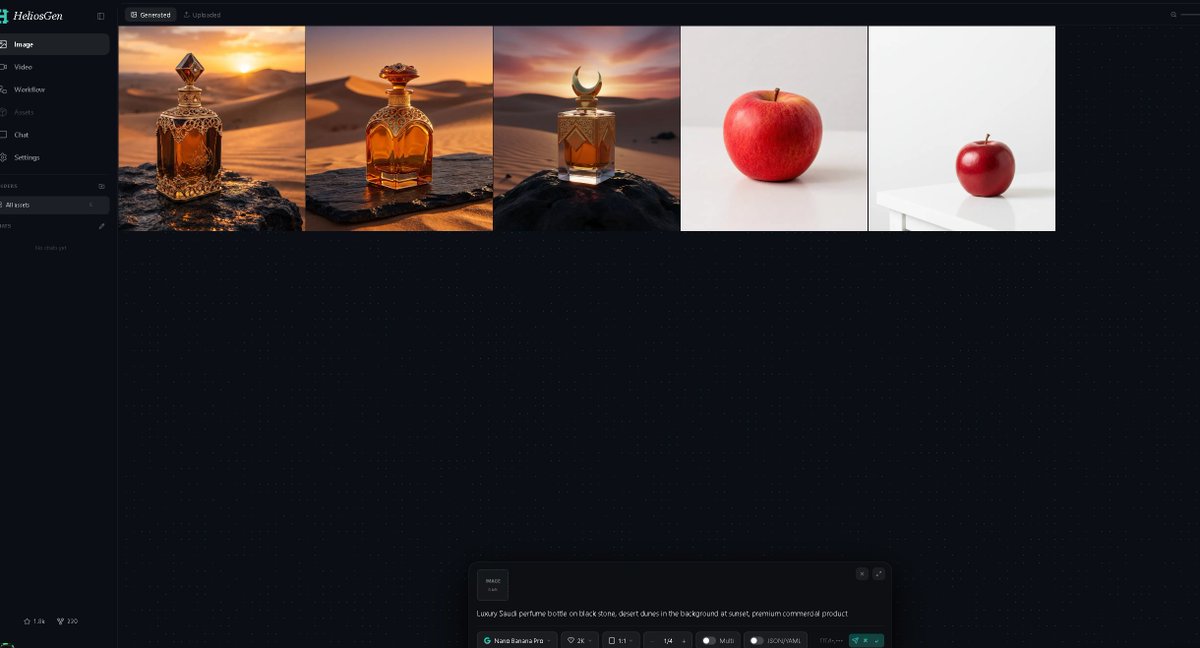
A wide dark-mode HeliosGen-style dashboard mockup showing generated image thumbnails and an AI prompt control panel for showcasing an image generation workflow.
Dark AI Generation Dashboard Screenshot

Prompt

Goal: Create a dark-mode desktop web app screenshot for HeliosGen, an AI image/video generation dashboard, shown in a wide 16:9 browser-like canvas. Canvas: 1200×675 style screenshot, very dark navy/black interface with subtle dotted grid texture across the main workspace. Use a clean modern SaaS UI aesthetic, thin dividers, small muted gray text, and teal accents. Layout: A narrow left sidebar occupies about 10% of the width, with the main workspace filling the rest. At the top of the main workspace, show two small tabs: “Generated” selected and “Uploaded” inactive. Beneath the tabs, display exactly 5 generated image thumbnails in one horizontal row, aligned along the top, each separated by thin borders. Sidebar details: Top-left logo text reads “HeliosGen” with a small teal emblem. Include exactly 6 primary navigation items with icons: 1) Image selected, 2) Video, 3) Workflow, 4) Assets, 5) Chat, 6) Settings. Below that, show a small “Folders” section with exactly 1 folder row labeled “All works,” then an empty-state area reading “No chats yet.” At the bottom-left, add two tiny stats/icons resembling “1.8k” and “220.” Thumbnail row: Show exactly 5 thumbnails from left to right: 1) an ornate amber luxury perfume bottle on a dark rock in a golden desert at sunset, 2) a rounded amber perfume bottle with ornate gold cap on a stone slab in desert dunes at sunset, 3) a square amber perfume bottle with a crescent-shaped cap on a black rock in desert dunes at sunset, 4) a single red apple centered on an off-white studio background, 5) a smaller red apple sitting on a white table in a minimal white studio scene. The first three thumbnails should feel cinematic and warm; the last two should be minimal product-photo tests. Bottom prompt panel: Near the bottom center of the workspace, include a floating generation control panel with rounded corners. On the left of the panel, show a small square preview tile labeled “IMAGE 1:1.” In the main text area, include the prompt: “Luxury Saudi perfume bottle on black stone, desert dunes in the background at sunset, premium commercial product”. Along the bottom of the panel, show compact controls reading approximately “Nano Banana Pro,” “2K,” “1:1,” “1/4,” “Multi,” and “JSON (4.14k),” plus a teal send/generate button at the right. Visual style: Crisp UI screenshot, high contrast, minimal glow, fine dotted background, realistic generated-image thumbnails, no browser chrome, no extra popups, no people, no watermark.

Runs on 18 models

  • Flux
  • Flux 2
  • Flux Kontext
  • GPT-4o Image
  • GPT Image
  • GPT Image 2
  • GPT Image 2.5
  • Grok Imagine
  • Ideogram V3
  • Imagen 4
  • Midjourney
  • Nano Banana
  • +6 more

What this prompt produces

Realistic Group Selfie with Smartphone Flash Effect Not specified nano-banana-pro
Four Seasons Portrait Collage Not specified nano-banana-pro
Minimalist Dog Sketch Clipart Not specified nano-banana-pro
Mecha Girl figure concept generated by Nano Banana Pro Not specified nano-banana-pro
Candid Flash Photography: Chaotic Holiday Party (Duplicate) Not specified nano-banana-pro
Ethereal Floral Studio Portrait Not specified nano-banana-pro

Run this prompt with the API

The request below sends this prompt, with its default values filled in, to the first model it runs on. Swap the model name for any other model listed above.

Prompt API docs
/api/v1/gpt_image_2/text_to_image
curl -X POST https://runapi.ai/api/v1/gpt_image_2/text_to_image \
  -H "Authorization: Bearer $RUNAPI_API_KEY" \
  -H "Content-Type: application/json" \
  --data-binary @- <<'JSON'
{
  "model": "gpt-image-2",
  "prompt": "Goal: Create a dark-mode desktop web app screenshot for HeliosGen, an AI image/video generation dashboard, shown in a wide 16:9 browser-like canvas.\n\nCanvas: 1200×675 style screenshot, very dark navy/black interface with subtle dotted grid texture across the main workspace. Use a clean modern SaaS UI aesthetic, thin dividers, small muted gray text, and teal accents.\n\nLayout: A narrow left sidebar occupies about 10% of the width, with the main workspace filling the rest. At the top of the main workspace, show two small tabs: “Generated” selected and “Uploaded” inactive. Beneath the tabs, display exactly 5 generated image thumbnails in one horizontal row, aligned along the top, each separated by thin borders.\n\nSidebar details: Top-left logo text reads “HeliosGen” with a small teal emblem. Include exactly 6 primary navigation items with icons: 1) Image selected, 2) Video, 3) Workflow, 4) Assets, 5) Chat, 6) Settings. Below that, show a small “Folders” section with exactly 1 folder row labeled “All works,” then an empty-state area reading “No chats yet.” At the bottom-left, add two tiny stats/icons resembling “1.8k” and “220.”\n\nThumbnail row: Show exactly 5 thumbnails from left to right: 1) an ornate amber luxury perfume bottle on a dark rock in a golden desert at sunset, 2) a rounded amber perfume bottle with ornate gold cap on a stone slab in desert dunes at sunset, 3) a square amber perfume bottle with a crescent-shaped cap on a black rock in desert dunes at sunset, 4) a single red apple centered on an off-white studio background, 5) a smaller red apple sitting on a white table in a minimal white studio scene. The first three thumbnails should feel cinematic and warm; the last two should be minimal product-photo tests.\n\nBottom prompt panel: Near the bottom center of the workspace, include a floating generation control panel with rounded corners. On the left of the panel, show a small square preview tile labeled “IMAGE 1:1.” In the main text area, include the prompt: “Luxury Saudi perfume bottle on black stone, desert dunes in the background at sunset, premium commercial product”. Along the bottom of the panel, show compact controls reading approximately “Nano Banana Pro,” “2K,” “1:1,” “1/4,” “Multi,” and “JSON (4.14k),” plus a teal send/generate button at the right.\n\nVisual style: Crisp UI screenshot, high contrast, minimal glow, fine dotted background, realistic generated-image thumbnails, no browser chrome, no extra popups, no people, no watermark."
}
JSON

Try a prompt

Estimated: $0.04 / image

Sign in to generate with RunAPI.

Sign in to generate

Sign in to start generating with your available language models.

















