Voxel AI Website Building Infographic

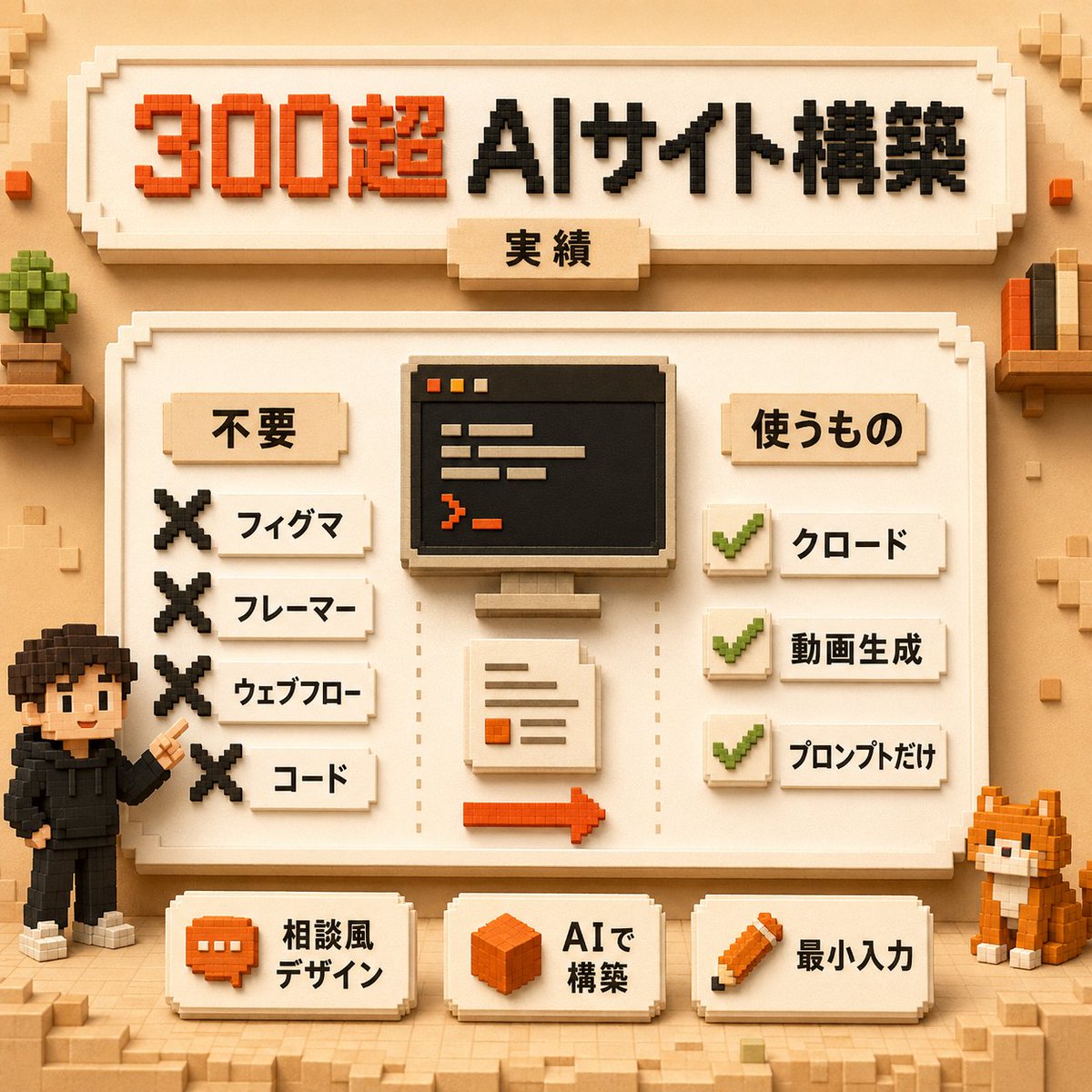
A square Japanese voxel-style infographic showing an AI website-building workflow with rejected tools, required tools, and minimal-input feature cards.
Voxel AI Website Building Infographic

Prompt

Goal: Create a square voxel-art Japanese infographic poster about building many AI websites with minimal tools, using a warm beige Minecraft-like block aesthetic. Canvas: 1:1 square composition, 768x768 style, soft studio lighting, tan paper-and-wood background, subtle voxel blocks in the corners, crisp isometric pixel/voxel edges, shallow shadows, no photorealism. Main headline area: At the top, place a large cream beveled signboard with blocky Japanese text reading 300超 AIサイト構築. Make “300超” bright orange-red and “AIサイト構築” black. Under the headline, attach a small centered beige tab label reading 実績. Use thick extruded voxel lettering. Central layout: Below the headline, create one large cream framed panel with a decorative stepped border. Inside it, divide the content into three vertical zones: left checklist, center workflow illustration, right checklist. Use dotted vertical divider lines between the zones. Left checklist: Title label reads 不要. Show exactly 4 rejected items, each with a large black voxel X icon on the left and a small cream label on the right. The 4 labels, top to bottom, are: 「フィグマ」, 「フレーマー」, 「ウェブフロー」, 「コード」. Center workflow illustration: Show exactly 3 main elements stacked vertically: 1) a black computer monitor with a simple code/editor window using orange and beige lines, 2) a cream document sheet with a few text lines and one orange square, 3) an orange right-pointing arrow along the bottom. Keep everything blocky and voxel-built. Right checklist: Title label reads 使うもの. Show exactly 3 approved items, each with a green voxel checkmark icon on a cream square and a small cream label to the right. The 3 labels, top to bottom, are: 「クロード」, 「動画生成」, 「プロンプトだけ」. Bottom row: Place exactly 3 separate cream beveled cards across the bottom of the main panel. Card 1 has an orange chat bubble icon and text 「相談風 デザイン」. Card 2 has an orange cube icon and text 「AIで 構築」. Card 3 has an orange pencil icon and text 「最小入力」. Characters and decorative objects: Add exactly 2 voxel characters/mascots: on the lower left, a small black-haired person in a black hoodie pointing upward toward the panel; on the lower right, an orange-and-white voxel cat sitting beside the panel. Add a small potted blocky plant on a shelf at upper left and a small shelf with upright books at upper right. Include scattered tiny beige and orange cubes for decoration, but keep the poster clean and readable. Visual style: High-quality 3D voxel diorama, blocky extruded Japanese typography, warm cream, tan, orange, black, and green palette, soft ambient occlusion, orthographic front view, friendly educational tech infographic, neatly aligned labels, crisp readable Japanese text. Constraints: Use exactly 4 X-mark rejected items, exactly 3 checkmark approved items, exactly 3 bottom feature cards, and exactly 2 mascot figures. Do not add extra sections, extra checklists, logos, watermarks, or English text.

Runs on 18 models

  • Flux
  • Flux 2
  • Flux Kontext
  • GPT-4o Image
  • GPT Image
  • GPT Image 2
  • GPT Image 2.5
  • Grok Imagine
  • Ideogram V3
  • Imagen 4
  • Midjourney
  • Nano Banana
  • +6 more

What this prompt produces

Realistic Group Selfie with Smartphone Flash Effect Not specified nano-banana-pro
Four Seasons Portrait Collage Not specified nano-banana-pro
Minimalist Dog Sketch Clipart Not specified nano-banana-pro
Mecha Girl figure concept generated by Nano Banana Pro Not specified nano-banana-pro
Candid Flash Photography: Chaotic Holiday Party (Duplicate) Not specified nano-banana-pro
Ethereal Floral Studio Portrait Not specified nano-banana-pro

Run this prompt with the API

The request below sends this prompt, with its default values filled in, to the first model it runs on. Swap the model name for any other model listed above.

Prompt API docs
/api/v1/gpt_image_2/text_to_image
curl -X POST https://runapi.ai/api/v1/gpt_image_2/text_to_image \
  -H "Authorization: Bearer $RUNAPI_API_KEY" \
  -H "Content-Type: application/json" \
  --data-binary @- <<'JSON'
{
  "model": "gpt-image-2",
  "prompt": "Goal: Create a square voxel-art Japanese infographic poster about building many AI websites with minimal tools, using a warm beige Minecraft-like block aesthetic.\n\nCanvas: 1:1 square composition, 768x768 style, soft studio lighting, tan paper-and-wood background, subtle voxel blocks in the corners, crisp isometric pixel/voxel edges, shallow shadows, no photorealism.\n\nMain headline area: At the top, place a large cream beveled signboard with blocky Japanese text reading 300超 AIサイト構築. Make “300超” bright orange-red and “AIサイト構築” black. Under the headline, attach a small centered beige tab label reading 実績. Use thick extruded voxel lettering.\n\nCentral layout: Below the headline, create one large cream framed panel with a decorative stepped border. Inside it, divide the content into three vertical zones: left checklist, center workflow illustration, right checklist. Use dotted vertical divider lines between the zones.\n\nLeft checklist: Title label reads 不要. Show exactly 4 rejected items, each with a large black voxel X icon on the left and a small cream label on the right. The 4 labels, top to bottom, are: 「フィグマ」, 「フレーマー」, 「ウェブフロー」, 「コード」.\n\nCenter workflow illustration: Show exactly 3 main elements stacked vertically: 1) a black computer monitor with a simple code/editor window using orange and beige lines, 2) a cream document sheet with a few text lines and one orange square, 3) an orange right-pointing arrow along the bottom. Keep everything blocky and voxel-built.\n\nRight checklist: Title label reads 使うもの. Show exactly 3 approved items, each with a green voxel checkmark icon on a cream square and a small cream label to the right. The 3 labels, top to bottom, are: 「クロード」, 「動画生成」, 「プロンプトだけ」.\n\nBottom row: Place exactly 3 separate cream beveled cards across the bottom of the main panel. Card 1 has an orange chat bubble icon and text 「相談風 デザイン」. Card 2 has an orange cube icon and text 「AIで 構築」. Card 3 has an orange pencil icon and text 「最小入力」.\n\nCharacters and decorative objects: Add exactly 2 voxel characters/mascots: on the lower left, a small black-haired person in a black hoodie pointing upward toward the panel; on the lower right, an orange-and-white voxel cat sitting beside the panel. Add a small potted blocky plant on a shelf at upper left and a small shelf with upright books at upper right. Include scattered tiny beige and orange cubes for decoration, but keep the poster clean and readable.\n\nVisual style: High-quality 3D voxel diorama, blocky extruded Japanese typography, warm cream, tan, orange, black, and green palette, soft ambient occlusion, orthographic front view, friendly educational tech infographic, neatly aligned labels, crisp readable Japanese text.\n\nConstraints: Use exactly 4 X-mark rejected items, exactly 3 checkmark approved items, exactly 3 bottom feature cards, and exactly 2 mascot figures. Do not add extra sections, extra checklists, logos, watermarks, or English text."
}
JSON

Try a prompt

Estimated: $0.04 / image

Sign in to generate with RunAPI.

Sign in to generate

Sign in to start generating with your available language models.