Anime Tactical RPG Battle UI

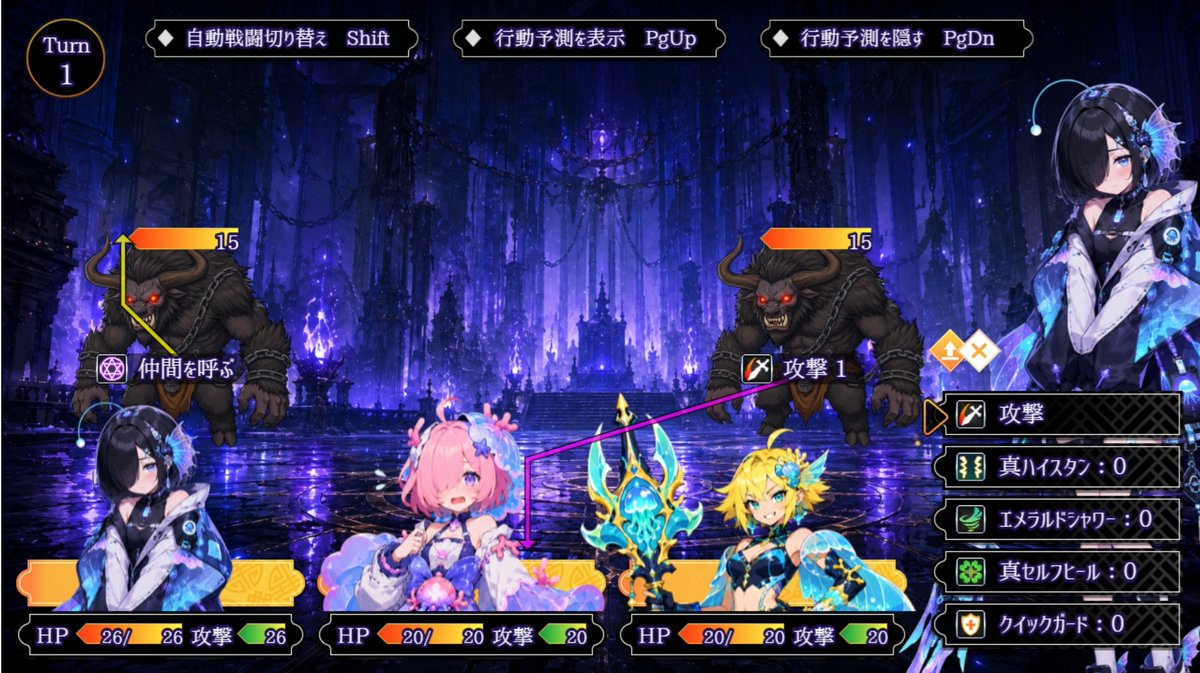
Generates a polished anime fantasy tactical RPG battle screenshot with Japanese UI, party panels, enemies, targeting line, and command menu.
Anime Tactical RPG Battle UI

Prompt

Goal: Create a 16:9 fantasy tactical RPG battle screenshot in an anime gacha style, as if from a polished RPG Maker-style game UI, using a dark magical dungeon battle scene with three playable girls fighting two monsters. Canvas: Wide 1920×1080-style game screen, cinematic composition, crisp but not overly detailed character art, high-contrast dark blue and purple palette with glowing UI elements. Background: A vast ruined gothic cathedral or underground throne hall, filled with violet flames, blue magical light, hanging chains, towering pillars, reflective wet stone floor, distant stairs and a central glowing altar. The mood is ominous, mystical, and dungeon-like. Battle layout: Show exactly 5 battlefield characters: 3 heroines along the bottom foreground and 2 enemies in the midground. The 3 player characters are: 1) left heroine, a black-haired girl with one eye partly covered, wearing a white-and-black futuristic kimono-like jacket with blue crystalline accents; 2) center heroine, a cute pink-haired girl with fluffy pastel outfit and blue-pink ornaments; 3) right heroine, a blonde elf-like girl in turquoise and gold armor holding an ornate glowing blue-gold staff. The 2 enemies are both horned minotaur-like demons with dark fur, chains, red glowing eyes, hunched poses, and orange HP bars labeled 15 above them. Place one enemy on the left side and one on the upper right-center. Character portrait: On the far right, include a large half-body portrait of the black-haired heroine, matching the left heroine, looking cool and slightly shy, with a moon-like halo ring and blue crystalline flower accessory. Action targeting: Draw a bright magenta targeting line from the center pink-haired heroine toward the right minotaur. Add small orange target-choice diamond icons near the line. The right-side action command should highlight a basic attack. UI count and text: Include exactly 3 top command tabs, exactly 1 turn badge, exactly 3 bottom party status panels, exactly 2 enemy HP bars, and exactly 5 right-side action menu entries. Preserve the visible Japanese labels and keyboard prompts: - Turn badge at top left: “Turn” and “1”. - Top command tab 1: “◆ 自動戦闘切り替え Shift”. - Top command tab 2: “◆ 行動予測を表示 PgUp”. - Top command tab 3: “◆ 行動予測を隠す PgDn”. - Left enemy command label: “仲間を呼ぶ”. - Right enemy label near the targeting line: “攻撃 1”. - Right action menu has exactly 5 stacked black panels with icons and text: 1) “攻撃”, 2) “真ハイスタク:0”, 3) “エメラルドシャワー:0”, 4) “真セルフヒール:0”, 5) “クイックガード:0”. - Bottom party panels: 3 panels, each with “HP”, orange/yellow HP meter, and “攻撃” with a green value box. Left panel shows “26/26” and attack “26”; center panel shows “20/20” and attack “20”; right panel shows “20/20” and attack “20”. Visual style: Highly polished anime fantasy game screenshot, vibrant glowing effects, dark UI frames with gold trim, readable white and violet text, ornate fantasy borders, sharp character silhouettes, no motion blur, no watermark. Customization: The scene should feature black-haired blue-crystal heroine, pink-haired pastel mage girl, blonde elf staff wielder, horned minotaur demons, and dark violet gothic dungeon cathedral.

Runs on 18 models

  • Flux
  • Flux 2
  • Flux Kontext
  • GPT-4o Image
  • GPT Image
  • GPT Image 2
  • GPT Image 2.5
  • Grok Imagine
  • Ideogram V3
  • Imagen 4
  • Midjourney
  • Nano Banana
  • +6 more

What this prompt produces

咖啡馆旅行手账分栏页 Not specified gpt-image-2
日系 Chibi 互动小插画 Not specified gpt-image-2
动漫动作短片设定分镜板 Not specified gpt-image-2
Realistic Group Selfie with Smartphone Flash Effect Not specified nano-banana-pro
Four Seasons Portrait Collage Not specified nano-banana-pro
Minimalist Dog Sketch Clipart Not specified nano-banana-pro

Run this prompt with the API

The request below sends this prompt, with its default values filled in, to the first model it runs on. Swap the model name for any other model listed above.

Prompt API docs
/api/v1/gpt_image_2/text_to_image
curl -X POST https://runapi.ai/api/v1/gpt_image_2/text_to_image \
  -H "Authorization: Bearer $RUNAPI_API_KEY" \
  -H "Content-Type: application/json" \
  --data-binary @- <<'JSON'
{
  "model": "gpt-image-2",
  "prompt": "Goal: Create a 16:9 fantasy tactical RPG battle screenshot in an anime gacha style, as if from a polished RPG Maker-style game UI, using a dark magical dungeon battle scene with three playable girls fighting two monsters.\n\nCanvas: Wide 1920×1080-style game screen, cinematic composition, crisp but not overly detailed character art, high-contrast dark blue and purple palette with glowing UI elements.\n\nBackground: A vast ruined gothic cathedral or underground throne hall, filled with violet flames, blue magical light, hanging chains, towering pillars, reflective wet stone floor, distant stairs and a central glowing altar. The mood is ominous, mystical, and dungeon-like.\n\nBattle layout: Show exactly 5 battlefield characters: 3 heroines along the bottom foreground and 2 enemies in the midground. The 3 player characters are: 1) left heroine, a black-haired girl with one eye partly covered, wearing a white-and-black futuristic kimono-like jacket with blue crystalline accents; 2) center heroine, a cute pink-haired girl with fluffy pastel outfit and blue-pink ornaments; 3) right heroine, a blonde elf-like girl in turquoise and gold armor holding an ornate glowing blue-gold staff. The 2 enemies are both horned minotaur-like demons with dark fur, chains, red glowing eyes, hunched poses, and orange HP bars labeled 15 above them. Place one enemy on the left side and one on the upper right-center.\n\nCharacter portrait: On the far right, include a large half-body portrait of the black-haired heroine, matching the left heroine, looking cool and slightly shy, with a moon-like halo ring and blue crystalline flower accessory.\n\nAction targeting: Draw a bright magenta targeting line from the center pink-haired heroine toward the right minotaur. Add small orange target-choice diamond icons near the line. The right-side action command should highlight a basic attack.\n\nUI count and text: Include exactly 3 top command tabs, exactly 1 turn badge, exactly 3 bottom party status panels, exactly 2 enemy HP bars, and exactly 5 right-side action menu entries. Preserve the visible Japanese labels and keyboard prompts:\n- Turn badge at top left: “Turn” and “1”.\n- Top command tab 1: “◆ 自動戦闘切り替え   Shift”.\n- Top command tab 2: “◆ 行動予測を表示   PgUp”.\n- Top command tab 3: “◆ 行動予測を隠す   PgDn”.\n- Left enemy command label: “仲間を呼ぶ”.\n- Right enemy label near the targeting line: “攻撃 1”.\n- Right action menu has exactly 5 stacked black panels with icons and text: 1) “攻撃”, 2) “真ハイスタク:0”, 3) “エメラルドシャワー:0”, 4) “真セルフヒール:0”, 5) “クイックガード:0”.\n- Bottom party panels: 3 panels, each with “HP”, orange/yellow HP meter, and “攻撃” with a green value box. Left panel shows “26/26” and attack “26”; center panel shows “20/20” and attack “20”; right panel shows “20/20” and attack “20”.\n\nVisual style: Highly polished anime fantasy game screenshot, vibrant glowing effects, dark UI frames with gold trim, readable white and violet text, ornate fantasy borders, sharp character silhouettes, no motion blur, no watermark.\n\nCustomization: The scene should feature black-haired blue-crystal heroine, pink-haired pastel mage girl, blonde elf staff wielder, horned minotaur demons, and dark violet gothic dungeon cathedral."
}
JSON

Try a prompt

Estimated: $0.04 / image

Sign in to generate with RunAPI.

Sign in to generate

Sign in to start generating with your available language models.