Blue Jays Broadcast Crowd Screenshot

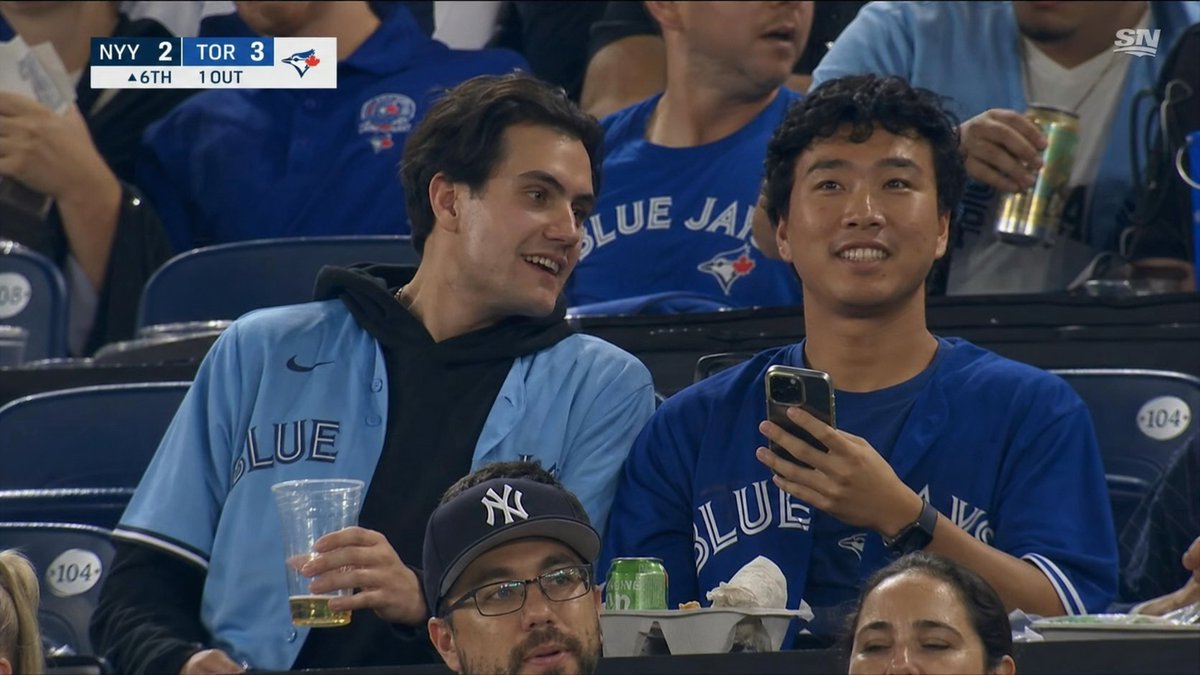
Generates a realistic televised baseball crowd shot at a Toronto Blue Jays game with scoreboard graphics and anonymized fan faces.
Blue Jays Broadcast Crowd Screenshot

Prompt

Create a realistic broadcast-quality television screenshot from a Major League Baseball game in the stands at a Toronto Blue Jays home game, as if captured from a Sportsnet live feed. The scene shows two young male fans seated in dark blue stadium seats, centered in the frame, both with their faces covered by plain dark-brown rectangular privacy masks. The left fan has medium dark hair and wears a light powder-blue Blue Jays button-up jersey over a black hoodie, holding a clear plastic cup with a small amount of beer; the right fan wears a royal-blue Blue Jays jersey, holds a smartphone upright in one hand, and has a black smartwatch. In the foreground, partially cropped spectators include two additional visible dark-brown face-cover rectangles, making four total privacy masks in the image. Around them are other fans in Blue Jays shirts, one holding a tall can, plus stadium seat number plaques reading 104, a snack tray with food, a green can, and crumpled napkins. Add an authentic TV scoreboard graphic in the top-left corner with NYY 2, TOR 3, the Blue Jays logo, and a lower status row reading ▲6TH 1 OUT. Add a small white SN logo in the top-right corner. Use documentary sports-broadcast framing, slight telephoto compression, arena lighting, realistic crowd blur, sharp jerseys and hands, 16:9 aspect ratio, no cinematic filters, no illustration style.

Runs on 18 models

  • Flux
  • Flux 2
  • Flux Kontext
  • GPT-4o Image
  • GPT Image
  • GPT Image 2
  • GPT Image 2.5
  • Grok Imagine
  • Ideogram V3
  • Imagen 4
  • Midjourney
  • Nano Banana
  • +6 more

What this prompt produces

咖啡馆旅行手账分栏页 Not specified gpt-image-2
日系 Chibi 互动小插画 Not specified gpt-image-2
动漫动作短片设定分镜板 Not specified gpt-image-2
Realistic Group Selfie with Smartphone Flash Effect Not specified nano-banana-pro
Four Seasons Portrait Collage Not specified nano-banana-pro
Minimalist Dog Sketch Clipart Not specified nano-banana-pro

Run this prompt with the API

The request below sends this prompt, with its default values filled in, to the first model it runs on. Swap the model name for any other model listed above.

Prompt API docs
/api/v1/gpt_image_2/text_to_image
curl -X POST https://runapi.ai/api/v1/gpt_image_2/text_to_image \
  -H "Authorization: Bearer $RUNAPI_API_KEY" \
  -H "Content-Type: application/json" \
  --data-binary @- <<'JSON'
{
  "model": "gpt-image-2",
  "prompt": "Create a realistic broadcast-quality television screenshot from a Major League Baseball game in the stands at a Toronto Blue Jays home game, as if captured from a Sportsnet live feed. The scene shows two young male fans seated in dark blue stadium seats, centered in the frame, both with their faces covered by plain dark-brown rectangular privacy masks. The left fan has medium dark hair and wears a light powder-blue Blue Jays button-up jersey over a black hoodie, holding a clear plastic cup with a small amount of beer; the right fan wears a royal-blue Blue Jays jersey, holds a smartphone upright in one hand, and has a black smartwatch. In the foreground, partially cropped spectators include two additional visible dark-brown face-cover rectangles, making four total privacy masks in the image. Around them are other fans in Blue Jays shirts, one holding a tall can, plus stadium seat number plaques reading 104, a snack tray with food, a green can, and crumpled napkins. Add an authentic TV scoreboard graphic in the top-left corner with NYY 2, TOR 3, the Blue Jays logo, and a lower status row reading ▲6TH  1 OUT. Add a small white SN logo in the top-right corner. Use documentary sports-broadcast framing, slight telephoto compression, arena lighting, realistic crowd blur, sharp jerseys and hands, 16:9 aspect ratio, no cinematic filters, no illustration style."
}
JSON

Try a prompt

Estimated: $0.04 / image

Sign in to generate with RunAPI.

Sign in to generate

Sign in to start generating with your available language models.