Witch Sketch to Fantasy Result UI

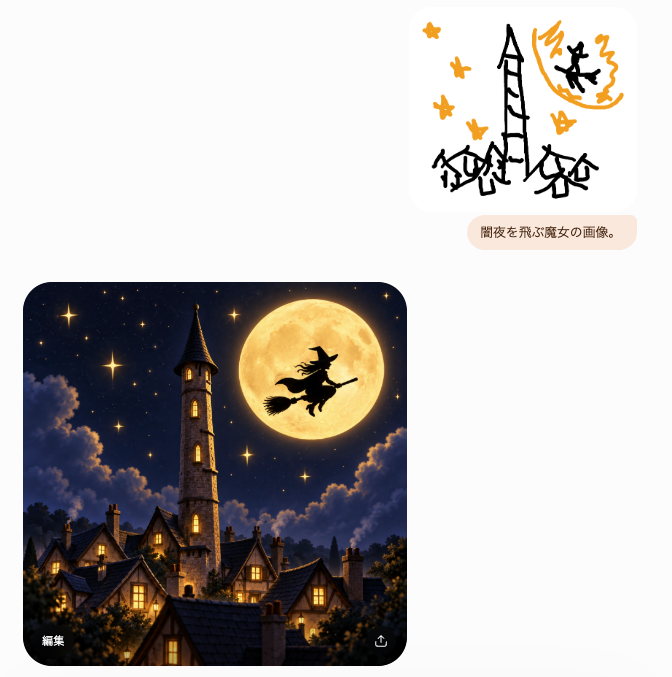
Creates a chat-style UI screenshot where a crude witch doodle prompt becomes a polished moonlit fantasy village image.
Witch Sketch to Fantasy Result UI

Prompt

Goal: Create a minimalist chat-style image generation interface screenshot showing a rough sketch prompt and a polished generated result. Canvas: Square-ish light gray/off-white background, about 665×677 px, with lots of empty space. Use a clean modern mobile/web UI aesthetic with rounded cards and subtle shadows. Layout: Place exactly 3 main UI elements: 1 small sketch image card in the upper right, 1 small rounded text prompt bubble directly below it, and 1 large generated image card in the lower left. Leave the left side mostly blank above the large card. Upper sketch card: A white rounded rectangle with a childlike black-and-orange doodle. The doodle contains exactly 6 orange star shapes, a tall crooked black tower in the center, 3 small black haunted houses along the bottom, an orange full moon in the upper right, and 1 black witch silhouette flying across the moon. Keep the sketch rough, marker-like, playful, and sparse. Prompt bubble: A pale peach rounded pill below the sketch card containing the Japanese text 闇夜を飛ぶ魔女の画像。 in small dark brown type. Generated image card: A large rounded-corner square image in the lower left, cinematic fantasy style. Depict a cozy gothic village at night beneath a deep navy starry sky. Include exactly 1 tall stone clock/bell tower with a pointed dark roof near the left-center, exactly 1 enormous glowing golden full moon near the upper right, and exactly 1 black witch silhouette riding a broom in front of the moon. Include clustered steep-roof houses with warm yellow-lit windows in the foreground, soft glowing stars, dramatic moonlit clouds, and dark treetops framing the bottom. The image should feel like a highly polished transformation of the crude sketch. UI details: On the lower-left corner inside the large generated image, show the small white Japanese label 編集. On the lower-right corner inside the same image, show a small white share/export icon. No other visible text. Visual style: High contrast between the simple doodle and the refined result; rounded corners; soft app-interface spacing; no watermark; no extra panels; keep the composition faithful to a generated-image chat result.

Runs on 18 models

  • Flux
  • Flux 2
  • Flux Kontext
  • GPT-4o Image
  • GPT Image
  • GPT Image 2
  • GPT Image 2.5
  • Grok Imagine
  • Ideogram V3
  • Imagen 4
  • Midjourney
  • Nano Banana
  • +6 more

What this prompt produces

咖啡馆旅行手账分栏页 Not specified gpt-image-2
日系 Chibi 互动小插画 Not specified gpt-image-2
动漫动作短片设定分镜板 Not specified gpt-image-2
Realistic Group Selfie with Smartphone Flash Effect Not specified nano-banana-pro
Four Seasons Portrait Collage Not specified nano-banana-pro
Minimalist Dog Sketch Clipart Not specified nano-banana-pro

Run this prompt with the API

The request below sends this prompt, with its default values filled in, to the first model it runs on. Swap the model name for any other model listed above.

Prompt API docs
/api/v1/gpt_image_2/text_to_image
curl -X POST https://runapi.ai/api/v1/gpt_image_2/text_to_image \
  -H "Authorization: Bearer $RUNAPI_API_KEY" \
  -H "Content-Type: application/json" \
  --data-binary @- <<'JSON'
{
  "model": "gpt-image-2",
  "prompt": "Goal: Create a minimalist chat-style image generation interface screenshot showing a rough sketch prompt and a polished generated result.\n\nCanvas: Square-ish light gray/off-white background, about 665×677 px, with lots of empty space. Use a clean modern mobile/web UI aesthetic with rounded cards and subtle shadows.\n\nLayout: Place exactly 3 main UI elements: 1 small sketch image card in the upper right, 1 small rounded text prompt bubble directly below it, and 1 large generated image card in the lower left. Leave the left side mostly blank above the large card.\n\nUpper sketch card: A white rounded rectangle with a childlike black-and-orange doodle. The doodle contains exactly 6 orange star shapes, a tall crooked black tower in the center, 3 small black haunted houses along the bottom, an orange full moon in the upper right, and 1 black witch silhouette flying across the moon. Keep the sketch rough, marker-like, playful, and sparse.\n\nPrompt bubble: A pale peach rounded pill below the sketch card containing the Japanese text 闇夜を飛ぶ魔女の画像。 in small dark brown type.\n\nGenerated image card: A large rounded-corner square image in the lower left, cinematic fantasy style. Depict a cozy gothic village at night beneath a deep navy starry sky. Include exactly 1 tall stone clock/bell tower with a pointed dark roof near the left-center, exactly 1 enormous glowing golden full moon near the upper right, and exactly 1 black witch silhouette riding a broom in front of the moon. Include clustered steep-roof houses with warm yellow-lit windows in the foreground, soft glowing stars, dramatic moonlit clouds, and dark treetops framing the bottom. The image should feel like a highly polished transformation of the crude sketch.\n\nUI details: On the lower-left corner inside the large generated image, show the small white Japanese label 編集. On the lower-right corner inside the same image, show a small white share/export icon. No other visible text.\n\nVisual style: High contrast between the simple doodle and the refined result; rounded corners; soft app-interface spacing; no watermark; no extra panels; keep the composition faithful to a generated-image chat result."
}
JSON

Try a prompt

Estimated: $0.04 / image

Sign in to generate with RunAPI.

Sign in to generate

Sign in to start generating with your available language models.

















