Mint Anime Music Player Wallpaper

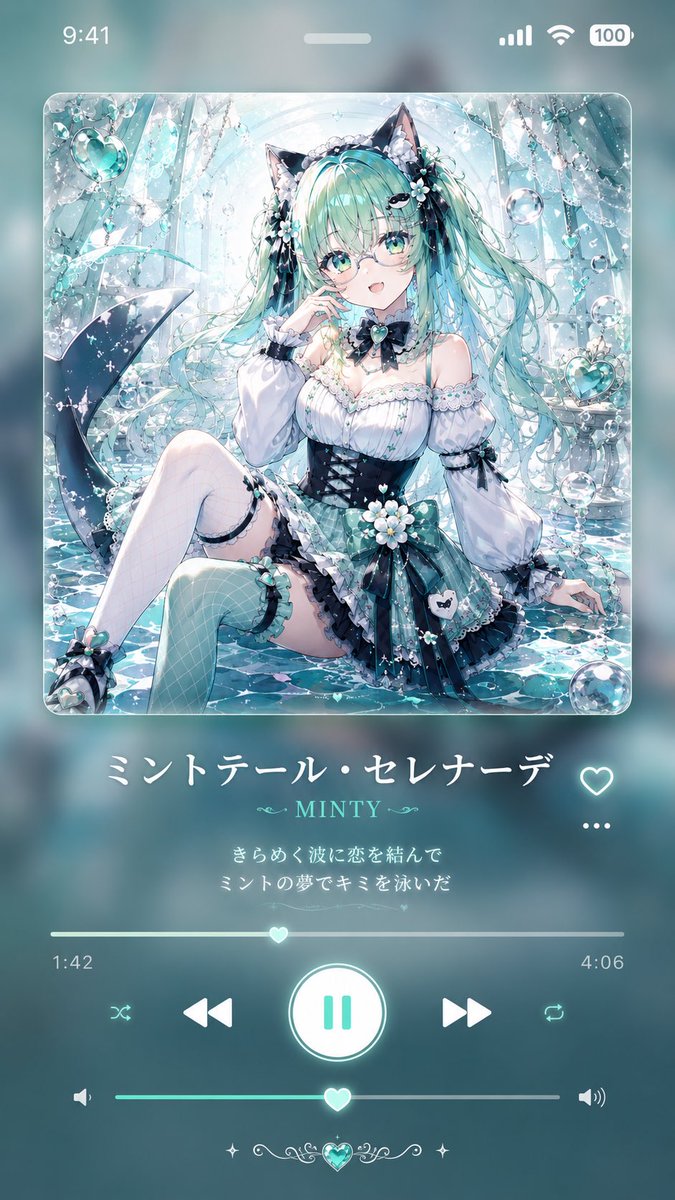
Creates a 9:16 glassmorphism smartphone music player wallpaper with a mint-haired anime cat-girl mermaid idol album cover and Japanese song UI.
Mint Anime Music Player Wallpaper

Prompt

Goal: Create a vertical 9:16 smartphone wallpaper styled like a dreamy music player screen, featuring an anime album-art illustration and a translucent teal audio UI. Canvas: 9:16 phone wallpaper, soft aqua and mint color palette, blurred glassmorphism background, iPhone-like status bar at the top showing 9:41 on the left and signal, Wi‑Fi, and 100% battery on the right, with a small white home-indicator pill near the top center. Main album art: A large rounded-square album cover centered in the upper half, with glossy glass edges and subtle glow. Inside the cover, illustrate Minty Serenade as a beautiful anime cat-girl mermaid-idol sitting in sparkling shallow water inside an ornate crystalline underwater palace. She has very long flowing mint turquoise twin-tail hair, black cat ears, large aqua eyes, delicate round glasses, a shy open-mouth expression, and pale skin. Her outfit is a frilly white-and-black gothic lolita swimsuit dress with mint plaid accents, black corset waist, lace sleeves, ribbons, flower ornaments, pearl details, thigh-high stockings, and small teal bows. Include a dark mermaid tail curling behind her on the left. Surround her with bubbles, dangling crystal chains, heart-shaped aqua jewels, white flowers, shimmering water reflections, sparkles, and luminous cyan highlights. The illustration should be highly detailed, romantic, glossy, and ethereal. Music player layout below album art: Center the song title in large elegant white Japanese text: ミントテール・セレナーデ. To the right of the title line place one outlined heart favorite icon. Below it, show the artist name in smaller mint serif text with decorative flourishes: MINTY. Under that, include exactly 2 centered Japanese lyric lines in small glowing white text: 1) きらめく波に恋を結んで 2) ミントの夢でキミを泳いだ. To the right of the lyric area place a horizontal three-dot menu icon. Playback controls: Add one thin progress bar with a glowing heart-shaped scrubber near the center; show elapsed time 1:42 on the left and total time 4:06 on the right. Beneath it, place exactly 5 playback icons in a row: shuffle, previous track, large circular pause button in the center, next track, repeat. The central pause button should be a glowing white circle with mint pause bars. Below that, add a volume slider with speaker icon on the left, louder speaker icon on the right, and another heart-shaped knob. At the bottom center, add a small decorative aqua heart gem with symmetrical filigree and tiny star sparkles. Visual style: Soft glow, translucent frosted glass UI, crisp anime rendering, pastel mint/cyan highlights, white typography, romantic underwater fantasy mood, no harsh shadows, no watermark, no extra app branding. Keep all interface elements aligned and readable like a polished music playback screen.

Runs on 18 models

  • Flux
  • Flux 2
  • Flux Kontext
  • GPT-4o Image
  • GPT Image
  • GPT Image 2
  • GPT Image 2.5
  • Grok Imagine
  • Ideogram V3
  • Imagen 4
  • Midjourney
  • Nano Banana
  • +6 more

What this prompt produces

Realistic Group Selfie with Smartphone Flash Effect Not specified nano-banana-pro
Four Seasons Portrait Collage Not specified nano-banana-pro
Minimalist Dog Sketch Clipart Not specified nano-banana-pro
Mecha Girl figure concept generated by Nano Banana Pro Not specified nano-banana-pro
Candid Flash Photography: Chaotic Holiday Party (Duplicate) Not specified nano-banana-pro
Ethereal Floral Studio Portrait Not specified nano-banana-pro

Run this prompt with the API

The request below sends this prompt, with its default values filled in, to the first model it runs on. Swap the model name for any other model listed above.

Prompt API docs
/api/v1/gpt_image_2/text_to_image
curl -X POST https://runapi.ai/api/v1/gpt_image_2/text_to_image \
  -H "Authorization: Bearer $RUNAPI_API_KEY" \
  -H "Content-Type: application/json" \
  --data-binary @- <<'JSON'
{
  "model": "gpt-image-2",
  "prompt": "Goal: Create a vertical 9:16 smartphone wallpaper styled like a dreamy music player screen, featuring an anime album-art illustration and a translucent teal audio UI.\n\nCanvas: 9:16 phone wallpaper, soft aqua and mint color palette, blurred glassmorphism background, iPhone-like status bar at the top showing 9:41 on the left and signal, Wi‑Fi, and 100% battery on the right, with a small white home-indicator pill near the top center.\n\nMain album art: A large rounded-square album cover centered in the upper half, with glossy glass edges and subtle glow. Inside the cover, illustrate Minty Serenade as a beautiful anime cat-girl mermaid-idol sitting in sparkling shallow water inside an ornate crystalline underwater palace. She has very long flowing mint turquoise twin-tail hair, black cat ears, large aqua eyes, delicate round glasses, a shy open-mouth expression, and pale skin. Her outfit is a frilly white-and-black gothic lolita swimsuit dress with mint plaid accents, black corset waist, lace sleeves, ribbons, flower ornaments, pearl details, thigh-high stockings, and small teal bows. Include a dark mermaid tail curling behind her on the left. Surround her with bubbles, dangling crystal chains, heart-shaped aqua jewels, white flowers, shimmering water reflections, sparkles, and luminous cyan highlights. The illustration should be highly detailed, romantic, glossy, and ethereal.\n\nMusic player layout below album art: Center the song title in large elegant white Japanese text: ミントテール・セレナーデ. To the right of the title line place one outlined heart favorite icon. Below it, show the artist name in smaller mint serif text with decorative flourishes: MINTY. Under that, include exactly 2 centered Japanese lyric lines in small glowing white text: 1) きらめく波に恋を結んで 2) ミントの夢でキミを泳いだ. To the right of the lyric area place a horizontal three-dot menu icon.\n\nPlayback controls: Add one thin progress bar with a glowing heart-shaped scrubber near the center; show elapsed time 1:42 on the left and total time 4:06 on the right. Beneath it, place exactly 5 playback icons in a row: shuffle, previous track, large circular pause button in the center, next track, repeat. The central pause button should be a glowing white circle with mint pause bars. Below that, add a volume slider with speaker icon on the left, louder speaker icon on the right, and another heart-shaped knob. At the bottom center, add a small decorative aqua heart gem with symmetrical filigree and tiny star sparkles.\n\nVisual style: Soft glow, translucent frosted glass UI, crisp anime rendering, pastel mint/cyan highlights, white typography, romantic underwater fantasy mood, no harsh shadows, no watermark, no extra app branding. Keep all interface elements aligned and readable like a polished music playback screen."
}
JSON

Try a prompt

Estimated: $0.04 / image

Sign in to generate with RunAPI.

Sign in to generate

Sign in to start generating with your available language models.

















