Transforms a phone photo into an elegant Vogue-inspired ink-and-watercolor editorial illustration while preserving the original composition.
Prompt
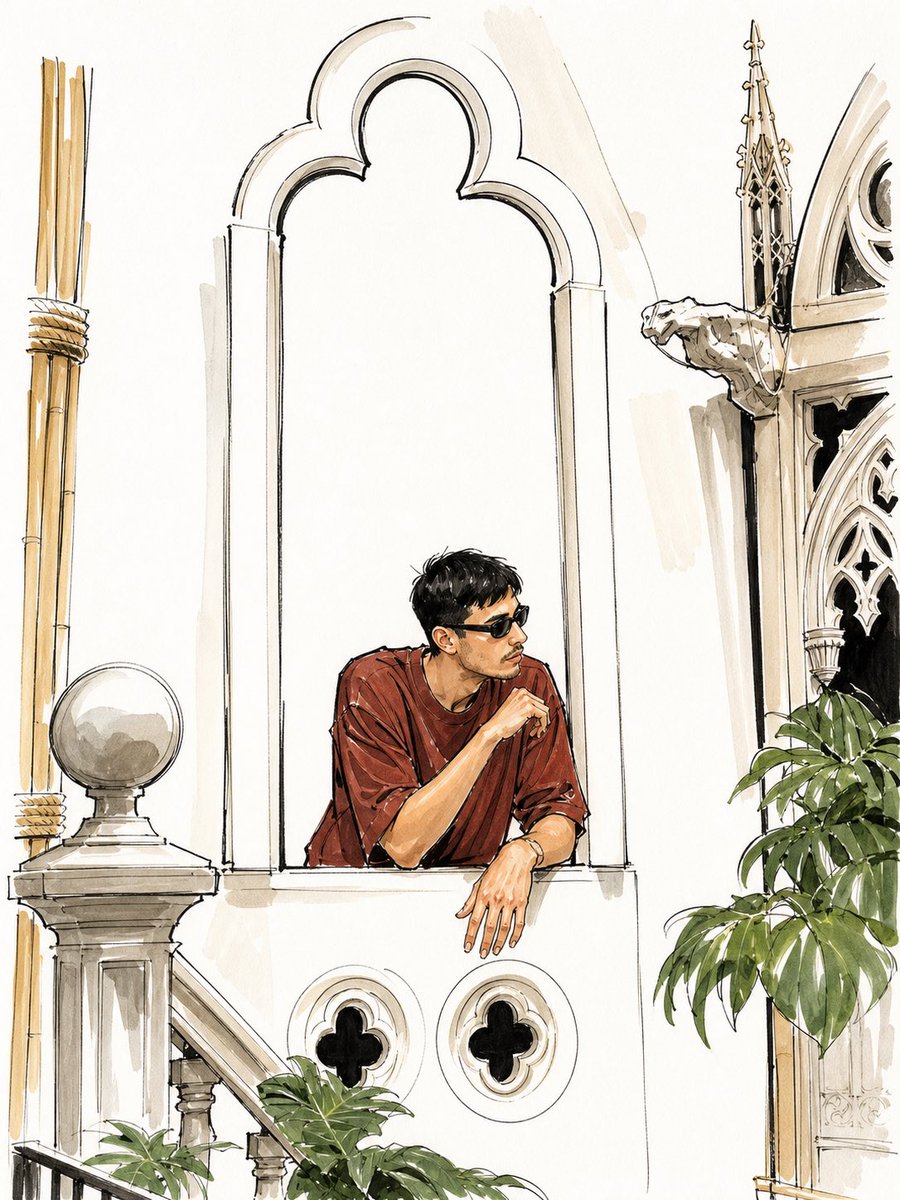
Using REFERENCE_0 as the source image, transform the phone photo into a refined Vogue-style fashion/architectural illustration. Keep the same vertical composition, the same person leaning out of the arched window in the same pose, and preserve the anonymized blurred face. Convert the scene into elegant ink-and-watercolor line art on a mostly white paper background, with loose black sketch outlines, soft beige shadows, muted green foliage, and a warm rust-red shirt. Simplify the photographic wall into clean white negative space while retaining the key architectural features: the tall scalloped arch window, the Gothic ornament and gargoyle-like detail on the right, the stone stair post with round finial on the left, the bamboo poles, leafy plants, and exactly 2 small circular quatrefoil vents below the window. Make it look like a high-fashion travel illustration from Vogue, polished but hand-drawn, with airy editorial spacing and no added text, logos, or extra people.
Runs on 18 models
Flux
Flux 2
Flux Kontext
GPT-4o Image
GPT Image
GPT Image 2
GPT Image 2.5
Grok Imagine
Ideogram V3
Imagen 4
Midjourney
Nano Banana
+6 more
What this prompt produces
Not specified
nano-banana-pro
$0.11 / callNot specified · Not specified
Not specified
nano-banana-pro
$0.11 / callNot specified · Not specified
Not specified
nano-banana-pro
$0.11 / callNot specified · Not specified
Not specified
nano-banana-pro
$0.11 / callNot specified · Not specified
Not specified
nano-banana-pro
$0.11 / callNot specified · Not specified
Not specified
nano-banana-pro
$0.11 / callNot specified · Not specified
Run this prompt with the API
The request below sends this prompt, with its default values filled in, to the first model it runs on. Swap the model name for any other model listed above.
curl -X POST https://runapi.ai/api/v1/gpt_image_2/text_to_image \
  -H "Authorization: Bearer $RUNAPI_API_KEY" \
  -H "Content-Type: application/json" \
  --data-binary @- <<'JSON'
{
  "model": "gpt-image-2",
  "prompt": "Using REFERENCE_0 as the source image, transform the phone photo into a refined Vogue-style fashion/architectural illustration. Keep the same vertical composition, the same person leaning out of the arched window in the same pose, and preserve the anonymized blurred face. Convert the scene into elegant ink-and-watercolor line art on a mostly white paper background, with loose black sketch outlines, soft beige shadows, muted green foliage, and a warm rust-red shirt. Simplify the photographic wall into clean white negative space while retaining the key architectural features: the tall scalloped arch window, the Gothic ornament and gargoyle-like detail on the right, the stone stair post with round finial on the left, the bamboo poles, leafy plants, and exactly 2 small circular quatrefoil vents below the window. Make it look like a high-fashion travel illustration from Vogue, polished but hand-drawn, with airy editorial spacing and no added text, logos, or extra people."
}
JSON
A detailed watercolor cutaway of a busy open-air harbor fish market at dawn, landscape 4:3. A long stone pavilion with weathered Romanesque arches and a high timber-framed ceiling runs diagonally through the frame; the dark tiled floor is wet and reflective. Fishmongers in work shirts and aprons sort silver fish on crushed ice in wooden crates and along long tables; brass hanging scales dangle from the stone arches; empty crates stack nearby. Through the arches on the right, warm golden dawn light spreads over a calm harbor with docked fishing boats and a few seagulls in the pale sky. Soft watercolor washes, visible brush texture, cool blue-grey stone contrasted with warm sunrise gold, lively but orderly morning market mood. No readable signs, no logos, no watermarks, no brand names.
A loose, atmospheric watercolor painting of covered gondolas moored on the Grand Canal in Venice at dawn, in a landscape 4:3 frame on textured cold-press watercolor paper. In the lower left, three long black gondolas rest side by side, wrapped in dark blue-grey covers, one with a pale tan tarp, the front gondola's curved prow and metal prow ornament rising at the far left edge. Tall wooden mooring poles with red-and-white spiral stripes and small pointed caps stand in the water across the middle and right of the frame, some linked to the gondolas by sagging ropes and chains. Across the canal, a hazy, softly painted skyline of old palazzos stretches to the right, with a slender bell tower, and on the left a large domed baroque basilica with smaller domes and lanterns, in the spirit of Santa Maria della Salute, silhouetted against the light. The sky glows in soft peach, apricot, and lavender washes with drifting clouds. The calm water reflects the poles, gondolas, and sky in broken vertical strokes of violet, pink, and white. Visible brushstrokes, wet-in-wet blooms, granulating pigments, soft edges, and white paper showing through. Peaceful, romantic early-morning mood. No people, no text, no signature.
A loose, expressive watercolor painting of a common kingfisher diving headfirst into a calm forest stream, in a wide landscape 16:9 composition on textured white watercolor paper. The bird is in the center of the frame, plunging almost vertically downward with its wings folded tight along its body: a brilliant cobalt and turquoise blue back and wings speckled with lighter blue, a rich rust-orange chest and belly, a small white patch at the neck, and a long dark dagger-like beak whose tip is just touching the water. Where the beak meets the surface, a burst of white splash and flying droplets rises, surrounded by concentric blue-grey ripples spreading across the water. In the upper left, a mossy olive-green branch reaches into the frame from the edge, with long slender drooping willow leaves hanging down the left side toward the water, the branch the bird has just left. On the right, a soft, blurry riverbank of green, teal, and yellow-green foliage washes is mirrored faintly in the stream. Wet-on-wet blooms, granulating pigment, loose drips and splatters, crisp details only on the bird and the splash, and the white of the paper left unpainted for highlights and as a soft vignette around the edges. Fresh, lively, natural mood. No text, no signature, no frame.
Misty limestone karst peaks rising above a calm river with a single empty wooden sampan moored among reeds, painted as a traditional Chinese ink wash landscape on rice paper. Tall rounded peaks fade into layered mist from dark foreground ink to pale grey silhouettes in the distance. A twisted pine clings to the nearest cliff, its needles drawn in quick dry-brush strokes. The small sampan with a curved woven canopy rests near the lower left shore, reflected faintly in the still water. Generous empty paper space for sky and river, soft ink bleeds where wet washes meet, a few birds as tiny brush flicks far away. Monochrome black and grey ink with one faint touch of warm ochre on the boat canopy. Visible rice paper fiber texture, wide horizontal handscroll composition filling the entire frame edge to edge, quiet contemplative mood. No people, no text, no calligraphy, no seals, no signature.
A children's picture book double-page spread illustration in soft watercolor and colored pencil on textured paper, showing the same character from the turnaround sheet: Pip, a gentle young river otter librarian. Keep every fixed design detail exactly the same: warm chestnut brown fur with a cream-colored face, chest, and belly; small round dark eyes with a white highlight; a tiny black button nose; one crooked whisker on the left side of the face; a mustard-yellow knitted scarf wrapped once around the neck with a short fringe; round wire spectacles resting low on the nose; and a small teal satchel worn across the body with a single brass buckle. Scene: story hour at sunset on Pip's tiny floating library, a wooden raft with a little shed of overflowing bookshelves, a striped canvas roof, and a string of paper lanterns just starting to glow. Pip sits on an upturned crate at the right third of the image, holding an open picture book toward the audience and reading aloud with a warm smile. Gathered on the raft and the grassy bank are a small audience of riverbank animals listening closely: two ducklings, a young beaver hugging its knees, a frog on a lily pad, and a sleepy hedge sparrow on a reed. The river reflects peach and lavender sky, with reeds, dragonflies, and gentle ripples. Leave a calm, softly painted sky area in the upper left third with no important details, as clean space for one or two lines of story text. Cozy, gentle, age-appropriate mood. No text, no letters, no watermark, 16:9 wide composition.
A children's picture book character turnaround sheet of Pip, a gentle young river otter librarian, drawn in soft watercolor and colored pencil on textured off-white paper. Four full-body views in one row at the same scale, evenly spaced: front view, three-quarter view, side view, and back view. Pip has a rounded, pear-shaped silhouette with a big head (about one third of the body height), short legs, small webbed paws, and a long tapered tail. Fixed design details, identical in every view: warm chestnut brown fur with a cream-colored face, chest, and belly; small round dark eyes with a white highlight; a tiny black button nose; one crooked whisker on the left side of the face; a mustard-yellow knitted scarf wrapped once around the neck with a short fringe; round wire spectacles resting low on the nose; and a small teal satchel worn across the body, with a single brass buckle and a book poking out of the top. Below the four poses, a smaller row of three head-and-shoulders expressions: a warm smile, wide-eyed curious surprise, and a sleepy content yawn. Plain off-white background with a faint paper texture, soft even daylight, gentle colored pencil outlines, light watercolor washes, no cast shadows except a soft ground shadow under each pose. No text, no labels, no arrows, 16:9 wide composition.
Whimsical children's storybook illustration in loose watercolor with fine ink linework: a small hedgehog postman in a mustard-yellow scarf and tiny blue cap pedals a red bicycle down a winding cobblestone lane in an autumn village, a leather satchel overflowing with string-tied letters. Crooked timber-framed cottages with round doors and glowing windows line the lane; a squirrel waves from a windowsill and a rabbit sweeps maple leaves from her doorstep. Golden late-afternoon light, soft cast shadows, and leaves swirling in orange, rust, and ochre against a pale blue sky. Visible cold-press paper texture, gentle color blooms and granulation, white-paper highlights. Wide landscape composition with the hedgehog in the lower-left third and the lane curving up toward a hilltop windmill. Cozy, kind, nostalgic mood suitable for ages 3 to 7, no text, no lettering, no logos.