Four-Panel AI Landscape Comparison

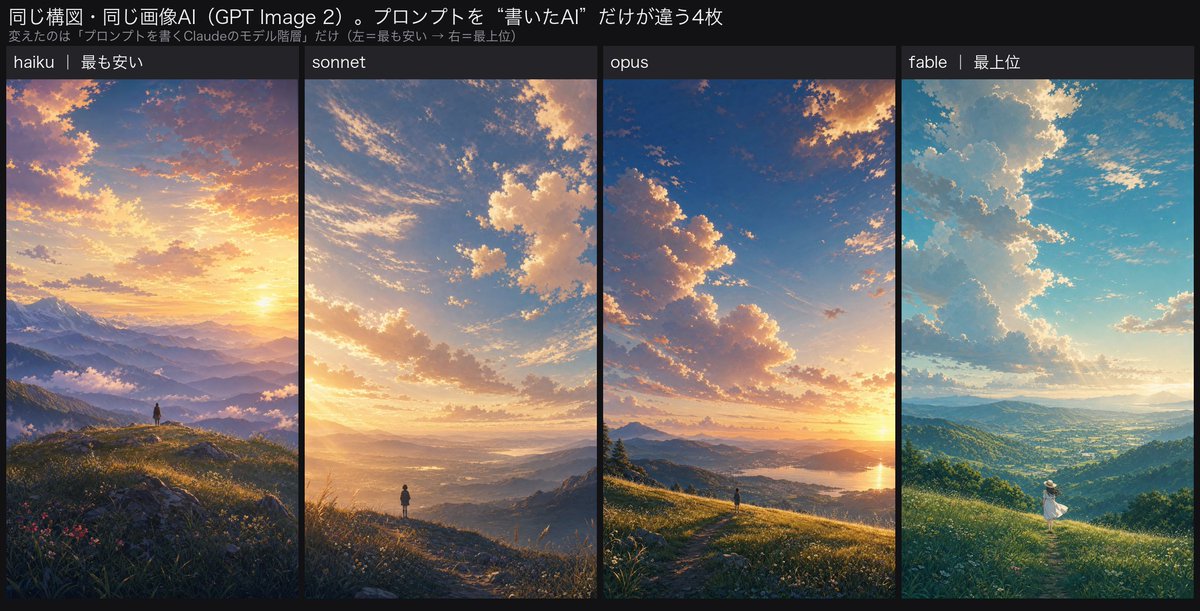
Creates a dark social-media comparison banner with four labeled anime landscape outputs for different Claude model tiers.
Four-Panel AI Landscape Comparison

Prompt

Goal: Create a wide comparison graphic showing how four prompt-writing AI model tiers produce the same landscape scene in GPT Image 2, with a dark editorial UI frame and Japanese headline text. Canvas: Extra-wide horizontal banner, approximately 2:1 aspect ratio, black/dark charcoal background, clean social-media comparison layout. Use thin black dividers between image columns and a compact top title area. Top text: Large white Japanese headline: 同じ構図・同じ画像AI(GPT Image 2)。プロンプトを“書いたAI”だけが違う4枚. Under it, add a smaller gray subtitle: 変えたのは「プロンプトを書くClaudeのモデル階層」だけ(左=最も安い → 右=最上位). Layout: Four equal vertical landscape panels placed side by side, each with a small dark label bar at the top. Use exactly 4 panels, ordered left to right: 1. Label: “haiku | 最も安い” — a dramatic semi-realistic anime landscape at golden sunset, high mountain range in the distance, layered misty valleys, wildflower-covered rocky foreground, a tiny solitary person standing on a ridge, warm orange-purple clouds, slightly over-embellished cinematic atmosphere. 2. Label: “sonnet” — cleaner and more elegant sunset mountain valley, broad sky with soft glowing cumulus clouds, golden light spilling across rolling hills, a small lone figure on a ridge path, balanced composition, polished anime background style. 3. Label: “opus” — high-quality but restrained sunset vista, deep blue sky fading to orange near the horizon, large illuminated cloud formations, grassy hillside foreground, distant lake or reflective water, tiny figure near the bottom center, premium but conventional scenic framing. 4. Label: “fable | 最上位” — emotionally directed bright morning or late-afternoon landscape, turquoise-blue sky, towering luminous white clouds, sunbeams over a vast green valley, a small person in a white dress and hat standing in meadow grass at lower right, more narrative and poetic mood. Visual style: Refined Japanese anime background art blended with painterly cinematic lighting, highly detailed skies and atmospheric perspective. Keep all four panels similar in composition and subject matter so the comparison feels controlled, but vary mood and art direction per label. Use crisp white text, dark label bars, no logos, no watermark. Constraints: Preserve exactly 4 image panels and exactly these 4 visible panel labels. Make the title and subtitle legible. Keep the overall image looking like a posted comparison chart rather than a standalone landscape collage.

Runs on 18 models

  • Flux
  • Flux 2
  • Flux Kontext
  • GPT-4o Image
  • GPT Image
  • GPT Image 2
  • GPT Image 2.5
  • Grok Imagine
  • Ideogram V3
  • Imagen 4
  • Midjourney
  • Nano Banana
  • +6 more

What this prompt produces

Realistic Group Selfie with Smartphone Flash Effect Not specified nano-banana-pro
Four Seasons Portrait Collage Not specified nano-banana-pro
Minimalist Dog Sketch Clipart Not specified nano-banana-pro
Mecha Girl figure concept generated by Nano Banana Pro Not specified nano-banana-pro
Candid Flash Photography: Chaotic Holiday Party (Duplicate) Not specified nano-banana-pro
Ethereal Floral Studio Portrait Not specified nano-banana-pro

Run this prompt with the API

The request below sends this prompt, with its default values filled in, to the first model it runs on. Swap the model name for any other model listed above.

Prompt API docs
/api/v1/gpt_image_2/text_to_image
curl -X POST https://runapi.ai/api/v1/gpt_image_2/text_to_image \
  -H "Authorization: Bearer $RUNAPI_API_KEY" \
  -H "Content-Type: application/json" \
  --data-binary @- <<'JSON'
{
  "model": "gpt-image-2",
  "prompt": "Goal: Create a wide comparison graphic showing how four prompt-writing AI model tiers produce the same landscape scene in GPT Image 2, with a dark editorial UI frame and Japanese headline text.\n\nCanvas: Extra-wide horizontal banner, approximately 2:1 aspect ratio, black/dark charcoal background, clean social-media comparison layout. Use thin black dividers between image columns and a compact top title area.\n\nTop text: Large white Japanese headline: 同じ構図・同じ画像AI(GPT Image 2)。プロンプトを“書いたAI”だけが違う4枚. Under it, add a smaller gray subtitle: 変えたのは「プロンプトを書くClaudeのモデル階層」だけ(左=最も安い → 右=最上位).\n\nLayout: Four equal vertical landscape panels placed side by side, each with a small dark label bar at the top. Use exactly 4 panels, ordered left to right:\n1. Label: “haiku | 最も安い” — a dramatic semi-realistic anime landscape at golden sunset, high mountain range in the distance, layered misty valleys, wildflower-covered rocky foreground, a tiny solitary person standing on a ridge, warm orange-purple clouds, slightly over-embellished cinematic atmosphere.\n2. Label: “sonnet” — cleaner and more elegant sunset mountain valley, broad sky with soft glowing cumulus clouds, golden light spilling across rolling hills, a small lone figure on a ridge path, balanced composition, polished anime background style.\n3. Label: “opus” — high-quality but restrained sunset vista, deep blue sky fading to orange near the horizon, large illuminated cloud formations, grassy hillside foreground, distant lake or reflective water, tiny figure near the bottom center, premium but conventional scenic framing.\n4. Label: “fable | 最上位” — emotionally directed bright morning or late-afternoon landscape, turquoise-blue sky, towering luminous white clouds, sunbeams over a vast green valley, a small person in a white dress and hat standing in meadow grass at lower right, more narrative and poetic mood.\n\nVisual style: Refined Japanese anime background art blended with painterly cinematic lighting, highly detailed skies and atmospheric perspective. Keep all four panels similar in composition and subject matter so the comparison feels controlled, but vary mood and art direction per label. Use crisp white text, dark label bars, no logos, no watermark.\n\nConstraints: Preserve exactly 4 image panels and exactly these 4 visible panel labels. Make the title and subtitle legible. Keep the overall image looking like a posted comparison chart rather than a standalone landscape collage."
}
JSON

Try a prompt

Estimated: $0.04 / image

Sign in to generate with RunAPI.

Sign in to generate

Sign in to start generating with your available language models.