AI Prompt Gallery Browser Mockup

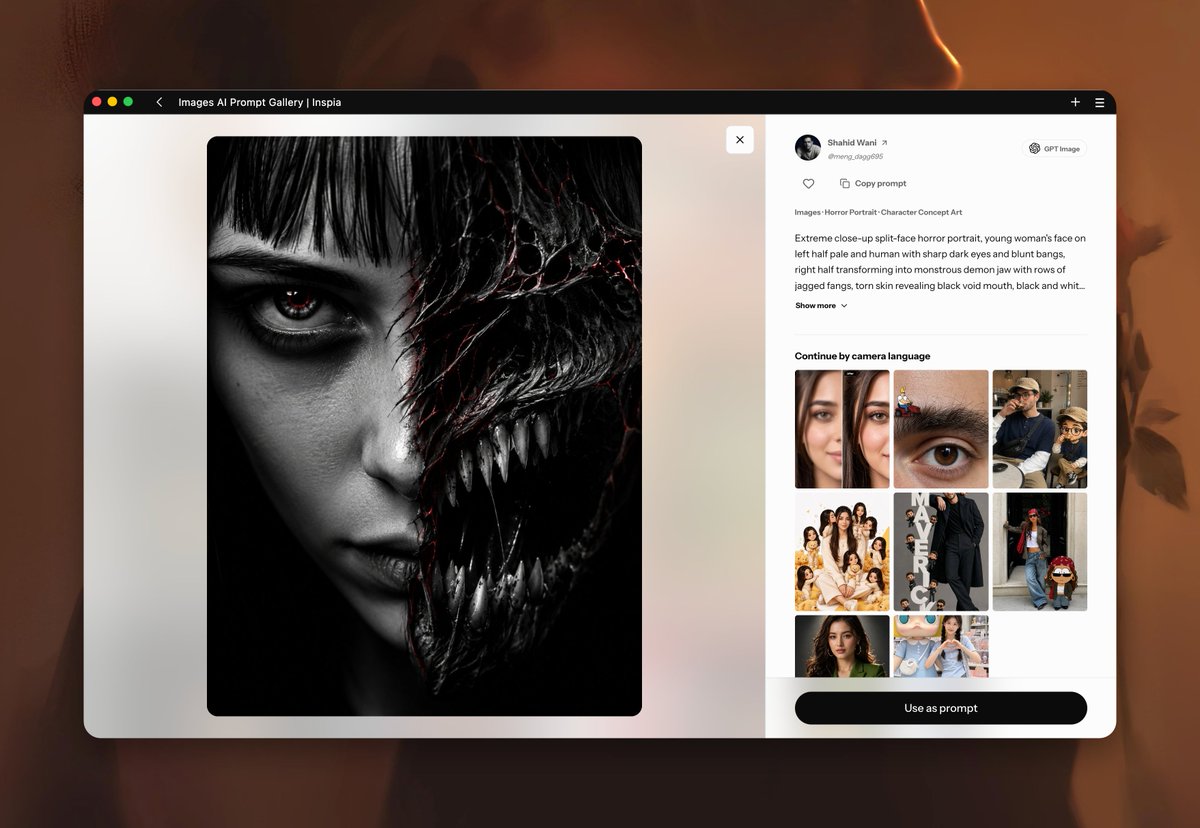
A detailed prompt for generating a realistic desktop web app screenshot featuring an AI prompt gallery with a horror portrait preview and sidebar controls.
AI Prompt Gallery Browser Mockup

Prompt

Goal: Create a polished desktop browser screenshot mockup of an AI image prompt gallery web app called Images AI Prompt Gallery | Inspia, shown floating over a blurred warm brown/orange background. Canvas: 1200×831 landscape image. Center a large rounded-corner browser window with a black top bar, subtle drop shadow, and macOS-style red, yellow, green window buttons at the top left. The browser occupies most of the frame, with soft orange blurred photographic shapes visible behind it. Layout: The web app is split into 2 main panels. Left panel is a large image preview area on an off-white to pale beige background, containing one square artwork with rounded corners. Right panel is a white details sidebar with user information, prompt text, a thumbnail grid, and a bottom action button. Top browser bar details: Show exactly 3 colored window dots on the far left, a small back chevron, the title text “Images AI Prompt Gallery | Inspia”, and exactly 2 icons on the far right: a plus sign and a hamburger menu. Left image preview: Display one large square horror portrait, nearly black-and-white, centered in the left panel. The portrait is an extreme close-up split-face image of a young woman: the left half is a human female face with pale skin, straight black bangs, a single intense dark eye with a tiny red reflection, dark under-eye makeup, and black lipstick; the right half transforms into a monstrous demon jaw with torn glossy black skin, cracked veiny texture with subtle red fissures, many sharp jagged teeth, and a gaping black mouth. Use dramatic high contrast, cinematic lighting, realistic texture, and a horror character concept art feel. Add one small white square close button with an “×” near the top-right of the left panel. Right sidebar details: At the top show a circular profile avatar, the creator name Shahid Wani with a small external-link arrow, the handle “@meng_dog695”, and a small pill badge labeled GPT Image. Under it show exactly 2 action controls: a heart icon and “Copy prompt”. Add the category line “Images · Horror Portrait · Character Concept Art”. Then show a prompt excerpt beginning with: Extreme close-up split-face horror portrait, young woman's face on left half pale and human with sharp dark eyes and blunt bangs, right half transforming into monstrous demon jaw with rows of jagged fangs, torn skin revealing black void mouth, black and whit... followed by a “show more” label with a down chevron. Thumbnail section: Add the heading “Continue by camera language”. Below it create exactly 8 rounded image thumbnails arranged as a compact 3-column grid: row 1 has 3 thumbnails, row 2 has 3 thumbnails, row 3 has 2 thumbnails. The thumbnails should depict, in order: 1) two side-by-side female portrait close-ups, 2) an extreme close-up brown eye with tiny cartoon stickers on the eyebrow, 3) a seated man in cap beside a small cartoon doll, 4) a group portrait of multiple women in cream outfits, 5) a tall fashion photo of a person in black with vertical text, 6) a street-fashion woman with jeans and sunglasses beside a small doll, 7) a natural headshot of a curly-haired woman in a green top, 8) a woman posing with oversized cute plush characters. Bottom control: At the bottom of the sidebar place one wide black rounded pill button centered horizontally with white text Use as prompt. Visual style: Clean modern SaaS interface, crisp UI typography, realistic browser chrome, soft shadows, rounded corners, minimal iconography, strong contrast between the monochrome horror artwork and the bright white interface. Keep all UI text legible and do not add extra panels, thumbnails, buttons, or watermarks.

Runs on 18 models

  • Flux
  • Flux 2
  • Flux Kontext
  • GPT-4o Image
  • GPT Image
  • GPT Image 2
  • GPT Image 2.5
  • Grok Imagine
  • Ideogram V3
  • Imagen 4
  • Midjourney
  • Nano Banana
  • +6 more

What this prompt produces

Realistic Group Selfie with Smartphone Flash Effect Not specified nano-banana-pro
Four Seasons Portrait Collage Not specified nano-banana-pro
Minimalist Dog Sketch Clipart Not specified nano-banana-pro
Mecha Girl figure concept generated by Nano Banana Pro Not specified nano-banana-pro
Candid Flash Photography: Chaotic Holiday Party (Duplicate) Not specified nano-banana-pro
Ethereal Floral Studio Portrait Not specified nano-banana-pro

Run this prompt with the API

The request below sends this prompt, with its default values filled in, to the first model it runs on. Swap the model name for any other model listed above.

Prompt API docs
/api/v1/gpt_image_2/text_to_image
curl -X POST https://runapi.ai/api/v1/gpt_image_2/text_to_image \
  -H "Authorization: Bearer $RUNAPI_API_KEY" \
  -H "Content-Type: application/json" \
  --data-binary @- <<'JSON'
{
  "model": "gpt-image-2",
  "prompt": "Goal: Create a polished desktop browser screenshot mockup of an AI image prompt gallery web app called Images AI Prompt Gallery | Inspia, shown floating over a blurred warm brown/orange background.\n\nCanvas: 1200×831 landscape image. Center a large rounded-corner browser window with a black top bar, subtle drop shadow, and macOS-style red, yellow, green window buttons at the top left. The browser occupies most of the frame, with soft orange blurred photographic shapes visible behind it.\n\nLayout: The web app is split into 2 main panels. Left panel is a large image preview area on an off-white to pale beige background, containing one square artwork with rounded corners. Right panel is a white details sidebar with user information, prompt text, a thumbnail grid, and a bottom action button.\n\nTop browser bar details: Show exactly 3 colored window dots on the far left, a small back chevron, the title text “Images AI Prompt Gallery | Inspia”, and exactly 2 icons on the far right: a plus sign and a hamburger menu.\n\nLeft image preview: Display one large square horror portrait, nearly black-and-white, centered in the left panel. The portrait is an extreme close-up split-face image of a young woman: the left half is a human female face with pale skin, straight black bangs, a single intense dark eye with a tiny red reflection, dark under-eye makeup, and black lipstick; the right half transforms into a monstrous demon jaw with torn glossy black skin, cracked veiny texture with subtle red fissures, many sharp jagged teeth, and a gaping black mouth. Use dramatic high contrast, cinematic lighting, realistic texture, and a horror character concept art feel. Add one small white square close button with an “×” near the top-right of the left panel.\n\nRight sidebar details: At the top show a circular profile avatar, the creator name Shahid Wani with a small external-link arrow, the handle “@meng_dog695”, and a small pill badge labeled GPT Image. Under it show exactly 2 action controls: a heart icon and “Copy prompt”. Add the category line “Images · Horror Portrait · Character Concept Art”. Then show a prompt excerpt beginning with: Extreme close-up split-face horror portrait, young woman's face on left half pale and human with sharp dark eyes and blunt bangs, right half transforming into monstrous demon jaw with rows of jagged fangs, torn skin revealing black void mouth, black and whit... followed by a “show more” label with a down chevron.\n\nThumbnail section: Add the heading “Continue by camera language”. Below it create exactly 8 rounded image thumbnails arranged as a compact 3-column grid: row 1 has 3 thumbnails, row 2 has 3 thumbnails, row 3 has 2 thumbnails. The thumbnails should depict, in order: 1) two side-by-side female portrait close-ups, 2) an extreme close-up brown eye with tiny cartoon stickers on the eyebrow, 3) a seated man in cap beside a small cartoon doll, 4) a group portrait of multiple women in cream outfits, 5) a tall fashion photo of a person in black with vertical text, 6) a street-fashion woman with jeans and sunglasses beside a small doll, 7) a natural headshot of a curly-haired woman in a green top, 8) a woman posing with oversized cute plush characters.\n\nBottom control: At the bottom of the sidebar place one wide black rounded pill button centered horizontally with white text Use as prompt.\n\nVisual style: Clean modern SaaS interface, crisp UI typography, realistic browser chrome, soft shadows, rounded corners, minimal iconography, strong contrast between the monochrome horror artwork and the bright white interface. Keep all UI text legible and do not add extra panels, thumbnails, buttons, or watermarks."
}
JSON

Try a prompt

Estimated: $0.04 / image

Sign in to generate with RunAPI.

Sign in to generate

Sign in to start generating with your available language models.

















