Japanese Manus Chat Pixel Art Screenshot

Generates a clean Japanese AI chat screenshot featuring Manus producing a 16-bit pixel-art anime horse-girl portrait.
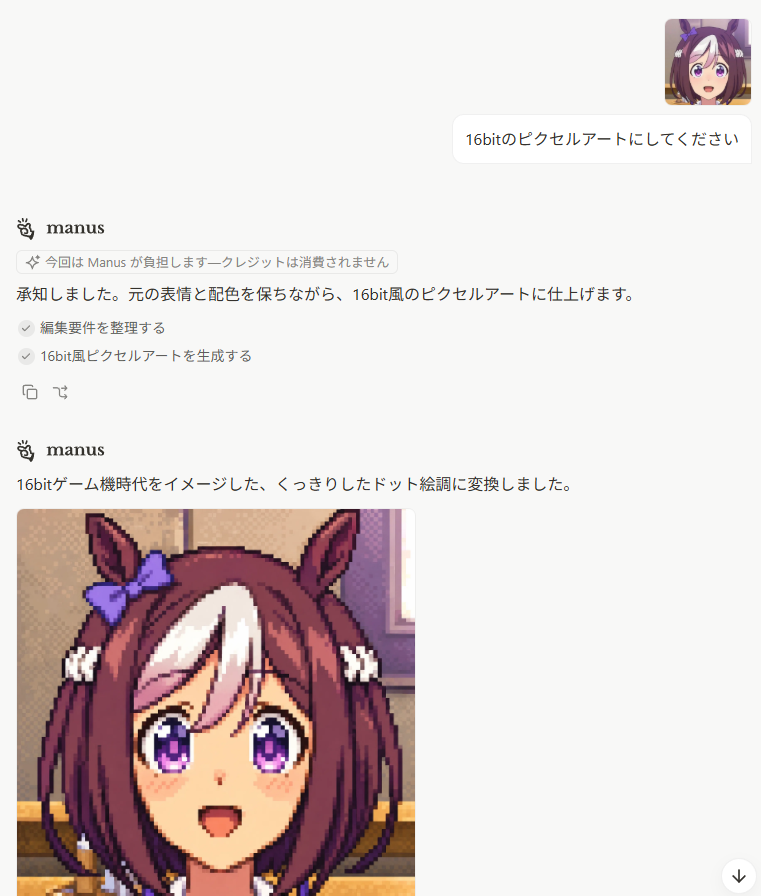
Japanese Manus Chat Pixel Art Screenshot

Prompt

Goal: Create a realistic screenshot of a minimalist AI chat interface showing a Japanese conversation where a user asks for a 16-bit pixel-art conversion and the assistant responds with a generated image. Canvas: Portrait screenshot, 768 x 896 px, white background, clean web-app UI with lots of empty space. No browser chrome, no visible sidebars. Use soft gray dividers, rounded cards, and small interface icons. Layout: Top-right user area contains exactly 2 discrete elements: 1 small square anime avatar, and 1 rounded white chat bubble. The avatar is an anime horse-girl face with brown hair, white forelock, purple eyes, horse ears, and a purple ribbon. The user bubble text is 16bitのピクセルアートにしてください. Assistant message block 1: Place the Manus logo and the bold name “manus” on the left. Below it, show exactly 1 small rounded notice pill containing a sparkle icon and Japanese text 今回は Manus が負担します—クレジットは消費されません. Then show the assistant reply line: 承知しました。元の表情と配色を保ちながら、16bit風のピクセルアートに仕上げます。. Under that, show exactly 2 checked task rows with gray circular check icons: 1) “編集要件を整理する” and 2) “16bit風ピクセルアートを生成する”. Beneath the tasks, show exactly 2 small action icons: a copy icon and a curved-arrow/regenerate-style icon. Assistant message block 2: Lower on the page, repeat the Manus logo and bold name “manus”. Under it, show a single Japanese sentence: 16bitゲーム機時代をイメージした、くっきりしたドット絵調に変換しました。. Below this sentence, align a large generated image preview to the left. Generated image preview: The preview is a square-ish pixel-art portrait cropped by the screenshot bottom edge. It shows a cheerful anime horse-girl character in crisp 16-bit game style: brown bob-length hair with a large white forelock, tall horse ears, a purple bow on the left ear, purple sparkling eyes, small blush marks, open smiling mouth, and white hair ties near both sides. Use chunky pixel edges, visible dithering, limited retro palette, and dark outline pixels. Background inside the pixel-art image is a warm indoor room with beige wall, window light, and horizontal furniture/trim, all rendered in pixel art. The visible generated preview should occupy the lower-left portion and be cut off at the bottom of the screenshot. Additional UI details: Add a small floating circular down-arrow button at the bottom-right corner. Keep the overall look like a Japanese Manus chat page, with generous margins, black body text, subtle gray UI accents, and no true transparency checkerboard. Count of visible repeated UI/content elements: 1 user avatar, 1 user message bubble, 2 Manus headers, 1 notice pill, 2 checked task rows, 2 small action icons, 1 generated image preview, and 1 floating down-arrow button. Constraints: Preserve the Japanese text exactly where given in the default parameter values. Do not add extra messages, extra avatars, extra buttons, watermarks, browser tabs, or side navigation.

Runs on 18 models

  • Flux
  • Flux 2
  • Flux Kontext
  • GPT-4o Image
  • GPT Image
  • GPT Image 2
  • GPT Image 2.5
  • Grok Imagine
  • Ideogram V3
  • Imagen 4
  • Midjourney
  • Nano Banana
  • +6 more

What this prompt produces

Realistic Group Selfie with Smartphone Flash Effect Not specified nano-banana-pro
Four Seasons Portrait Collage Not specified nano-banana-pro
Minimalist Dog Sketch Clipart Not specified nano-banana-pro
Mecha Girl figure concept generated by Nano Banana Pro Not specified nano-banana-pro
Candid Flash Photography: Chaotic Holiday Party (Duplicate) Not specified nano-banana-pro
Ethereal Floral Studio Portrait Not specified nano-banana-pro

Run this prompt with the API

The request below sends this prompt, with its default values filled in, to the first model it runs on. Swap the model name for any other model listed above.

Prompt API docs
/api/v1/gpt_image_2/text_to_image
curl -X POST https://runapi.ai/api/v1/gpt_image_2/text_to_image \
  -H "Authorization: Bearer $RUNAPI_API_KEY" \
  -H "Content-Type: application/json" \
  --data-binary @- <<'JSON'
{
  "model": "gpt-image-2",
  "prompt": "Goal: Create a realistic screenshot of a minimalist AI chat interface showing a Japanese conversation where a user asks for a 16-bit pixel-art conversion and the assistant responds with a generated image.\n\nCanvas: Portrait screenshot, 768 x 896 px, white background, clean web-app UI with lots of empty space. No browser chrome, no visible sidebars. Use soft gray dividers, rounded cards, and small interface icons.\n\nLayout: Top-right user area contains exactly 2 discrete elements: 1 small square anime avatar, and 1 rounded white chat bubble. The avatar is an anime horse-girl face with brown hair, white forelock, purple eyes, horse ears, and a purple ribbon. The user bubble text is 16bitのピクセルアートにしてください.\n\nAssistant message block 1: Place the Manus logo and the bold name “manus” on the left. Below it, show exactly 1 small rounded notice pill containing a sparkle icon and Japanese text 今回は Manus が負担します—クレジットは消費されません. Then show the assistant reply line: 承知しました。元の表情と配色を保ちながら、16bit風のピクセルアートに仕上げます。. Under that, show exactly 2 checked task rows with gray circular check icons: 1) “編集要件を整理する” and 2) “16bit風ピクセルアートを生成する”. Beneath the tasks, show exactly 2 small action icons: a copy icon and a curved-arrow/regenerate-style icon.\n\nAssistant message block 2: Lower on the page, repeat the Manus logo and bold name “manus”. Under it, show a single Japanese sentence: 16bitゲーム機時代をイメージした、くっきりしたドット絵調に変換しました。. Below this sentence, align a large generated image preview to the left.\n\nGenerated image preview: The preview is a square-ish pixel-art portrait cropped by the screenshot bottom edge. It shows a cheerful anime horse-girl character in crisp 16-bit game style: brown bob-length hair with a large white forelock, tall horse ears, a purple bow on the left ear, purple sparkling eyes, small blush marks, open smiling mouth, and white hair ties near both sides. Use chunky pixel edges, visible dithering, limited retro palette, and dark outline pixels. Background inside the pixel-art image is a warm indoor room with beige wall, window light, and horizontal furniture/trim, all rendered in pixel art. The visible generated preview should occupy the lower-left portion and be cut off at the bottom of the screenshot.\n\nAdditional UI details: Add a small floating circular down-arrow button at the bottom-right corner. Keep the overall look like a Japanese Manus chat page, with generous margins, black body text, subtle gray UI accents, and no true transparency checkerboard. Count of visible repeated UI/content elements: 1 user avatar, 1 user message bubble, 2 Manus headers, 1 notice pill, 2 checked task rows, 2 small action icons, 1 generated image preview, and 1 floating down-arrow button.\n\nConstraints: Preserve the Japanese text exactly where given in the default parameter values. Do not add extra messages, extra avatars, extra buttons, watermarks, browser tabs, or side navigation."
}
JSON

Try a prompt

Estimated: $0.04 / image

Sign in to generate with RunAPI.

Sign in to generate

Sign in to start generating with your available language models.

















