Technical Engineering Product Infographic

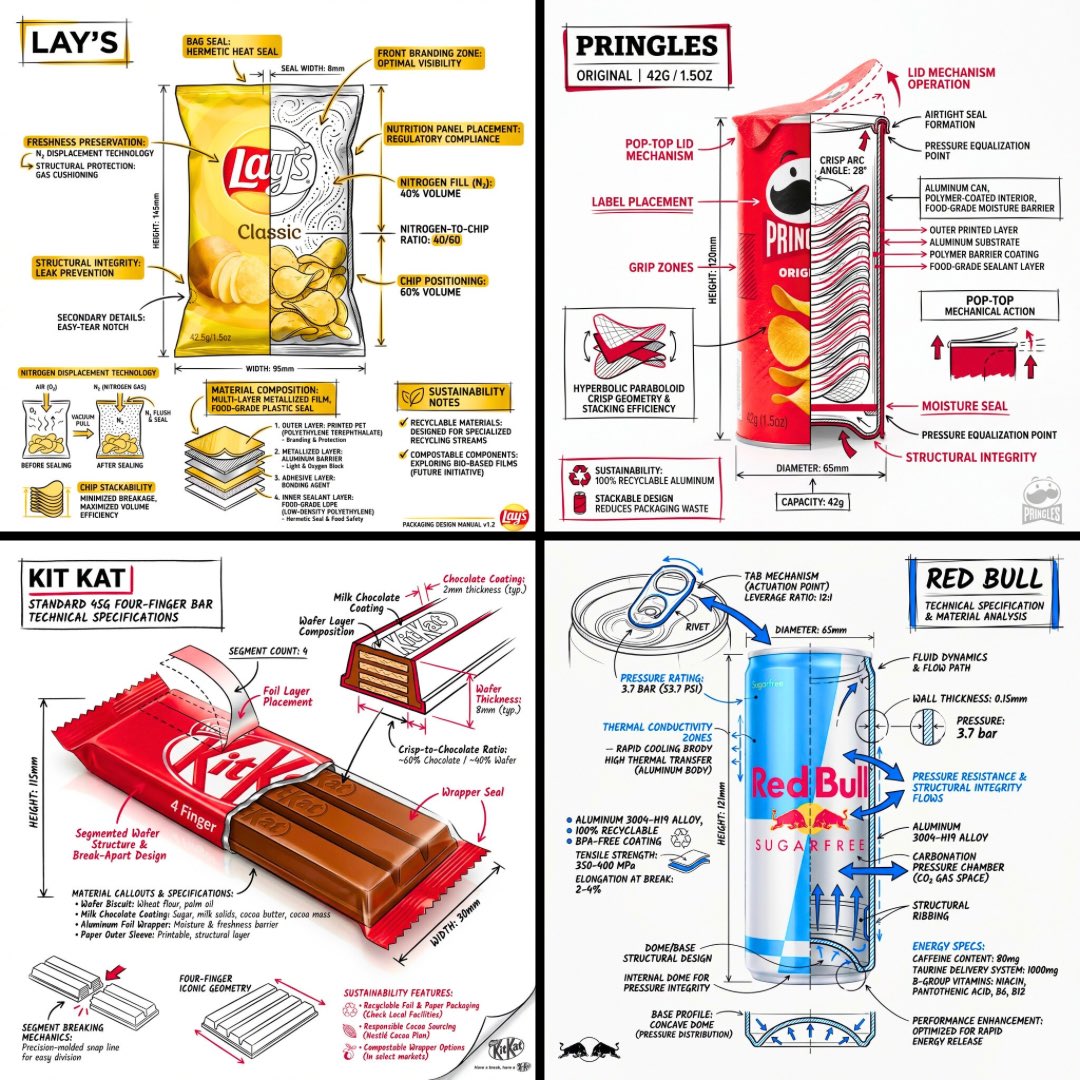
A prompt for creating architectural-style technical infographics that overlay annotations and diagrams onto realistic product renders.
Technical Engineering Product Infographic

Prompt

Design a branded technical infographic of a [SNACK] that overlays architectural-style annotations onto a realistic product photograph or photoreal render. Place everything on a pure white studio background, with black ink linework as the primary technical language and strategic [BRAND COLOR] accents (engineer-sketch energy on premium packaging). Layer the following annotations on top of the product: • Labels calling out every key component • An internal cross-section that reveals layering, structure, or internal design • Dimensions, measurements, and product specifications • Material callouts listing composition and quantities • Arrows pointing to primary features and structural details • A small schematic or sectional diagram showing mechanical / design logic • Sustainability callouts Set the product name in bold font inside a hand-drawn annotation box with an accent-color border, anchored in an upper corner as the title. Style and layout rules: • Keep the realistic product fully visible underneath all the linework • Annotations should read as sketched, technical, and architectural • About 70-80% black linework for primary technical lines, 20-30% [BRAND COLOR] for accent highlights • Balanced composition with generous negative space • Educational food-engineering tone with premium brand polish • Drop a subtle brand logo mark in one corner Visual style: minimal technical-illustration aesthetic, black linework with accent color over realistic imagery, precise but with a slightly hand-drawn feel. Color palette: white background, black annotation lines and text, [BRAND COLOR] reserved for accents and key callouts only. Output: 1080×1080, ultra-crisp, optimized for social feeds, no watermark.

Runs on 18 models

  • Flux
  • Flux 2
  • Flux Kontext
  • GPT-4o Image
  • GPT Image
  • GPT Image 2
  • GPT Image 2.5
  • Grok Imagine
  • Ideogram V3
  • Imagen 4
  • Midjourney
  • Nano Banana
  • +6 more

What this prompt produces

Realistic Group Selfie with Smartphone Flash Effect Not specified nano-banana-pro
Four Seasons Portrait Collage Not specified nano-banana-pro
Minimalist Dog Sketch Clipart Not specified nano-banana-pro
Mecha Girl figure concept generated by Nano Banana Pro Not specified nano-banana-pro
Candid Flash Photography: Chaotic Holiday Party (Duplicate) Not specified nano-banana-pro
Ethereal Floral Studio Portrait Not specified nano-banana-pro

Run this prompt with the API

The request below sends this prompt, with its default values filled in, to the first model it runs on. Swap the model name for any other model listed above.

Prompt API docs
/api/v1/gpt_image_2/text_to_image
curl -X POST https://runapi.ai/api/v1/gpt_image_2/text_to_image \
  -H "Authorization: Bearer $RUNAPI_API_KEY" \
  -H "Content-Type: application/json" \
  --data-binary @- <<'JSON'
{
  "model": "gpt-image-2",
  "prompt": "Design a branded technical infographic of a [SNACK] that overlays architectural-style annotations onto a realistic product photograph or photoreal render. Place everything on a pure white studio background, with black ink linework as the primary technical language and strategic [BRAND COLOR] accents (engineer-sketch energy on premium packaging).\n\nLayer the following annotations on top of the product:\n• Labels calling out every key component\n• An internal cross-section that reveals layering, structure, or internal design\n• Dimensions, measurements, and product specifications\n• Material callouts listing composition and quantities\n• Arrows pointing to primary features and structural details\n• A small schematic or sectional diagram showing mechanical / design logic\n• Sustainability callouts\nSet the product name in bold font inside a hand-drawn annotation box with an accent-color border, anchored in an upper corner as the title.\n\nStyle and layout rules:\n• Keep the realistic product fully visible underneath all the linework\n• Annotations should read as sketched, technical, and architectural\n• About 70-80% black linework for primary technical lines, 20-30% [BRAND COLOR] for accent highlights\n• Balanced composition with generous negative space\n• Educational food-engineering tone with premium brand polish\n• Drop a subtle brand logo mark in one corner\n\nVisual style: minimal technical-illustration aesthetic, black linework with accent color over realistic imagery, precise but with a slightly hand-drawn feel.\nColor palette: white background, black annotation lines and text, [BRAND COLOR] reserved for accents and key callouts only.\nOutput: 1080×1080, ultra-crisp, optimized for social feeds, no watermark."
}
JSON

Try a prompt

Estimated: $0.04 / image

Sign in to generate with RunAPI.

Sign in to generate

Sign in to start generating with your available language models.