Whiteboard Skill-Building Workflow

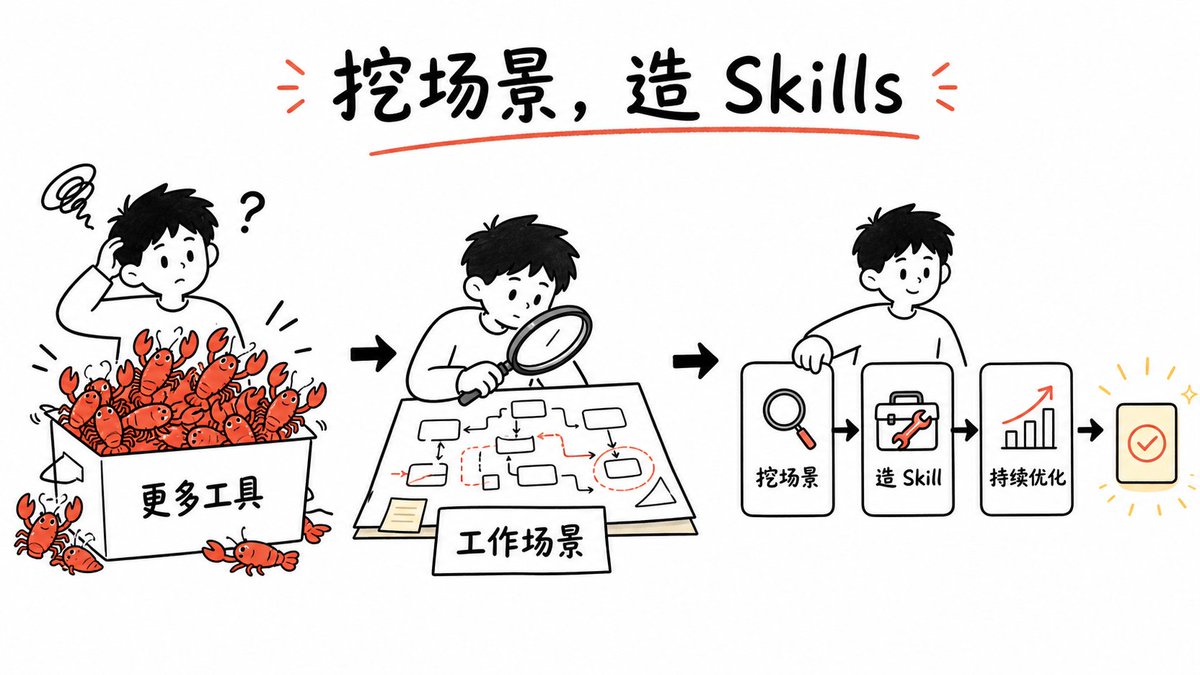
A hand-drawn whiteboard explainer showing how messy tool overload becomes reusable skills through scenario analysis and optimization.
Whiteboard Skill-Building Workflow

Prompt

Goal: Create a clean whiteboard hand-drawn explainer illustration about turning messy tool overload into reusable GPT image skills. Use a playful black marker sketch style with selective red-orange accents and a few yellow highlights. Canvas: Wide 16:9 horizontal canvas, white background, generous margins, centered composition. Hand-drawn black outlines, slightly imperfect marker strokes, minimal shading, no photorealism. Title: At the top center, write the large handwritten headline 挖场景,造 Skills. Use bold black brush lettering, underline it with one red-orange curved stroke, and add two small red-orange emphasis marks on each side of the title. Layout: Arrange the story as a left-to-right workflow with three main illustrated scenes connected by bold black arrows. Scene 1 on the left shows confusion and too many tools; scene 2 in the center shows analyzing the work scenario; scene 3 on the right shows a simplified skill-building pipeline. Scene 1: Draw a confused young person with short black hair scratching their head, a question mark beside them, and a scribbly frustration cloud above. They stand behind a large open box labeled 更多工具. The box is overflowing with exactly 18 small red-orange cartoon crawfish/lobsters as a metaphor for too many tools: 15 visible inside or on the rim of the box and 3 outside near the bottom/left edges. Each crawfish has simple black eyes, claws, and segmented bodies. Add small motion lines around the box. Scene 2: Draw the same young person leaning over a table with a magnifying glass, studying a paper workflow map. The paper contains a hand-drawn process diagram with exactly 10 small rounded rectangles/nodes, thin black connector arrows, and a few red dashed boxes and red arrows marking important points. Add a small sticky note on the lower left of the paper. In front of the table, place a rectangular label card reading 工作场景. Scene 3: Draw the same young person smiling and holding or leaning on the first card of a pipeline. The pipeline contains exactly 4 visible cards/icons arranged horizontally: card 1 with a magnifying glass icon and label 挖场景; card 2 with a toolbox/wrench icon and label 造 Skill; card 3 with an upward bar chart and red rising arrow icon labeled 持续优化; card 4 is a small rounded square success card with a red-orange checkmark, surrounded by short yellow radiating lines and sparkle marks. Connect the cards with bold black arrows. Visual style: Simple black-and-white whiteboard illustration, friendly Notion-like doodle proportions, rounded characters, thick marker outlines, sparse red-orange accent color on crawfish, arrows, tools, underlines, and chart arrow. Keep the background empty and uncluttered. Constraints: Preserve the left-to-right narrative and the exact counts of the three main scenes, 18 crawfish/lobsters, 10 workflow nodes, and 4 pipeline cards. Do not add extra panels, logos, watermarks, or dense explanatory text.

Runs on 18 models

  • Flux
  • Flux 2
  • Flux Kontext
  • GPT-4o Image
  • GPT Image
  • GPT Image 2
  • GPT Image 2.5
  • Grok Imagine
  • Ideogram V3
  • Imagen 4
  • Midjourney
  • Nano Banana
  • +6 more

What this prompt produces

Realistic Group Selfie with Smartphone Flash Effect Not specified nano-banana-pro
Four Seasons Portrait Collage Not specified nano-banana-pro
Minimalist Dog Sketch Clipart Not specified nano-banana-pro
Mecha Girl figure concept generated by Nano Banana Pro Not specified nano-banana-pro
Candid Flash Photography: Chaotic Holiday Party (Duplicate) Not specified nano-banana-pro
Ethereal Floral Studio Portrait Not specified nano-banana-pro

Run this prompt with the API

The request below sends this prompt, with its default values filled in, to the first model it runs on. Swap the model name for any other model listed above.

Prompt API docs
/api/v1/gpt_image_2/text_to_image
curl -X POST https://runapi.ai/api/v1/gpt_image_2/text_to_image \
  -H "Authorization: Bearer $RUNAPI_API_KEY" \
  -H "Content-Type: application/json" \
  --data-binary @- <<'JSON'
{
  "model": "gpt-image-2",
  "prompt": "Goal: Create a clean whiteboard hand-drawn explainer illustration about turning messy tool overload into reusable GPT image skills. Use a playful black marker sketch style with selective red-orange accents and a few yellow highlights.\n\nCanvas: Wide 16:9 horizontal canvas, white background, generous margins, centered composition. Hand-drawn black outlines, slightly imperfect marker strokes, minimal shading, no photorealism.\n\nTitle: At the top center, write the large handwritten headline 挖场景,造 Skills. Use bold black brush lettering, underline it with one red-orange curved stroke, and add two small red-orange emphasis marks on each side of the title.\n\nLayout: Arrange the story as a left-to-right workflow with three main illustrated scenes connected by bold black arrows. Scene 1 on the left shows confusion and too many tools; scene 2 in the center shows analyzing the work scenario; scene 3 on the right shows a simplified skill-building pipeline.\n\nScene 1: Draw a confused young person with short black hair scratching their head, a question mark beside them, and a scribbly frustration cloud above. They stand behind a large open box labeled 更多工具. The box is overflowing with exactly 18 small red-orange cartoon crawfish/lobsters as a metaphor for too many tools: 15 visible inside or on the rim of the box and 3 outside near the bottom/left edges. Each crawfish has simple black eyes, claws, and segmented bodies. Add small motion lines around the box.\n\nScene 2: Draw the same young person leaning over a table with a magnifying glass, studying a paper workflow map. The paper contains a hand-drawn process diagram with exactly 10 small rounded rectangles/nodes, thin black connector arrows, and a few red dashed boxes and red arrows marking important points. Add a small sticky note on the lower left of the paper. In front of the table, place a rectangular label card reading 工作场景.\n\nScene 3: Draw the same young person smiling and holding or leaning on the first card of a pipeline. The pipeline contains exactly 4 visible cards/icons arranged horizontally: card 1 with a magnifying glass icon and label 挖场景; card 2 with a toolbox/wrench icon and label 造 Skill; card 3 with an upward bar chart and red rising arrow icon labeled 持续优化; card 4 is a small rounded square success card with a red-orange checkmark, surrounded by short yellow radiating lines and sparkle marks. Connect the cards with bold black arrows.\n\nVisual style: Simple black-and-white whiteboard illustration, friendly Notion-like doodle proportions, rounded characters, thick marker outlines, sparse red-orange accent color on crawfish, arrows, tools, underlines, and chart arrow. Keep the background empty and uncluttered.\n\nConstraints: Preserve the left-to-right narrative and the exact counts of the three main scenes, 18 crawfish/lobsters, 10 workflow nodes, and 4 pipeline cards. Do not add extra panels, logos, watermarks, or dense explanatory text."
}
JSON

Try a prompt

Estimated: $0.04 / image

Sign in to generate with RunAPI.

Sign in to generate

Sign in to start generating with your available language models.