AI Model Portrait Comparison

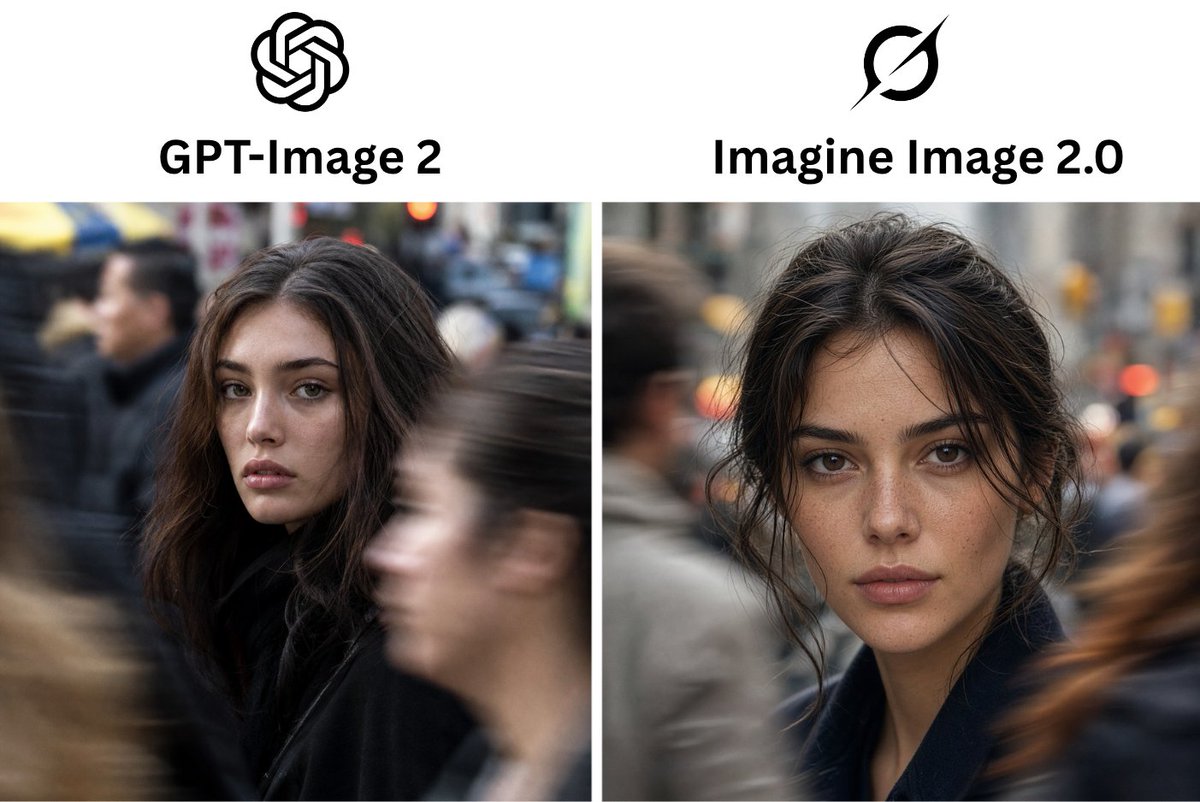
Creates a side-by-side social media comparison graphic of two AI image models using realistic urban portrait outputs.
AI Model Portrait Comparison

Prompt

Goal: Create a clean side-by-side comparison graphic showing two AI image model outputs as realistic street portraits. Canvas: Horizontal 3:2 social media comparison image, white background, high resolution. Use a simple two-column layout with a narrow vertical white divider between the image panels. Layout: Top header area contains exactly 2 black logos centered above exactly 2 bold model names. Left column: OpenAI knot logo above the heading “GPT-Image 2”. Right column: Grok-style black circular slash logo above the heading “Imagine Image 2.0”. Below the headers are exactly 2 equal-size rectangular photo panels: one on the left and one on the right. Photo content: Both panels show a cinematic, photorealistic urban street portrait of the same young woman in a crowded city. She has dark brown hair, natural makeup, full brows, soft lips, and a calm direct gaze. She wears a dark coat. The background is a busy city sidewalk with motion-blurred pedestrians, shallow depth of field, muted gray urban tones, and warm bokeh traffic lights. Left photo panel: The woman is slightly left of center, turned partly toward the camera, with loose voluminous hair around her face. A large blurred pedestrian crosses the foreground on the right, partially obscuring the lower face/body area; another blurred figure appears on the left. The image should feel like a candid real-camera street photograph with natural imperfections and documentary realism. Right photo panel: The woman is centered closer to camera, facing forward with slightly tousled hair pulled back loosely and face-framing strands. Her facial detail is sharper and more polished, with visible skin texture and freckles. Blurred pedestrians pass on both sides, including a gray figure on the left and a warm brown motion blur on the right. Visual style: Photorealistic DSLR street photography, natural light, shallow depth of field, 50mm lens feel, realistic skin texture, subtle filmic color grading, high detail in faces, strong motion blur on passing pedestrians, no illustration style. Text and element count: Include exactly 2 logos, exactly 2 headings, exactly 2 photo panels, and exactly 2 main female portraits. Do not add extra captions, scores, labels, borders, watermarks, or interface elements.

Runs on 18 models

  • Flux
  • Flux 2
  • Flux Kontext
  • GPT-4o Image
  • GPT Image
  • GPT Image 2
  • GPT Image 2.5
  • Grok Imagine
  • Ideogram V3
  • Imagen 4
  • Midjourney
  • Nano Banana
  • +6 more

What this prompt produces

Realistic Group Selfie with Smartphone Flash Effect Not specified nano-banana-pro
Four Seasons Portrait Collage Not specified nano-banana-pro
Minimalist Dog Sketch Clipart Not specified nano-banana-pro
Mecha Girl figure concept generated by Nano Banana Pro Not specified nano-banana-pro
Candid Flash Photography: Chaotic Holiday Party (Duplicate) Not specified nano-banana-pro
Ethereal Floral Studio Portrait Not specified nano-banana-pro

Run this prompt with the API

The request below sends this prompt, with its default values filled in, to the first model it runs on. Swap the model name for any other model listed above.

Prompt API docs
/api/v1/gpt_image_2/text_to_image
curl -X POST https://runapi.ai/api/v1/gpt_image_2/text_to_image \
  -H "Authorization: Bearer $RUNAPI_API_KEY" \
  -H "Content-Type: application/json" \
  --data-binary @- <<'JSON'
{
  "model": "gpt-image-2",
  "prompt": "Goal: Create a clean side-by-side comparison graphic showing two AI image model outputs as realistic street portraits.\n\nCanvas: Horizontal 3:2 social media comparison image, white background, high resolution. Use a simple two-column layout with a narrow vertical white divider between the image panels.\n\nLayout: Top header area contains exactly 2 black logos centered above exactly 2 bold model names. Left column: OpenAI knot logo above the heading “GPT-Image 2”. Right column: Grok-style black circular slash logo above the heading “Imagine Image 2.0”. Below the headers are exactly 2 equal-size rectangular photo panels: one on the left and one on the right.\n\nPhoto content: Both panels show a cinematic, photorealistic urban street portrait of the same young woman in a crowded city. She has dark brown hair, natural makeup, full brows, soft lips, and a calm direct gaze. She wears a dark coat. The background is a busy city sidewalk with motion-blurred pedestrians, shallow depth of field, muted gray urban tones, and warm bokeh traffic lights.\n\nLeft photo panel: The woman is slightly left of center, turned partly toward the camera, with loose voluminous hair around her face. A large blurred pedestrian crosses the foreground on the right, partially obscuring the lower face/body area; another blurred figure appears on the left. The image should feel like a candid real-camera street photograph with natural imperfections and documentary realism.\n\nRight photo panel: The woman is centered closer to camera, facing forward with slightly tousled hair pulled back loosely and face-framing strands. Her facial detail is sharper and more polished, with visible skin texture and freckles. Blurred pedestrians pass on both sides, including a gray figure on the left and a warm brown motion blur on the right.\n\nVisual style: Photorealistic DSLR street photography, natural light, shallow depth of field, 50mm lens feel, realistic skin texture, subtle filmic color grading, high detail in faces, strong motion blur on passing pedestrians, no illustration style.\n\nText and element count: Include exactly 2 logos, exactly 2 headings, exactly 2 photo panels, and exactly 2 main female portraits. Do not add extra captions, scores, labels, borders, watermarks, or interface elements."
}
JSON

Try a prompt

Estimated: $0.04 / image

Sign in to generate with RunAPI.

Sign in to generate

Sign in to start generating with your available language models.