Qwen Image Model Review Banner

A luxury editorial social media banner template for promoting an AI image model review or benchmark comparison.
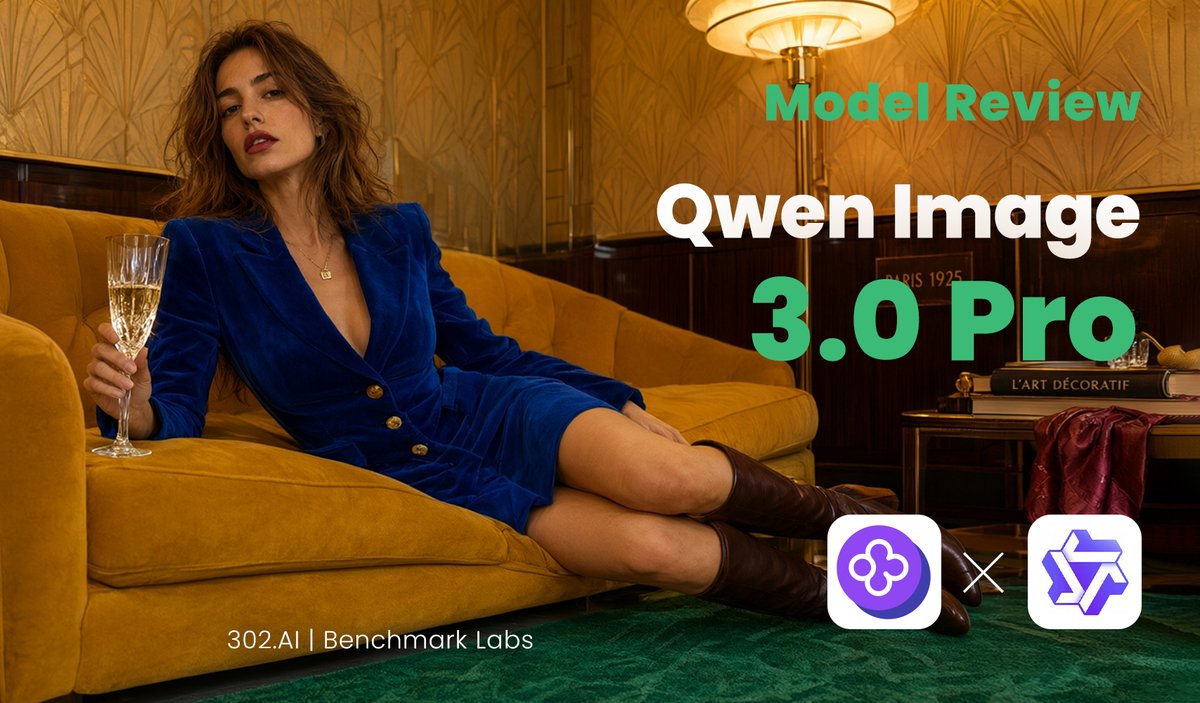
Qwen Image Model Review Banner

Prompt

Goal: Create a cinematic editorial social media banner for an AI model review of Qwen Image 3.0 Pro, combining a luxury lounge fashion photograph with bold tech-review typography. Canvas: Wide landscape 16:9 banner, about 1200×675 px, optimized for X/Twitter link preview. Use a warm golden color grade with high contrast and shallow cinematic lighting. Main image: A fashionable adult woman lounges diagonally across a mustard-yellow velvet sofa in an art deco interior. She has loose wavy brown hair, red lipstick, and a confident relaxed expression, wearing a deep royal-blue velvet blazer dress with gold buttons, bare legs, and dark brown knee-high boots. Her left side is toward the viewer; she holds a champagne flute in one hand near the left edge while reclining with legs extended toward the lower right. The room has patterned gold wallpaper, dark wood wall paneling, a green carpet, and a glowing vintage floor lamp near the upper center-right. Include a small side table on the right with stacked art/design books and a draped burgundy fabric, creating a 1920s Parisian hotel lounge mood. Text layout: Place large review text on the right half, leaving the woman mostly unobstructed on the left. Use exactly 3 main text elements: top label “Model Review” in bold teal-green sans serif, main title “Qwen Image” in very large bold white sans serif, and version line “3.0 Pro” in extra-large bold teal-green sans serif. Add a small footer credit near the bottom left-center reading “302.AI | Benchmark Labs” in thin white sans serif. Logo area: At the bottom right, show exactly 3 discrete logo/comparison elements: a rounded white square containing a purple circular clover-like AI icon on the left, a white “×” multiplication sign in the middle, and a rounded white square containing a purple geometric star/cube-like logo on the right. Visual style: Luxury editorial photography blended with clean SaaS benchmark branding; crisp typography, warm amber highlights, teal accent text, deep green floor, mustard sofa, royal-blue outfit. Make the composition look like a polished review thumbnail for Qwen Image 3.0 Pro versus GPT-Image-2. Constraints: Keep all visible text legible and spelled exactly as specified. Do not add extra captions, watermarks, interface chrome, or additional logos. Preserve the wide banner layout and the three-logo comparison cluster.

Runs on 18 models

  • Flux
  • Flux 2
  • Flux Kontext
  • GPT-4o Image
  • GPT Image
  • GPT Image 2
  • GPT Image 2.5
  • Grok Imagine
  • Ideogram V3
  • Imagen 4
  • Midjourney
  • Nano Banana
  • +6 more

What this prompt produces

Realistic Group Selfie with Smartphone Flash Effect Not specified nano-banana-pro
Four Seasons Portrait Collage Not specified nano-banana-pro
Minimalist Dog Sketch Clipart Not specified nano-banana-pro
Mecha Girl figure concept generated by Nano Banana Pro Not specified nano-banana-pro
Candid Flash Photography: Chaotic Holiday Party (Duplicate) Not specified nano-banana-pro
Ethereal Floral Studio Portrait Not specified nano-banana-pro

Run this prompt with the API

The request below sends this prompt, with its default values filled in, to the first model it runs on. Swap the model name for any other model listed above.

Prompt API docs
/api/v1/gpt_image_2/text_to_image
curl -X POST https://runapi.ai/api/v1/gpt_image_2/text_to_image \
  -H "Authorization: Bearer $RUNAPI_API_KEY" \
  -H "Content-Type: application/json" \
  --data-binary @- <<'JSON'
{
  "model": "gpt-image-2",
  "prompt": "Goal: Create a cinematic editorial social media banner for an AI model review of Qwen Image 3.0 Pro, combining a luxury lounge fashion photograph with bold tech-review typography.\n\nCanvas: Wide landscape 16:9 banner, about 1200×675 px, optimized for X/Twitter link preview. Use a warm golden color grade with high contrast and shallow cinematic lighting.\n\nMain image: A fashionable adult woman lounges diagonally across a mustard-yellow velvet sofa in an art deco interior. She has loose wavy brown hair, red lipstick, and a confident relaxed expression, wearing a deep royal-blue velvet blazer dress with gold buttons, bare legs, and dark brown knee-high boots. Her left side is toward the viewer; she holds a champagne flute in one hand near the left edge while reclining with legs extended toward the lower right. The room has patterned gold wallpaper, dark wood wall paneling, a green carpet, and a glowing vintage floor lamp near the upper center-right. Include a small side table on the right with stacked art/design books and a draped burgundy fabric, creating a 1920s Parisian hotel lounge mood.\n\nText layout: Place large review text on the right half, leaving the woman mostly unobstructed on the left. Use exactly 3 main text elements: top label “Model Review” in bold teal-green sans serif, main title “Qwen Image” in very large bold white sans serif, and version line “3.0 Pro” in extra-large bold teal-green sans serif. Add a small footer credit near the bottom left-center reading “302.AI | Benchmark Labs” in thin white sans serif.\n\nLogo area: At the bottom right, show exactly 3 discrete logo/comparison elements: a rounded white square containing a purple circular clover-like AI icon on the left, a white “×” multiplication sign in the middle, and a rounded white square containing a purple geometric star/cube-like logo on the right.\n\nVisual style: Luxury editorial photography blended with clean SaaS benchmark branding; crisp typography, warm amber highlights, teal accent text, deep green floor, mustard sofa, royal-blue outfit. Make the composition look like a polished review thumbnail for Qwen Image 3.0 Pro versus GPT-Image-2.\n\nConstraints: Keep all visible text legible and spelled exactly as specified. Do not add extra captions, watermarks, interface chrome, or additional logos. Preserve the wide banner layout and the three-logo comparison cluster."
}
JSON

Try a prompt

Estimated: $0.04 / image

Sign in to generate with RunAPI.

Sign in to generate

Sign in to start generating with your available language models.