iPhone App Store Mockup on Desk

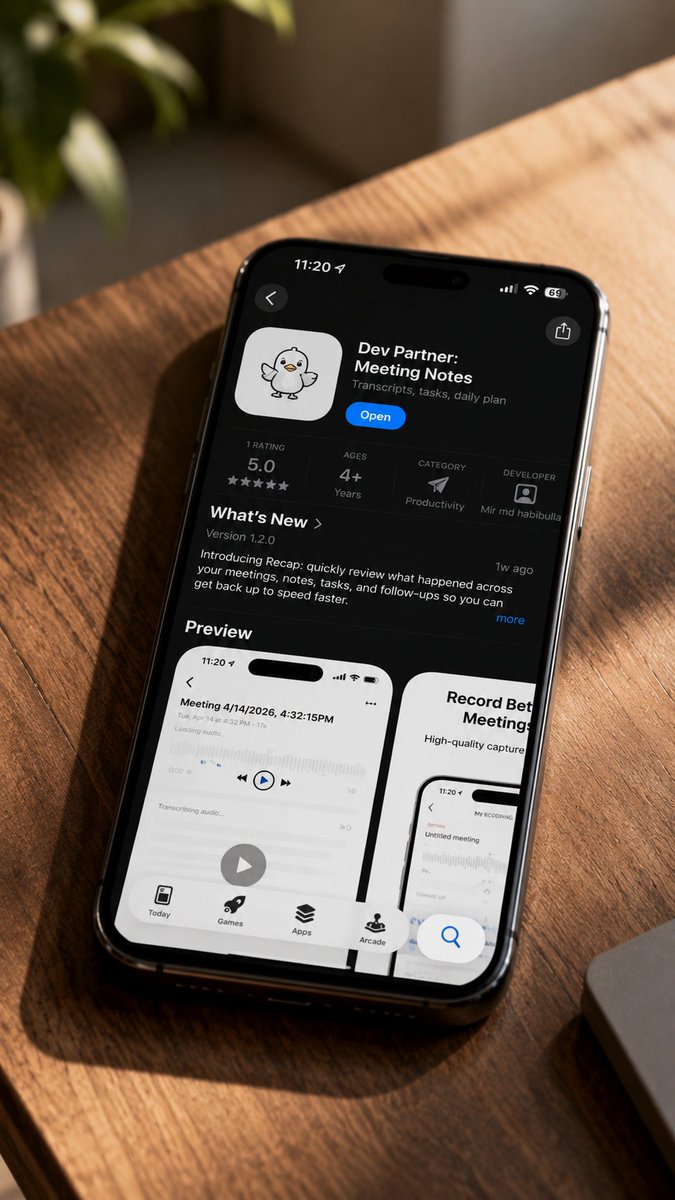
A realistic lifestyle mockup showing an iPhone App Store listing for a meeting notes app on a sunlit wooden desk.
iPhone App Store Mockup on Desk

Prompt

Create a realistic lifestyle product mockup photo of a black iPhone lying diagonally on a warm wooden desk in golden sunlight, shot from above at a slight angle with shallow depth of field. The phone displays an iOS App Store app detail page in dark mode for Dev Partner: Meeting Notes, with a cute white app icon showing a small hand-drawn duck/chick mascot, a blue Open button, and the subtitle Transcripts, tasks, daily plan. The top iPhone status bar shows 11:20, cellular/Wi‑Fi/battery icons, and a dynamic island; include a back chevron at top left and share icon at top right. The app information row must contain exactly 4 discrete stats: 1 rating showing 5.0 with five stars, age rating 4+ Years, category Productivity with a paper-plane style icon, and developer Mir md habibulla with a small profile icon. Below, show a What's New section with Version 1.2.0, a short update paragraph about introducing Recap to quickly review meetings, notes, tasks, and follow-ups, plus a small “1w ago” label and “more” link. Under that, show a Preview heading and exactly 2 visible preview cards: the left card is a white mobile screenshot titled “Meeting 4/14/2026, 4:32:15PM” with an audio waveform, play controls, a large circular play button, and bottom tabs; the right card is partially visible and titled “Record Better Meetings” with a phone screenshot. At the bottom of the App Store screen show exactly 4 navigation tabs labeled Today, Games, Apps, and Arcade, plus a floating blue search button near the lower right. Surroundings: blurred green plant in the upper left background, a partial silver laptop edge at lower right, strong diagonal sunlight and wood grain shadows across the table, premium candid tech photography, high detail, natural reflections on the phone glass, no hands, no extra devices, no watermark.

Runs on 18 models

  • Flux
  • Flux 2
  • Flux Kontext
  • GPT-4o Image
  • GPT Image
  • GPT Image 2
  • GPT Image 2.5
  • Grok Imagine
  • Ideogram V3
  • Imagen 4
  • Midjourney
  • Nano Banana
  • +6 more

What this prompt produces

咖啡馆旅行手账分栏页 Not specified gpt-image-2
日系 Chibi 互动小插画 Not specified gpt-image-2
动漫动作短片设定分镜板 Not specified gpt-image-2
Realistic Group Selfie with Smartphone Flash Effect Not specified nano-banana-pro
Four Seasons Portrait Collage Not specified nano-banana-pro
Minimalist Dog Sketch Clipart Not specified nano-banana-pro

Run this prompt with the API

The request below sends this prompt, with its default values filled in, to the first model it runs on. Swap the model name for any other model listed above.

Prompt API docs
/api/v1/gpt_image_2/text_to_image
curl -X POST https://runapi.ai/api/v1/gpt_image_2/text_to_image \
  -H "Authorization: Bearer $RUNAPI_API_KEY" \
  -H "Content-Type: application/json" \
  --data-binary @- <<'JSON'
{
  "model": "gpt-image-2",
  "prompt": "Create a realistic lifestyle product mockup photo of a black iPhone lying diagonally on a warm wooden desk in golden sunlight, shot from above at a slight angle with shallow depth of field. The phone displays an iOS App Store app detail page in dark mode for Dev Partner: Meeting Notes, with a cute white app icon showing a small hand-drawn duck/chick mascot, a blue Open button, and the subtitle Transcripts, tasks, daily plan. The top iPhone status bar shows 11:20, cellular/Wi‑Fi/battery icons, and a dynamic island; include a back chevron at top left and share icon at top right. The app information row must contain exactly 4 discrete stats: 1 rating showing 5.0 with five stars, age rating 4+ Years, category Productivity with a paper-plane style icon, and developer Mir md habibulla with a small profile icon. Below, show a What's New section with Version 1.2.0, a short update paragraph about introducing Recap to quickly review meetings, notes, tasks, and follow-ups, plus a small “1w ago” label and “more” link. Under that, show a Preview heading and exactly 2 visible preview cards: the left card is a white mobile screenshot titled “Meeting 4/14/2026, 4:32:15PM” with an audio waveform, play controls, a large circular play button, and bottom tabs; the right card is partially visible and titled “Record Better Meetings” with a phone screenshot. At the bottom of the App Store screen show exactly 4 navigation tabs labeled Today, Games, Apps, and Arcade, plus a floating blue search button near the lower right. Surroundings: blurred green plant in the upper left background, a partial silver laptop edge at lower right, strong diagonal sunlight and wood grain shadows across the table, premium candid tech photography, high detail, natural reflections on the phone glass, no hands, no extra devices, no watermark."
}
JSON

Try a prompt

Estimated: $0.04 / image

Sign in to generate with RunAPI.

Sign in to generate

Sign in to start generating with your available language models.