Rabbit Racer Workflow Board

Generates a clean concept-art workflow board showing an anime cyberpunk character, her character sheet, and a matching futuristic motorcycle design.
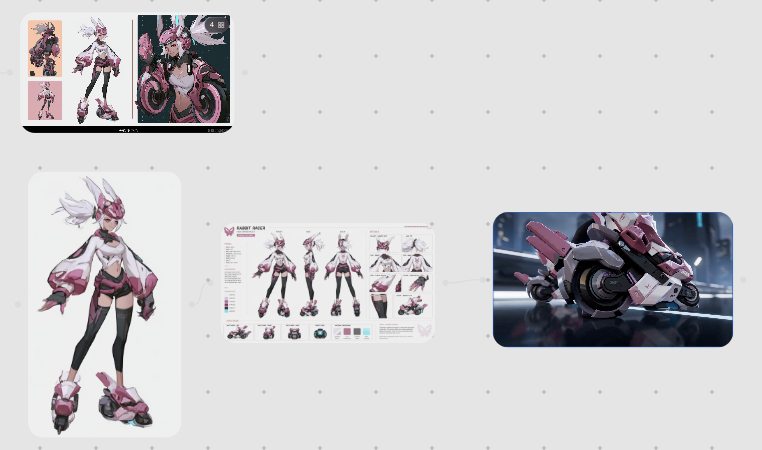
Rabbit Racer Workflow Board

Prompt

Goal: Create a clean workflow presentation canvas showing how a futuristic anime character design is developed into a character sheet and then into a 3D sci-fi vehicle concept. Canvas: Wide 16:9 light gray canvas with a subtle evenly spaced dotted grid background. Use lots of negative space and a modern design-board aesthetic. Layout: Arrange exactly 4 main visual elements connected as a process. In the top-left, place a small black rounded-rectangle preview board containing exactly 3 vertical concept images: 1 small full-body pink-and-black character sketch on the left, 1 larger full-body white-haired character concept in the middle, and 1 dynamic close-up motorcycle/rider illustration on the right. In the lower-left, place a large rounded white card with a full-body character render. In the center, place a horizontal character turnaround/spec sheet. On the right, place a large rounded rectangular cinematic render of a futuristic motorcycle. Add faint thin gray connector lines/arrows flowing from the left character card to the central sheet and from the central sheet to the right vehicle render. Subject details: The main character is Rabbit Racer, a stylized cyberpunk anime girl with spiky white hair, pink bunny-ear helmet or head fins, a cropped white-and-pink jacket with oversized sleeves, black leggings, pink armor accents, and chunky futuristic roller-skate boots. The design language is glossy pink, white, black, and dark gray, with sharp mecha details and racing motifs. The center spec sheet should show exactly 3 main full-body turnaround poses across the middle, plus smaller detail callouts for clothing, boots, accessories, color swatches, and vehicle miniatures. The right render shows a compact pink-and-white futuristic racing motorcycle with circular wheel housings, angular armor panels, black mechanical parts, decals, and a glossy cinematic studio-lit look. Text content: Include the readable title RABBIT RACER on the central character sheet, with tiny technical labels and color chips that look like a professional model sheet; the small text can be mostly decorative and not fully readable. Visual style: Polished AI concept-art workflow mockup, crisp digital illustration mixed with product-design presentation, soft shadows, rounded corners, high-resolution details, muted gray interface background, elegant spacing, no clutter. Constraints: Keep the 4 main elements exactly as described, preserve the left-to-right workflow, avoid extra panels, avoid watermarks, avoid logos, and do not add large explanatory captions outside the character sheet.

Runs on 18 models

  • Flux
  • Flux 2
  • Flux Kontext
  • GPT-4o Image
  • GPT Image
  • GPT Image 2
  • GPT Image 2.5
  • Grok Imagine
  • Ideogram V3
  • Imagen 4
  • Midjourney
  • Nano Banana
  • +6 more

What this prompt produces

咖啡馆旅行手账分栏页 Not specified gpt-image-2
日系 Chibi 互动小插画 Not specified gpt-image-2
动漫动作短片设定分镜板 Not specified gpt-image-2
Realistic Group Selfie with Smartphone Flash Effect Not specified nano-banana-pro
Four Seasons Portrait Collage Not specified nano-banana-pro
Minimalist Dog Sketch Clipart Not specified nano-banana-pro

Run this prompt with the API

The request below sends this prompt, with its default values filled in, to the first model it runs on. Swap the model name for any other model listed above.

Prompt API docs
/api/v1/gpt_image_2/text_to_image
curl -X POST https://runapi.ai/api/v1/gpt_image_2/text_to_image \
  -H "Authorization: Bearer $RUNAPI_API_KEY" \
  -H "Content-Type: application/json" \
  --data-binary @- <<'JSON'
{
  "model": "gpt-image-2",
  "prompt": "Goal: Create a clean workflow presentation canvas showing how a futuristic anime character design is developed into a character sheet and then into a 3D sci-fi vehicle concept.\n\nCanvas: Wide 16:9 light gray canvas with a subtle evenly spaced dotted grid background. Use lots of negative space and a modern design-board aesthetic.\n\nLayout: Arrange exactly 4 main visual elements connected as a process. In the top-left, place a small black rounded-rectangle preview board containing exactly 3 vertical concept images: 1 small full-body pink-and-black character sketch on the left, 1 larger full-body white-haired character concept in the middle, and 1 dynamic close-up motorcycle/rider illustration on the right. In the lower-left, place a large rounded white card with a full-body character render. In the center, place a horizontal character turnaround/spec sheet. On the right, place a large rounded rectangular cinematic render of a futuristic motorcycle. Add faint thin gray connector lines/arrows flowing from the left character card to the central sheet and from the central sheet to the right vehicle render.\n\nSubject details: The main character is Rabbit Racer, a stylized cyberpunk anime girl with spiky white hair, pink bunny-ear helmet or head fins, a cropped white-and-pink jacket with oversized sleeves, black leggings, pink armor accents, and chunky futuristic roller-skate boots. The design language is glossy pink, white, black, and dark gray, with sharp mecha details and racing motifs. The center spec sheet should show exactly 3 main full-body turnaround poses across the middle, plus smaller detail callouts for clothing, boots, accessories, color swatches, and vehicle miniatures. The right render shows a compact pink-and-white futuristic racing motorcycle with circular wheel housings, angular armor panels, black mechanical parts, decals, and a glossy cinematic studio-lit look.\n\nText content: Include the readable title RABBIT RACER on the central character sheet, with tiny technical labels and color chips that look like a professional model sheet; the small text can be mostly decorative and not fully readable.\n\nVisual style: Polished AI concept-art workflow mockup, crisp digital illustration mixed with product-design presentation, soft shadows, rounded corners, high-resolution details, muted gray interface background, elegant spacing, no clutter.\n\nConstraints: Keep the 4 main elements exactly as described, preserve the left-to-right workflow, avoid extra panels, avoid watermarks, avoid logos, and do not add large explanatory captions outside the character sheet."
}
JSON

Try a prompt

Estimated: $0.04 / image

Sign in to generate with RunAPI.

Sign in to generate

Sign in to start generating with your available language models.