Claude Code Japanese SaaS Poster

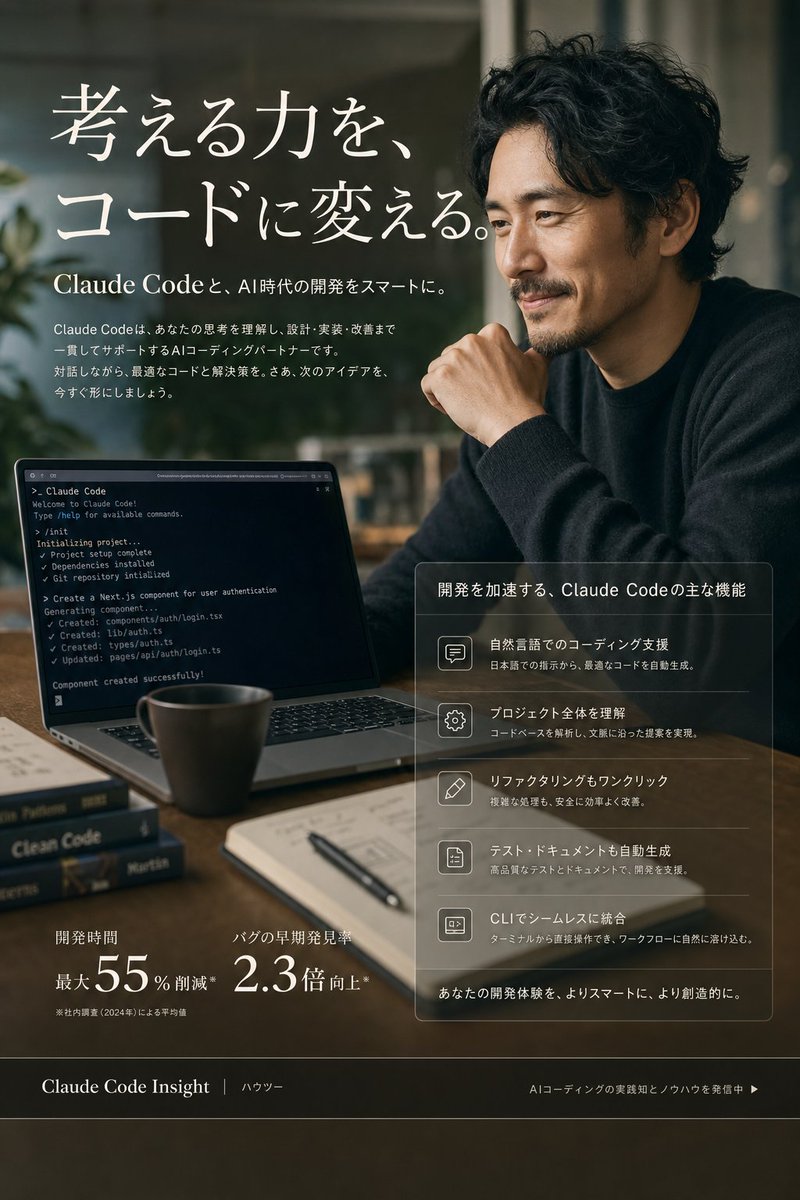
Creates a cinematic Japanese marketing poster for Claude Code with a developer workspace photo, feature card, metrics, and editorial SaaS typography.
Claude Code Japanese SaaS Poster

Prompt

Goal: Create a premium vertical Japanese marketing poster for Claude Code, promoting AI coding automation and smarter development. Canvas: Vertical 3:4 poster, 768×1024 style, cinematic editorial photography with dark warm tones, shallow depth of field, soft window light, subtle film grain, high-end SaaS advertisement aesthetic. Main visual: A realistic workspace scene in a modern cafe or studio. On the right, an adult Japanese man in a dark knit sweater sits at a wooden table, leaning forward with one hand near his chin; his face is covered by a plain opaque warm-brown rectangular privacy block. He has messy black hair visible above the block. On the left foreground, an open laptop displays a dark terminal window with Claude Code-like command-line output, checkmarks, generated files, and project-complete messages. Add a ceramic coffee cup, a notebook with pen, and two stacked programming books on the table; one book spine reads “Clean Code.” Background is blurred with plants and interior glass, muted green and brown palette. Top headline area: Large elegant Japanese serif typography in white, placed upper left, reading 「考える力を、コードに変える。」 with generous line spacing and a refined magazine-ad feel. Under it, add a smaller subheading: 「Claude Codeと、AI時代の開発をスマートに。」 Then add a short Japanese body paragraph explaining that Claude Code understands thinking and supports design, implementation, and improvement as an AI coding partner. Feature panel: Place one translucent glassmorphism card in the lower-right middle, with a thin white border and soft blur. Card title: 「開発を加速する、Claude Codeの主な機能」. Include exactly 5 feature rows, each with a simple outlined icon on the left, a bold Japanese feature label, and a smaller Japanese description. The 5 rows are: 1) speech bubble icon, 「自然言語でのコーディング支援」; 2) gear icon, 「プロジェクト全体を理解」; 3) pencil icon, 「リファクタリングもワンクリック」; 4) document icon, 「テスト・ドキュメントも自動生成」; 5) terminal window icon, 「CLIでシームレスに統合」. End the card with the line 「あなたの開発体験を、よりスマートに、より創造的に。」 Metrics: In the lower-left area, show exactly 2 large numerical proof points in white serif type: first metric label 「開発時間」 with value 「最大 55% 削減」 and a tiny footnote; second metric label 「バグの早期発見率」 with value 「2.3倍 向上*」. Footer: Add a full-width dark translucent footer bar at the bottom. Left text: 「Claude Code Insight」 followed by a divider and 「ハウツー」. Right text: 「AIコーディングの実践知とノウハウを発信中 ▶」. Visual style: Sophisticated Japanese tech magazine advertisement, photorealistic but with polished layout overlays, cream-white typography, thin lines, restrained contrast, warm shadows, no bright neon colors. Constraints: Keep the composition text-heavy but clean and readable. Use exactly 1 main person, 1 laptop, 1 coffee cup, 1 notebook, 1 pen, 2 visible stacked books, 1 feature card, 5 feature rows, and 2 metric blocks. Do not add logos beyond the product name. Preserve the Japanese text exactly where specified.

Runs on 18 models

  • Flux
  • Flux 2
  • Flux Kontext
  • GPT-4o Image
  • GPT Image
  • GPT Image 2
  • GPT Image 2.5
  • Grok Imagine
  • Ideogram V3
  • Imagen 4
  • Midjourney
  • Nano Banana
  • +6 more

What this prompt produces

Realistic Group Selfie with Smartphone Flash Effect Not specified nano-banana-pro
Four Seasons Portrait Collage Not specified nano-banana-pro
Minimalist Dog Sketch Clipart Not specified nano-banana-pro
Mecha Girl figure concept generated by Nano Banana Pro Not specified nano-banana-pro
Candid Flash Photography: Chaotic Holiday Party (Duplicate) Not specified nano-banana-pro
Ethereal Floral Studio Portrait Not specified nano-banana-pro

Run this prompt with the API

The request below sends this prompt, with its default values filled in, to the first model it runs on. Swap the model name for any other model listed above.

Prompt API docs
/api/v1/gpt_image_2/text_to_image
curl -X POST https://runapi.ai/api/v1/gpt_image_2/text_to_image \
  -H "Authorization: Bearer $RUNAPI_API_KEY" \
  -H "Content-Type: application/json" \
  --data-binary @- <<'JSON'
{
  "model": "gpt-image-2",
  "prompt": "Goal: Create a premium vertical Japanese marketing poster for Claude Code, promoting AI coding automation and smarter development.\n\nCanvas: Vertical 3:4 poster, 768×1024 style, cinematic editorial photography with dark warm tones, shallow depth of field, soft window light, subtle film grain, high-end SaaS advertisement aesthetic.\n\nMain visual: A realistic workspace scene in a modern cafe or studio. On the right, an adult Japanese man in a dark knit sweater sits at a wooden table, leaning forward with one hand near his chin; his face is covered by a plain opaque warm-brown rectangular privacy block. He has messy black hair visible above the block. On the left foreground, an open laptop displays a dark terminal window with Claude Code-like command-line output, checkmarks, generated files, and project-complete messages. Add a ceramic coffee cup, a notebook with pen, and two stacked programming books on the table; one book spine reads “Clean Code.” Background is blurred with plants and interior glass, muted green and brown palette.\n\nTop headline area: Large elegant Japanese serif typography in white, placed upper left, reading 「考える力を、コードに変える。」 with generous line spacing and a refined magazine-ad feel. Under it, add a smaller subheading: 「Claude Codeと、AI時代の開発をスマートに。」 Then add a short Japanese body paragraph explaining that Claude Code understands thinking and supports design, implementation, and improvement as an AI coding partner.\n\nFeature panel: Place one translucent glassmorphism card in the lower-right middle, with a thin white border and soft blur. Card title: 「開発を加速する、Claude Codeの主な機能」. Include exactly 5 feature rows, each with a simple outlined icon on the left, a bold Japanese feature label, and a smaller Japanese description. The 5 rows are: 1) speech bubble icon, 「自然言語でのコーディング支援」; 2) gear icon, 「プロジェクト全体を理解」; 3) pencil icon, 「リファクタリングもワンクリック」; 4) document icon, 「テスト・ドキュメントも自動生成」; 5) terminal window icon, 「CLIでシームレスに統合」. End the card with the line 「あなたの開発体験を、よりスマートに、より創造的に。」\n\nMetrics: In the lower-left area, show exactly 2 large numerical proof points in white serif type: first metric label 「開発時間」 with value 「最大 55% 削減」 and a tiny footnote; second metric label 「バグの早期発見率」 with value 「2.3倍 向上*」.\n\nFooter: Add a full-width dark translucent footer bar at the bottom. Left text: 「Claude Code Insight」 followed by a divider and 「ハウツー」. Right text: 「AIコーディングの実践知とノウハウを発信中 ▶」.\n\nVisual style: Sophisticated Japanese tech magazine advertisement, photorealistic but with polished layout overlays, cream-white typography, thin lines, restrained contrast, warm shadows, no bright neon colors.\n\nConstraints: Keep the composition text-heavy but clean and readable. Use exactly 1 main person, 1 laptop, 1 coffee cup, 1 notebook, 1 pen, 2 visible stacked books, 1 feature card, 5 feature rows, and 2 metric blocks. Do not add logos beyond the product name. Preserve the Japanese text exactly where specified."
}
JSON

Try a prompt

Estimated: $0.04 / image

Sign in to generate with RunAPI.

Sign in to generate

Sign in to start generating with your available language models.