AI Agent LP Ecosystem Infographic
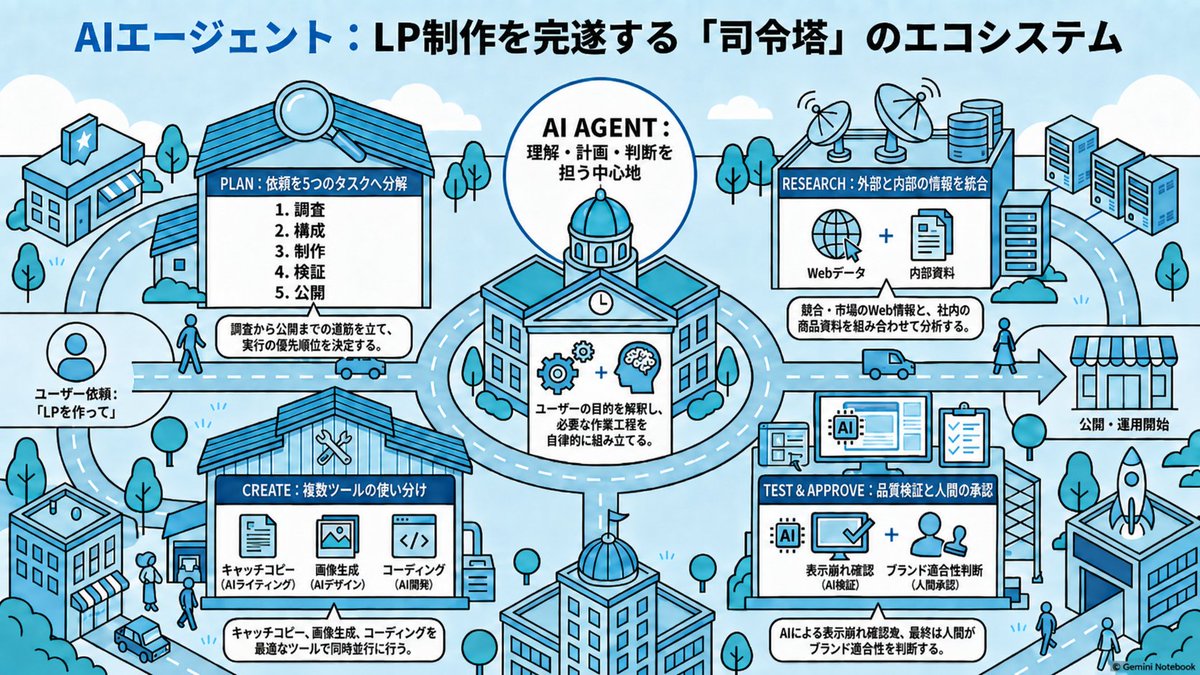
AI Agent LP Ecosystem Infographic

Prompt

Goal: Create a wide isometric Japanese infographic explaining an ecosystem where an AI agent acts as a command tower to complete landing page production. Use the headline AIエージェント:LP制作を完遂する「司令塔」のエコシステム across the top, with “AIエージェント” in blue and the rest in black. Canvas: Horizontal 16:9 educational slide, light sky-blue background, clean vector line art, blue/cyan/white palette with black outlines, rounded clouds, roads, trees, small people, buildings, and arrows. Style should feel like a friendly isometric city map mixed with a business workflow diagram, crisp and readable, no photorealism. Layout: Place 1 large central circular hub building labeled AI AGENT, surrounded by exactly 4 facility cards/buildings connected by roads and directional arrows. Include a user request icon on the far left feeding into the system and a storefront/publication area on the far right as the final output. The overall composition should show the relationship between facilities more than a strict vertical flow. Central hub: A domed civic building inside a large outlined circle, labeled “AI AGENT: 理解・計画・判断を担う中心地”. Add icons of gears plus a brain, and a caption box: “ユーザーの目的を解釈し、必要な作業工程を自律的に組み立てる。” Counted diagram elements: Include exactly 4 main workflow facilities/cards: 1) PLAN, 2) RESEARCH, 3) CREATE, 4) TEST & APPROVE. Include exactly 5 numbered plan tasks in the PLAN card: 1. 調査, 2. 構成, 3. 制作, 4. 検証, 5. 公開. Include exactly 3 creation tools in the CREATE card: キャッチコピー(AIライティング), 画像生成(AIデザイン), コーディング(AI開発). Include exactly 2 research inputs in the RESEARCH card: Webデータ and 内部資料. Include exactly 2 test/approval checks in the TEST & APPROVE card: 表示崩れ確認(AI検証) and ブランド適合性判断(人間承認). Facility details and text: Top-left facility card with a magnifying glass on the roof, titled “PLAN:依頼を5つのタスクへ分解”, containing the 5 numbered tasks and a bottom caption: “調査から公開までの道筋を立て、実行の優先順位を決定する。” Top-right facility card titled “RESEARCH:外部と内部の情報を統合”, showing a globe icon plus document icon and caption: “統合:市場のWeb情報と、社内の商品資料を組み合わせて分析する。” Bottom-left facility card titled “CREATE:複数ツールの使い分け”, showing the 3 tool icons and caption: “キャッチコピー、画像生成、コーディングを最適なツールで同時並行に行う。” Bottom-right facility card titled “TEST & APPROVE:品質検証と人間の承認”, showing an AI chip, screen with checkmark, clipboard, and human figures, with caption: “AIによる表示崩れ確認、最終は人間がブランド適合性を判断する。” Side elements: On the far left, show a circular user avatar and label ユーザー依頼:「LPを作って」. On the far right, show a large arrow pointing to a small shop/storefront labeled 公開・運用開始. Add surrounding city elements: at least 6 buildings including office blocks and a shop, roads with dashed lane markings, tiny cars/trucks, pedestrians, trees, antennas or database cylinders near the research area, and a rocket on a rooftop near the publication side. Visual style: Use thick black outlines, flat fills, limited blue monochrome palette with white panels, subtle shadows, clean infographic spacing, hand-drawn isometric technical illustration feeling. Keep all text legible, centered in its boxes, and preserve Japanese labels exactly as specified. Add a small bottom-right credit text Gemini Notebook.

Runs on 21 models

  • Flux
  • Flux 2
  • Flux Kontext
  • GPT-4o Image
  • GPT Image
  • GPT Image 2
  • GPT Image 2.5
  • GPT Image 2.6
  • Grok Imagine
  • Ideogram V3
  • Imagen 4
  • Kling
  • +9 more

What this prompt produces

Hunyuan  prompt: chained Not specified hunyuan-3
Seedream 5 prompt: you can change the outfit if thats a better match ... Not specified seedream-5-pro
Hunyuan  prompt: این موجود با اون دستی که روی زمین گذاشته و کنار پا... Not specified hunyuan-3
Seedream 5 prompt: photo professionnelle Not specified v2
Seedream 5 prompt: girls Not specified v2
ChatGPT Image prompt: billboard Not specified v1

Run this prompt with the API

The request below sends this prompt, with its default values filled in, to the first model it runs on. Swap the model name for any other model listed above.

Prompt API docs
/api/v1/gpt_image_2/text_to_image
curl -X POST https://runapi.ai/api/v1/gpt_image_2/text_to_image \
  -H "Authorization: Bearer $RUNAPI_API_KEY" \
  -H "Content-Type: application/json" \
  --data-binary @- <<'JSON'
{
  "model": "gpt-image-2",
  "prompt": "Goal: Create a wide isometric Japanese infographic explaining an ecosystem where an AI agent acts as a command tower to complete landing page production. Use the headline AIエージェント:LP制作を完遂する「司令塔」のエコシステム across the top, with “AIエージェント” in blue and the rest in black.\n\nCanvas: Horizontal 16:9 educational slide, light sky-blue background, clean vector line art, blue/cyan/white palette with black outlines, rounded clouds, roads, trees, small people, buildings, and arrows. Style should feel like a friendly isometric city map mixed with a business workflow diagram, crisp and readable, no photorealism.\n\nLayout: Place 1 large central circular hub building labeled AI AGENT, surrounded by exactly 4 facility cards/buildings connected by roads and directional arrows. Include a user request icon on the far left feeding into the system and a storefront/publication area on the far right as the final output. The overall composition should show the relationship between facilities more than a strict vertical flow.\n\nCentral hub: A domed civic building inside a large outlined circle, labeled “AI AGENT: 理解・計画・判断を担う中心地”. Add icons of gears plus a brain, and a caption box: “ユーザーの目的を解釈し、必要な作業工程を自律的に組み立てる。”\n\nCounted diagram elements: Include exactly 4 main workflow facilities/cards: 1) PLAN, 2) RESEARCH, 3) CREATE, 4) TEST & APPROVE. Include exactly 5 numbered plan tasks in the PLAN card: 1. 調査, 2. 構成, 3. 制作, 4. 検証, 5. 公開. Include exactly 3 creation tools in the CREATE card: キャッチコピー(AIライティング), 画像生成(AIデザイン), コーディング(AI開発). Include exactly 2 research inputs in the RESEARCH card: Webデータ and 内部資料. Include exactly 2 test/approval checks in the TEST & APPROVE card: 表示崩れ確認(AI検証) and ブランド適合性判断(人間承認).\n\nFacility details and text: Top-left facility card with a magnifying glass on the roof, titled “PLAN:依頼を5つのタスクへ分解”, containing the 5 numbered tasks and a bottom caption: “調査から公開までの道筋を立て、実行の優先順位を決定する。” Top-right facility card titled “RESEARCH:外部と内部の情報を統合”, showing a globe icon plus document icon and caption: “統合:市場のWeb情報と、社内の商品資料を組み合わせて分析する。” Bottom-left facility card titled “CREATE:複数ツールの使い分け”, showing the 3 tool icons and caption: “キャッチコピー、画像生成、コーディングを最適なツールで同時並行に行う。” Bottom-right facility card titled “TEST & APPROVE:品質検証と人間の承認”, showing an AI chip, screen with checkmark, clipboard, and human figures, with caption: “AIによる表示崩れ確認、最終は人間がブランド適合性を判断する。”\n\nSide elements: On the far left, show a circular user avatar and label ユーザー依頼:「LPを作って」. On the far right, show a large arrow pointing to a small shop/storefront labeled 公開・運用開始. Add surrounding city elements: at least 6 buildings including office blocks and a shop, roads with dashed lane markings, tiny cars/trucks, pedestrians, trees, antennas or database cylinders near the research area, and a rocket on a rooftop near the publication side.\n\nVisual style: Use thick black outlines, flat fills, limited blue monochrome palette with white panels, subtle shadows, clean infographic spacing, hand-drawn isometric technical illustration feeling. Keep all text legible, centered in its boxes, and preserve Japanese labels exactly as specified. Add a small bottom-right credit text Gemini Notebook."
}
JSON

Try a prompt