Extreme Close-Up Laughing Couple Portrait
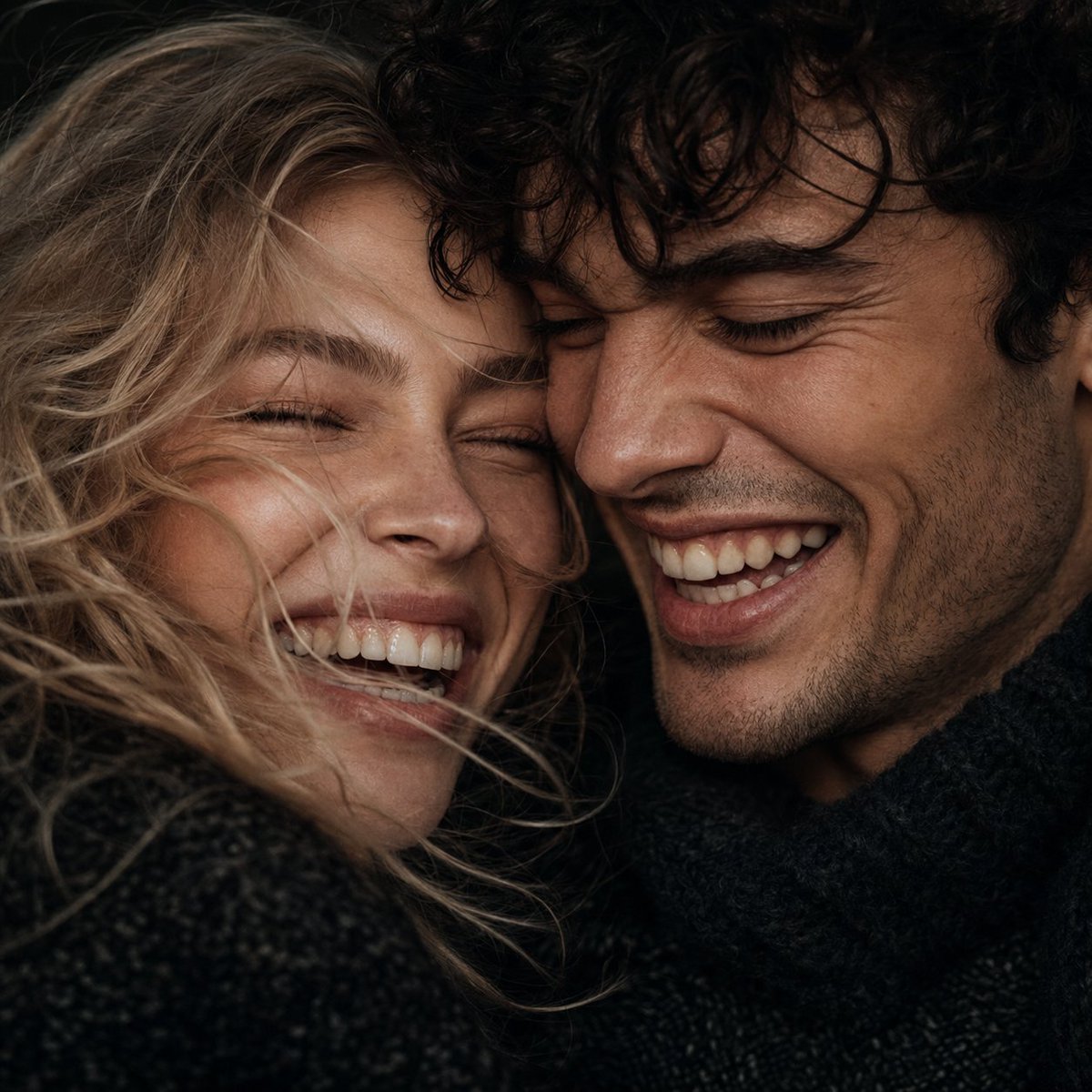
Extreme Close-Up Laughing Couple Portrait

Prompt

Create an extreme close-up square macro portrait of a young couple laughing together, with two people: a young woman on the left with messy light brown blonde windblown hair, and a young man on the right with dark tousled hair and light stubble. Their faces are pressed very close together, cropped tightly so the composition fills the entire frame; show only partial hair, cheeks, mouths, jawlines, and the upper edges of dark chunky knit sweaters. Capture a candid, hyper-realistic editorial photography style with high-fidelity skin texture, natural pores, slight freckles, subtle cheek flush, realistic teeth and gums, crinkled nearly closed eyes from intense joyful laughter, and authentic imperfect expressions. Use a dark minimalist background and moody cinematic color grading with deep desaturated tones, warm raw skin undertones, high contrast, and soft dramatic directional key light catching fine strands of hair and sculpting the noses, brows, lips, and cheek contours. Shot as if on 35mm film, shallow depth of field, sharp focus on the center where the faces meet, dark textured knitwear around their necks, raw intimate atmosphere, award-winning fashion editorial realism. Use a 1:1 square aspect ratio and avoid text, logos, extra people, or overly polished beauty retouching.

Runs on 21 models

  • Flux
  • Flux 2
  • Flux Kontext
  • GPT-4o Image
  • GPT Image
  • GPT Image 2
  • GPT Image 2.5
  • GPT Image 2.6
  • Grok Imagine
  • Ideogram V3
  • Imagen 4
  • Kling
  • +9 more

What this prompt produces

Hunyuan  prompt: dog pose Not specified hunyuan-3
Wireless Doorbell Camera Instructions Prompt Not specified gpt-image-2
Hunyuan  prompt: wine Not specified hunyuan-3
Hunyuan  prompt: can beer Not specified hunyuan-3
Hunyuan  prompt: ربات Not specified hunyuan-3
Hero prompt: recreate image 1 (close up indoor portrait of a wo... Not specified 1.0

Run this prompt with the API

The request below sends this prompt, with its default values filled in, to the first model it runs on. Swap the model name for any other model listed above.

Prompt API docs
/api/v1/gpt_image_2/text_to_image
curl -X POST https://runapi.ai/api/v1/gpt_image_2/text_to_image \
  -H "Authorization: Bearer $RUNAPI_API_KEY" \
  -H "Content-Type: application/json" \
  --data-binary @- <<'JSON'
{
  "model": "gpt-image-2",
  "prompt": "Create an extreme close-up square macro portrait of a young couple laughing together, with two people: a young woman on the left with messy light brown blonde windblown hair, and a young man on the right with dark tousled hair and light stubble. Their faces are pressed very close together, cropped tightly so the composition fills the entire frame; show only partial hair, cheeks, mouths, jawlines, and the upper edges of dark chunky knit sweaters. Capture a candid, hyper-realistic editorial photography style with high-fidelity skin texture, natural pores, slight freckles, subtle cheek flush, realistic teeth and gums, crinkled nearly closed eyes from intense joyful laughter, and authentic imperfect expressions. Use a dark minimalist background and moody cinematic color grading with deep desaturated tones, warm raw skin undertones, high contrast, and soft dramatic directional key light catching fine strands of hair and sculpting the noses, brows, lips, and cheek contours. Shot as if on 35mm film, shallow depth of field, sharp focus on the center where the faces meet, dark textured knitwear around their necks, raw intimate atmosphere, award-winning fashion editorial realism. Use a 1:1 square aspect ratio and avoid text, logos, extra people, or overly polished beauty retouching."
}
JSON

Try a prompt