Samsung Galaxy S26 Ultra Poster
Samsung Galaxy S26 Ultra Poster

prompt

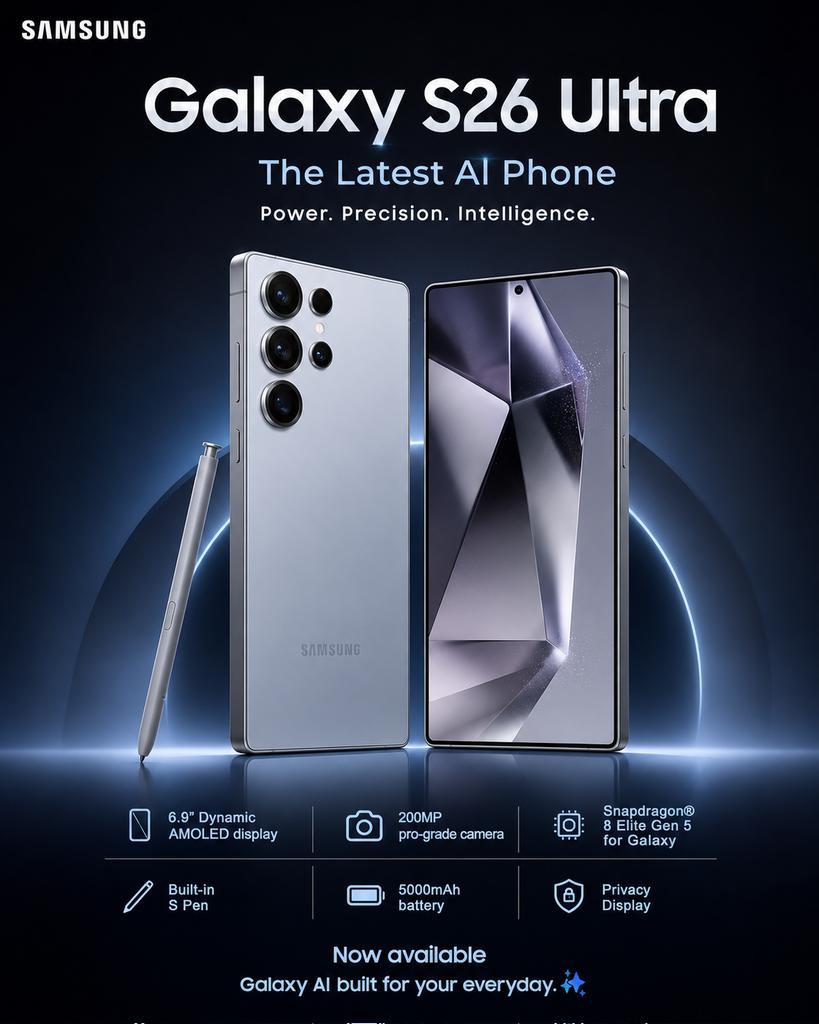
Create a premium commercial advertising poster for Samsung Galaxy S26 Ultra in a sleek modern Samsung flagship style. Use a vertical poster canvas with a dark futuristic navy-black background, soft gradients, subtle blue and silver glow accents, glossy reflections, and high-end studio lighting. Place the white SAMSUNG logo in the top-left corner. Center a large bold headline reading “Galaxy S26 Ultra”, with a smaller glowing blue subtitle “The Latest AI Phone” beneath it and the tagline “Power. Precision. Intelligence.” below that. In the center, show two premium silver smartphones standing upright: the left phone shows the back with a matte silver finish and a multi-lens camera cluster with exactly 5 visible camera/sensor circles arranged near the top-left; the right phone shows the front display with thin bezels, a centered punch-hole camera, and an abstract metallic geometric wallpaper in silver, black, and lavender tones. Add a silver S Pen standing diagonally to the left of the phones. Behind the devices, add a glowing partial blue halo ring and a horizontal light flare at the base, with the phones reflected on a glossy floor. Along the lower third, create a clean spec bar with exactly 6 feature items in two rows of three, separated by thin vertical dividers and simple outline icons: 1) phone icon with “6.9” Dynamic AMOLED display”, 2) camera icon with “200MP pro-grade camera”, 3) chip icon with “Snapdragon® 8 Elite Gen 5 for Galaxy”, 4) pen icon with “Built-in S Pen”, 5) battery icon with “5000mAh battery”, 6) shield/lock icon with “Privacy Display”. At the bottom center, add the call-to-action “Now available” and the supporting line “Galaxy AI built for your everyday.” with two small sparkle symbols. Use crisp white and pale blue typography, centered alignment, premium spacing, realistic product rendering, metallic edges, and no extra text or watermarks.

Werkt met 21 modellen

  • Flux
  • Flux 2
  • Flux Kontext
  • GPT-4o Image
  • GPT Image
  • GPT Image 2
  • GPT Image 2.5
  • GPT Image 2.6
  • Grok Imagine
  • Ideogram V3
  • Imagen 4
  • Kling
  • +9 Meer

Wat deze prompt oplevert

Hunyuan  prompt: dog pose Niet opgegeven hunyuan-3
Wireless Doorbell Camera Instructions Prompt Niet opgegeven gpt-image-2
Hunyuan  prompt: wine Niet opgegeven hunyuan-3
Hunyuan  prompt: can beer Niet opgegeven hunyuan-3
Hunyuan  prompt: ربات Niet opgegeven hunyuan-3
Hero prompt: recreate image 1 (close up indoor portrait of a wo... Niet opgegeven 1.0

Run deze prompt met de API

Het onderstaande verzoek stuurt deze prompt, met de standaardwaarden ingevuld, naar het eerste model waarop het draait. Verwissel de modelnaam voor een ander hierboven vermeld model.

prompt API-documentatie
/api/v1/gpt_image_2/text_to_image
curl -X POST https://runapi.ai/api/v1/gpt_image_2/text_to_image \
  -H "Authorization: Bearer $RUNAPI_API_KEY" \
  -H "Content-Type: application/json" \
  --data-binary @- <<'JSON'
{
  "model": "gpt-image-2",
  "prompt": "Create a premium commercial advertising poster for Samsung Galaxy S26 Ultra in a sleek modern Samsung flagship style. Use a vertical poster canvas with a dark futuristic navy-black background, soft gradients, subtle blue and silver glow accents, glossy reflections, and high-end studio lighting. Place the white SAMSUNG logo in the top-left corner. Center a large bold headline reading “Galaxy S26 Ultra”, with a smaller glowing blue subtitle “The Latest AI Phone” beneath it and the tagline “Power. Precision. Intelligence.” below that. In the center, show two premium silver smartphones standing upright: the left phone shows the back with a matte silver finish and a multi-lens camera cluster with exactly 5 visible camera/sensor circles arranged near the top-left; the right phone shows the front display with thin bezels, a centered punch-hole camera, and an abstract metallic geometric wallpaper in silver, black, and lavender tones. Add a silver S Pen standing diagonally to the left of the phones. Behind the devices, add a glowing partial blue halo ring and a horizontal light flare at the base, with the phones reflected on a glossy floor. Along the lower third, create a clean spec bar with exactly 6 feature items in two rows of three, separated by thin vertical dividers and simple outline icons: 1) phone icon with “6.9” Dynamic AMOLED display”, 2) camera icon with “200MP pro-grade camera”, 3) chip icon with “Snapdragon® 8 Elite Gen 5 for Galaxy”, 4) pen icon with “Built-in S Pen”, 5) battery icon with “5000mAh battery”, 6) shield/lock icon with “Privacy Display”. At the bottom center, add the call-to-action “Now available” and the supporting line “Galaxy AI built for your everyday.” with two small sparkle symbols. Use crisp white and pale blue typography, centered alignment, premium spacing, realistic product rendering, metallic edges, and no extra text or watermarks."
}
JSON

Probeer a prompt