DevKnow SaaS Landing Page
DevKnow SaaS Landing Page

prompt

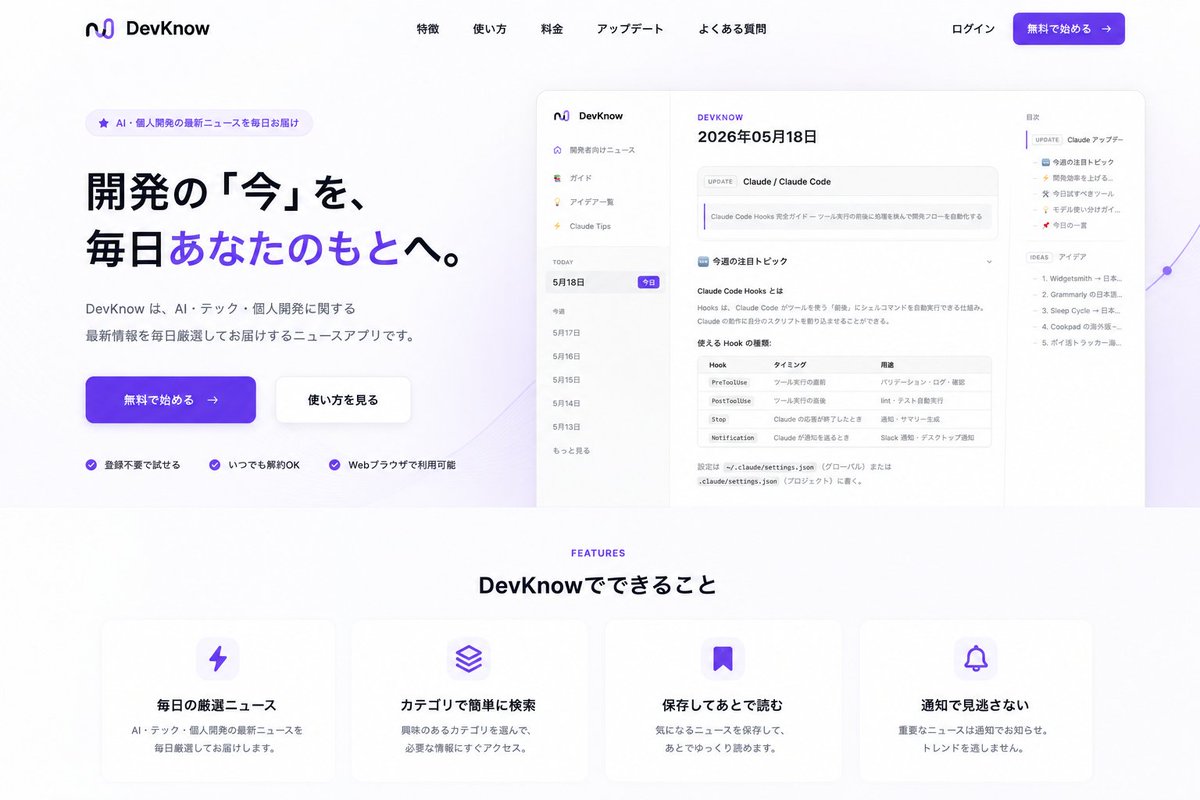
Using REFERENCE_0 as the product UI screenshot, turn it into a polished Japanese SaaS landing page for DevKnow. Keep the app screenshot recognizable but place it inside a large rounded browser/mockup preview on the right side of the hero section, slightly scaled down with soft shadow and a subtle purple abstract line/gradient accent behind it. Layout: Create a clean desktop landing page with a white background and purple brand accents. Add a top navigation bar with the existing logo/name on the left, five centered menu links labeled 「特徴」, 「使い方」, 「料金」, 「アップデート」, 「よくある質問」, and on the right 「ログイン」 plus a purple CTA button labeled 「無料で始める →」. Hero section: On the left, add a small rounded badge reading 「AI・個人開発の最新ニュースを毎日お届け」. Add a large bold Japanese headline: 開発の「今」を、毎日あなたのもとへ。 with the phrase 「あなたのもとへ」 highlighted in purple. Below it, add supporting copy: DevKnow は、AI・テック・個人開発に関する最新情報を毎日厳選してお届けするニュースアプリです。. Add two hero buttons: a primary purple 「無料で始める →」 button and a secondary white 「使い方を見る」 button. Under the buttons, add exactly 3 trust points with small purple check icons: 「登録不要で始める」, 「いつでも解約OK」, 「Webブラウザで利用可能」. Features section: Beneath the hero, add a centered section label “FEATURES” in purple and the heading 「DevKnow でできること」. Create exactly 4 rounded feature cards in one row with soft shadows and purple icons: 1) lightning icon, title 「毎日の厳選ニュース」, description 「AI・テック・個人開発の最新ニュースを毎日厳選してお届けします。」; 2) stacked layers icon, title 「カテゴリで簡単に検索」, description 「興味のあるカテゴリを選んで、必要な情報にすぐアクセス。」; 3) bookmark icon, title 「保存してあとで読む」, description 「気になるニュースを保存して、あとでゆっくり読めます。」; 4) bell icon, title 「通知で見逃さない」, description 「重要なニュースは通知でお知らせ。トレンドを逃しません。」 Style constraints: Make it look like a modern production-ready landing page, not a raw app screenshot. Use spacious margins, rounded corners, subtle shadows, purple gradient buttons, crisp Japanese typography, and remove any clutter outside the composed landing page. Keep the reference app UI content visible but secondary to the landing page design.

Werkt met 20 modellen

  • Flux
  • Flux 2
  • Flux Kontext
  • GPT-4o Image
  • GPT Image
  • GPT Image 2
  • GPT Image 2.5
  • GPT Image 2.6
  • Grok Imagine
  • Ideogram V3
  • Imagen 4
  • Kling
  • +8 Meer

Wat deze prompt oplevert

Hunyuan  prompt: póster/imagen Niet opgegeven hunyuan-3
Seedream 5 prompt: Conductor Niet opgegeven v2
FLUX prompt: oil painting Niet opgegeven flux-2-pro
ChatGPT Image prompt: vytvor fotorealistycke študio quality s viacerimi ... Niet opgegeven v1
Hunyuan  prompt: Dogs Niet opgegeven hunyuan-3
FLUX prompt: pastel character sticker Niet opgegeven flux-2-pro

Run deze prompt met de API

Het onderstaande verzoek stuurt deze prompt, met de standaardwaarden ingevuld, naar het eerste model waarop het draait. Verwissel de modelnaam voor een ander hierboven vermeld model.

prompt API-documentatie
/api/v1/gpt_image_2/text_to_image
curl -X POST https://runapi.ai/api/v1/gpt_image_2/text_to_image \
  -H "Authorization: Bearer $RUNAPI_API_KEY" \
  -H "Content-Type: application/json" \
  --data-binary @- <<'JSON'
{
  "model": "gpt-image-2",
  "prompt": "Using REFERENCE_0 as the product UI screenshot, turn it into a polished Japanese SaaS landing page for DevKnow. Keep the app screenshot recognizable but place it inside a large rounded browser/mockup preview on the right side of the hero section, slightly scaled down with soft shadow and a subtle purple abstract line/gradient accent behind it.\n\nLayout: Create a clean desktop landing page with a white background and purple brand accents. Add a top navigation bar with the existing logo/name on the left, five centered menu links labeled 「特徴」, 「使い方」, 「料金」, 「アップデート」, 「よくある質問」, and on the right 「ログイン」 plus a purple CTA button labeled 「無料で始める →」.\n\nHero section: On the left, add a small rounded badge reading 「AI・個人開発の最新ニュースを毎日お届け」. Add a large bold Japanese headline: 開発の「今」を、毎日あなたのもとへ。 with the phrase 「あなたのもとへ」 highlighted in purple. Below it, add supporting copy: DevKnow は、AI・テック・個人開発に関する最新情報を毎日厳選してお届けするニュースアプリです。. Add two hero buttons: a primary purple 「無料で始める →」 button and a secondary white 「使い方を見る」 button. Under the buttons, add exactly 3 trust points with small purple check icons: 「登録不要で始める」, 「いつでも解約OK」, 「Webブラウザで利用可能」.\n\nFeatures section: Beneath the hero, add a centered section label “FEATURES” in purple and the heading 「DevKnow でできること」. Create exactly 4 rounded feature cards in one row with soft shadows and purple icons: 1) lightning icon, title 「毎日の厳選ニュース」, description 「AI・テック・個人開発の最新ニュースを毎日厳選してお届けします。」; 2) stacked layers icon, title 「カテゴリで簡単に検索」, description 「興味のあるカテゴリを選んで、必要な情報にすぐアクセス。」; 3) bookmark icon, title 「保存してあとで読む」, description 「気になるニュースを保存して、あとでゆっくり読めます。」; 4) bell icon, title 「通知で見逃さない」, description 「重要なニュースは通知でお知らせ。トレンドを逃しません。」\n\nStyle constraints: Make it look like a modern production-ready landing page, not a raw app screenshot. Use spacious margins, rounded corners, subtle shadows, purple gradient buttons, crisp Japanese typography, and remove any clutter outside the composed landing page. Keep the reference app UI content visible but secondary to the landing page design."
}
JSON

Probeer a prompt

Schatting: $0.04 / afbeelding

Log in om te genereren met RunAPI.

Meld je aan om te genereren

Meld je aan om te beginnen met genereren met je beschikbare taalmodellen.