Clean Authenticator Onboarding UI
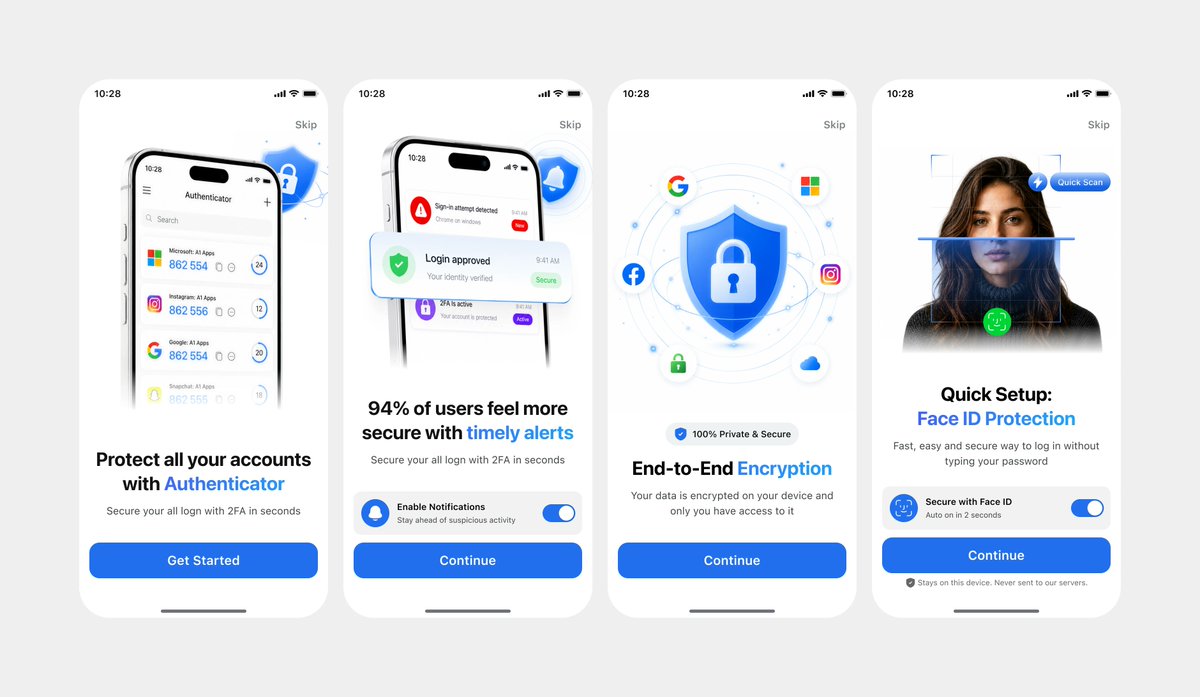
Clean Authenticator Onboarding UI

prompt

Using REFERENCE_1 as the primary UI reference and REFERENCE_0 only for the darker variant details if needed, recreate the mobile onboarding flow as a clean, front-facing design mockup instead of a photographed laptop screen. Extract and straighten the four iPhone-style screens, remove all camera perspective, glare, browser chrome, laptop edges, and surrounding environment, and place the screens evenly spaced on a light gray canvas. Keep the same white/light theme, rounded phone cards, blue security branding, typography hierarchy, icons, illustrations, and CTA style. Produce exactly 4 onboarding screens from left to right: 1) authenticator accounts list with headline “Protect all your accounts with Authenticator” and CTA “Get Started”; 2) security alert notifications with headline “94% of users feel more secure with timely alerts” and CTA “Continue”; 3) shield/lock encryption illustration with headline “End-to-End Encryption” and CTA “Continue”; 4) Face ID quick setup with the portrait/scan graphic, headline “Quick Setup: Face ID Protection”, secure Face ID toggle card, small privacy note, and CTA “Continue”. Use bright blue as the main accent color, keep the app name as Authenticator, and keep the status time as 10:28. Make the result look like a polished Figma export/product presentation, crisp and high resolution, with no real-world photo artifacts.

Werkt met 20 modellen

  • Flux
  • Flux 2
  • Flux Kontext
  • GPT-4o Image
  • GPT Image
  • GPT Image 2
  • GPT Image 2.5
  • GPT Image 2.6
  • Grok Imagine
  • Ideogram V3
  • Imagen 4
  • Kling
  • +8 Meer

Wat deze prompt oplevert

Split-Page Coffee Shop Travel Journal Niet opgegeven gpt-image-2
Cute Chibi Characters in a Sweet Playful Moment Niet opgegeven gpt-image-2
Underground Train Yard Clash Anime Development Board Niet opgegeven gpt-image-2
Realistic Group Selfie with Smartphone Flash Effect Niet opgegeven nano-banana-pro
Exploded-View Structural Cutaway for Food Photography Niet opgegeven nano-banana-pro
Four Seasons Portrait Collage Niet opgegeven nano-banana-pro

Run deze prompt met de API

Het onderstaande verzoek stuurt deze prompt, met de standaardwaarden ingevuld, naar het eerste model waarop het draait. Verwissel de modelnaam voor een ander hierboven vermeld model.

prompt API-documentatie
/api/v1/gpt_image_2/text_to_image
curl -X POST https://runapi.ai/api/v1/gpt_image_2/text_to_image \
  -H "Authorization: Bearer $RUNAPI_API_KEY" \
  -H "Content-Type: application/json" \
  --data-binary @- <<'JSON'
{
  "model": "gpt-image-2",
  "prompt": "Using REFERENCE_1 as the primary UI reference and REFERENCE_0 only for the darker variant details if needed, recreate the mobile onboarding flow as a clean, front-facing design mockup instead of a photographed laptop screen. Extract and straighten the four iPhone-style screens, remove all camera perspective, glare, browser chrome, laptop edges, and surrounding environment, and place the screens evenly spaced on a light gray canvas. Keep the same white/light theme, rounded phone cards, blue security branding, typography hierarchy, icons, illustrations, and CTA style. Produce exactly 4 onboarding screens from left to right: 1) authenticator accounts list with headline “Protect all your accounts with Authenticator” and CTA “Get Started”; 2) security alert notifications with headline “94% of users feel more secure with timely alerts” and CTA “Continue”; 3) shield/lock encryption illustration with headline “End-to-End Encryption” and CTA “Continue”; 4) Face ID quick setup with the portrait/scan graphic, headline “Quick Setup: Face ID Protection”, secure Face ID toggle card, small privacy note, and CTA “Continue”. Use bright blue as the main accent color, keep the app name as Authenticator, and keep the status time as 10:28. Make the result look like a polished Figma export/product presentation, crisp and high resolution, with no real-world photo artifacts."
}
JSON

Probeer a prompt

Schatting: $0.04 / afbeelding

Log in om te genereren met RunAPI.

Meld je aan om te genereren

Meld je aan om te beginnen met genereren met je beschikbare taalmodellen.