Grok Imagine Image 2.0 Launch Banner
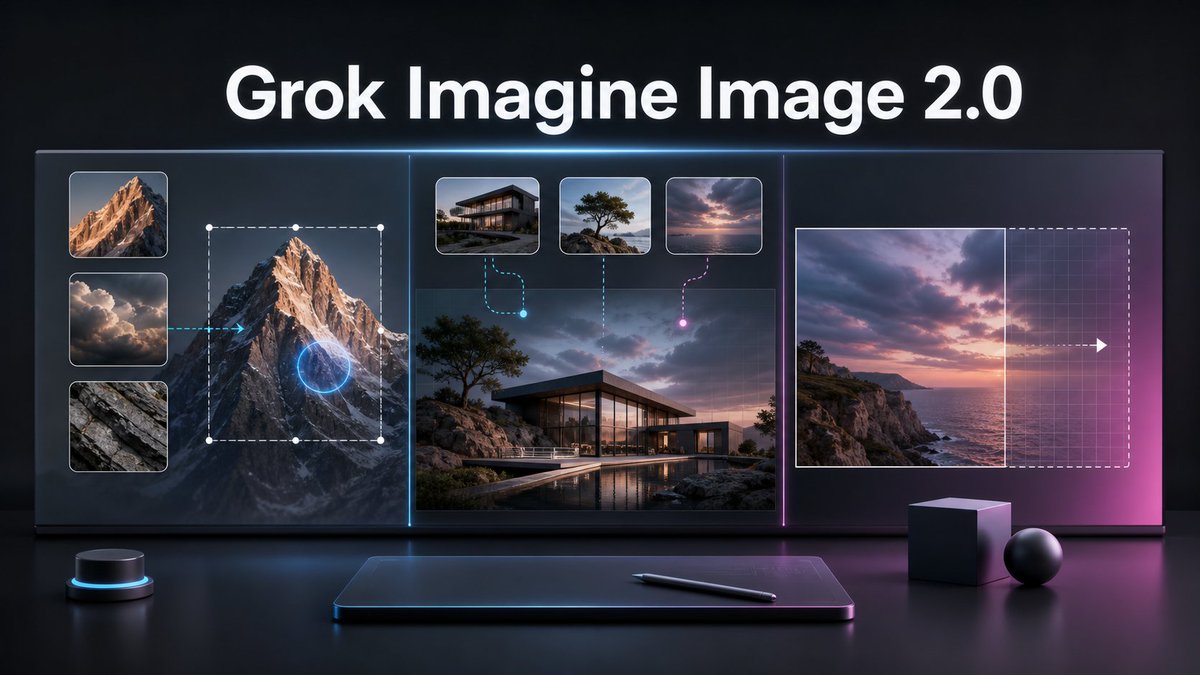
Grok Imagine Image 2.0 Launch Banner

الأمر

Goal: Create a cinematic dark tech launch banner for Grok Imagine Image 2.0, showing an advanced AI image editing workflow on a large futuristic display. Canvas: Wide 16:9 horizontal composition, glossy black studio environment, high contrast, premium product-announcement style. Use a deep charcoal background with subtle blue and magenta rim lighting, reflections on a polished desk surface, and a soft neon glow around interface elements. Layout: Place a large bold white headline centered at the top reading “Grok Imagine Image 2.0”. Below it, create one continuous widescreen glass UI display divided into exactly 3 vertical sections by thin glowing separators: cyan separator between the left and center sections, magenta separator between the center and right sections. Left section: Show local image editing. Include exactly 3 stacked reference thumbnails on the far left: 1) sunlit mountain peak, 2) dramatic clouds, 3) gray rock texture. To the right of these thumbnails, show a large mountain image with a dashed rectangular selection box, white corner/edge handles, and a glowing blue circular edit target over the mountain. Add a cyan arrow pointing from the cloud thumbnail area toward the mountain, implying guided editing. Center section: Show multi-image reference generation. Use a large realistic image of a modern glass house on a rocky coastal landscape at dusk, with a pool reflection in the foreground. Above it, include exactly 3 small rounded reference cards: 1) modern house exterior, 2) lone windswept tree on rocks, 3) pink-purple sunset sky over water. Connect the first card with a cyan dashed curved line ending in a glowing cyan dot, connect the second card with a vertical dotted line, and connect the third card with a magenta dashed curved line ending in a glowing magenta dot. Right section: Show intelligent resizing or outpainting. Include a sunset seascape image on the left side of the panel, a vertical boundary line at its right edge, and a larger dashed rectangular extension area to the right with a faint grid overlay. Add a white arrow pointing right across the extension area to indicate expansion. The right side should fade into a magenta glow. Foreground objects: On the desk below the display, include exactly 4 objects: 1) a small black cylindrical control puck with a cyan light ring on the left, 2) a slim dark drawing tablet centered with a soft blue rim glow, 3) a black stylus lying diagonally on the tablet, 4) two matte geometric props on the right consisting of one cube and one sphere. Visual style: Ultra-polished 3D render mixed with realistic UI mockup, dramatic cinematic lighting, glass panels, crisp rounded thumbnails, subtle grid textures, neon cyan and magenta accents, shallow reflections, high-resolution product keynote aesthetic. Keep the typography clean, bold, and sans-serif. No extra logos, watermarks, people, or additional text.

يعمل على موديلات 21

  • Flux
  • Flux 2
  • Flux Kontext
  • GPT-4o Image
  • GPT Image
  • GPT Image 2
  • GPT Image 2.5
  • GPT Image 2.6
  • Grok Imagine
  • Ideogram V3
  • Imagen 4
  • Kling
  • +9 المزيد

ما الذي ينتجه هذا الـ prompt؟

Hunyuan  prompt: chained غير محدد hunyuan-3
Seedream 5 prompt: you can change the outfit if thats a better match ... غير محدد seedream-5-pro
Hunyuan  prompt: این موجود با اون دستی که روی زمین گذاشته و کنار پا... غير محدد hunyuan-3
Seedream 5 prompt: photo professionnelle غير محدد v2
Seedream 5 prompt: girls غير محدد v2
ChatGPT Image prompt: billboard غير محدد v1

قم بتشغيل هذه المطالبة باستخدام واجهة برمجة التطبيقات

يرسل الطلب أدناه هذه المطالبة، مع ملء قيمها الافتراضية، إلى النموذج الأول الذي تعمل عليه. استبدل اسم الطراز بأي طراز آخر مذكور أعلاه.

مستندات واجهة برمجة التطبيقات الفورية
/api/v1/gpt_image_2/text_to_image
curl -X POST https://runapi.ai/api/v1/gpt_image_2/text_to_image \
  -H "Authorization: Bearer $RUNAPI_API_KEY" \
  -H "Content-Type: application/json" \
  --data-binary @- <<'JSON'
{
  "model": "gpt-image-2",
  "prompt": "Goal: Create a cinematic dark tech launch banner for Grok Imagine Image 2.0, showing an advanced AI image editing workflow on a large futuristic display.\n\nCanvas: Wide 16:9 horizontal composition, glossy black studio environment, high contrast, premium product-announcement style. Use a deep charcoal background with subtle blue and magenta rim lighting, reflections on a polished desk surface, and a soft neon glow around interface elements.\n\nLayout: Place a large bold white headline centered at the top reading “Grok Imagine Image 2.0”. Below it, create one continuous widescreen glass UI display divided into exactly 3 vertical sections by thin glowing separators: cyan separator between the left and center sections, magenta separator between the center and right sections.\n\nLeft section: Show local image editing. Include exactly 3 stacked reference thumbnails on the far left: 1) sunlit mountain peak, 2) dramatic clouds, 3) gray rock texture. To the right of these thumbnails, show a large mountain image with a dashed rectangular selection box, white corner/edge handles, and a glowing blue circular edit target over the mountain. Add a cyan arrow pointing from the cloud thumbnail area toward the mountain, implying guided editing.\n\nCenter section: Show multi-image reference generation. Use a large realistic image of a modern glass house on a rocky coastal landscape at dusk, with a pool reflection in the foreground. Above it, include exactly 3 small rounded reference cards: 1) modern house exterior, 2) lone windswept tree on rocks, 3) pink-purple sunset sky over water. Connect the first card with a cyan dashed curved line ending in a glowing cyan dot, connect the second card with a vertical dotted line, and connect the third card with a magenta dashed curved line ending in a glowing magenta dot.\n\nRight section: Show intelligent resizing or outpainting. Include a sunset seascape image on the left side of the panel, a vertical boundary line at its right edge, and a larger dashed rectangular extension area to the right with a faint grid overlay. Add a white arrow pointing right across the extension area to indicate expansion. The right side should fade into a magenta glow.\n\nForeground objects: On the desk below the display, include exactly 4 objects: 1) a small black cylindrical control puck with a cyan light ring on the left, 2) a slim dark drawing tablet centered with a soft blue rim glow, 3) a black stylus lying diagonally on the tablet, 4) two matte geometric props on the right consisting of one cube and one sphere.\n\nVisual style: Ultra-polished 3D render mixed with realistic UI mockup, dramatic cinematic lighting, glass panels, crisp rounded thumbnails, subtle grid textures, neon cyan and magenta accents, shallow reflections, high-resolution product keynote aesthetic. Keep the typography clean, bold, and sans-serif. No extra logos, watermarks, people, or additional text."
}
JSON

جرب المطالبة