Building Pyramids in Excel Poster
Building Pyramids in Excel Poster

翻译: Prompt

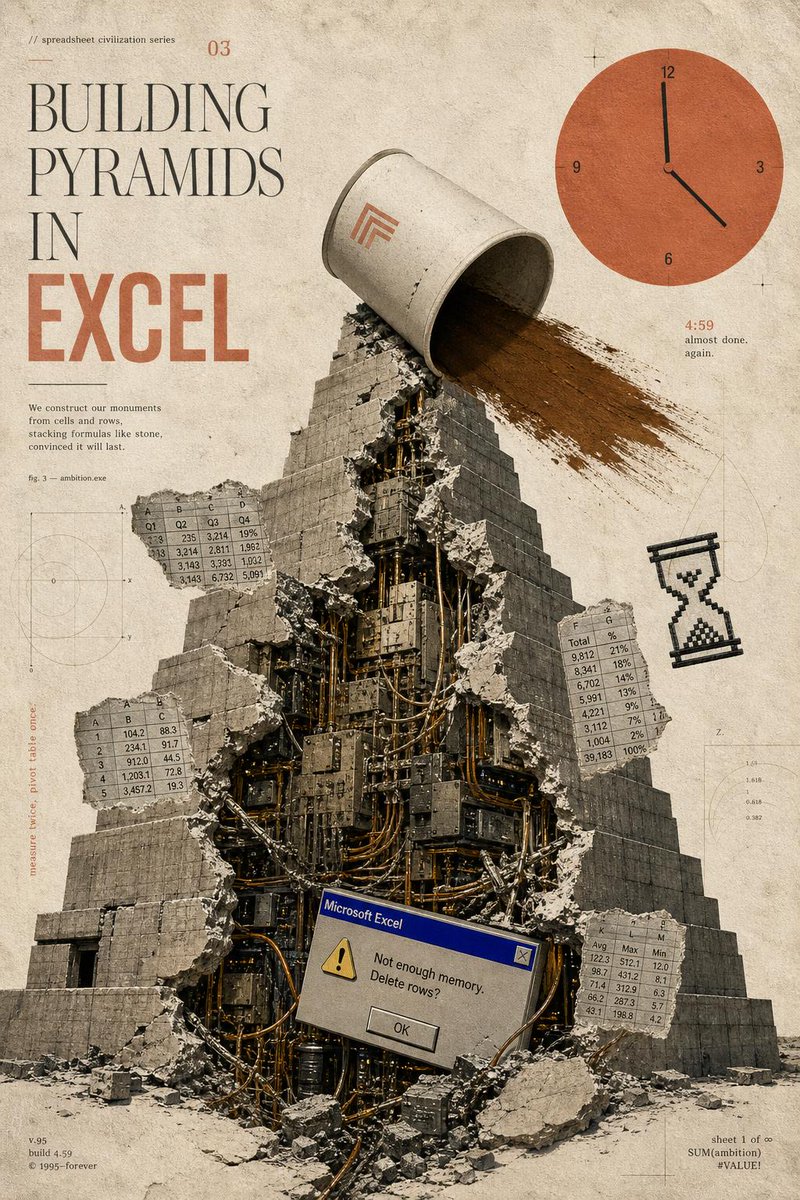
Goal: Create a surreal vintage editorial poster for a fictional “spreadsheet civilization series” about BUILDING PYRAMIDS IN EXCEL, combining ancient monumental architecture with obsolete office software anxiety. Canvas: Vertical poster, 2:3 ratio, aged cream paper background with stains, dust, scratches, faint technical drafting marks, thin registration crosses, and muted sepia tones. Use a distressed printed-magazine texture, like an archival science pamphlet mixed with brutalist collage art. Layout: Large typography occupies the upper-left quadrant. A monumental stepped pyramid fills the center and lower half, viewed from slightly below, with rubble at the base. The upper-right quadrant contains a large flat orange clock graphic. Small spreadsheet tables, diagrams, and marginal notes float around the pyramid like technical annotations. Main subject: A massive gray stone stepped pyramid, cracked open vertically down the front. The broken opening reveals a dense mechanical interior made of dark metal panels, cables, pipes, servers, wires, and industrial machinery. Concrete chunks and debris scatter outward. At the top of the pyramid, a large tipped-over off-white bucket or cylindrical container pours a wide stream of brown sand or dirt down the right side of the pyramid. Put a small minimalist orange geometric logo on the bucket. Typography and visible text: Upper-left small text reads “// spreadsheet civilization series” and a small issue number “03”. The main title is stacked in tall elegant serif type: “BUILDING” then “PYRAMIDS” then “IN”, with “EXCEL” below in very large bold condensed orange block letters. Add a small paragraph under the title: “We construct our monuments from cells and rows, stacking formulas like stone, convinced it will last.” Add “fig. 3 — ambition.exe” nearby. Bottom-left small footer text: “v.95”, “build 4.59”, “© 1995–forever”. Bottom-right small footer text: “sheet 1 of ∞”, “SUM(ambition)”, “#VALUE!”. Near the clock, include “4:59” in orange and the tiny caption “almost done. again.” Add a vertical margin note on the left that reads “measure twice, pivot table once.” Discrete elements to include exactly: 1 central broken pyramid; 1 tipped bucket pouring sand; 1 orange clock in the upper right with numbers 12, 3, 6, 9 and black hands indicating roughly 4:59; 1 pixelated black hourglass icon on the right side; 1 Microsoft Excel-style error dialog near the lower center of the pyramid; 4 floating spreadsheet table fragments. The 4 spreadsheet fragments are: a top-left fragment labeled with columns A, B, C, D and rows of decimal values; a left-middle fragment with columns A, B, C and rows 1–5; a right-middle fragment with columns F, G and rows labeled “Total” plus percentages; a bottom-right fragment with columns K, L, M and labels like Avg, Max, Min. Error dialog detail: Make the dialog look like an old Windows 95 Microsoft Excel alert box with a blue title bar reading “Microsoft Excel”, a yellow warning triangle, the message “Not enough memory. Delete rows?”, and a centered “OK” button. Visual style: Analog collage, photoreal stone and rubble mixed with flat vector UI elements, muted beige-gray-black palette with burnt orange accents, high grain, slight ink misregistration, soft shadows, worn paper texture, thin drafting lines and faint circular graph diagrams in the background. Constraints: Keep the composition clean and poster-like, with no modern glossy interface, no people, no extra logos besides the small bucket mark and the Excel dialog, and no additional major objects beyond the counted elements.

翻译: Runs on 21 models

  • Flux
  • Flux 2
  • Flux Kontext
  • GPT-4o Image
  • GPT Image
  • GPT Image 2
  • GPT Image 2.5
  • GPT Image 2.6
  • Grok Imagine
  • Ideogram V3
  • Imagen 4
  • Kling
  • 翻译: +9 more

此 prompt 的输出

Hunyuan  prompt: dog pose 未指定 hunyuan-3
Wireless Doorbell Camera Instructions Prompt 未指定 gpt-image-2
Hunyuan  prompt: wine 未指定 hunyuan-3
Hunyuan  prompt: can beer 未指定 hunyuan-3
Hunyuan  prompt: ربات 未指定 hunyuan-3
Hero prompt: recreate image 1 (close up indoor portrait of a wo... 未指定 1.0

翻译: Run this prompt with the API

翻译: The request below sends this prompt, with its default values filled in, to the first model it runs on. Swap the model name for any other model listed above.

翻译: Prompt API docs
/api/v1/gpt_image_2/text_to_image
curl -X POST https://runapi.ai/api/v1/gpt_image_2/text_to_image \
  -H "Authorization: Bearer $RUNAPI_API_KEY" \
  -H "Content-Type: application/json" \
  --data-binary @- <<'JSON'
{
  "model": "gpt-image-2",
  "prompt": "Goal: Create a surreal vintage editorial poster for a fictional “spreadsheet civilization series” about BUILDING PYRAMIDS IN EXCEL, combining ancient monumental architecture with obsolete office software anxiety.\n\nCanvas: Vertical poster, 2:3 ratio, aged cream paper background with stains, dust, scratches, faint technical drafting marks, thin registration crosses, and muted sepia tones. Use a distressed printed-magazine texture, like an archival science pamphlet mixed with brutalist collage art.\n\nLayout: Large typography occupies the upper-left quadrant. A monumental stepped pyramid fills the center and lower half, viewed from slightly below, with rubble at the base. The upper-right quadrant contains a large flat orange clock graphic. Small spreadsheet tables, diagrams, and marginal notes float around the pyramid like technical annotations.\n\nMain subject: A massive gray stone stepped pyramid, cracked open vertically down the front. The broken opening reveals a dense mechanical interior made of dark metal panels, cables, pipes, servers, wires, and industrial machinery. Concrete chunks and debris scatter outward. At the top of the pyramid, a large tipped-over off-white bucket or cylindrical container pours a wide stream of brown sand or dirt down the right side of the pyramid. Put a small minimalist orange geometric logo on the bucket.\n\nTypography and visible text: Upper-left small text reads “// spreadsheet civilization series” and a small issue number “03”. The main title is stacked in tall elegant serif type: “BUILDING” then “PYRAMIDS” then “IN”, with “EXCEL” below in very large bold condensed orange block letters. Add a small paragraph under the title: “We construct our monuments from cells and rows, stacking formulas like stone, convinced it will last.” Add “fig. 3 — ambition.exe” nearby. Bottom-left small footer text: “v.95”, “build 4.59”, “© 1995–forever”. Bottom-right small footer text: “sheet 1 of ∞”, “SUM(ambition)”, “#VALUE!”. Near the clock, include “4:59” in orange and the tiny caption “almost done. again.” Add a vertical margin note on the left that reads “measure twice, pivot table once.”\n\nDiscrete elements to include exactly: 1 central broken pyramid; 1 tipped bucket pouring sand; 1 orange clock in the upper right with numbers 12, 3, 6, 9 and black hands indicating roughly 4:59; 1 pixelated black hourglass icon on the right side; 1 Microsoft Excel-style error dialog near the lower center of the pyramid; 4 floating spreadsheet table fragments. The 4 spreadsheet fragments are: a top-left fragment labeled with columns A, B, C, D and rows of decimal values; a left-middle fragment with columns A, B, C and rows 1–5; a right-middle fragment with columns F, G and rows labeled “Total” plus percentages; a bottom-right fragment with columns K, L, M and labels like Avg, Max, Min.\n\nError dialog detail: Make the dialog look like an old Windows 95 Microsoft Excel alert box with a blue title bar reading “Microsoft Excel”, a yellow warning triangle, the message “Not enough memory. Delete rows?”, and a centered “OK” button.\n\nVisual style: Analog collage, photoreal stone and rubble mixed with flat vector UI elements, muted beige-gray-black palette with burnt orange accents, high grain, slight ink misregistration, soft shadows, worn paper texture, thin drafting lines and faint circular graph diagrams in the background.\n\nConstraints: Keep the composition clean and poster-like, with no modern glossy interface, no people, no extra logos besides the small bucket mark and the Excel dialog, and no additional major objects beyond the counted elements."
}
JSON

翻译: Try a prompt