Dark Research Figure Gallery UI

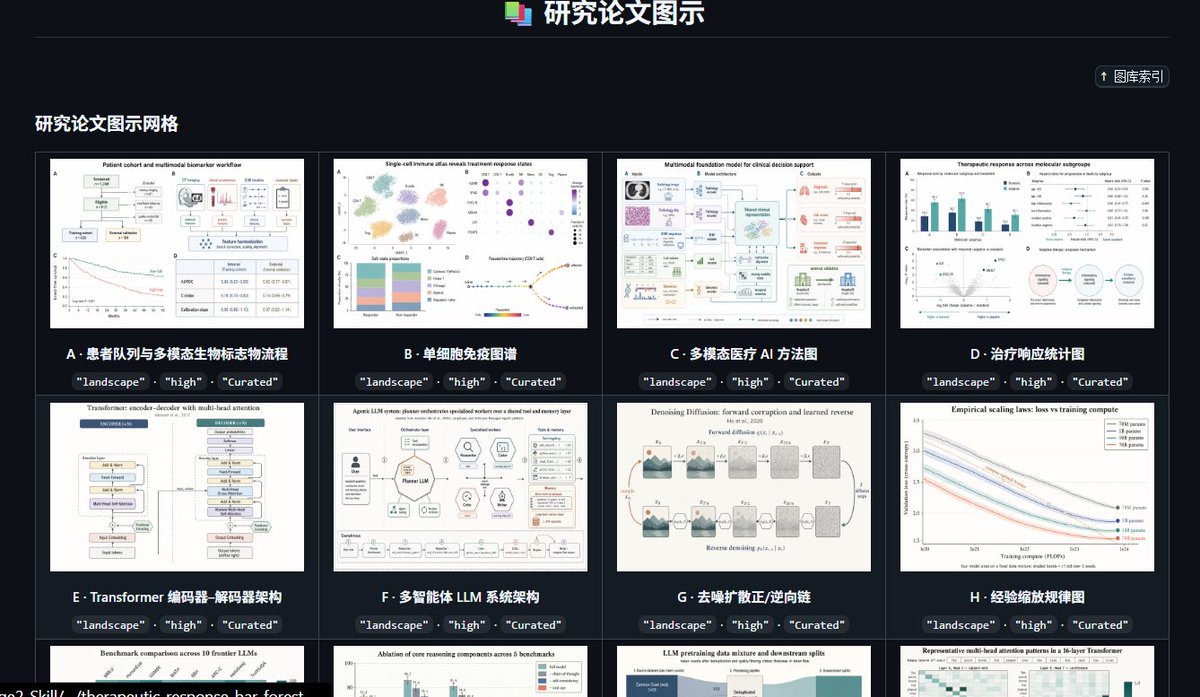
Creates a dark web gallery interface displaying curated research paper figure style cards for an academic visual preset library.
Dark Research Figure Gallery UI

翻译: Prompt

Goal: Create a dark, high-end gallery index page for a curated preset library of research paper figure styles, titled 研究论文图示. The interface should look like a polished web app screenshot showcasing academic diagram thumbnails. Canvas: Wide landscape browser-like composition, approximately 16:9, dark charcoal background, subtle grid borders, crisp UI typography, high contrast white and cyan text. Header: Center the title at the top with a small stacked multicolor document icon to its left. Add a thin horizontal divider line below the header. In the upper-right area, place a compact rounded button labeled “↑ 图库索引”. Section title: On the left below the divider, show the section heading 研究论文图示网格 in bold light text. Layout: Display a 4-column gallery grid with thin gray borders and dark card gutters. Show exactly 12 visible gallery cards: 8 full cards in the first two rows and 4 partially visible cards in the third row at the bottom edge. Each card contains a white research-paper-style thumbnail image, a bold lettered title underneath, and three small dark rounded tag pills below the title reading exactly “landscape”, “high”, and “Curated”. Visible card count and labels: Card A: “患者队列与多模态生物标志物流称流程”, thumbnail showing a patient cohort workflow with boxes, charts, and a survival curve. Card B: “单细胞免疫图谱”, thumbnail showing a single-cell immune atlas with UMAP clusters, dot plot, stacked bar chart, and trajectory plot. Card C: “多模态医疗 AI 方法图”, thumbnail showing a multimodal foundation model clinical decision support diagram with medical image, pathology, text, and model blocks. Card D: “治疗响应统计图”, thumbnail showing therapeutic response statistics with bar charts, forest plots, scatter plot, and a circular workflow. Card E: “Transformer 编码器-解码器架构”, thumbnail showing a transformer encoder-decoder architecture diagram with stacked module blocks. Card F: “多智能体 LLM 系统架构”, thumbnail showing an LLM multi-agent system architecture with central model block, surrounding tool icons, memory, reflection, and evaluation modules. Card G: “去噪扩散正/逆向链”, thumbnail showing a denoising diffusion forward and reverse process chain with noisy image panels and arrows. Card H: “经验缩放规律图”, thumbnail showing empirical scaling laws with multiple descending colored curves and a legend. Bottom partially visible card 1: title begins “Benchmark comparison across 10 frontier LLMs”, thumbnail with bar chart comparisons. Bottom partially visible card 2: title begins “Ablation of core reasoning components across 5 benchmarks”, thumbnail with grouped bars. Bottom partially visible card 3: title begins “LLM pretraining data mixture and downstream splits”, thumbnail with stacked area/data mixture blocks. Bottom partially visible card 4: title begins “Representative multi-head attention patterns in a 16-layer Transformer”, thumbnail with heatmaps. Visual style: Use a modern SaaS dashboard aesthetic, dark mode, neat academic curation feel, subtle cyan accents, small but legible labels, and realistic research figure thumbnails that resemble high-quality journal diagrams. Keep thumbnails varied but consistently white-background scientific figures. Constraints: Preserve the Chinese interface labels and card titles as written. Do not add people, photos, watermarks, browser address bars, or decorative clutter. The composition should feel like a screenshot of a curated research-figure template library named GPT-IMAGE-2-SKILL.

翻译: Runs on 18 models

  • Flux
  • Flux 2
  • Flux Kontext
  • GPT-4o Image
  • GPT Image
  • GPT Image 2
  • GPT Image 2.5
  • Grok Imagine
  • Ideogram V3
  • Imagen 4
  • Midjourney
  • Nano Banana
  • 翻译: +6 more

此 prompt 的输出

Realistic Group Selfie with Smartphone Flash Effect 未指定 nano-banana-pro
Four Seasons Portrait Collage 未指定 nano-banana-pro
Minimalist Dog Sketch Clipart 未指定 nano-banana-pro
Mecha Girl figure concept generated by Nano Banana Pro 未指定 nano-banana-pro
Candid Flash Photography: Chaotic Holiday Party (Duplicate) 未指定 nano-banana-pro
Ethereal Floral Studio Portrait 未指定 nano-banana-pro

翻译: Run this prompt with the API

翻译: The request below sends this prompt, with its default values filled in, to the first model it runs on. Swap the model name for any other model listed above.

翻译: Prompt API docs
/api/v1/gpt_image_2/text_to_image
curl -X POST https://runapi.ai/api/v1/gpt_image_2/text_to_image \
  -H "Authorization: Bearer $RUNAPI_API_KEY" \
  -H "Content-Type: application/json" \
  --data-binary @- <<'JSON'
{
  "model": "gpt-image-2",
  "prompt": "Goal: Create a dark, high-end gallery index page for a curated preset library of research paper figure styles, titled 研究论文图示. The interface should look like a polished web app screenshot showcasing academic diagram thumbnails.\n\nCanvas: Wide landscape browser-like composition, approximately 16:9, dark charcoal background, subtle grid borders, crisp UI typography, high contrast white and cyan text.\n\nHeader: Center the title at the top with a small stacked multicolor document icon to its left. Add a thin horizontal divider line below the header. In the upper-right area, place a compact rounded button labeled “↑ 图库索引”.\n\nSection title: On the left below the divider, show the section heading 研究论文图示网格 in bold light text.\n\nLayout: Display a 4-column gallery grid with thin gray borders and dark card gutters. Show exactly 12 visible gallery cards: 8 full cards in the first two rows and 4 partially visible cards in the third row at the bottom edge. Each card contains a white research-paper-style thumbnail image, a bold lettered title underneath, and three small dark rounded tag pills below the title reading exactly “landscape”, “high”, and “Curated”.\n\nVisible card count and labels: Card A: “患者队列与多模态生物标志物流称流程”, thumbnail showing a patient cohort workflow with boxes, charts, and a survival curve. Card B: “单细胞免疫图谱”, thumbnail showing a single-cell immune atlas with UMAP clusters, dot plot, stacked bar chart, and trajectory plot. Card C: “多模态医疗 AI 方法图”, thumbnail showing a multimodal foundation model clinical decision support diagram with medical image, pathology, text, and model blocks. Card D: “治疗响应统计图”, thumbnail showing therapeutic response statistics with bar charts, forest plots, scatter plot, and a circular workflow. Card E: “Transformer 编码器-解码器架构”, thumbnail showing a transformer encoder-decoder architecture diagram with stacked module blocks. Card F: “多智能体 LLM 系统架构”, thumbnail showing an LLM multi-agent system architecture with central model block, surrounding tool icons, memory, reflection, and evaluation modules. Card G: “去噪扩散正/逆向链”, thumbnail showing a denoising diffusion forward and reverse process chain with noisy image panels and arrows. Card H: “经验缩放规律图”, thumbnail showing empirical scaling laws with multiple descending colored curves and a legend. Bottom partially visible card 1: title begins “Benchmark comparison across 10 frontier LLMs”, thumbnail with bar chart comparisons. Bottom partially visible card 2: title begins “Ablation of core reasoning components across 5 benchmarks”, thumbnail with grouped bars. Bottom partially visible card 3: title begins “LLM pretraining data mixture and downstream splits”, thumbnail with stacked area/data mixture blocks. Bottom partially visible card 4: title begins “Representative multi-head attention patterns in a 16-layer Transformer”, thumbnail with heatmaps.\n\nVisual style: Use a modern SaaS dashboard aesthetic, dark mode, neat academic curation feel, subtle cyan accents, small but legible labels, and realistic research figure thumbnails that resemble high-quality journal diagrams. Keep thumbnails varied but consistently white-background scientific figures.\n\nConstraints: Preserve the Chinese interface labels and card titles as written. Do not add people, photos, watermarks, browser address bars, or decorative clutter. The composition should feel like a screenshot of a curated research-figure template library named GPT-IMAGE-2-SKILL."
}
JSON

翻译: Try a prompt

预计: $0.04 / 张图片

登录后即可使用 RunAPI 生成。

登录后生成

登录后即可使用可用语言模型开始生成。

















