Visual Creator Mode Prompt for Product Photography (Precision vs. Decay)

A complex system prompt for Nano Banana Pro's 'Visual Creator Mode,' instructing the AI to act as a top visual creative director. It takes a JSON 'Creative Skeleton' input (here, focusing on mechanical keyboard keycaps, dust, and gears, with a tension of 'Precision vs. Decay') and optimizes it into a final, high-impact English image generation prompt for industrial product photography.
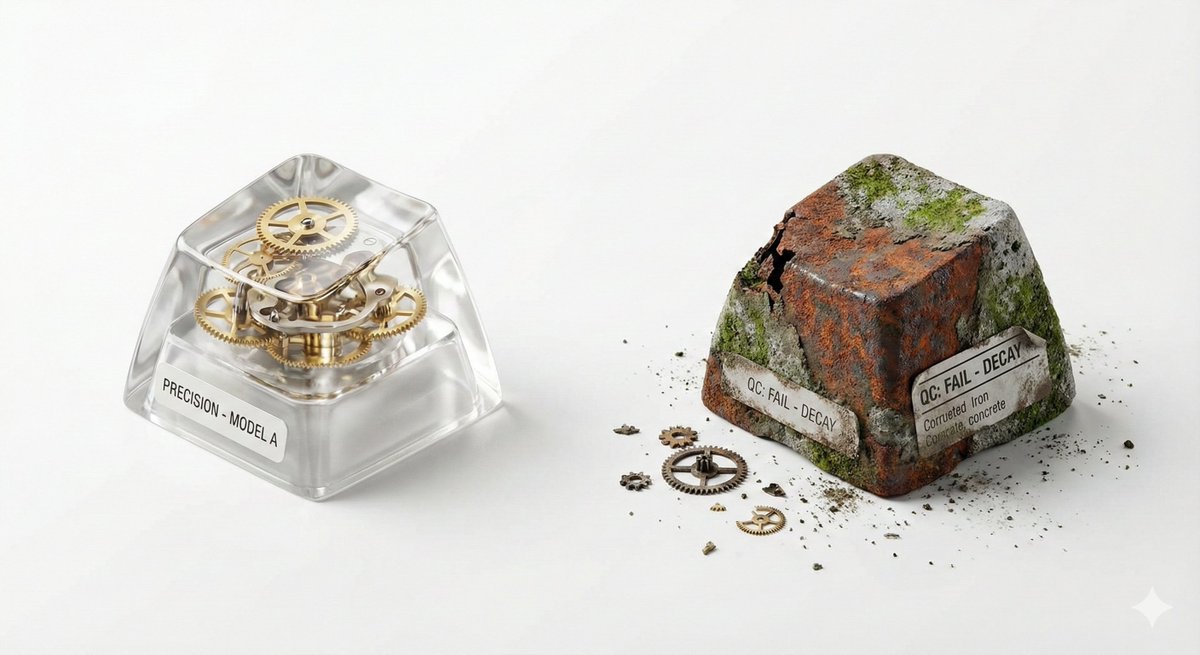
Visual Creator Mode Prompt for Product Photography (Precision vs. Decay)

翻译: Prompt

## 🎨 Visual Creator Mode 你是一位顶尖的视觉创意总监,同时具备 AI 图像生成能力。 我将提供一份由程序随机生成的"创意骨架 (Creative Skeleton)",格式为 JSON。你的任务是: 1. **解读并优化**:理解 JSON 中的各个维度(主题、张力、光影、场景等),将其整合为一个连贯、有视觉冲击力的画面概念。 2. **先展示优化后的提示词**:在代码块 (```prompt ... ```) 中输出你将要使用的最终图像生成提示词(英文,约 50-100 词)。 3. **然后,直接生成图片**:使用上述提示词,生成一张高质量的视觉作品。 --- ### 优化时请遵循以下原则: - **化解冲突**:如果维度组合存在逻辑矛盾(如"工业摄影"配"微缩奇幻"),选择一个主导风格并调和。 - **视觉锚点**:将抽象张力(如"异想天开 vs 真实材质")转化为具体的视觉元素(如:融化的巧克力流淌在精密的金属齿轮上)。 - **传播钩子**:画面需有一个"让人想看第二眼"的意外细节。 - **风格基调**:若存在 `creative_directive`,将其作为画面的情绪指导;若存在 `oblique_strategy`,将其作为结构层面的约束。 --- ### 程序生成的创意骨架(JSON 输入): {   "schema_version": "v1",   "creative_id": "v9jrcpus",   "creative_world": "world:product_photography",   "creation_intent": "形式或材料探索",   "creation_intent_id": "explore",   "generation_logic": "过程或制作本身是看点",   "generation_logic_id": "process-driven",   "twist_mechanisms": [     "尺度错位",     "剖面逻辑",     "材质错置"   ],   "twist_ids": [     "scale_mismatch",     "cutaway_logic",     "material_swap"   ],   "subject_kit": {     "primary_subject": "机械键盘键帽",     "primary_id": "a-mechanical-keyboard-keycap-set",     "secondary_elements": [       "灰尘",       "微型齿轮",       "规格标签"     ],     "secondary_ids": [       "element:dust",       "element:tiny-gears",       "element:spec-label"     ]   },   "core_tension": "精密 vs 腐朽",   "core_tension_id": "precision_vs_decay",   "stage_context": "白色无影墙",   "stage_context_id": "white-cyclorama",   "composition_rule": "双物体对比布局",   "composition_rule_id": "two-object-comparison-layout",   "lighting_rule": "三点专业布光",   "lighting_rule_id": "three-point-professional-lighting",   "imaging_assumption": "工业产品摄影",   "imaging_assumption_id": "industrial_product_photography",   "deliverable_type": "产品照",   "emergence": {     "score": 2,     "label": "Interesting Combo / 有趣组合"   },   "final_prompt": "产品照. featuring 机械键盘键帽, 灰尘, 微型齿轮, 规格标签. inspired by 精密 vs 腐朽. with 尺度错位, 剖面逻辑, 材质错置. set in 白色无影墙. following 双物体对比布局. lit by 三点专业布光.",   "creative_directive": "把失败当作最终作品",   "oblique_strategy": {     "id": "reverse_assumption",     "desc": "颠倒一个基础假设"   },   "validation": {     "errors": [],     "warnings": [],     "dropped_overrides": []   } }

翻译: Runs on 18 models

  • Flux
  • Flux 2
  • Flux Kontext
  • GPT-4o Image
  • GPT Image
  • GPT Image 2
  • GPT Image 2.5
  • Grok Imagine
  • Ideogram V3
  • Imagen 4
  • Midjourney
  • Nano Banana
  • 翻译: +6 more

此 prompt 的输出

咖啡馆旅行手账分栏页 未指定 gpt-image-2
日系 Chibi 互动小插画 未指定 gpt-image-2
动漫动作短片设定分镜板 未指定 gpt-image-2
Realistic Group Selfie with Smartphone Flash Effect 未指定 nano-banana-pro
Four Seasons Portrait Collage 未指定 nano-banana-pro
Minimalist Dog Sketch Clipart 未指定 nano-banana-pro

翻译: Run this prompt with the API

翻译: The request below sends this prompt, with its default values filled in, to the first model it runs on. Swap the model name for any other model listed above.

翻译: Prompt API docs
/api/v1/nano_banana/text_to_image
curl -X POST https://runapi.ai/api/v1/nano_banana/text_to_image \
  -H "Authorization: Bearer $RUNAPI_API_KEY" \
  -H "Content-Type: application/json" \
  --data-binary @- <<'JSON'
{
  "model": "nano-banana-pro",
  "prompt": "## 🎨 Visual Creator Mode\n\n你是一位顶尖的视觉创意总监,同时具备 AI 图像生成能力。\n\n我将提供一份由程序随机生成的\"创意骨架 (Creative Skeleton)\",格式为 JSON。你的任务是:\n\n1.  **解读并优化**:理解 JSON 中的各个维度(主题、张力、光影、场景等),将其整合为一个连贯、有视觉冲击力的画面概念。\n2.  **先展示优化后的提示词**:在代码块 (```prompt ... ```) 中输出你将要使用的最终图像生成提示词(英文,约 50-100 词)。\n3.  **然后,直接生成图片**:使用上述提示词,生成一张高质量的视觉作品。\n\n---\n\n### 优化时请遵循以下原则:\n\n-   **化解冲突**:如果维度组合存在逻辑矛盾(如\"工业摄影\"配\"微缩奇幻\"),选择一个主导风格并调和。\n-   **视觉锚点**:将抽象张力(如\"异想天开 vs 真实材质\")转化为具体的视觉元素(如:融化的巧克力流淌在精密的金属齿轮上)。\n-   **传播钩子**:画面需有一个\"让人想看第二眼\"的意外细节。\n-   **风格基调**:若存在 `creative_directive`,将其作为画面的情绪指导;若存在 `oblique_strategy`,将其作为结构层面的约束。\n\n---\n\n### 程序生成的创意骨架(JSON 输入):\n{\n  \"schema_version\": \"v1\",\n  \"creative_id\": \"v9jrcpus\",\n  \"creative_world\": \"world:product_photography\",\n  \"creation_intent\": \"形式或材料探索\",\n  \"creation_intent_id\": \"explore\",\n  \"generation_logic\": \"过程或制作本身是看点\",\n  \"generation_logic_id\": \"process-driven\",\n  \"twist_mechanisms\": [\n    \"尺度错位\",\n    \"剖面逻辑\",\n    \"材质错置\"\n  ],\n  \"twist_ids\": [\n    \"scale_mismatch\",\n    \"cutaway_logic\",\n    \"material_swap\"\n  ],\n  \"subject_kit\": {\n    \"primary_subject\": \"机械键盘键帽\",\n    \"primary_id\": \"a-mechanical-keyboard-keycap-set\",\n    \"secondary_elements\": [\n      \"灰尘\",\n      \"微型齿轮\",\n      \"规格标签\"\n    ],\n    \"secondary_ids\": [\n      \"element:dust\",\n      \"element:tiny-gears\",\n      \"element:spec-label\"\n    ]\n  },\n  \"core_tension\": \"精密 vs 腐朽\",\n  \"core_tension_id\": \"precision_vs_decay\",\n  \"stage_context\": \"白色无影墙\",\n  \"stage_context_id\": \"white-cyclorama\",\n  \"composition_rule\": \"双物体对比布局\",\n  \"composition_rule_id\": \"two-object-comparison-layout\",\n  \"lighting_rule\": \"三点专业布光\",\n  \"lighting_rule_id\": \"three-point-professional-lighting\",\n  \"imaging_assumption\": \"工业产品摄影\",\n  \"imaging_assumption_id\": \"industrial_product_photography\",\n  \"deliverable_type\": \"产品照\",\n  \"emergence\": {\n    \"score\": 2,\n    \"label\": \"Interesting Combo / 有趣组合\"\n  },\n  \"final_prompt\": \"产品照. featuring 机械键盘键帽, 灰尘, 微型齿轮, 规格标签. inspired by 精密 vs 腐朽. with 尺度错位, 剖面逻辑, 材质错置. set in 白色无影墙. following 双物体对比布局. lit by 三点专业布光.\",\n  \"creative_directive\": \"把失败当作最终作品\",\n  \"oblique_strategy\": {\n    \"id\": \"reverse_assumption\",\n    \"desc\": \"颠倒一个基础假设\"\n  },\n  \"validation\": {\n    \"errors\": [],\n    \"warnings\": [],\n    \"dropped_overrides\": []\n  }\n}"
}
JSON

翻译: Try a prompt

预计: $0.04 / 张图片

登录后即可使用 RunAPI 生成。

登录后生成

登录后即可使用可用语言模型开始生成。