Minimal AI Lock-In Comparison Slide

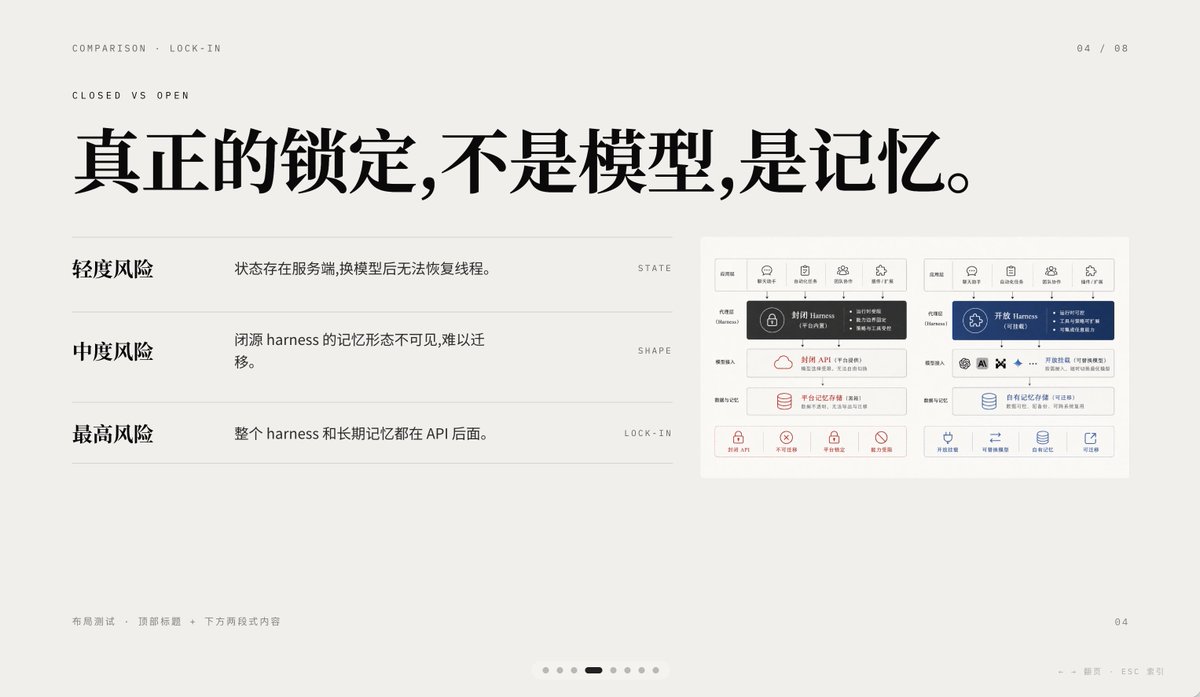
This prompt generates a polished Chinese presentation slide comparing closed versus open AI memory lock-in, suitable for keynote decks, product strategy talks, and premium infographic PPTs.
Minimal AI Lock-In Comparison Slide

翻译: Prompt

A minimalist editorial presentation slide in 16:9 format with a warm light-gray paper background, lots of negative space, refined Swiss-style grid layout, and high-end PPT/keynote design aesthetics. The slide is a comparison page about lock-in, using elegant Chinese typography mixed with tiny English navigation text. At the top left, place two small uppercase English breadcrumb lines: “COMPARISON · LOCK-IN” and below it “CLOSED VS OPEN”, in a thin sans-serif with wide tracking. At the top right, place the page indicator “04 / 08”. Center-left across the upper half, add a very large bold black Chinese headline: “真正的锁定,不是模型,是记忆。” On the left half below the headline, create a three-row comparison list separated by thin horizontal gray rules. Row 1 has the bold Chinese label “轻度风险” on the left, with the explanatory sentence “状态存在服务端,换模型后无法恢复线程。” to its right, and a tiny uppercase English keyword aligned far right: “STATE”. Row 2 has the bold label “中度风险”, with the sentence “闭源 harness 的记忆形态不可见,难以迁移。” and the far-right keyword “SHAPE”. Row 3 has the bold label “最高风险”, with the sentence “整个 harness 和长期记忆都在 API 后面。” and the far-right keyword “LOCK-IN”. On the right side of the slide, place a small inset comparison diagram card with a white background and subtle border, containing 2 side-by-side system architecture panels. The left panel represents a closed system in dark gray and muted red accents; the right panel represents an open system in deep blue accents. Each panel should have 5 small top icon tabs, a central highlighted harness block, several stacked rounded rectangular modules below, and a bottom row of 4 small capability icons with short Chinese labels. Keep the inset detailed but small, so it reads as a supporting visual rather than the main focus. At the bottom left, add tiny light-gray Chinese footer text: “布局测试 · 顶部标题 + 下方两段式内容”. At the bottom right, place a small page number “04”. Centered near the bottom edge, add a carousel indicator with exactly 7 small dots, where the 4th dot is a short dark rounded pill indicating the active slide and the other 6 dots are pale gray circles. Also add tiny faint navigation hints at the lower right edge reading “← → 翻页 ESC 关闭”. Use crisp vector text rendering, understated contrast, elegant spacing, and a calm premium infographic style suitable for a business presentation about AI platform comparison and API memory lock-in.

翻译: Runs on 18 models

  • Flux
  • Flux 2
  • Flux Kontext
  • GPT-4o Image
  • GPT Image
  • GPT Image 2
  • GPT Image 2.5
  • Grok Imagine
  • Ideogram V3
  • Imagen 4
  • Midjourney
  • Nano Banana
  • 翻译: +6 more

此 prompt 的输出

Realistic Group Selfie with Smartphone Flash Effect 未指定 nano-banana-pro
Four Seasons Portrait Collage 未指定 nano-banana-pro
Minimalist Dog Sketch Clipart 未指定 nano-banana-pro
Mecha Girl figure concept generated by Nano Banana Pro 未指定 nano-banana-pro
Candid Flash Photography: Chaotic Holiday Party (Duplicate) 未指定 nano-banana-pro
Ethereal Floral Studio Portrait 未指定 nano-banana-pro

翻译: Run this prompt with the API

翻译: The request below sends this prompt, with its default values filled in, to the first model it runs on. Swap the model name for any other model listed above.

翻译: Prompt API docs
/api/v1/gpt_image_2/text_to_image
curl -X POST https://runapi.ai/api/v1/gpt_image_2/text_to_image \
  -H "Authorization: Bearer $RUNAPI_API_KEY" \
  -H "Content-Type: application/json" \
  --data-binary @- <<'JSON'
{
  "model": "gpt-image-2",
  "prompt": "A minimalist editorial presentation slide in 16:9 format with a warm light-gray paper background, lots of negative space, refined Swiss-style grid layout, and high-end PPT/keynote design aesthetics. The slide is a comparison page about lock-in, using elegant Chinese typography mixed with tiny English navigation text. At the top left, place two small uppercase English breadcrumb lines: “COMPARISON · LOCK-IN” and below it “CLOSED VS OPEN”, in a thin sans-serif with wide tracking. At the top right, place the page indicator “04 / 08”. Center-left across the upper half, add a very large bold black Chinese headline: “真正的锁定,不是模型,是记忆。” On the left half below the headline, create a three-row comparison list separated by thin horizontal gray rules. Row 1 has the bold Chinese label “轻度风险” on the left, with the explanatory sentence “状态存在服务端,换模型后无法恢复线程。” to its right, and a tiny uppercase English keyword aligned far right: “STATE”. Row 2 has the bold label “中度风险”, with the sentence “闭源 harness 的记忆形态不可见,难以迁移。” and the far-right keyword “SHAPE”. Row 3 has the bold label “最高风险”, with the sentence “整个 harness 和长期记忆都在 API 后面。” and the far-right keyword “LOCK-IN”. On the right side of the slide, place a small inset comparison diagram card with a white background and subtle border, containing 2 side-by-side system architecture panels. The left panel represents a closed system in dark gray and muted red accents; the right panel represents an open system in deep blue accents. Each panel should have 5 small top icon tabs, a central highlighted harness block, several stacked rounded rectangular modules below, and a bottom row of 4 small capability icons with short Chinese labels. Keep the inset detailed but small, so it reads as a supporting visual rather than the main focus. At the bottom left, add tiny light-gray Chinese footer text: “布局测试 · 顶部标题 + 下方两段式内容”. At the bottom right, place a small page number “04”. Centered near the bottom edge, add a carousel indicator with exactly 7 small dots, where the 4th dot is a short dark rounded pill indicating the active slide and the other 6 dots are pale gray circles. Also add tiny faint navigation hints at the lower right edge reading “← → 翻页   ESC 关闭”. Use crisp vector text rendering, understated contrast, elegant spacing, and a calm premium infographic style suitable for a business presentation about AI platform comparison and API memory lock-in."
}
JSON

翻译: Try a prompt

预计: $0.04 / 张图片

登录后即可使用 RunAPI 生成。

登录后生成

登录后即可使用可用语言模型开始生成。