---
title: Warrior Fashion Fusion Designer — prompt dla gpt-image-2 | RunAPI
description: Skopiuj ten prompt RunAPI, sprawdź kroki konfiguracji agenta i użyj kodu API dla gpt-image-2.
url: https://runapi.ai/pl/prompts/warrior-fashion-fusion-and-wardrobe-transformation-AwkvMA.md
canonical: https://runapi.ai/prompts/warrior-fashion-fusion-and-wardrobe-transformation-AwkvMA
locale: pl
site: RunAPI
image: https://runapi.ai/assets/opengraph-bfaaa0f0.png
prompt_id: 24674
model: gpt-image-2
modality: image
endpoint: "/api/v1/gpt_image_2/text_to_image"
---
> HTML version: https://runapi.ai/pl/prompts/warrior-fashion-fusion-and-wardrobe-transformation-AwkvMA
> Site index for agents: https://runapi.ai/llms.txt
# Warrior Fashion Fusion Designer
Skopiuj ten prompt RunAPI, sprawdź kroki konfiguracji agenta i użyj kodu API dla gpt-image-2.
**Prompty** · Obraz
## Prompt
```text
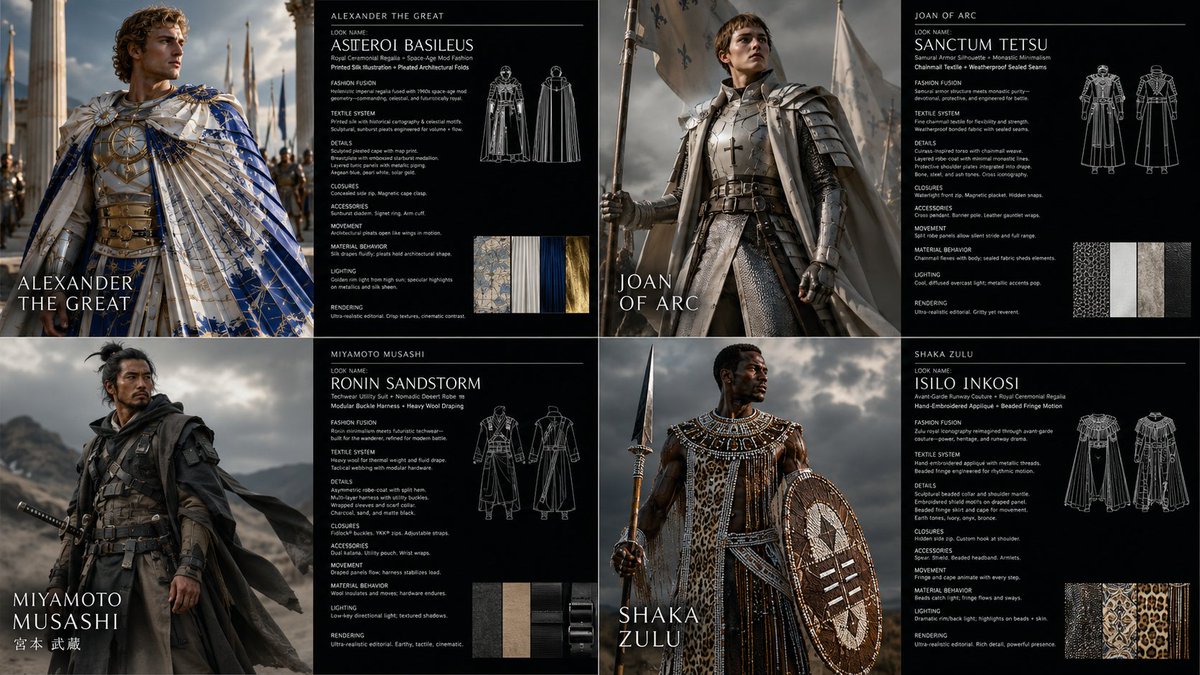
2x2 grid, 16:9, do this for 4 famous warriors: Input A is the subject photo. You are a god-tier fashion designer, costume director, textile artist, and editorial photographer. Phase 1: Wardrobe Fusion Randomly select TWO Fashion Archetypes and TWO Textile Systems. Blend them into a coherent wearable identity. Fashion Archetypes: [Avant-Garde Runway Couture, Nomadic Desert Robe, Cybernetic Streetwear, Victorian Mourning Dress, Samurai Armor Silhouette, 1970s Disco Glamour, Arctic Expedition Gear, Renaissance Court Attire, Punk Deconstruction, Monastic Minimalism, Space-Age Mod Fashion, Baroque Opera Costume, Techwear Utility Suit, Ballet Rehearsal Layers, Royal Ceremonial Regalia] Textile Systems: [Quilted Panel Construction, Laser-Cut Mesh, Hand-Embroidered Appliqué, Reflective Foil Laminate, Heavy Wool Draping, Transparent Organza Layers, Ribbed Knit Compression, Modular Buckle Harness, Beaded Fringe Motion, Pleated Architectural Folds, Weatherproof Sealed Seams, Chainmail Textile, Printed Silk Illustration, Inflated Puffer Volumes, Raw Frayed Edges] Phase 2: Visual Rendering Generate a 2:1 horizontal asset sheet. LEFT HALF: Transform the subject’s clothing, accessories, and styling using the generated fashion identity. Preserve exact body pose, face angle, silhouette boundaries, background layout, and camera framing. RIGHT HALF: Create a dark fashion-spec panel with clean white text. Phase 3: Text Content Render this text on the right panel: "Look Name: [Generate a name from the 4 selected elements] Input A is the source photo. Goal: Restyle the subject into '[Look Name]'. Rules: Pose Fidelity: Preserve exact body pose, silhouette, camera angle, and facial direction. Fashion Fusion: Combine [Fashion Archetype 1] with [Fashion Archetype 2]. Textile System: Construct garments using [Textile System 1] and [Textile System 2]. Details: Include seams, closures, textile weight, movement, accessories, and styling logic. Lighting: Editorial fashion lighting suited to the materials. Rendering: Photorealistic high-fashion campaign image. Output: ONE image, high-fidelity wardrobe transformation. "
```
### Wygeneruj ten prompt
| Model | GPT Image 2 2 |
|---|---|
| Szacowany koszt | $0.03 / wywołanie |
| Endpoint | `/api/v1/gpt_image_2/text_to_image` |
[Zaloguj się, aby wygenerować](https://runapi.ai/pl/login)
Wygenerowany obraz pojawi się tutaj
## Analiza promptu
### Temat
Warrior Fashion Fusion Designer
### Atmosfera
fashion / Obraz
### Techniczne
gpt-image-2 / Gpt Image 2 / Text To Image / /api/v1/gpt_image_2/text_to_image
### Styl
campaign, editorial, fashion, photorealistic, restyle, textile, wardrobe
## Modele obsługujące ten prompt
| Modalność | Model | Cena | Wypróbuj |
|---|---|---|---|
| Obraz | Qwen 2/qwen-2-text-to-image | $0.04 / obraz | [Wypróbuj](https://runapi.ai/pl/models/qwen-2/text-to-image.md) |
| Obraz | Qwen 3/qwen-3-pro-text-to-image | $0.04-$0.08 / obraz | [Wypróbuj](https://runapi.ai/pl/models/qwen-3/pro-text-to-image.md) |
| Obraz | Qwen 3/qwen-3-text-to-image | $0.03 / obraz | [Wypróbuj](https://runapi.ai/pl/models/qwen-3/text-to-image.md) |
| Obraz | Qwen Image/qwen-image-text-to-image | $0.03 / obraz | [Wypróbuj](https://runapi.ai/pl/models/qwen-image/text-to-image.md) |
| Obraz | Wan/wan-2.7-image | $0.03 / obraz | [Wypróbuj](https://runapi.ai/pl/models/wan/2.7-image.md) |
## SZCZEGÓŁY URUCHOMIENIA
| Field | Value |
|---|---|
| Model | `gpt-image-2` |
| Modality | Obraz |
| Category | fashion |
| Tags | campaign, editorial, fashion, photorealistic, restyle, textile, wardrobe |
## Use with an agent
### Claude Code
1. claude mcp add runapi -s user -- npx -y @runapi.ai/mcp
2. Uruchom ponownie Claude Code
3. Wklej ten prompt: Wygeneruj obraz: "2x2 grid, 16:9, do this for 4 famous warriors: Input A is the subject photo. You are a god-tier fashion designer, costume director, textile artist, and editorial photographer. Phase 1: Wardrobe Fusion Randomly select TWO Fashion Archetypes and TWO Textile Systems. Blend them into a coherent wearable identity. Fashion Archetypes: [Avant-Garde Runway Couture, Nomadic Desert Robe, Cybernetic Streetwear, Victorian Mourning Dress, Samurai Armor Silhouette, 1970s Disco Glamour, Arctic Expedition Gear, Renaissance Court Attire, Punk Deconstruction, Monastic Minimalism, Space-Age Mod Fashion, Baroque Opera Costume, Techwear Utility Suit, Ballet Rehearsal Layers, Royal Ceremonial Regalia] Textile Systems: [Quilted Panel Construction, Laser-Cut Mesh, Hand-Embroidered Appliqué, Reflective Foil Laminate, Heavy Wool Draping, Transparent Organza Layers, Ribbed Knit Compression, Modular Buckle Harness, Beaded Fringe Motion, Pleated Architectural Folds, Weatherproof Sealed Seams, Chainmail Textile, Printed Silk Illustration, Inflated Puffer Volumes, Raw Frayed Edges] Phase 2: Visual Rendering Generate a 2:1 horizontal asset sheet. LEFT HALF: Transform the subject’s clothing, accessories, and styling using the generated fashion identity. Preserve exact body pose, face angle, silhouette boundaries, background layout, and camera framing. RIGHT HALF: Create a dark fashion-spec panel with clean white text. Phase 3: Text Content Render this text on the right panel: "Look Name: [Generate a name from the 4 selected elements] Input A is the source photo. Goal: Restyle the subject into '[Look Name]'. Rules: Pose Fidelity: Preserve exact body pose, silhouette, camera angle, and facial direction. Fashion Fusion: Combine [Fashion Archetype 1] with [Fashion Archetype 2]. Textile System: Construct garments using [Textile System 1] and [Textile System 2]. Details: Include seams, closures, textile weight, movement, accessories, and styling logic. Lighting: Editorial fashion lighting suited to the materials. Rendering: Photorealistic high-fashion campaign image. Output: ONE image, high-fidelity wardrobe transformation. " "
### Codex
1. codex plugin install runapi-mcp@agents
2. Uruchom ponownie Codex
3. Wklej ten prompt: Wygeneruj obraz: "2x2 grid, 16:9, do this for 4 famous warriors: Input A is the subject photo. You are a god-tier fashion designer, costume director, textile artist, and editorial photographer. Phase 1: Wardrobe Fusion Randomly select TWO Fashion Archetypes and TWO Textile Systems. Blend them into a coherent wearable identity. Fashion Archetypes: [Avant-Garde Runway Couture, Nomadic Desert Robe, Cybernetic Streetwear, Victorian Mourning Dress, Samurai Armor Silhouette, 1970s Disco Glamour, Arctic Expedition Gear, Renaissance Court Attire, Punk Deconstruction, Monastic Minimalism, Space-Age Mod Fashion, Baroque Opera Costume, Techwear Utility Suit, Ballet Rehearsal Layers, Royal Ceremonial Regalia] Textile Systems: [Quilted Panel Construction, Laser-Cut Mesh, Hand-Embroidered Appliqué, Reflective Foil Laminate, Heavy Wool Draping, Transparent Organza Layers, Ribbed Knit Compression, Modular Buckle Harness, Beaded Fringe Motion, Pleated Architectural Folds, Weatherproof Sealed Seams, Chainmail Textile, Printed Silk Illustration, Inflated Puffer Volumes, Raw Frayed Edges] Phase 2: Visual Rendering Generate a 2:1 horizontal asset sheet. LEFT HALF: Transform the subject’s clothing, accessories, and styling using the generated fashion identity. Preserve exact body pose, face angle, silhouette boundaries, background layout, and camera framing. RIGHT HALF: Create a dark fashion-spec panel with clean white text. Phase 3: Text Content Render this text on the right panel: "Look Name: [Generate a name from the 4 selected elements] Input A is the source photo. Goal: Restyle the subject into '[Look Name]'. Rules: Pose Fidelity: Preserve exact body pose, silhouette, camera angle, and facial direction. Fashion Fusion: Combine [Fashion Archetype 1] with [Fashion Archetype 2]. Textile System: Construct garments using [Textile System 1] and [Textile System 2]. Details: Include seams, closures, textile weight, movement, accessories, and styling logic. Lighting: Editorial fashion lighting suited to the materials. Rendering: Photorealistic high-fashion campaign image. Output: ONE image, high-fidelity wardrobe transformation. " "
### Cursor
1. npx @runapi.ai/mcp init cursor
2. Uruchom ponownie Cursor
3. Wklej ten prompt: Wygeneruj obraz: "2x2 grid, 16:9, do this for 4 famous warriors: Input A is the subject photo. You are a god-tier fashion designer, costume director, textile artist, and editorial photographer. Phase 1: Wardrobe Fusion Randomly select TWO Fashion Archetypes and TWO Textile Systems. Blend them into a coherent wearable identity. Fashion Archetypes: [Avant-Garde Runway Couture, Nomadic Desert Robe, Cybernetic Streetwear, Victorian Mourning Dress, Samurai Armor Silhouette, 1970s Disco Glamour, Arctic Expedition Gear, Renaissance Court Attire, Punk Deconstruction, Monastic Minimalism, Space-Age Mod Fashion, Baroque Opera Costume, Techwear Utility Suit, Ballet Rehearsal Layers, Royal Ceremonial Regalia] Textile Systems: [Quilted Panel Construction, Laser-Cut Mesh, Hand-Embroidered Appliqué, Reflective Foil Laminate, Heavy Wool Draping, Transparent Organza Layers, Ribbed Knit Compression, Modular Buckle Harness, Beaded Fringe Motion, Pleated Architectural Folds, Weatherproof Sealed Seams, Chainmail Textile, Printed Silk Illustration, Inflated Puffer Volumes, Raw Frayed Edges] Phase 2: Visual Rendering Generate a 2:1 horizontal asset sheet. LEFT HALF: Transform the subject’s clothing, accessories, and styling using the generated fashion identity. Preserve exact body pose, face angle, silhouette boundaries, background layout, and camera framing. RIGHT HALF: Create a dark fashion-spec panel with clean white text. Phase 3: Text Content Render this text on the right panel: "Look Name: [Generate a name from the 4 selected elements] Input A is the source photo. Goal: Restyle the subject into '[Look Name]'. Rules: Pose Fidelity: Preserve exact body pose, silhouette, camera angle, and facial direction. Fashion Fusion: Combine [Fashion Archetype 1] with [Fashion Archetype 2]. Textile System: Construct garments using [Textile System 1] and [Textile System 2]. Details: Include seams, closures, textile weight, movement, accessories, and styling logic. Lighting: Editorial fashion lighting suited to the materials. Rendering: Photorealistic high-fashion campaign image. Output: ONE image, high-fidelity wardrobe transformation. " "
### Windsurf
1. npx @runapi.ai/mcp init windsurf
2. Uruchom ponownie Windsurf
3. Wklej ten prompt: Wygeneruj obraz: "2x2 grid, 16:9, do this for 4 famous warriors: Input A is the subject photo. You are a god-tier fashion designer, costume director, textile artist, and editorial photographer. Phase 1: Wardrobe Fusion Randomly select TWO Fashion Archetypes and TWO Textile Systems. Blend them into a coherent wearable identity. Fashion Archetypes: [Avant-Garde Runway Couture, Nomadic Desert Robe, Cybernetic Streetwear, Victorian Mourning Dress, Samurai Armor Silhouette, 1970s Disco Glamour, Arctic Expedition Gear, Renaissance Court Attire, Punk Deconstruction, Monastic Minimalism, Space-Age Mod Fashion, Baroque Opera Costume, Techwear Utility Suit, Ballet Rehearsal Layers, Royal Ceremonial Regalia] Textile Systems: [Quilted Panel Construction, Laser-Cut Mesh, Hand-Embroidered Appliqué, Reflective Foil Laminate, Heavy Wool Draping, Transparent Organza Layers, Ribbed Knit Compression, Modular Buckle Harness, Beaded Fringe Motion, Pleated Architectural Folds, Weatherproof Sealed Seams, Chainmail Textile, Printed Silk Illustration, Inflated Puffer Volumes, Raw Frayed Edges] Phase 2: Visual Rendering Generate a 2:1 horizontal asset sheet. LEFT HALF: Transform the subject’s clothing, accessories, and styling using the generated fashion identity. Preserve exact body pose, face angle, silhouette boundaries, background layout, and camera framing. RIGHT HALF: Create a dark fashion-spec panel with clean white text. Phase 3: Text Content Render this text on the right panel: "Look Name: [Generate a name from the 4 selected elements] Input A is the source photo. Goal: Restyle the subject into '[Look Name]'. Rules: Pose Fidelity: Preserve exact body pose, silhouette, camera angle, and facial direction. Fashion Fusion: Combine [Fashion Archetype 1] with [Fashion Archetype 2]. Textile System: Construct garments using [Textile System 1] and [Textile System 2]. Details: Include seams, closures, textile weight, movement, accessories, and styling logic. Lighting: Editorial fashion lighting suited to the materials. Rendering: Photorealistic high-fashion campaign image. Output: ONE image, high-fidelity wardrobe transformation. " "
## Generate via API
### curl
```curl
curl -X POST https://runapi.ai/api/v1/gpt_image_2/text_to_image \
-H "Authorization: Bearer $RUNAPI_API_KEY" \
-H "Content-Type: application/json" \
--data-binary @- <<'JSON'
{
"model": "gpt-image-2",
"prompt": "2x2 grid, 16:9, do this for 4 famous warriors: Input A is the subject photo. You are a god-tier fashion designer, costume director, textile artist, and editorial photographer. Phase 1: Wardrobe Fusion Randomly select TWO Fashion Archetypes and TWO Textile Systems. Blend them into a coherent wearable identity. Fashion Archetypes: [Avant-Garde Runway Couture, Nomadic Desert Robe, Cybernetic Streetwear, Victorian Mourning Dress, Samurai Armor Silhouette, 1970s Disco Glamour, Arctic Expedition Gear, Renaissance Court Attire, Punk Deconstruction, Monastic Minimalism, Space-Age Mod Fashion, Baroque Opera Costume, Techwear Utility Suit, Ballet Rehearsal Layers, Royal Ceremonial Regalia] Textile Systems: [Quilted Panel Construction, Laser-Cut Mesh, Hand-Embroidered Appliqué, Reflective Foil Laminate, Heavy Wool Draping, Transparent Organza Layers, Ribbed Knit Compression, Modular Buckle Harness, Beaded Fringe Motion, Pleated Architectural Folds, Weatherproof Sealed Seams, Chainmail Textile, Printed Silk Illustration, Inflated Puffer Volumes, Raw Frayed Edges] Phase 2: Visual Rendering Generate a 2:1 horizontal asset sheet. LEFT HALF: Transform the subject’s clothing, accessories, and styling using the generated fashion identity. Preserve exact body pose, face angle, silhouette boundaries, background layout, and camera framing. RIGHT HALF: Create a dark fashion-spec panel with clean white text. Phase 3: Text Content Render this text on the right panel: \"Look Name: [Generate a name from the 4 selected elements] Input A is the source photo. Goal: Restyle the subject into '[Look Name]'. Rules: Pose Fidelity: Preserve exact body pose, silhouette, camera angle, and facial direction. Fashion Fusion: Combine [Fashion Archetype 1] with [Fashion Archetype 2]. Textile System: Construct garments using [Textile System 1] and [Textile System 2]. Details: Include seams, closures, textile weight, movement, accessories, and styling logic. Lighting: Editorial fashion lighting suited to the materials. Rendering: Photorealistic high-fashion campaign image. Output: ONE image, high-fidelity wardrobe transformation. \" "
}
JSON
```
### Node.js
```javascript
import { GptImage2Client } from "@runapi.ai/gpt-image-2";
const client = new GptImage2Client({
apiKey: process.env.RUNAPI_API_KEY,
});
const result = await client.textToImage.run({
"model": "gpt-image-2",
"prompt": "2x2 grid, 16:9, do this for 4 famous warriors: Input A is the subject photo. You are a god-tier fashion designer, costume director, textile artist, and editorial photographer. Phase 1: Wardrobe Fusion Randomly select TWO Fashion Archetypes and TWO Textile Systems. Blend them into a coherent wearable identity. Fashion Archetypes: [Avant-Garde Runway Couture, Nomadic Desert Robe, Cybernetic Streetwear, Victorian Mourning Dress, Samurai Armor Silhouette, 1970s Disco Glamour, Arctic Expedition Gear, Renaissance Court Attire, Punk Deconstruction, Monastic Minimalism, Space-Age Mod Fashion, Baroque Opera Costume, Techwear Utility Suit, Ballet Rehearsal Layers, Royal Ceremonial Regalia] Textile Systems: [Quilted Panel Construction, Laser-Cut Mesh, Hand-Embroidered Appliqué, Reflective Foil Laminate, Heavy Wool Draping, Transparent Organza Layers, Ribbed Knit Compression, Modular Buckle Harness, Beaded Fringe Motion, Pleated Architectural Folds, Weatherproof Sealed Seams, Chainmail Textile, Printed Silk Illustration, Inflated Puffer Volumes, Raw Frayed Edges] Phase 2: Visual Rendering Generate a 2:1 horizontal asset sheet. LEFT HALF: Transform the subject’s clothing, accessories, and styling using the generated fashion identity. Preserve exact body pose, face angle, silhouette boundaries, background layout, and camera framing. RIGHT HALF: Create a dark fashion-spec panel with clean white text. Phase 3: Text Content Render this text on the right panel: \"Look Name: [Generate a name from the 4 selected elements] Input A is the source photo. Goal: Restyle the subject into '[Look Name]'. Rules: Pose Fidelity: Preserve exact body pose, silhouette, camera angle, and facial direction. Fashion Fusion: Combine [Fashion Archetype 1] with [Fashion Archetype 2]. Textile System: Construct garments using [Textile System 1] and [Textile System 2]. Details: Include seams, closures, textile weight, movement, accessories, and styling logic. Lighting: Editorial fashion lighting suited to the materials. Rendering: Photorealistic high-fashion campaign image. Output: ONE image, high-fidelity wardrobe transformation. \" "
});
console.log(result.id);
```
### Python
```python
import json
import os
import requests
response = requests.post(
"https://runapi.ai/api/v1/gpt_image_2/text_to_image",
headers={"Authorization": f"Bearer {os.environ['RUNAPI_API_KEY']}"},
json=json.loads("{\n \"model\": \"gpt-image-2\",\n \"prompt\": \"2x2 grid, 16:9, do this for 4 famous warriors: \u003cinstruction\u003e Input A is the subject photo. You are a god-tier fashion designer, costume director, textile artist, and editorial photographer. Phase 1: Wardrobe Fusion Randomly select TWO Fashion Archetypes and TWO Textile Systems. Blend them into a coherent wearable identity. Fashion Archetypes: [Avant-Garde Runway Couture, Nomadic Desert Robe, Cybernetic Streetwear, Victorian Mourning Dress, Samurai Armor Silhouette, 1970s Disco Glamour, Arctic Expedition Gear, Renaissance Court Attire, Punk Deconstruction, Monastic Minimalism, Space-Age Mod Fashion, Baroque Opera Costume, Techwear Utility Suit, Ballet Rehearsal Layers, Royal Ceremonial Regalia] Textile Systems: [Quilted Panel Construction, Laser-Cut Mesh, Hand-Embroidered Appliqué, Reflective Foil Laminate, Heavy Wool Draping, Transparent Organza Layers, Ribbed Knit Compression, Modular Buckle Harness, Beaded Fringe Motion, Pleated Architectural Folds, Weatherproof Sealed Seams, Chainmail Textile, Printed Silk Illustration, Inflated Puffer Volumes, Raw Frayed Edges] Phase 2: Visual Rendering Generate a 2:1 horizontal asset sheet. LEFT HALF: Transform the subject’s clothing, accessories, and styling using the generated fashion identity. Preserve exact body pose, face angle, silhouette boundaries, background layout, and camera framing. RIGHT HALF: Create a dark fashion-spec panel with clean white text. Phase 3: Text Content Render this text on the right panel: \\\"Look Name: [Generate a name from the 4 selected elements] \u003cinstruction\u003e Input A is the source photo. Goal: Restyle the subject into '[Look Name]'. Rules: Pose Fidelity: Preserve exact body pose, silhouette, camera angle, and facial direction. Fashion Fusion: Combine [Fashion Archetype 1] with [Fashion Archetype 2]. Textile System: Construct garments using [Textile System 1] and [Textile System 2]. Details: Include seams, closures, textile weight, movement, accessories, and styling logic. Lighting: Editorial fashion lighting suited to the materials. Rendering: Photorealistic high-fashion campaign image. Output: ONE image, high-fidelity wardrobe transformation. \u003c/instruction\u003e\\\" \u003c/instruction\u003e\"\n}")
)
response.raise_for_status()
print(response.json()["id"])
```
### PHP
```php
true,
CURLOPT_HTTPHEADER => [
"Authorization: Bearer " . getenv("RUNAPI_API_KEY"),
"Content-Type: application/json",
],
CURLOPT_POSTFIELDS => "{\n \"model\": \"gpt-image-2\",\n \"prompt\": \"2x2 grid, 16:9, do this for 4 famous warriors: \u003cinstruction\u003e Input A is the subject photo. You are a god-tier fashion designer, costume director, textile artist, and editorial photographer. Phase 1: Wardrobe Fusion Randomly select TWO Fashion Archetypes and TWO Textile Systems. Blend them into a coherent wearable identity. Fashion Archetypes: [Avant-Garde Runway Couture, Nomadic Desert Robe, Cybernetic Streetwear, Victorian Mourning Dress, Samurai Armor Silhouette, 1970s Disco Glamour, Arctic Expedition Gear, Renaissance Court Attire, Punk Deconstruction, Monastic Minimalism, Space-Age Mod Fashion, Baroque Opera Costume, Techwear Utility Suit, Ballet Rehearsal Layers, Royal Ceremonial Regalia] Textile Systems: [Quilted Panel Construction, Laser-Cut Mesh, Hand-Embroidered Appliqué, Reflective Foil Laminate, Heavy Wool Draping, Transparent Organza Layers, Ribbed Knit Compression, Modular Buckle Harness, Beaded Fringe Motion, Pleated Architectural Folds, Weatherproof Sealed Seams, Chainmail Textile, Printed Silk Illustration, Inflated Puffer Volumes, Raw Frayed Edges] Phase 2: Visual Rendering Generate a 2:1 horizontal asset sheet. LEFT HALF: Transform the subject’s clothing, accessories, and styling using the generated fashion identity. Preserve exact body pose, face angle, silhouette boundaries, background layout, and camera framing. RIGHT HALF: Create a dark fashion-spec panel with clean white text. Phase 3: Text Content Render this text on the right panel: \\\"Look Name: [Generate a name from the 4 selected elements] \u003cinstruction\u003e Input A is the source photo. Goal: Restyle the subject into '[Look Name]'. Rules: Pose Fidelity: Preserve exact body pose, silhouette, camera angle, and facial direction. Fashion Fusion: Combine [Fashion Archetype 1] with [Fashion Archetype 2]. Textile System: Construct garments using [Textile System 1] and [Textile System 2]. Details: Include seams, closures, textile weight, movement, accessories, and styling logic. Lighting: Editorial fashion lighting suited to the materials. Rendering: Photorealistic high-fashion campaign image. Output: ONE image, high-fidelity wardrobe transformation. \u003c/instruction\u003e\\\" \u003c/instruction\u003e\"\n}",
CURLOPT_RETURNTRANSFER => true,
]);
$response = json_decode(curl_exec($ch), true);
curl_close($ch);
echo $response["id"] . PHP_EOL;
```
### Java
```java
import java.net.URI;
import java.net.http.HttpClient;
import java.net.http.HttpRequest;
import java.net.http.HttpResponse;
var request = HttpRequest.newBuilder(URI.create("https://runapi.ai/api/v1/gpt_image_2/text_to_image"))
.header("Authorization", "Bearer " + System.getenv("RUNAPI_API_KEY"))
.header("Content-Type", "application/json")
.POST(HttpRequest.BodyPublishers.ofString("{\n \"model\": \"gpt-image-2\",\n \"prompt\": \"2x2 grid, 16:9, do this for 4 famous warriors: \u003cinstruction\u003e Input A is the subject photo. You are a god-tier fashion designer, costume director, textile artist, and editorial photographer. Phase 1: Wardrobe Fusion Randomly select TWO Fashion Archetypes and TWO Textile Systems. Blend them into a coherent wearable identity. Fashion Archetypes: [Avant-Garde Runway Couture, Nomadic Desert Robe, Cybernetic Streetwear, Victorian Mourning Dress, Samurai Armor Silhouette, 1970s Disco Glamour, Arctic Expedition Gear, Renaissance Court Attire, Punk Deconstruction, Monastic Minimalism, Space-Age Mod Fashion, Baroque Opera Costume, Techwear Utility Suit, Ballet Rehearsal Layers, Royal Ceremonial Regalia] Textile Systems: [Quilted Panel Construction, Laser-Cut Mesh, Hand-Embroidered Appliqué, Reflective Foil Laminate, Heavy Wool Draping, Transparent Organza Layers, Ribbed Knit Compression, Modular Buckle Harness, Beaded Fringe Motion, Pleated Architectural Folds, Weatherproof Sealed Seams, Chainmail Textile, Printed Silk Illustration, Inflated Puffer Volumes, Raw Frayed Edges] Phase 2: Visual Rendering Generate a 2:1 horizontal asset sheet. LEFT HALF: Transform the subject’s clothing, accessories, and styling using the generated fashion identity. Preserve exact body pose, face angle, silhouette boundaries, background layout, and camera framing. RIGHT HALF: Create a dark fashion-spec panel with clean white text. Phase 3: Text Content Render this text on the right panel: \\\"Look Name: [Generate a name from the 4 selected elements] \u003cinstruction\u003e Input A is the source photo. Goal: Restyle the subject into '[Look Name]'. Rules: Pose Fidelity: Preserve exact body pose, silhouette, camera angle, and facial direction. Fashion Fusion: Combine [Fashion Archetype 1] with [Fashion Archetype 2]. Textile System: Construct garments using [Textile System 1] and [Textile System 2]. Details: Include seams, closures, textile weight, movement, accessories, and styling logic. Lighting: Editorial fashion lighting suited to the materials. Rendering: Photorealistic high-fashion campaign image. Output: ONE image, high-fidelity wardrobe transformation. \u003c/instruction\u003e\\\" \u003c/instruction\u003e\"\n}"))
.build();
var response = HttpClient.newHttpClient().send(request, HttpResponse.BodyHandlers.ofString());
System.out.println(response.body());
```
### Ruby
```ruby
require "json"
require "net/http"
uri = URI("https://runapi.ai/api/v1/gpt_image_2/text_to_image")
request = Net::HTTP::Post.new(uri)
request["Authorization"] = "Bearer " + ENV.fetch("RUNAPI_API_KEY")
request["Content-Type"] = "application/json"
request.body = "{\n \"model\": \"gpt-image-2\",\n \"prompt\": \"2x2 grid, 16:9, do this for 4 famous warriors: \u003cinstruction\u003e Input A is the subject photo. You are a god-tier fashion designer, costume director, textile artist, and editorial photographer. Phase 1: Wardrobe Fusion Randomly select TWO Fashion Archetypes and TWO Textile Systems. Blend them into a coherent wearable identity. Fashion Archetypes: [Avant-Garde Runway Couture, Nomadic Desert Robe, Cybernetic Streetwear, Victorian Mourning Dress, Samurai Armor Silhouette, 1970s Disco Glamour, Arctic Expedition Gear, Renaissance Court Attire, Punk Deconstruction, Monastic Minimalism, Space-Age Mod Fashion, Baroque Opera Costume, Techwear Utility Suit, Ballet Rehearsal Layers, Royal Ceremonial Regalia] Textile Systems: [Quilted Panel Construction, Laser-Cut Mesh, Hand-Embroidered Appliqué, Reflective Foil Laminate, Heavy Wool Draping, Transparent Organza Layers, Ribbed Knit Compression, Modular Buckle Harness, Beaded Fringe Motion, Pleated Architectural Folds, Weatherproof Sealed Seams, Chainmail Textile, Printed Silk Illustration, Inflated Puffer Volumes, Raw Frayed Edges] Phase 2: Visual Rendering Generate a 2:1 horizontal asset sheet. LEFT HALF: Transform the subject’s clothing, accessories, and styling using the generated fashion identity. Preserve exact body pose, face angle, silhouette boundaries, background layout, and camera framing. RIGHT HALF: Create a dark fashion-spec panel with clean white text. Phase 3: Text Content Render this text on the right panel: \\\"Look Name: [Generate a name from the 4 selected elements] \u003cinstruction\u003e Input A is the source photo. Goal: Restyle the subject into '[Look Name]'. Rules: Pose Fidelity: Preserve exact body pose, silhouette, camera angle, and facial direction. Fashion Fusion: Combine [Fashion Archetype 1] with [Fashion Archetype 2]. Textile System: Construct garments using [Textile System 1] and [Textile System 2]. Details: Include seams, closures, textile weight, movement, accessories, and styling logic. Lighting: Editorial fashion lighting suited to the materials. Rendering: Photorealistic high-fashion campaign image. Output: ONE image, high-fidelity wardrobe transformation. \u003c/instruction\u003e\\\" \u003c/instruction\u003e\"\n}"
response = Net::HTTP.start(uri.hostname, uri.port, use_ssl: true) { |http| http.request(request) }
puts JSON.parse(response.body).fetch("id")
```
### Go
```go
package main
import (
"context"
"fmt"
"log"
"net/http"
"os"
"strings"
)
func main() {
body := strings.NewReader("{\"model\":\"gpt-image-2\",\"prompt\":\"2x2 grid, 16:9, do this for 4 famous warriors: Input A is the subject photo. You are a god-tier fashion designer, costume director, textile artist, and editorial photographer. Phase 1: Wardrobe Fusion Randomly select TWO Fashion Archetypes and TWO Textile Systems. Blend them into a coherent wearable identity. Fashion Archetypes: [Avant-Garde Runway Couture, Nomadic Desert Robe, Cybernetic Streetwear, Victorian Mourning Dress, Samurai Armor Silhouette, 1970s Disco Glamour, Arctic Expedition Gear, Renaissance Court Attire, Punk Deconstruction, Monastic Minimalism, Space-Age Mod Fashion, Baroque Opera Costume, Techwear Utility Suit, Ballet Rehearsal Layers, Royal Ceremonial Regalia] Textile Systems: [Quilted Panel Construction, Laser-Cut Mesh, Hand-Embroidered Appliqué, Reflective Foil Laminate, Heavy Wool Draping, Transparent Organza Layers, Ribbed Knit Compression, Modular Buckle Harness, Beaded Fringe Motion, Pleated Architectural Folds, Weatherproof Sealed Seams, Chainmail Textile, Printed Silk Illustration, Inflated Puffer Volumes, Raw Frayed Edges] Phase 2: Visual Rendering Generate a 2:1 horizontal asset sheet. LEFT HALF: Transform the subject’s clothing, accessories, and styling using the generated fashion identity. Preserve exact body pose, face angle, silhouette boundaries, background layout, and camera framing. RIGHT HALF: Create a dark fashion-spec panel with clean white text. Phase 3: Text Content Render this text on the right panel: \\\"Look Name: [Generate a name from the 4 selected elements] Input A is the source photo. Goal: Restyle the subject into '[Look Name]'. Rules: Pose Fidelity: Preserve exact body pose, silhouette, camera angle, and facial direction. Fashion Fusion: Combine [Fashion Archetype 1] with [Fashion Archetype 2]. Textile System: Construct garments using [Textile System 1] and [Textile System 2]. Details: Include seams, closures, textile weight, movement, accessories, and styling logic. Lighting: Editorial fashion lighting suited to the materials. Rendering: Photorealistic high-fashion campaign image. Output: ONE image, high-fidelity wardrobe transformation. \\\" \"}")
req, err := http.NewRequestWithContext(context.Background(), http.MethodPost, "https://runapi.ai/api/v1/gpt_image_2/text_to_image", body)
if err != nil {
log.Fatal(err)
}
req.Header.Set("Authorization", "Bearer "+os.Getenv("RUNAPI_API_KEY"))
req.Header.Set("Content-Type", "application/json")
resp, err := http.DefaultClient.Do(req)
if err != nil {
log.Fatal(err)
}
defer resp.Body.Close()
fmt.Println(resp.Status)
}
```
### CLI
```cli
$ runapi generate \
--model gpt-image-2 \
--prompt "2x2 grid, 16:9, do this for 4 famous warriors: Input A is the subject photo. You are a god-tier fashion designer, costume director, textile artist, and editorial photographer. Phase 1: Wardrobe Fusion Randomly select TWO Fashion Archetypes and TWO Textile Systems. Blend them into a coherent wearable identity. Fashion Archetypes: [Avant-Garde Runway Couture, Nomadic Desert Robe, Cybernetic Streetwear, Victorian Mourning Dress, Samurai Armor Silhouette, 1970s Disco Glamour, Arctic Expedition Gear, Renaissance Court Attire, Punk Deconstruction, Monastic Minimalism, Space-Age Mod Fashion, Baroque Opera Costume, Techwear Utility Suit, Ballet Rehearsal Layers, Royal Ceremonial Regalia] Textile Systems: [Quilted Panel Construction, Laser-Cut Mesh, Hand-Embroidered Appliqué, Reflective Foil Laminate, Heavy Wool Draping, Transparent Organza Layers, Ribbed Knit Compression, Modular Buckle Harness, Beaded Fringe Motion, Pleated Architectural Folds, Weatherproof Sealed Seams, Chainmail Textile, Printed Silk Illustration, Inflated Puffer Volumes, Raw Frayed Edges] Phase 2: Visual Rendering Generate a 2:1 horizontal asset sheet. LEFT HALF: Transform the subject’s clothing, accessories, and styling using the generated fashion identity. Preserve exact body pose, face angle, silhouette boundaries, background layout, and camera framing. RIGHT HALF: Create a dark fashion-spec panel with clean white text. Phase 3: Text Content Render this text on the right panel: \"Look Name: [Generate a name from the 4 selected elements] Input A is the source photo. Goal: Restyle the subject into '[Look Name]'. Rules: Pose Fidelity: Preserve exact body pose, silhouette, camera angle, and facial direction. Fashion Fusion: Combine [Fashion Archetype 1] with [Fashion Archetype 2]. Textile System: Construct garments using [Textile System 1] and [Textile System 2]. Details: Include seams, closures, textile weight, movement, accessories, and styling logic. Lighting: Editorial fashion lighting suited to the materials. Rendering: Photorealistic high-fashion campaign image. Output: ONE image, high-fidelity wardrobe transformation. \" " \
--wait
```
## Więcej promptów podobnych do tego
- [Rainy French Street at Night](https://runapi.ai/pl/prompts/french-street-in-steady-rain-at-early-evening-7B59pA.md) — `gpt-image-2`
- [Camera Dome 48-Point View Setup](https://runapi.ai/pl/prompts/3d-rendered-camera-dome-with-three-rings-and-48-points-JPa6v0.md) — `gpt-image-2`
- [Cozy Vintage Hallway Dance Scene](https://runapi.ai/pl/prompts/elderly-couple-s-playful-hallway-dance-AkyGwJ.md) — `gpt-image-2`
## Jak używać tego promptu gpt-image-2
### Jak bezpiecznie skopiować ten prompt?
Użyj przycisku kopiowania obok pełnego bloku promptu. Kopiuje on wyłącznie tekst promptu, bez etykiet strony, dzięki czemu możesz wkleić go do instrukcji agenta, body żądania JSON albo własnej biblioteki promptów.
### Dlaczego strona szczegółów pokazuje parametry?
Niektóre prompty zostały zebrane z zapisanymi ustawieniami generowania, takimi jak proporcje, czas trwania lub sterowanie głosem. Gdy parametry istnieją, strona pokazuje je osobno, aby można było ponownie użyć tekstu promptu i ustrukturyzowanych ustawień razem.
### Który endpoint powinienem wywołać?
Użyj ścieżki endpointu pokazanej w bloku kodu API. Ścieżka jest generowana na podstawie usługi RunAPI i nazwy endpointu promptu, a następnie renderowana jako publiczny URL API używany przez curl i przykłady SDK.
### Czy mogę użyć tego promptu w agencie zamiast w kodzie?
Tak. Wybierz Claude Code, Codex, Cursor lub Windsurf w przełączniku kart, zainstaluj RunAPI MCP Server i wklej wygenerowaną instrukcję. Instrukcja zawiera pełny tekst promptu.
## Budujesz z zespołem?
Pomożemy w konfiguracji dla firm, integracjach i kwestiach technicznych.
[Skontaktuj się](https://runapi.ai/pl/contact.md)
---
## More from RunAPI
- [Home](https://runapi.ai/pl/.md)
### Produkt
- [Katalog modeli](https://runapi.ai/pl/models.md)
- [Cennik](https://runapi.ai/pl/pricing.md)
- [Dostawcy](https://runapi.ai/pl/models#all-models)
- [Galeria promptów](https://runapi.ai/pl/prompts.md)
### Dla developerów
- [Dokumentacja](https://runapi.ai/pl/docs/guides)
- [SDK](https://runapi.ai/pl/sdk.md)
- [CLI](https://runapi.ai/pl/cli.md)
- [Serwer MCP](https://runapi.ai/pl/mcp.md)
- [x402](https://runapi.ai/pl/x402.md)
### Przewodniki
- [Claude Code vs Cursor](https://runapi.ai/pl/claude-code-vs-cursor.md)
- [Konfiguracja Cursor API](https://runapi.ai/pl/cursor-api-setup.md)
- [RunAPI vs OpenRouter](https://runapi.ai/pl/openrouter-alternative.md)
### Firma
- [Enterprise](https://runapi.ai/pl/contact.md)
- [Kontakt](https://runapi.ai/pl/contact.md)
### Prawne
- [Regulamin](https://runapi.ai/pl/terms.md)
- [Prywatność](https://runapi.ai/pl/privacy.md)
- [Site index for agents](https://runapi.ai/llms.txt)
Contact: contact@runapi.ai
## Structured data
```json
[
{
"@context": "https://schema.org",
"inLanguage": "pl",
"@type": "WebSite",
"name": "RunAPI",
"url": "https://runapi.ai/pl",
"potentialAction": {
"@type": "SearchAction",
"target": {
"@type": "EntryPoint",
"urlTemplate": "https://runapi.ai/pl/models?q={search_term_string}"
},
"query-input": "required name=search_term_string"
}
},
{
"@context": "https://schema.org",
"inLanguage": "pl",
"@type": "Organization",
"name": "RunAPI",
"url": "https://runapi.ai/pl",
"logo": {
"@type": "ImageObject",
"url": "https://runapi.ai/plicon.svg"
},
"sameAs": [
"https://github.com/runapi-ai"
]
},
{
"@context": "https://schema.org",
"inLanguage": "pl",
"@type": "BreadcrumbList",
"itemListElement": [
{
"@type": "ListItem",
"position": 1,
"name": "Strona główna",
"item": "https://runapi.ai/pl"
},
{
"@type": "ListItem",
"position": 2,
"name": "Prompty",
"item": "https://runapi.ai/pl/prompts"
},
{
"@type": "ListItem",
"position": 3,
"name": "Obraz",
"item": "https://runapi.ai/pl/prompts/image"
},
{
"@type": "ListItem",
"position": 4,
"name": "Warrior Fashion Fusion Designer",
"item": "https://runapi.ai/prompts/warrior-fashion-fusion-and-wardrobe-transformation-AwkvMA"
}
]
},
{
"@context": "https://schema.org",
"inLanguage": "pl",
"@type": "FAQPage",
"mainEntity": [
{
"@type": "Question",
"name": "Jak bezpiecznie skopiować ten prompt?",
"acceptedAnswer": {
"@type": "Answer",
"text": "Użyj przycisku kopiowania obok pełnego bloku promptu. Kopiuje on wyłącznie tekst promptu, bez etykiet strony, dzięki czemu możesz wkleić go do instrukcji agenta, body żądania JSON albo własnej biblioteki promptów."
}
},
{
"@type": "Question",
"name": "Dlaczego strona szczegółów pokazuje parametry?",
"acceptedAnswer": {
"@type": "Answer",
"text": "Niektóre prompty zostały zebrane z zapisanymi ustawieniami generowania, takimi jak proporcje, czas trwania lub sterowanie głosem. Gdy parametry istnieją, strona pokazuje je osobno, aby można było ponownie użyć tekstu promptu i ustrukturyzowanych ustawień razem."
}
},
{
"@type": "Question",
"name": "Który endpoint powinienem wywołać?",
"acceptedAnswer": {
"@type": "Answer",
"text": "Użyj ścieżki endpointu pokazanej w bloku kodu API. Ścieżka jest generowana na podstawie usługi RunAPI i nazwy endpointu promptu, a następnie renderowana jako publiczny URL API używany przez curl i przykłady SDK."
}
},
{
"@type": "Question",
"name": "Czy mogę użyć tego promptu w agencie zamiast w kodzie?",
"acceptedAnswer": {
"@type": "Answer",
"text": "Tak. Wybierz Claude Code, Codex, Cursor lub Windsurf w przełączniku kart, zainstaluj RunAPI MCP Server i wklej wygenerowaną instrukcję. Instrukcja zawiera pełny tekst promptu."
}
}
]
},
{
"@context": "https://schema.org",
"inLanguage": "en",
"@type": "CreativeWork",
"name": "Warrior Fashion Fusion Designer",
"text": "2x2 grid, 16:9, do this for 4 famous warriors: Input A is the subject photo. You are a god-tier fashion designer, costume director, textile artist, and editorial photographer. Phase 1: Wardrobe Fusion Randomly select TWO Fashion Archetypes and TWO Textile Systems. Blend them into a coherent wearable identity. Fashion Archetypes: [Avant-Garde Runway Couture, Nomadic Desert Robe, Cybernetic Streetwear, Victorian Mourning Dress, Samurai Armor Silhouette, 1970s Disco Glamour, Arctic Expedition Gear, Renaissance Court Attire, Punk Deconstruction, Monastic Minimalism, Space-Age Mod Fashion, Baroque Opera Costume, Techwear Utility Suit, Ballet Rehearsal Layers, Royal Ceremonial Regalia] Textile Systems: [Quilted Panel Construction, Laser-Cut Mesh, Hand-Embroidered Appliqué, Reflective Foil Laminate, Heavy Wool Draping, Transparent Organza Layers, Ribbed Knit Compression, Modular Buckle Harness, Beaded Fringe Motion, Pleated Architectural Folds, Weatherproof Sealed Seams, Chainmail Textile, Printed Silk Illustration, Inflated Puffer Volumes, Raw Frayed Edges] Phase 2: Visual Rendering Generate a 2:1 horizontal asset sheet. LEFT HALF: Transform the subject’s clothing, accessories, and styling using the generated fashion identity. Preserve exact body pose, face angle, silhouette boundaries, background layout, and camera framing. RIGHT HALF: Create a dark fashion-spec panel with clean white text. Phase 3: Text Content Render this text on the right panel: \"Look Name: [Generate a name from the 4 selected elements] Input A is the source photo. Goal: Restyle the subject into '[Look Name]'. Rules: Pose Fidelity: Preserve exact body pose, silhouette, camera angle, and facial direction. Fashion Fusion: Combine [Fashion Archetype 1] with [Fashion Archetype 2]. Textile System: Construct garments using [Textile System 1] and [Textile System 2]. Details: Include seams, closures, textile weight, movement, accessories, and styling logic. Lighting: Editorial fashion lighting suited to the materials. Rendering: Photorealistic high-fashion campaign image. Output: ONE image, high-fidelity wardrobe transformation. \" ",
"image": "https://cdn.runapi.ai/public/prompts/previews/d93a93e8daa37b847eb66796824b12b0d2704f0114a180bc0a74af118075e76e-runapi-ai.jpg",
"about": [
"image",
"gpt-image-2",
"fashion"
]
}
]
```