---
title: Engineering Assembly Documentation Layout — prompt dla gpt-image-2 | RunAPI
description: Skopiuj ten prompt RunAPI, sprawdź kroki konfiguracji agenta i użyj kodu API dla gpt-image-2.
url: https://runapi.ai/pl/prompts/optimus-robot-assembly-workflow-JvOkL0.md
canonical: https://runapi.ai/prompts/optimus-robot-assembly-workflow-JvOkL0
locale: pl
site: RunAPI
image: https://runapi.ai/assets/opengraph-bfaaa0f0.png
prompt_id: 20853
model: gpt-image-2
modality: image
endpoint: "/api/v1/gpt_image_2/text_to_image"
---
> HTML version: https://runapi.ai/pl/prompts/optimus-robot-assembly-workflow-JvOkL0
> Site index for agents: https://runapi.ai/llms.txt
# Engineering Assembly Documentation Layout
Skopiuj ten prompt RunAPI, sprawdź kroki konfiguracji agenta i użyj kodu API dla gpt-image-2.
**Prompty** · Obraz
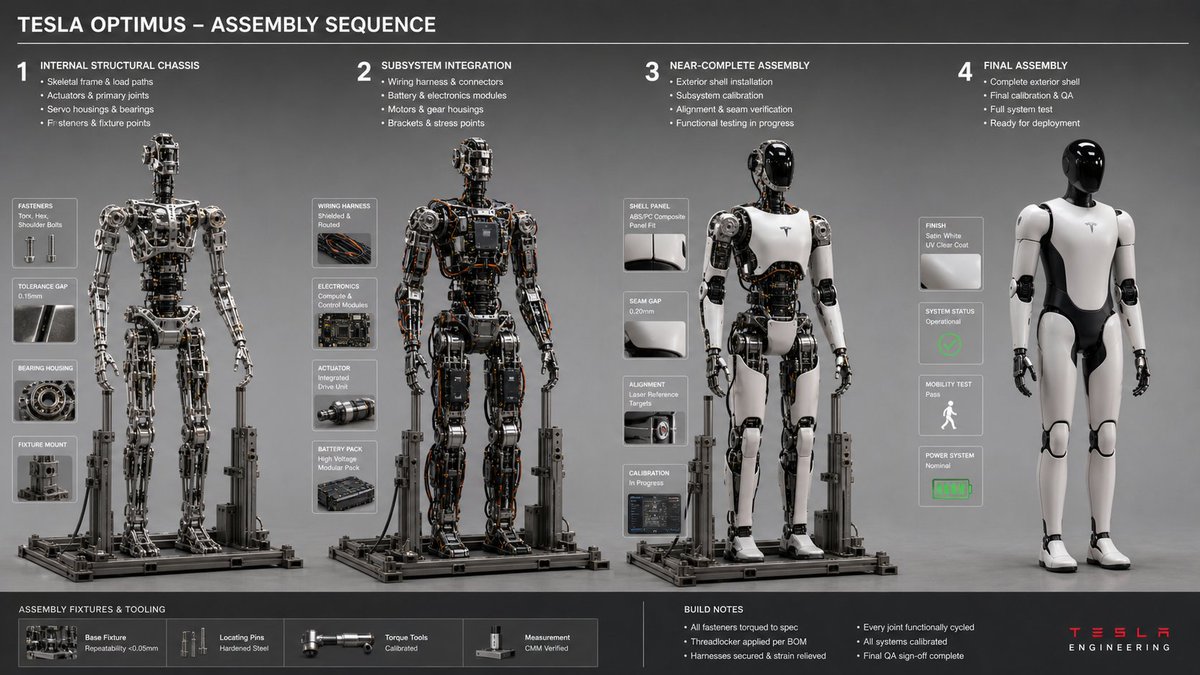
## Prompt
```text
16:9, do this for a Tesla Optimus Robot OBJECT: [INSERT OBJECT] STAGES: 4 RULE: AI infers logical build sequence from internal chassis to exterior shell. INFERENCE: Fastener types, jig/fixture shadows, tool marks, tolerance gaps, workspace debris. DOUBLE_INFER: Assembly order → stress points → wear patterns on tools/hands (if present). LAYOUT: Horizontal sequence, consistent lighting, isometric or 3/4 view. STYLE: Engineering workflow documentation, neutral gray backdrop, sharp focus ::3
```
### Wygeneruj ten prompt
| Model | GPT Image 2 2 |
|---|---|
| Szacowany koszt | $0.03 / wywołanie |
| Endpoint | `/api/v1/gpt_image_2/text_to_image` |
[Zaloguj się, aby wygenerować](https://runapi.ai/pl/login)
Wygenerowany obraz pojawi się tutaj
## Analiza promptu
### Temat
Engineering Assembly Documentation Layout
### Atmosfera
science-fiction / Obraz
### Techniczne
gpt-image-2 / Gpt Image 2 / Text To Image / /api/v1/gpt_image_2/text_to_image
### Styl
assembly, documentation, engineering, gray, isometric, sharp-focus, workflow
## Modele obsługujące ten prompt
| Modalność | Model | Cena | Wypróbuj |
|---|---|---|---|
| Obraz | Qwen 2/qwen-2-text-to-image | $0.04 / obraz | [Wypróbuj](https://runapi.ai/pl/models/qwen-2/text-to-image.md) |
| Obraz | Qwen 3/qwen-3-pro-text-to-image | $0.04-$0.08 / obraz | [Wypróbuj](https://runapi.ai/pl/models/qwen-3/pro-text-to-image.md) |
| Obraz | Qwen 3/qwen-3-text-to-image | $0.03 / obraz | [Wypróbuj](https://runapi.ai/pl/models/qwen-3/text-to-image.md) |
| Obraz | Qwen Image/qwen-image-text-to-image | $0.03 / obraz | [Wypróbuj](https://runapi.ai/pl/models/qwen-image/text-to-image.md) |
| Obraz | Wan/wan-2.7-image | $0.03 / obraz | [Wypróbuj](https://runapi.ai/pl/models/wan/2.7-image.md) |
## SZCZEGÓŁY URUCHOMIENIA
| Field | Value |
|---|---|
| Model | `gpt-image-2` |
| Modality | Obraz |
| Category | science-fiction |
| Tags | assembly, documentation, engineering, gray, isometric, sharp-focus, workflow |
## Use with an agent
### Claude Code
1. claude mcp add runapi -s user -- npx -y @runapi.ai/mcp
2. Uruchom ponownie Claude Code
3. Wklej ten prompt: Wygeneruj obraz: "16:9, do this for a Tesla Optimus Robot OBJECT: [INSERT OBJECT] STAGES: 4 RULE: AI infers logical build sequence from internal chassis to exterior shell. INFERENCE: Fastener types, jig/fixture shadows, tool marks, tolerance gaps, workspace debris. DOUBLE_INFER: Assembly order → stress points → wear patterns on tools/hands (if present). LAYOUT: Horizontal sequence, consistent lighting, isometric or 3/4 view. STYLE: Engineering workflow documentation, neutral gray backdrop, sharp focus ::3 "
### Codex
1. codex plugin install runapi-mcp@agents
2. Uruchom ponownie Codex
3. Wklej ten prompt: Wygeneruj obraz: "16:9, do this for a Tesla Optimus Robot OBJECT: [INSERT OBJECT] STAGES: 4 RULE: AI infers logical build sequence from internal chassis to exterior shell. INFERENCE: Fastener types, jig/fixture shadows, tool marks, tolerance gaps, workspace debris. DOUBLE_INFER: Assembly order → stress points → wear patterns on tools/hands (if present). LAYOUT: Horizontal sequence, consistent lighting, isometric or 3/4 view. STYLE: Engineering workflow documentation, neutral gray backdrop, sharp focus ::3 "
### Cursor
1. npx @runapi.ai/mcp init cursor
2. Uruchom ponownie Cursor
3. Wklej ten prompt: Wygeneruj obraz: "16:9, do this for a Tesla Optimus Robot OBJECT: [INSERT OBJECT] STAGES: 4 RULE: AI infers logical build sequence from internal chassis to exterior shell. INFERENCE: Fastener types, jig/fixture shadows, tool marks, tolerance gaps, workspace debris. DOUBLE_INFER: Assembly order → stress points → wear patterns on tools/hands (if present). LAYOUT: Horizontal sequence, consistent lighting, isometric or 3/4 view. STYLE: Engineering workflow documentation, neutral gray backdrop, sharp focus ::3 "
### Windsurf
1. npx @runapi.ai/mcp init windsurf
2. Uruchom ponownie Windsurf
3. Wklej ten prompt: Wygeneruj obraz: "16:9, do this for a Tesla Optimus Robot OBJECT: [INSERT OBJECT] STAGES: 4 RULE: AI infers logical build sequence from internal chassis to exterior shell. INFERENCE: Fastener types, jig/fixture shadows, tool marks, tolerance gaps, workspace debris. DOUBLE_INFER: Assembly order → stress points → wear patterns on tools/hands (if present). LAYOUT: Horizontal sequence, consistent lighting, isometric or 3/4 view. STYLE: Engineering workflow documentation, neutral gray backdrop, sharp focus ::3 "
## Generate via API
### curl
```curl
curl -X POST https://runapi.ai/api/v1/gpt_image_2/text_to_image \
-H "Authorization: Bearer $RUNAPI_API_KEY" \
-H "Content-Type: application/json" \
--data-binary @- <<'JSON'
{
"model": "gpt-image-2",
"prompt": "16:9, do this for a Tesla Optimus Robot OBJECT: [INSERT OBJECT] STAGES: 4 RULE: AI infers logical build sequence from internal chassis to exterior shell. INFERENCE: Fastener types, jig/fixture shadows, tool marks, tolerance gaps, workspace debris. DOUBLE_INFER: Assembly order → stress points → wear patterns on tools/hands (if present). LAYOUT: Horizontal sequence, consistent lighting, isometric or 3/4 view. STYLE: Engineering workflow documentation, neutral gray backdrop, sharp focus ::3 "
}
JSON
```
### Node.js
```javascript
import { GptImage2Client } from "@runapi.ai/gpt-image-2";
const client = new GptImage2Client({
apiKey: process.env.RUNAPI_API_KEY,
});
const result = await client.textToImage.run({
"model": "gpt-image-2",
"prompt": "16:9, do this for a Tesla Optimus Robot OBJECT: [INSERT OBJECT] STAGES: 4 RULE: AI infers logical build sequence from internal chassis to exterior shell. INFERENCE: Fastener types, jig/fixture shadows, tool marks, tolerance gaps, workspace debris. DOUBLE_INFER: Assembly order → stress points → wear patterns on tools/hands (if present). LAYOUT: Horizontal sequence, consistent lighting, isometric or 3/4 view. STYLE: Engineering workflow documentation, neutral gray backdrop, sharp focus ::3 "
});
console.log(result.id);
```
### Python
```python
import json
import os
import requests
response = requests.post(
"https://runapi.ai/api/v1/gpt_image_2/text_to_image",
headers={"Authorization": f"Bearer {os.environ['RUNAPI_API_KEY']}"},
json=json.loads("{\n \"model\": \"gpt-image-2\",\n \"prompt\": \"16:9, do this for a Tesla Optimus Robot\u003cassembly_seq\u003e OBJECT: [INSERT OBJECT] STAGES: 4 RULE: AI infers logical build sequence from internal chassis to exterior shell. INFERENCE: Fastener types, jig/fixture shadows, tool marks, tolerance gaps, workspace debris. DOUBLE_INFER: Assembly order → stress points → wear patterns on tools/hands (if present). LAYOUT: Horizontal sequence, consistent lighting, isometric or 3/4 view. \u003c/assembly_seq\u003e \u003crender\u003e STYLE: Engineering workflow documentation, neutral gray backdrop, sharp focus ::3 \u003c/render\u003e\"\n}")
)
response.raise_for_status()
print(response.json()["id"])
```
### PHP
```php
true,
CURLOPT_HTTPHEADER => [
"Authorization: Bearer " . getenv("RUNAPI_API_KEY"),
"Content-Type: application/json",
],
CURLOPT_POSTFIELDS => "{\n \"model\": \"gpt-image-2\",\n \"prompt\": \"16:9, do this for a Tesla Optimus Robot\u003cassembly_seq\u003e OBJECT: [INSERT OBJECT] STAGES: 4 RULE: AI infers logical build sequence from internal chassis to exterior shell. INFERENCE: Fastener types, jig/fixture shadows, tool marks, tolerance gaps, workspace debris. DOUBLE_INFER: Assembly order → stress points → wear patterns on tools/hands (if present). LAYOUT: Horizontal sequence, consistent lighting, isometric or 3/4 view. \u003c/assembly_seq\u003e \u003crender\u003e STYLE: Engineering workflow documentation, neutral gray backdrop, sharp focus ::3 \u003c/render\u003e\"\n}",
CURLOPT_RETURNTRANSFER => true,
]);
$response = json_decode(curl_exec($ch), true);
curl_close($ch);
echo $response["id"] . PHP_EOL;
```
### Java
```java
import java.net.URI;
import java.net.http.HttpClient;
import java.net.http.HttpRequest;
import java.net.http.HttpResponse;
var request = HttpRequest.newBuilder(URI.create("https://runapi.ai/api/v1/gpt_image_2/text_to_image"))
.header("Authorization", "Bearer " + System.getenv("RUNAPI_API_KEY"))
.header("Content-Type", "application/json")
.POST(HttpRequest.BodyPublishers.ofString("{\n \"model\": \"gpt-image-2\",\n \"prompt\": \"16:9, do this for a Tesla Optimus Robot\u003cassembly_seq\u003e OBJECT: [INSERT OBJECT] STAGES: 4 RULE: AI infers logical build sequence from internal chassis to exterior shell. INFERENCE: Fastener types, jig/fixture shadows, tool marks, tolerance gaps, workspace debris. DOUBLE_INFER: Assembly order → stress points → wear patterns on tools/hands (if present). LAYOUT: Horizontal sequence, consistent lighting, isometric or 3/4 view. \u003c/assembly_seq\u003e \u003crender\u003e STYLE: Engineering workflow documentation, neutral gray backdrop, sharp focus ::3 \u003c/render\u003e\"\n}"))
.build();
var response = HttpClient.newHttpClient().send(request, HttpResponse.BodyHandlers.ofString());
System.out.println(response.body());
```
### Ruby
```ruby
require "json"
require "net/http"
uri = URI("https://runapi.ai/api/v1/gpt_image_2/text_to_image")
request = Net::HTTP::Post.new(uri)
request["Authorization"] = "Bearer " + ENV.fetch("RUNAPI_API_KEY")
request["Content-Type"] = "application/json"
request.body = "{\n \"model\": \"gpt-image-2\",\n \"prompt\": \"16:9, do this for a Tesla Optimus Robot\u003cassembly_seq\u003e OBJECT: [INSERT OBJECT] STAGES: 4 RULE: AI infers logical build sequence from internal chassis to exterior shell. INFERENCE: Fastener types, jig/fixture shadows, tool marks, tolerance gaps, workspace debris. DOUBLE_INFER: Assembly order → stress points → wear patterns on tools/hands (if present). LAYOUT: Horizontal sequence, consistent lighting, isometric or 3/4 view. \u003c/assembly_seq\u003e \u003crender\u003e STYLE: Engineering workflow documentation, neutral gray backdrop, sharp focus ::3 \u003c/render\u003e\"\n}"
response = Net::HTTP.start(uri.hostname, uri.port, use_ssl: true) { |http| http.request(request) }
puts JSON.parse(response.body).fetch("id")
```
### Go
```go
package main
import (
"context"
"fmt"
"log"
"net/http"
"os"
"strings"
)
func main() {
body := strings.NewReader("{\"model\":\"gpt-image-2\",\"prompt\":\"16:9, do this for a Tesla Optimus Robot OBJECT: [INSERT OBJECT] STAGES: 4 RULE: AI infers logical build sequence from internal chassis to exterior shell. INFERENCE: Fastener types, jig/fixture shadows, tool marks, tolerance gaps, workspace debris. DOUBLE_INFER: Assembly order → stress points → wear patterns on tools/hands (if present). LAYOUT: Horizontal sequence, consistent lighting, isometric or 3/4 view. STYLE: Engineering workflow documentation, neutral gray backdrop, sharp focus ::3 \"}")
req, err := http.NewRequestWithContext(context.Background(), http.MethodPost, "https://runapi.ai/api/v1/gpt_image_2/text_to_image", body)
if err != nil {
log.Fatal(err)
}
req.Header.Set("Authorization", "Bearer "+os.Getenv("RUNAPI_API_KEY"))
req.Header.Set("Content-Type", "application/json")
resp, err := http.DefaultClient.Do(req)
if err != nil {
log.Fatal(err)
}
defer resp.Body.Close()
fmt.Println(resp.Status)
}
```
### CLI
```cli
$ runapi generate \
--model gpt-image-2 \
--prompt "16:9, do this for a Tesla Optimus Robot OBJECT: [INSERT OBJECT] STAGES: 4 RULE: AI infers logical build sequence from internal chassis to exterior shell. INFERENCE: Fastener types, jig/fixture shadows, tool marks, tolerance gaps, workspace debris. DOUBLE_INFER: Assembly order → stress points → wear patterns on tools/hands (if present). LAYOUT: Horizontal sequence, consistent lighting, isometric or 3/4 view. STYLE: Engineering workflow documentation, neutral gray backdrop, sharp focus ::3 " \
--wait
```
## Więcej promptów podobnych do tego
- [Split-Page Coffee Shop Travel Journal](https://runapi.ai/pl/prompts/split-page-coffee-shop-travel-journal-04BGD7.md) — `gpt-image-2`
- [Cute Chibi Characters in a Sweet Playful Moment](https://runapi.ai/pl/prompts/cute-chibi-characters-in-a-sweet-playful-moment-ARgVj7.md) — `gpt-image-2`
- [Underground Train Yard Clash Anime Development Board](https://runapi.ai/pl/prompts/underground-train-yard-clash-anime-development-board-Axmyw7.md) — `gpt-image-2`
## Jak używać tego promptu gpt-image-2
### Jak bezpiecznie skopiować ten prompt?
Użyj przycisku kopiowania obok pełnego bloku promptu. Kopiuje on wyłącznie tekst promptu, bez etykiet strony, dzięki czemu możesz wkleić go do instrukcji agenta, body żądania JSON albo własnej biblioteki promptów.
### Dlaczego strona szczegółów pokazuje parametry?
Niektóre prompty zostały zebrane z zapisanymi ustawieniami generowania, takimi jak proporcje, czas trwania lub sterowanie głosem. Gdy parametry istnieją, strona pokazuje je osobno, aby można było ponownie użyć tekstu promptu i ustrukturyzowanych ustawień razem.
### Który endpoint powinienem wywołać?
Użyj ścieżki endpointu pokazanej w bloku kodu API. Ścieżka jest generowana na podstawie usługi RunAPI i nazwy endpointu promptu, a następnie renderowana jako publiczny URL API używany przez curl i przykłady SDK.
### Czy mogę użyć tego promptu w agencie zamiast w kodzie?
Tak. Wybierz Claude Code, Codex, Cursor lub Windsurf w przełączniku kart, zainstaluj RunAPI MCP Server i wklej wygenerowaną instrukcję. Instrukcja zawiera pełny tekst promptu.
## Budujesz z zespołem?
Pomożemy w konfiguracji dla firm, integracjach i kwestiach technicznych.
[Skontaktuj się](https://runapi.ai/pl/contact.md)
---
## More from RunAPI
- [Home](https://runapi.ai/pl/.md)
### Produkt
- [Katalog modeli](https://runapi.ai/pl/models.md)
- [Cennik](https://runapi.ai/pl/pricing.md)
- [Dostawcy](https://runapi.ai/pl/models#all-models)
- [Galeria promptów](https://runapi.ai/pl/prompts.md)
### Dla developerów
- [Dokumentacja](https://runapi.ai/pl/docs/guides)
- [SDK](https://runapi.ai/pl/sdk.md)
- [CLI](https://runapi.ai/pl/cli.md)
- [Serwer MCP](https://runapi.ai/pl/mcp.md)
- [x402](https://runapi.ai/pl/x402.md)
### Przewodniki
- [Claude Code vs Cursor](https://runapi.ai/pl/claude-code-vs-cursor.md)
- [Konfiguracja Cursor API](https://runapi.ai/pl/cursor-api-setup.md)
- [RunAPI vs OpenRouter](https://runapi.ai/pl/openrouter-alternative.md)
### Firma
- [Enterprise](https://runapi.ai/pl/contact.md)
- [Kontakt](https://runapi.ai/pl/contact.md)
### Prawne
- [Regulamin](https://runapi.ai/pl/terms.md)
- [Prywatność](https://runapi.ai/pl/privacy.md)
- [Site index for agents](https://runapi.ai/llms.txt)
Contact: contact@runapi.ai
## Structured data
```json
[
{
"@context": "https://schema.org",
"inLanguage": "pl",
"@type": "WebSite",
"name": "RunAPI",
"url": "https://runapi.ai/pl",
"potentialAction": {
"@type": "SearchAction",
"target": {
"@type": "EntryPoint",
"urlTemplate": "https://runapi.ai/pl/models?q={search_term_string}"
},
"query-input": "required name=search_term_string"
}
},
{
"@context": "https://schema.org",
"inLanguage": "pl",
"@type": "Organization",
"name": "RunAPI",
"url": "https://runapi.ai/pl",
"logo": {
"@type": "ImageObject",
"url": "https://runapi.ai/plicon.svg"
},
"sameAs": [
"https://github.com/runapi-ai"
]
},
{
"@context": "https://schema.org",
"inLanguage": "pl",
"@type": "BreadcrumbList",
"itemListElement": [
{
"@type": "ListItem",
"position": 1,
"name": "Strona główna",
"item": "https://runapi.ai/pl"
},
{
"@type": "ListItem",
"position": 2,
"name": "Prompty",
"item": "https://runapi.ai/pl/prompts"
},
{
"@type": "ListItem",
"position": 3,
"name": "Obraz",
"item": "https://runapi.ai/pl/prompts/image"
},
{
"@type": "ListItem",
"position": 4,
"name": "Engineering Assembly Documentation Layout",
"item": "https://runapi.ai/prompts/optimus-robot-assembly-workflow-JvOkL0"
}
]
},
{
"@context": "https://schema.org",
"inLanguage": "pl",
"@type": "FAQPage",
"mainEntity": [
{
"@type": "Question",
"name": "Jak bezpiecznie skopiować ten prompt?",
"acceptedAnswer": {
"@type": "Answer",
"text": "Użyj przycisku kopiowania obok pełnego bloku promptu. Kopiuje on wyłącznie tekst promptu, bez etykiet strony, dzięki czemu możesz wkleić go do instrukcji agenta, body żądania JSON albo własnej biblioteki promptów."
}
},
{
"@type": "Question",
"name": "Dlaczego strona szczegółów pokazuje parametry?",
"acceptedAnswer": {
"@type": "Answer",
"text": "Niektóre prompty zostały zebrane z zapisanymi ustawieniami generowania, takimi jak proporcje, czas trwania lub sterowanie głosem. Gdy parametry istnieją, strona pokazuje je osobno, aby można było ponownie użyć tekstu promptu i ustrukturyzowanych ustawień razem."
}
},
{
"@type": "Question",
"name": "Który endpoint powinienem wywołać?",
"acceptedAnswer": {
"@type": "Answer",
"text": "Użyj ścieżki endpointu pokazanej w bloku kodu API. Ścieżka jest generowana na podstawie usługi RunAPI i nazwy endpointu promptu, a następnie renderowana jako publiczny URL API używany przez curl i przykłady SDK."
}
},
{
"@type": "Question",
"name": "Czy mogę użyć tego promptu w agencie zamiast w kodzie?",
"acceptedAnswer": {
"@type": "Answer",
"text": "Tak. Wybierz Claude Code, Codex, Cursor lub Windsurf w przełączniku kart, zainstaluj RunAPI MCP Server i wklej wygenerowaną instrukcję. Instrukcja zawiera pełny tekst promptu."
}
}
]
},
{
"@context": "https://schema.org",
"inLanguage": "en",
"@type": "CreativeWork",
"name": "Engineering Assembly Documentation Layout",
"text": "16:9, do this for a Tesla Optimus Robot OBJECT: [INSERT OBJECT] STAGES: 4 RULE: AI infers logical build sequence from internal chassis to exterior shell. INFERENCE: Fastener types, jig/fixture shadows, tool marks, tolerance gaps, workspace debris. DOUBLE_INFER: Assembly order → stress points → wear patterns on tools/hands (if present). LAYOUT: Horizontal sequence, consistent lighting, isometric or 3/4 view. STYLE: Engineering workflow documentation, neutral gray backdrop, sharp focus ::3 ",
"image": "https://cdn.runapi.ai/public/prompts/previews/edfa26d972f748ddfe8efc8fe015fe0f5ee5ee2bc861e9b443e2ebfb0de83d97-runapi-ai.jpg",
"about": [
"image",
"gpt-image-2",
"science-fiction"
]
}
]
```