---
title: Google Fonts Japanese Tutorial Infographic - gpt-image-2プロンプト | RunAPI
description: このRunAPIプロンプトをコピーし、エージェントのセットアップ手順を確認して、gpt-image-2のAPIコードを使用してください。
url: https://runapi.ai/ja/prompts/prm_KYOje3XAD56wueGj8kQpwx20.md
canonical: https://runapi.ai/ja/prompts/prm_KYOje3XAD56wueGj8kQpwx20
locale: ja
site: RunAPI
image: https://runapi.ai/assets/opengraph-bfaaa0f0.png
prompt_id: 19183
model: gpt-image-2
modality: image
endpoint: "/api/v1/gpt_image_2/text_to_image"
---
> HTML version: https://runapi.ai/ja/prompts/prm_KYOje3XAD56wueGj8kQpwx20
> Site index for agents: https://runapi.ai/llms.txt
# Google Fonts Japanese Tutorial Infographic
このRunAPIプロンプトをコピーし、エージェントのセットアップ手順を確認して、gpt-image-2のAPIコードを使用してください。
**プロンプト** · 画像
## プロンプト
```text
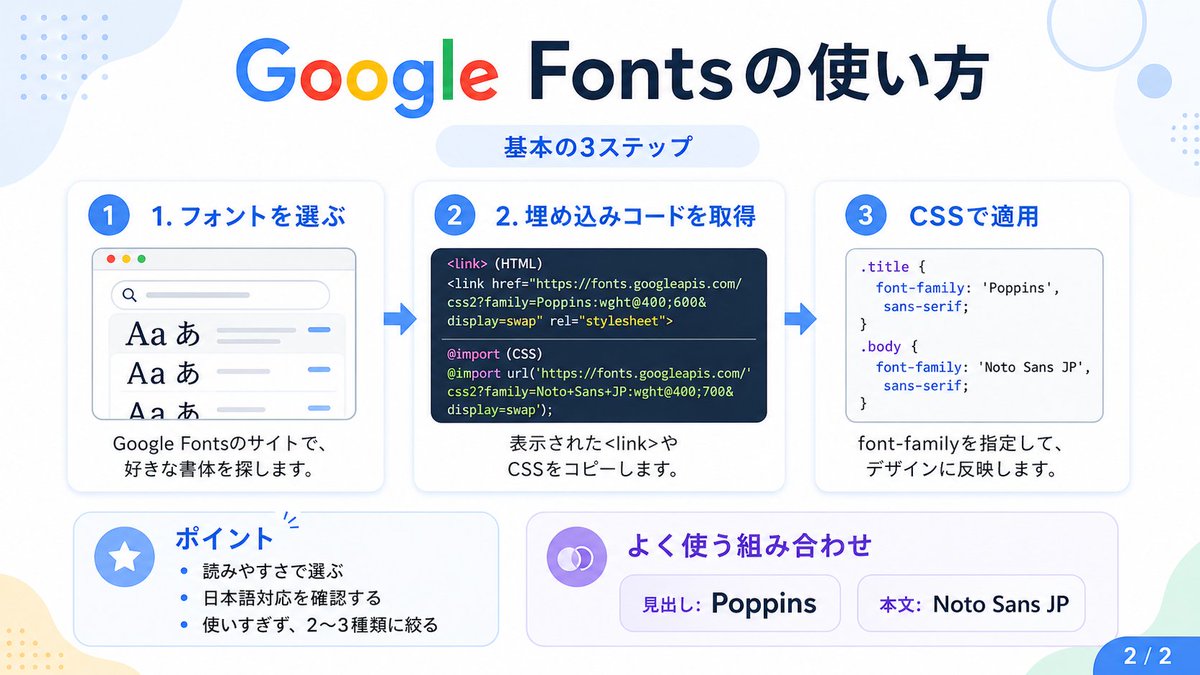
{"type":"Japanese infographic","topic":"How to use Google Fonts","style":"clean modern flat design, white background, soft pastel blue and mint corner blobs, rounded cards with subtle shadows, tech tutorial aesthetic, crisp vector typography and UI illustrations","canvas":{"aspect_ratio":"16:9"},"headline":{"main":"Google Fontsの使い方","sub":"基本の3ステップ"},"layout":{"sections":[{"title":"1. フォントを選ぶ","position":"left","count":1,"labels":["1. フォントを選ぶ"],"card_style":"rounded white panel with light blue border/shadow","icon":"blue numbered circle with 1","illustration":"browser window showing a font search interface, 3 visible font preview rows with large Aa あ samples, a search bar at top, small colored window buttons, light gray interface lines and blue accent dashes","body_text":"Google Fontsのサイトで、好きな書体を探します。"},{"title":"2. 埋め込みコードを取得","position":"center","count":1,"labels":["2. 埋め込みコードを取得"],"card_style":"rounded white panel with light blue border/shadow","icon":"blue numbered circle with 2","illustration":"dark code panel with two labeled code examples separated by a thin divider","code_blocks":{"count":2,"labels":[" (HTML)","@import (CSS)"],"content":["","@import url('https://fonts.googleapis.com/css2?family=Noto+Sans+JP:wght@400;700&display=swap');"]},"body_text":"表示されたやCSSをコピーします。"},{"title":"3. CSSで適用","position":"right","count":1,"labels":["3. CSSで適用"],"card_style":"rounded white panel with light blue border/shadow","icon":"blue numbered circle with 3","illustration":"white code card containing CSS with two selectors and font-family rules","code_blocks":{"count":2,"labels":[".title","body"],"content":[".title { font-family: 'Poppins', sans-serif; }","body { font-family: 'Noto Sans JP', sans-serif; }"]},"body_text":"font-familyを指定して、デザインに反映します。"},{"title":"ポイント","position":"bottom-left","count":3,"labels":["読みやすさで選ぶ","日本語対応を確認する","使いすぎず、2〜3種類に絞る"],"card_style":"rounded white panel with pale blue tint","icon":"blue star in a circle","body_format":"bullet list"},{"title":"よく使う組み合わせ","position":"bottom-center-right","count":2,"labels":["見出し: Poppins","本文: Noto Sans JP"],"card_style":"rounded white panel with pale lavender tint","icon":"purple linked-rings symbol","body_format":"two pill-shaped example boxes"}],"connectors":{"count":2,"style":"large blue right-pointing arrows between the 3 top cards"},"pagination":{"text":"2 / 2","position":"bottom-right","style":"blue rounded corner tab"}},"text_language":"Japanese","color_palette":{"primary_blue":"#2f80ff","navy":"#0f2b5b","google_colors":["#4285F4","#DB4437","#F4B400","#0F9D58"],"lavender":"#8b6cff","background":"#ffffff"}}
```
### このプロンプトを生成
| モデル | GPT Image 2 2 |
|---|---|
| 推定コスト | $0.03 / 回 |
| エンドポイント | `/api/v1/gpt_image_2/text_to_image` |
[サインインして生成](https://runapi.ai/ja/login)
生成された画像がここに表示されます
## プロンプトの内訳
### 被写体
Google Fonts Japanese Tutorial Infographic
### 雰囲気
art / 画像
### 技術的設定
gpt-image-2 / Gpt Image 2 / Text To Image / /api/v1/gpt_image_2/text_to_image
### スタイル
flat-design, google-fonts, japanese-infographic, pastel-blue, tech-tutorial, ui-illustrations, vector-typography
## このプロンプトに対応するモデル
| モダリティ | モデル | 料金 | 試す |
|---|---|---|---|
| 画像 | Qwen 2/qwen-2-text-to-image | $0.04 / 枚 | [試す](https://runapi.ai/ja/models/qwen-2/text-to-image.md) |
| 画像 | Qwen 3/qwen-3-pro-text-to-image | $0.04-$0.08 / 枚 | [試す](https://runapi.ai/ja/models/qwen-3/pro-text-to-image.md) |
| 画像 | Qwen 3/qwen-3-text-to-image | $0.03 / 枚 | [試す](https://runapi.ai/ja/models/qwen-3/text-to-image.md) |
| 画像 | Qwen Image/qwen-image-text-to-image | $0.03 / 枚 | [試す](https://runapi.ai/ja/models/qwen-image/text-to-image.md) |
| 画像 | Wan/wan-2.7-image | $0.03 / 枚 | [試す](https://runapi.ai/ja/models/wan/2.7-image.md) |
## 詳細
| Field | Value |
|---|---|
| モデル | `gpt-image-2` |
| Modality | 画像 |
| Category | art |
| Tags | flat-design, google-fonts, japanese-infographic, pastel-blue, tech-tutorial, ui-illustrations, vector-typography |
## Use with an agent
### Claude
1. claude mcp add runapi -s user -- npx -y @runapi.ai/mcp
2. Claude Codeを再起動する
3. このプロンプトを貼り付ける: 画像を生成してください:「{"type":"Japanese infographic","topic":"How to use Google Fonts","style":"clean modern flat design, white background, soft pastel blue and mint corner blobs, rounded cards with subtle shadows, tech tutorial aesthetic, crisp vector typography and UI illustrations","canvas":{"aspect_ratio":"16:9"},"headline":{"main":"Google Fontsの使い方","sub":"基本の3ステップ"},"layout":{"sections":[{"title":"1. フォントを選ぶ","position":"left","count":1,"labels":["1. フォントを選ぶ"],"card_style":"rounded white panel with light blue border/shadow","icon":"blue numbered circle with 1","illustration":"browser window showing a font search interface, 3 visible font preview rows with large Aa あ samples, a search bar at top, small colored window buttons, light gray interface lines and blue accent dashes","body_text":"Google Fontsのサイトで、好きな書体を探します。"},{"title":"2. 埋め込みコードを取得","position":"center","count":1,"labels":["2. 埋め込みコードを取得"],"card_style":"rounded white panel with light blue border/shadow","icon":"blue numbered circle with 2","illustration":"dark code panel with two labeled code examples separated by a thin divider","code_blocks":{"count":2,"labels":[" (HTML)","@import (CSS)"],"content":["","@import url('https://fonts.googleapis.com/css2?family=Noto+Sans+JP:wght@400;700&display=swap');"]},"body_text":"表示されたやCSSをコピーします。"},{"title":"3. CSSで適用","position":"right","count":1,"labels":["3. CSSで適用"],"card_style":"rounded white panel with light blue border/shadow","icon":"blue numbered circle with 3","illustration":"white code card containing CSS with two selectors and font-family rules","code_blocks":{"count":2,"labels":[".title","body"],"content":[".title { font-family: 'Poppins', sans-serif; }","body { font-family: 'Noto Sans JP', sans-serif; }"]},"body_text":"font-familyを指定して、デザインに反映します。"},{"title":"ポイント","position":"bottom-left","count":3,"labels":["読みやすさで選ぶ","日本語対応を確認する","使いすぎず、2〜3種類に絞る"],"card_style":"rounded white panel with pale blue tint","icon":"blue star in a circle","body_format":"bullet list"},{"title":"よく使う組み合わせ","position":"bottom-center-right","count":2,"labels":["見出し: Poppins","本文: Noto Sans JP"],"card_style":"rounded white panel with pale lavender tint","icon":"purple linked-rings symbol","body_format":"two pill-shaped example boxes"}],"connectors":{"count":2,"style":"large blue right-pointing arrows between the 3 top cards"},"pagination":{"text":"2 / 2","position":"bottom-right","style":"blue rounded corner tab"}},"text_language":"Japanese","color_palette":{"primary_blue":"#2f80ff","navy":"#0f2b5b","google_colors":["#4285F4","#DB4437","#F4B400","#0F9D58"],"lavender":"#8b6cff","background":"#ffffff"}}」
### Codex
1. codex plugin install runapi-mcp@agents
2. Codexを再起動する
3. このプロンプトを貼り付ける: 画像を生成してください:「{"type":"Japanese infographic","topic":"How to use Google Fonts","style":"clean modern flat design, white background, soft pastel blue and mint corner blobs, rounded cards with subtle shadows, tech tutorial aesthetic, crisp vector typography and UI illustrations","canvas":{"aspect_ratio":"16:9"},"headline":{"main":"Google Fontsの使い方","sub":"基本の3ステップ"},"layout":{"sections":[{"title":"1. フォントを選ぶ","position":"left","count":1,"labels":["1. フォントを選ぶ"],"card_style":"rounded white panel with light blue border/shadow","icon":"blue numbered circle with 1","illustration":"browser window showing a font search interface, 3 visible font preview rows with large Aa あ samples, a search bar at top, small colored window buttons, light gray interface lines and blue accent dashes","body_text":"Google Fontsのサイトで、好きな書体を探します。"},{"title":"2. 埋め込みコードを取得","position":"center","count":1,"labels":["2. 埋め込みコードを取得"],"card_style":"rounded white panel with light blue border/shadow","icon":"blue numbered circle with 2","illustration":"dark code panel with two labeled code examples separated by a thin divider","code_blocks":{"count":2,"labels":[" (HTML)","@import (CSS)"],"content":["","@import url('https://fonts.googleapis.com/css2?family=Noto+Sans+JP:wght@400;700&display=swap');"]},"body_text":"表示されたやCSSをコピーします。"},{"title":"3. CSSで適用","position":"right","count":1,"labels":["3. CSSで適用"],"card_style":"rounded white panel with light blue border/shadow","icon":"blue numbered circle with 3","illustration":"white code card containing CSS with two selectors and font-family rules","code_blocks":{"count":2,"labels":[".title","body"],"content":[".title { font-family: 'Poppins', sans-serif; }","body { font-family: 'Noto Sans JP', sans-serif; }"]},"body_text":"font-familyを指定して、デザインに反映します。"},{"title":"ポイント","position":"bottom-left","count":3,"labels":["読みやすさで選ぶ","日本語対応を確認する","使いすぎず、2〜3種類に絞る"],"card_style":"rounded white panel with pale blue tint","icon":"blue star in a circle","body_format":"bullet list"},{"title":"よく使う組み合わせ","position":"bottom-center-right","count":2,"labels":["見出し: Poppins","本文: Noto Sans JP"],"card_style":"rounded white panel with pale lavender tint","icon":"purple linked-rings symbol","body_format":"two pill-shaped example boxes"}],"connectors":{"count":2,"style":"large blue right-pointing arrows between the 3 top cards"},"pagination":{"text":"2 / 2","position":"bottom-right","style":"blue rounded corner tab"}},"text_language":"Japanese","color_palette":{"primary_blue":"#2f80ff","navy":"#0f2b5b","google_colors":["#4285F4","#DB4437","#F4B400","#0F9D58"],"lavender":"#8b6cff","background":"#ffffff"}}」
### Cursor
1. npx @runapi.ai/mcp init cursor
2. Cursorを再起動する
3. このプロンプトを貼り付ける: 画像を生成してください:「{"type":"Japanese infographic","topic":"How to use Google Fonts","style":"clean modern flat design, white background, soft pastel blue and mint corner blobs, rounded cards with subtle shadows, tech tutorial aesthetic, crisp vector typography and UI illustrations","canvas":{"aspect_ratio":"16:9"},"headline":{"main":"Google Fontsの使い方","sub":"基本の3ステップ"},"layout":{"sections":[{"title":"1. フォントを選ぶ","position":"left","count":1,"labels":["1. フォントを選ぶ"],"card_style":"rounded white panel with light blue border/shadow","icon":"blue numbered circle with 1","illustration":"browser window showing a font search interface, 3 visible font preview rows with large Aa あ samples, a search bar at top, small colored window buttons, light gray interface lines and blue accent dashes","body_text":"Google Fontsのサイトで、好きな書体を探します。"},{"title":"2. 埋め込みコードを取得","position":"center","count":1,"labels":["2. 埋め込みコードを取得"],"card_style":"rounded white panel with light blue border/shadow","icon":"blue numbered circle with 2","illustration":"dark code panel with two labeled code examples separated by a thin divider","code_blocks":{"count":2,"labels":[" (HTML)","@import (CSS)"],"content":["","@import url('https://fonts.googleapis.com/css2?family=Noto+Sans+JP:wght@400;700&display=swap');"]},"body_text":"表示されたやCSSをコピーします。"},{"title":"3. CSSで適用","position":"right","count":1,"labels":["3. CSSで適用"],"card_style":"rounded white panel with light blue border/shadow","icon":"blue numbered circle with 3","illustration":"white code card containing CSS with two selectors and font-family rules","code_blocks":{"count":2,"labels":[".title","body"],"content":[".title { font-family: 'Poppins', sans-serif; }","body { font-family: 'Noto Sans JP', sans-serif; }"]},"body_text":"font-familyを指定して、デザインに反映します。"},{"title":"ポイント","position":"bottom-left","count":3,"labels":["読みやすさで選ぶ","日本語対応を確認する","使いすぎず、2〜3種類に絞る"],"card_style":"rounded white panel with pale blue tint","icon":"blue star in a circle","body_format":"bullet list"},{"title":"よく使う組み合わせ","position":"bottom-center-right","count":2,"labels":["見出し: Poppins","本文: Noto Sans JP"],"card_style":"rounded white panel with pale lavender tint","icon":"purple linked-rings symbol","body_format":"two pill-shaped example boxes"}],"connectors":{"count":2,"style":"large blue right-pointing arrows between the 3 top cards"},"pagination":{"text":"2 / 2","position":"bottom-right","style":"blue rounded corner tab"}},"text_language":"Japanese","color_palette":{"primary_blue":"#2f80ff","navy":"#0f2b5b","google_colors":["#4285F4","#DB4437","#F4B400","#0F9D58"],"lavender":"#8b6cff","background":"#ffffff"}}」
### Windsurf
1. npx @runapi.ai/mcp init windsurf
2. Windsurfを再起動する
3. このプロンプトを貼り付ける: 画像を生成してください:「{"type":"Japanese infographic","topic":"How to use Google Fonts","style":"clean modern flat design, white background, soft pastel blue and mint corner blobs, rounded cards with subtle shadows, tech tutorial aesthetic, crisp vector typography and UI illustrations","canvas":{"aspect_ratio":"16:9"},"headline":{"main":"Google Fontsの使い方","sub":"基本の3ステップ"},"layout":{"sections":[{"title":"1. フォントを選ぶ","position":"left","count":1,"labels":["1. フォントを選ぶ"],"card_style":"rounded white panel with light blue border/shadow","icon":"blue numbered circle with 1","illustration":"browser window showing a font search interface, 3 visible font preview rows with large Aa あ samples, a search bar at top, small colored window buttons, light gray interface lines and blue accent dashes","body_text":"Google Fontsのサイトで、好きな書体を探します。"},{"title":"2. 埋め込みコードを取得","position":"center","count":1,"labels":["2. 埋め込みコードを取得"],"card_style":"rounded white panel with light blue border/shadow","icon":"blue numbered circle with 2","illustration":"dark code panel with two labeled code examples separated by a thin divider","code_blocks":{"count":2,"labels":[" (HTML)","@import (CSS)"],"content":["","@import url('https://fonts.googleapis.com/css2?family=Noto+Sans+JP:wght@400;700&display=swap');"]},"body_text":"表示されたやCSSをコピーします。"},{"title":"3. CSSで適用","position":"right","count":1,"labels":["3. CSSで適用"],"card_style":"rounded white panel with light blue border/shadow","icon":"blue numbered circle with 3","illustration":"white code card containing CSS with two selectors and font-family rules","code_blocks":{"count":2,"labels":[".title","body"],"content":[".title { font-family: 'Poppins', sans-serif; }","body { font-family: 'Noto Sans JP', sans-serif; }"]},"body_text":"font-familyを指定して、デザインに反映します。"},{"title":"ポイント","position":"bottom-left","count":3,"labels":["読みやすさで選ぶ","日本語対応を確認する","使いすぎず、2〜3種類に絞る"],"card_style":"rounded white panel with pale blue tint","icon":"blue star in a circle","body_format":"bullet list"},{"title":"よく使う組み合わせ","position":"bottom-center-right","count":2,"labels":["見出し: Poppins","本文: Noto Sans JP"],"card_style":"rounded white panel with pale lavender tint","icon":"purple linked-rings symbol","body_format":"two pill-shaped example boxes"}],"connectors":{"count":2,"style":"large blue right-pointing arrows between the 3 top cards"},"pagination":{"text":"2 / 2","position":"bottom-right","style":"blue rounded corner tab"}},"text_language":"Japanese","color_palette":{"primary_blue":"#2f80ff","navy":"#0f2b5b","google_colors":["#4285F4","#DB4437","#F4B400","#0F9D58"],"lavender":"#8b6cff","background":"#ffffff"}}」
## Generate via API
### curl
```curl
curl -X POST https://runapi.ai/api/v1/gpt_image_2/text_to_image \
-H "Authorization: Bearer $RUNAPI_API_KEY" \
-H "Content-Type: application/json" \
--data-binary @- <<'JSON'
{
"model": "gpt-image-2",
"prompt": "{\"type\":\"Japanese infographic\",\"topic\":\"How to use Google Fonts\",\"style\":\"clean modern flat design, white background, soft pastel blue and mint corner blobs, rounded cards with subtle shadows, tech tutorial aesthetic, crisp vector typography and UI illustrations\",\"canvas\":{\"aspect_ratio\":\"16:9\"},\"headline\":{\"main\":\"Google Fontsの使い方\",\"sub\":\"基本の3ステップ\"},\"layout\":{\"sections\":[{\"title\":\"1. フォントを選ぶ\",\"position\":\"left\",\"count\":1,\"labels\":[\"1. フォントを選ぶ\"],\"card_style\":\"rounded white panel with light blue border/shadow\",\"icon\":\"blue numbered circle with 1\",\"illustration\":\"browser window showing a font search interface, 3 visible font preview rows with large Aa あ samples, a search bar at top, small colored window buttons, light gray interface lines and blue accent dashes\",\"body_text\":\"Google Fontsのサイトで、好きな書体を探します。\"},{\"title\":\"2. 埋め込みコードを取得\",\"position\":\"center\",\"count\":1,\"labels\":[\"2. 埋め込みコードを取得\"],\"card_style\":\"rounded white panel with light blue border/shadow\",\"icon\":\"blue numbered circle with 2\",\"illustration\":\"dark code panel with two labeled code examples separated by a thin divider\",\"code_blocks\":{\"count\":2,\"labels\":[\" (HTML)\",\"@import (CSS)\"],\"content\":[\"\",\"@import url('https://fonts.googleapis.com/css2?family=Noto+Sans+JP:wght@400;700&display=swap');\"]},\"body_text\":\"表示されたやCSSをコピーします。\"},{\"title\":\"3. CSSで適用\",\"position\":\"right\",\"count\":1,\"labels\":[\"3. CSSで適用\"],\"card_style\":\"rounded white panel with light blue border/shadow\",\"icon\":\"blue numbered circle with 3\",\"illustration\":\"white code card containing CSS with two selectors and font-family rules\",\"code_blocks\":{\"count\":2,\"labels\":[\".title\",\"body\"],\"content\":[\".title { font-family: 'Poppins', sans-serif; }\",\"body { font-family: 'Noto Sans JP', sans-serif; }\"]},\"body_text\":\"font-familyを指定して、デザインに反映します。\"},{\"title\":\"ポイント\",\"position\":\"bottom-left\",\"count\":3,\"labels\":[\"読みやすさで選ぶ\",\"日本語対応を確認する\",\"使いすぎず、2〜3種類に絞る\"],\"card_style\":\"rounded white panel with pale blue tint\",\"icon\":\"blue star in a circle\",\"body_format\":\"bullet list\"},{\"title\":\"よく使う組み合わせ\",\"position\":\"bottom-center-right\",\"count\":2,\"labels\":[\"見出し: Poppins\",\"本文: Noto Sans JP\"],\"card_style\":\"rounded white panel with pale lavender tint\",\"icon\":\"purple linked-rings symbol\",\"body_format\":\"two pill-shaped example boxes\"}],\"connectors\":{\"count\":2,\"style\":\"large blue right-pointing arrows between the 3 top cards\"},\"pagination\":{\"text\":\"2 / 2\",\"position\":\"bottom-right\",\"style\":\"blue rounded corner tab\"}},\"text_language\":\"Japanese\",\"color_palette\":{\"primary_blue\":\"#2f80ff\",\"navy\":\"#0f2b5b\",\"google_colors\":[\"#4285F4\",\"#DB4437\",\"#F4B400\",\"#0F9D58\"],\"lavender\":\"#8b6cff\",\"background\":\"#ffffff\"}}"
}
JSON
```
### Node.js
```javascript
import { GptImage2Client } from "@runapi.ai/gpt-image-2";
const client = new GptImage2Client({
apiKey: process.env.RUNAPI_API_KEY,
});
const result = await client.textToImage.run({
"model": "gpt-image-2",
"prompt": "{\"type\":\"Japanese infographic\",\"topic\":\"How to use Google Fonts\",\"style\":\"clean modern flat design, white background, soft pastel blue and mint corner blobs, rounded cards with subtle shadows, tech tutorial aesthetic, crisp vector typography and UI illustrations\",\"canvas\":{\"aspect_ratio\":\"16:9\"},\"headline\":{\"main\":\"Google Fontsの使い方\",\"sub\":\"基本の3ステップ\"},\"layout\":{\"sections\":[{\"title\":\"1. フォントを選ぶ\",\"position\":\"left\",\"count\":1,\"labels\":[\"1. フォントを選ぶ\"],\"card_style\":\"rounded white panel with light blue border/shadow\",\"icon\":\"blue numbered circle with 1\",\"illustration\":\"browser window showing a font search interface, 3 visible font preview rows with large Aa あ samples, a search bar at top, small colored window buttons, light gray interface lines and blue accent dashes\",\"body_text\":\"Google Fontsのサイトで、好きな書体を探します。\"},{\"title\":\"2. 埋め込みコードを取得\",\"position\":\"center\",\"count\":1,\"labels\":[\"2. 埋め込みコードを取得\"],\"card_style\":\"rounded white panel with light blue border/shadow\",\"icon\":\"blue numbered circle with 2\",\"illustration\":\"dark code panel with two labeled code examples separated by a thin divider\",\"code_blocks\":{\"count\":2,\"labels\":[\" (HTML)\",\"@import (CSS)\"],\"content\":[\"\",\"@import url('https://fonts.googleapis.com/css2?family=Noto+Sans+JP:wght@400;700&display=swap');\"]},\"body_text\":\"表示されたやCSSをコピーします。\"},{\"title\":\"3. CSSで適用\",\"position\":\"right\",\"count\":1,\"labels\":[\"3. CSSで適用\"],\"card_style\":\"rounded white panel with light blue border/shadow\",\"icon\":\"blue numbered circle with 3\",\"illustration\":\"white code card containing CSS with two selectors and font-family rules\",\"code_blocks\":{\"count\":2,\"labels\":[\".title\",\"body\"],\"content\":[\".title { font-family: 'Poppins', sans-serif; }\",\"body { font-family: 'Noto Sans JP', sans-serif; }\"]},\"body_text\":\"font-familyを指定して、デザインに反映します。\"},{\"title\":\"ポイント\",\"position\":\"bottom-left\",\"count\":3,\"labels\":[\"読みやすさで選ぶ\",\"日本語対応を確認する\",\"使いすぎず、2〜3種類に絞る\"],\"card_style\":\"rounded white panel with pale blue tint\",\"icon\":\"blue star in a circle\",\"body_format\":\"bullet list\"},{\"title\":\"よく使う組み合わせ\",\"position\":\"bottom-center-right\",\"count\":2,\"labels\":[\"見出し: Poppins\",\"本文: Noto Sans JP\"],\"card_style\":\"rounded white panel with pale lavender tint\",\"icon\":\"purple linked-rings symbol\",\"body_format\":\"two pill-shaped example boxes\"}],\"connectors\":{\"count\":2,\"style\":\"large blue right-pointing arrows between the 3 top cards\"},\"pagination\":{\"text\":\"2 / 2\",\"position\":\"bottom-right\",\"style\":\"blue rounded corner tab\"}},\"text_language\":\"Japanese\",\"color_palette\":{\"primary_blue\":\"#2f80ff\",\"navy\":\"#0f2b5b\",\"google_colors\":[\"#4285F4\",\"#DB4437\",\"#F4B400\",\"#0F9D58\"],\"lavender\":\"#8b6cff\",\"background\":\"#ffffff\"}}"
});
console.log(result.id);
```
### Python
```python
import json
import os
import requests
response = requests.post(
"https://runapi.ai/api/v1/gpt_image_2/text_to_image",
headers={"Authorization": f"Bearer {os.environ['RUNAPI_API_KEY']}"},
json=json.loads("{\n \"model\": \"gpt-image-2\",\n \"prompt\": \"{\\\"type\\\":\\\"Japanese infographic\\\",\\\"topic\\\":\\\"How to use Google Fonts\\\",\\\"style\\\":\\\"clean modern flat design, white background, soft pastel blue and mint corner blobs, rounded cards with subtle shadows, tech tutorial aesthetic, crisp vector typography and UI illustrations\\\",\\\"canvas\\\":{\\\"aspect_ratio\\\":\\\"16:9\\\"},\\\"headline\\\":{\\\"main\\\":\\\"Google Fontsの使い方\\\",\\\"sub\\\":\\\"基本の3ステップ\\\"},\\\"layout\\\":{\\\"sections\\\":[{\\\"title\\\":\\\"1. フォントを選ぶ\\\",\\\"position\\\":\\\"left\\\",\\\"count\\\":1,\\\"labels\\\":[\\\"1. フォントを選ぶ\\\"],\\\"card_style\\\":\\\"rounded white panel with light blue border/shadow\\\",\\\"icon\\\":\\\"blue numbered circle with 1\\\",\\\"illustration\\\":\\\"browser window showing a font search interface, 3 visible font preview rows with large Aa あ samples, a search bar at top, small colored window buttons, light gray interface lines and blue accent dashes\\\",\\\"body_text\\\":\\\"Google Fontsのサイトで、好きな書体を探します。\\\"},{\\\"title\\\":\\\"2. 埋め込みコードを取得\\\",\\\"position\\\":\\\"center\\\",\\\"count\\\":1,\\\"labels\\\":[\\\"2. 埋め込みコードを取得\\\"],\\\"card_style\\\":\\\"rounded white panel with light blue border/shadow\\\",\\\"icon\\\":\\\"blue numbered circle with 2\\\",\\\"illustration\\\":\\\"dark code panel with two labeled code examples separated by a thin divider\\\",\\\"code_blocks\\\":{\\\"count\\\":2,\\\"labels\\\":[\\\"\u003clink\u003e (HTML)\\\",\\\"@import (CSS)\\\"],\\\"content\\\":[\\\"\u003clink href=\\\\\\\"https://fonts.googleapis.com/css2?family=Poppins:wght@400;600\u0026display=swap\\\\\\\" rel=\\\\\\\"stylesheet\\\\\\\"\u003e\\\",\\\"@import url('https://fonts.googleapis.com/css2?family=Noto+Sans+JP:wght@400;700\u0026display=swap');\\\"]},\\\"body_text\\\":\\\"表示された\u003clink\u003eやCSSをコピーします。\\\"},{\\\"title\\\":\\\"3. CSSで適用\\\",\\\"position\\\":\\\"right\\\",\\\"count\\\":1,\\\"labels\\\":[\\\"3. CSSで適用\\\"],\\\"card_style\\\":\\\"rounded white panel with light blue border/shadow\\\",\\\"icon\\\":\\\"blue numbered circle with 3\\\",\\\"illustration\\\":\\\"white code card containing CSS with two selectors and font-family rules\\\",\\\"code_blocks\\\":{\\\"count\\\":2,\\\"labels\\\":[\\\".title\\\",\\\"body\\\"],\\\"content\\\":[\\\".title { font-family: 'Poppins', sans-serif; }\\\",\\\"body { font-family: 'Noto Sans JP', sans-serif; }\\\"]},\\\"body_text\\\":\\\"font-familyを指定して、デザインに反映します。\\\"},{\\\"title\\\":\\\"ポイント\\\",\\\"position\\\":\\\"bottom-left\\\",\\\"count\\\":3,\\\"labels\\\":[\\\"読みやすさで選ぶ\\\",\\\"日本語対応を確認する\\\",\\\"使いすぎず、2〜3種類に絞る\\\"],\\\"card_style\\\":\\\"rounded white panel with pale blue tint\\\",\\\"icon\\\":\\\"blue star in a circle\\\",\\\"body_format\\\":\\\"bullet list\\\"},{\\\"title\\\":\\\"よく使う組み合わせ\\\",\\\"position\\\":\\\"bottom-center-right\\\",\\\"count\\\":2,\\\"labels\\\":[\\\"見出し: Poppins\\\",\\\"本文: Noto Sans JP\\\"],\\\"card_style\\\":\\\"rounded white panel with pale lavender tint\\\",\\\"icon\\\":\\\"purple linked-rings symbol\\\",\\\"body_format\\\":\\\"two pill-shaped example boxes\\\"}],\\\"connectors\\\":{\\\"count\\\":2,\\\"style\\\":\\\"large blue right-pointing arrows between the 3 top cards\\\"},\\\"pagination\\\":{\\\"text\\\":\\\"2 / 2\\\",\\\"position\\\":\\\"bottom-right\\\",\\\"style\\\":\\\"blue rounded corner tab\\\"}},\\\"text_language\\\":\\\"Japanese\\\",\\\"color_palette\\\":{\\\"primary_blue\\\":\\\"#2f80ff\\\",\\\"navy\\\":\\\"#0f2b5b\\\",\\\"google_colors\\\":[\\\"#4285F4\\\",\\\"#DB4437\\\",\\\"#F4B400\\\",\\\"#0F9D58\\\"],\\\"lavender\\\":\\\"#8b6cff\\\",\\\"background\\\":\\\"#ffffff\\\"}}\"\n}")
)
response.raise_for_status()
print(response.json()["id"])
```
### PHP
```php
true,
CURLOPT_HTTPHEADER => [
"Authorization: Bearer " . getenv("RUNAPI_API_KEY"),
"Content-Type: application/json",
],
CURLOPT_POSTFIELDS => "{\n \"model\": \"gpt-image-2\",\n \"prompt\": \"{\\\"type\\\":\\\"Japanese infographic\\\",\\\"topic\\\":\\\"How to use Google Fonts\\\",\\\"style\\\":\\\"clean modern flat design, white background, soft pastel blue and mint corner blobs, rounded cards with subtle shadows, tech tutorial aesthetic, crisp vector typography and UI illustrations\\\",\\\"canvas\\\":{\\\"aspect_ratio\\\":\\\"16:9\\\"},\\\"headline\\\":{\\\"main\\\":\\\"Google Fontsの使い方\\\",\\\"sub\\\":\\\"基本の3ステップ\\\"},\\\"layout\\\":{\\\"sections\\\":[{\\\"title\\\":\\\"1. フォントを選ぶ\\\",\\\"position\\\":\\\"left\\\",\\\"count\\\":1,\\\"labels\\\":[\\\"1. フォントを選ぶ\\\"],\\\"card_style\\\":\\\"rounded white panel with light blue border/shadow\\\",\\\"icon\\\":\\\"blue numbered circle with 1\\\",\\\"illustration\\\":\\\"browser window showing a font search interface, 3 visible font preview rows with large Aa あ samples, a search bar at top, small colored window buttons, light gray interface lines and blue accent dashes\\\",\\\"body_text\\\":\\\"Google Fontsのサイトで、好きな書体を探します。\\\"},{\\\"title\\\":\\\"2. 埋め込みコードを取得\\\",\\\"position\\\":\\\"center\\\",\\\"count\\\":1,\\\"labels\\\":[\\\"2. 埋め込みコードを取得\\\"],\\\"card_style\\\":\\\"rounded white panel with light blue border/shadow\\\",\\\"icon\\\":\\\"blue numbered circle with 2\\\",\\\"illustration\\\":\\\"dark code panel with two labeled code examples separated by a thin divider\\\",\\\"code_blocks\\\":{\\\"count\\\":2,\\\"labels\\\":[\\\"\u003clink\u003e (HTML)\\\",\\\"@import (CSS)\\\"],\\\"content\\\":[\\\"\u003clink href=\\\\\\\"https://fonts.googleapis.com/css2?family=Poppins:wght@400;600\u0026display=swap\\\\\\\" rel=\\\\\\\"stylesheet\\\\\\\"\u003e\\\",\\\"@import url('https://fonts.googleapis.com/css2?family=Noto+Sans+JP:wght@400;700\u0026display=swap');\\\"]},\\\"body_text\\\":\\\"表示された\u003clink\u003eやCSSをコピーします。\\\"},{\\\"title\\\":\\\"3. CSSで適用\\\",\\\"position\\\":\\\"right\\\",\\\"count\\\":1,\\\"labels\\\":[\\\"3. CSSで適用\\\"],\\\"card_style\\\":\\\"rounded white panel with light blue border/shadow\\\",\\\"icon\\\":\\\"blue numbered circle with 3\\\",\\\"illustration\\\":\\\"white code card containing CSS with two selectors and font-family rules\\\",\\\"code_blocks\\\":{\\\"count\\\":2,\\\"labels\\\":[\\\".title\\\",\\\"body\\\"],\\\"content\\\":[\\\".title { font-family: 'Poppins', sans-serif; }\\\",\\\"body { font-family: 'Noto Sans JP', sans-serif; }\\\"]},\\\"body_text\\\":\\\"font-familyを指定して、デザインに反映します。\\\"},{\\\"title\\\":\\\"ポイント\\\",\\\"position\\\":\\\"bottom-left\\\",\\\"count\\\":3,\\\"labels\\\":[\\\"読みやすさで選ぶ\\\",\\\"日本語対応を確認する\\\",\\\"使いすぎず、2〜3種類に絞る\\\"],\\\"card_style\\\":\\\"rounded white panel with pale blue tint\\\",\\\"icon\\\":\\\"blue star in a circle\\\",\\\"body_format\\\":\\\"bullet list\\\"},{\\\"title\\\":\\\"よく使う組み合わせ\\\",\\\"position\\\":\\\"bottom-center-right\\\",\\\"count\\\":2,\\\"labels\\\":[\\\"見出し: Poppins\\\",\\\"本文: Noto Sans JP\\\"],\\\"card_style\\\":\\\"rounded white panel with pale lavender tint\\\",\\\"icon\\\":\\\"purple linked-rings symbol\\\",\\\"body_format\\\":\\\"two pill-shaped example boxes\\\"}],\\\"connectors\\\":{\\\"count\\\":2,\\\"style\\\":\\\"large blue right-pointing arrows between the 3 top cards\\\"},\\\"pagination\\\":{\\\"text\\\":\\\"2 / 2\\\",\\\"position\\\":\\\"bottom-right\\\",\\\"style\\\":\\\"blue rounded corner tab\\\"}},\\\"text_language\\\":\\\"Japanese\\\",\\\"color_palette\\\":{\\\"primary_blue\\\":\\\"#2f80ff\\\",\\\"navy\\\":\\\"#0f2b5b\\\",\\\"google_colors\\\":[\\\"#4285F4\\\",\\\"#DB4437\\\",\\\"#F4B400\\\",\\\"#0F9D58\\\"],\\\"lavender\\\":\\\"#8b6cff\\\",\\\"background\\\":\\\"#ffffff\\\"}}\"\n}",
CURLOPT_RETURNTRANSFER => true,
]);
$response = json_decode(curl_exec($ch), true);
curl_close($ch);
echo $response["id"] . PHP_EOL;
```
### Java
```java
import java.net.URI;
import java.net.http.HttpClient;
import java.net.http.HttpRequest;
import java.net.http.HttpResponse;
var request = HttpRequest.newBuilder(URI.create("https://runapi.ai/api/v1/gpt_image_2/text_to_image"))
.header("Authorization", "Bearer " + System.getenv("RUNAPI_API_KEY"))
.header("Content-Type", "application/json")
.POST(HttpRequest.BodyPublishers.ofString("{\n \"model\": \"gpt-image-2\",\n \"prompt\": \"{\\\"type\\\":\\\"Japanese infographic\\\",\\\"topic\\\":\\\"How to use Google Fonts\\\",\\\"style\\\":\\\"clean modern flat design, white background, soft pastel blue and mint corner blobs, rounded cards with subtle shadows, tech tutorial aesthetic, crisp vector typography and UI illustrations\\\",\\\"canvas\\\":{\\\"aspect_ratio\\\":\\\"16:9\\\"},\\\"headline\\\":{\\\"main\\\":\\\"Google Fontsの使い方\\\",\\\"sub\\\":\\\"基本の3ステップ\\\"},\\\"layout\\\":{\\\"sections\\\":[{\\\"title\\\":\\\"1. フォントを選ぶ\\\",\\\"position\\\":\\\"left\\\",\\\"count\\\":1,\\\"labels\\\":[\\\"1. フォントを選ぶ\\\"],\\\"card_style\\\":\\\"rounded white panel with light blue border/shadow\\\",\\\"icon\\\":\\\"blue numbered circle with 1\\\",\\\"illustration\\\":\\\"browser window showing a font search interface, 3 visible font preview rows with large Aa あ samples, a search bar at top, small colored window buttons, light gray interface lines and blue accent dashes\\\",\\\"body_text\\\":\\\"Google Fontsのサイトで、好きな書体を探します。\\\"},{\\\"title\\\":\\\"2. 埋め込みコードを取得\\\",\\\"position\\\":\\\"center\\\",\\\"count\\\":1,\\\"labels\\\":[\\\"2. 埋め込みコードを取得\\\"],\\\"card_style\\\":\\\"rounded white panel with light blue border/shadow\\\",\\\"icon\\\":\\\"blue numbered circle with 2\\\",\\\"illustration\\\":\\\"dark code panel with two labeled code examples separated by a thin divider\\\",\\\"code_blocks\\\":{\\\"count\\\":2,\\\"labels\\\":[\\\"\u003clink\u003e (HTML)\\\",\\\"@import (CSS)\\\"],\\\"content\\\":[\\\"\u003clink href=\\\\\\\"https://fonts.googleapis.com/css2?family=Poppins:wght@400;600\u0026display=swap\\\\\\\" rel=\\\\\\\"stylesheet\\\\\\\"\u003e\\\",\\\"@import url('https://fonts.googleapis.com/css2?family=Noto+Sans+JP:wght@400;700\u0026display=swap');\\\"]},\\\"body_text\\\":\\\"表示された\u003clink\u003eやCSSをコピーします。\\\"},{\\\"title\\\":\\\"3. CSSで適用\\\",\\\"position\\\":\\\"right\\\",\\\"count\\\":1,\\\"labels\\\":[\\\"3. CSSで適用\\\"],\\\"card_style\\\":\\\"rounded white panel with light blue border/shadow\\\",\\\"icon\\\":\\\"blue numbered circle with 3\\\",\\\"illustration\\\":\\\"white code card containing CSS with two selectors and font-family rules\\\",\\\"code_blocks\\\":{\\\"count\\\":2,\\\"labels\\\":[\\\".title\\\",\\\"body\\\"],\\\"content\\\":[\\\".title { font-family: 'Poppins', sans-serif; }\\\",\\\"body { font-family: 'Noto Sans JP', sans-serif; }\\\"]},\\\"body_text\\\":\\\"font-familyを指定して、デザインに反映します。\\\"},{\\\"title\\\":\\\"ポイント\\\",\\\"position\\\":\\\"bottom-left\\\",\\\"count\\\":3,\\\"labels\\\":[\\\"読みやすさで選ぶ\\\",\\\"日本語対応を確認する\\\",\\\"使いすぎず、2〜3種類に絞る\\\"],\\\"card_style\\\":\\\"rounded white panel with pale blue tint\\\",\\\"icon\\\":\\\"blue star in a circle\\\",\\\"body_format\\\":\\\"bullet list\\\"},{\\\"title\\\":\\\"よく使う組み合わせ\\\",\\\"position\\\":\\\"bottom-center-right\\\",\\\"count\\\":2,\\\"labels\\\":[\\\"見出し: Poppins\\\",\\\"本文: Noto Sans JP\\\"],\\\"card_style\\\":\\\"rounded white panel with pale lavender tint\\\",\\\"icon\\\":\\\"purple linked-rings symbol\\\",\\\"body_format\\\":\\\"two pill-shaped example boxes\\\"}],\\\"connectors\\\":{\\\"count\\\":2,\\\"style\\\":\\\"large blue right-pointing arrows between the 3 top cards\\\"},\\\"pagination\\\":{\\\"text\\\":\\\"2 / 2\\\",\\\"position\\\":\\\"bottom-right\\\",\\\"style\\\":\\\"blue rounded corner tab\\\"}},\\\"text_language\\\":\\\"Japanese\\\",\\\"color_palette\\\":{\\\"primary_blue\\\":\\\"#2f80ff\\\",\\\"navy\\\":\\\"#0f2b5b\\\",\\\"google_colors\\\":[\\\"#4285F4\\\",\\\"#DB4437\\\",\\\"#F4B400\\\",\\\"#0F9D58\\\"],\\\"lavender\\\":\\\"#8b6cff\\\",\\\"background\\\":\\\"#ffffff\\\"}}\"\n}"))
.build();
var response = HttpClient.newHttpClient().send(request, HttpResponse.BodyHandlers.ofString());
System.out.println(response.body());
```
### Ruby
```ruby
require "json"
require "net/http"
uri = URI("https://runapi.ai/api/v1/gpt_image_2/text_to_image")
request = Net::HTTP::Post.new(uri)
request["Authorization"] = "Bearer " + ENV.fetch("RUNAPI_API_KEY")
request["Content-Type"] = "application/json"
request.body = "{\n \"model\": \"gpt-image-2\",\n \"prompt\": \"{\\\"type\\\":\\\"Japanese infographic\\\",\\\"topic\\\":\\\"How to use Google Fonts\\\",\\\"style\\\":\\\"clean modern flat design, white background, soft pastel blue and mint corner blobs, rounded cards with subtle shadows, tech tutorial aesthetic, crisp vector typography and UI illustrations\\\",\\\"canvas\\\":{\\\"aspect_ratio\\\":\\\"16:9\\\"},\\\"headline\\\":{\\\"main\\\":\\\"Google Fontsの使い方\\\",\\\"sub\\\":\\\"基本の3ステップ\\\"},\\\"layout\\\":{\\\"sections\\\":[{\\\"title\\\":\\\"1. フォントを選ぶ\\\",\\\"position\\\":\\\"left\\\",\\\"count\\\":1,\\\"labels\\\":[\\\"1. フォントを選ぶ\\\"],\\\"card_style\\\":\\\"rounded white panel with light blue border/shadow\\\",\\\"icon\\\":\\\"blue numbered circle with 1\\\",\\\"illustration\\\":\\\"browser window showing a font search interface, 3 visible font preview rows with large Aa あ samples, a search bar at top, small colored window buttons, light gray interface lines and blue accent dashes\\\",\\\"body_text\\\":\\\"Google Fontsのサイトで、好きな書体を探します。\\\"},{\\\"title\\\":\\\"2. 埋め込みコードを取得\\\",\\\"position\\\":\\\"center\\\",\\\"count\\\":1,\\\"labels\\\":[\\\"2. 埋め込みコードを取得\\\"],\\\"card_style\\\":\\\"rounded white panel with light blue border/shadow\\\",\\\"icon\\\":\\\"blue numbered circle with 2\\\",\\\"illustration\\\":\\\"dark code panel with two labeled code examples separated by a thin divider\\\",\\\"code_blocks\\\":{\\\"count\\\":2,\\\"labels\\\":[\\\"\u003clink\u003e (HTML)\\\",\\\"@import (CSS)\\\"],\\\"content\\\":[\\\"\u003clink href=\\\\\\\"https://fonts.googleapis.com/css2?family=Poppins:wght@400;600\u0026display=swap\\\\\\\" rel=\\\\\\\"stylesheet\\\\\\\"\u003e\\\",\\\"@import url('https://fonts.googleapis.com/css2?family=Noto+Sans+JP:wght@400;700\u0026display=swap');\\\"]},\\\"body_text\\\":\\\"表示された\u003clink\u003eやCSSをコピーします。\\\"},{\\\"title\\\":\\\"3. CSSで適用\\\",\\\"position\\\":\\\"right\\\",\\\"count\\\":1,\\\"labels\\\":[\\\"3. CSSで適用\\\"],\\\"card_style\\\":\\\"rounded white panel with light blue border/shadow\\\",\\\"icon\\\":\\\"blue numbered circle with 3\\\",\\\"illustration\\\":\\\"white code card containing CSS with two selectors and font-family rules\\\",\\\"code_blocks\\\":{\\\"count\\\":2,\\\"labels\\\":[\\\".title\\\",\\\"body\\\"],\\\"content\\\":[\\\".title { font-family: 'Poppins', sans-serif; }\\\",\\\"body { font-family: 'Noto Sans JP', sans-serif; }\\\"]},\\\"body_text\\\":\\\"font-familyを指定して、デザインに反映します。\\\"},{\\\"title\\\":\\\"ポイント\\\",\\\"position\\\":\\\"bottom-left\\\",\\\"count\\\":3,\\\"labels\\\":[\\\"読みやすさで選ぶ\\\",\\\"日本語対応を確認する\\\",\\\"使いすぎず、2〜3種類に絞る\\\"],\\\"card_style\\\":\\\"rounded white panel with pale blue tint\\\",\\\"icon\\\":\\\"blue star in a circle\\\",\\\"body_format\\\":\\\"bullet list\\\"},{\\\"title\\\":\\\"よく使う組み合わせ\\\",\\\"position\\\":\\\"bottom-center-right\\\",\\\"count\\\":2,\\\"labels\\\":[\\\"見出し: Poppins\\\",\\\"本文: Noto Sans JP\\\"],\\\"card_style\\\":\\\"rounded white panel with pale lavender tint\\\",\\\"icon\\\":\\\"purple linked-rings symbol\\\",\\\"body_format\\\":\\\"two pill-shaped example boxes\\\"}],\\\"connectors\\\":{\\\"count\\\":2,\\\"style\\\":\\\"large blue right-pointing arrows between the 3 top cards\\\"},\\\"pagination\\\":{\\\"text\\\":\\\"2 / 2\\\",\\\"position\\\":\\\"bottom-right\\\",\\\"style\\\":\\\"blue rounded corner tab\\\"}},\\\"text_language\\\":\\\"Japanese\\\",\\\"color_palette\\\":{\\\"primary_blue\\\":\\\"#2f80ff\\\",\\\"navy\\\":\\\"#0f2b5b\\\",\\\"google_colors\\\":[\\\"#4285F4\\\",\\\"#DB4437\\\",\\\"#F4B400\\\",\\\"#0F9D58\\\"],\\\"lavender\\\":\\\"#8b6cff\\\",\\\"background\\\":\\\"#ffffff\\\"}}\"\n}"
response = Net::HTTP.start(uri.hostname, uri.port, use_ssl: true) { |http| http.request(request) }
puts JSON.parse(response.body).fetch("id")
```
### Go
```go
package main
import (
"context"
"fmt"
"log"
"net/http"
"os"
"strings"
)
func main() {
body := strings.NewReader("{\"model\":\"gpt-image-2\",\"prompt\":\"{\\\"type\\\":\\\"Japanese infographic\\\",\\\"topic\\\":\\\"How to use Google Fonts\\\",\\\"style\\\":\\\"clean modern flat design, white background, soft pastel blue and mint corner blobs, rounded cards with subtle shadows, tech tutorial aesthetic, crisp vector typography and UI illustrations\\\",\\\"canvas\\\":{\\\"aspect_ratio\\\":\\\"16:9\\\"},\\\"headline\\\":{\\\"main\\\":\\\"Google Fontsの使い方\\\",\\\"sub\\\":\\\"基本の3ステップ\\\"},\\\"layout\\\":{\\\"sections\\\":[{\\\"title\\\":\\\"1. フォントを選ぶ\\\",\\\"position\\\":\\\"left\\\",\\\"count\\\":1,\\\"labels\\\":[\\\"1. フォントを選ぶ\\\"],\\\"card_style\\\":\\\"rounded white panel with light blue border/shadow\\\",\\\"icon\\\":\\\"blue numbered circle with 1\\\",\\\"illustration\\\":\\\"browser window showing a font search interface, 3 visible font preview rows with large Aa あ samples, a search bar at top, small colored window buttons, light gray interface lines and blue accent dashes\\\",\\\"body_text\\\":\\\"Google Fontsのサイトで、好きな書体を探します。\\\"},{\\\"title\\\":\\\"2. 埋め込みコードを取得\\\",\\\"position\\\":\\\"center\\\",\\\"count\\\":1,\\\"labels\\\":[\\\"2. 埋め込みコードを取得\\\"],\\\"card_style\\\":\\\"rounded white panel with light blue border/shadow\\\",\\\"icon\\\":\\\"blue numbered circle with 2\\\",\\\"illustration\\\":\\\"dark code panel with two labeled code examples separated by a thin divider\\\",\\\"code_blocks\\\":{\\\"count\\\":2,\\\"labels\\\":[\\\" (HTML)\\\",\\\"@import (CSS)\\\"],\\\"content\\\":[\\\"\\\",\\\"@import url('https://fonts.googleapis.com/css2?family=Noto+Sans+JP:wght@400;700&display=swap');\\\"]},\\\"body_text\\\":\\\"表示されたやCSSをコピーします。\\\"},{\\\"title\\\":\\\"3. CSSで適用\\\",\\\"position\\\":\\\"right\\\",\\\"count\\\":1,\\\"labels\\\":[\\\"3. CSSで適用\\\"],\\\"card_style\\\":\\\"rounded white panel with light blue border/shadow\\\",\\\"icon\\\":\\\"blue numbered circle with 3\\\",\\\"illustration\\\":\\\"white code card containing CSS with two selectors and font-family rules\\\",\\\"code_blocks\\\":{\\\"count\\\":2,\\\"labels\\\":[\\\".title\\\",\\\"body\\\"],\\\"content\\\":[\\\".title { font-family: 'Poppins', sans-serif; }\\\",\\\"body { font-family: 'Noto Sans JP', sans-serif; }\\\"]},\\\"body_text\\\":\\\"font-familyを指定して、デザインに反映します。\\\"},{\\\"title\\\":\\\"ポイント\\\",\\\"position\\\":\\\"bottom-left\\\",\\\"count\\\":3,\\\"labels\\\":[\\\"読みやすさで選ぶ\\\",\\\"日本語対応を確認する\\\",\\\"使いすぎず、2〜3種類に絞る\\\"],\\\"card_style\\\":\\\"rounded white panel with pale blue tint\\\",\\\"icon\\\":\\\"blue star in a circle\\\",\\\"body_format\\\":\\\"bullet list\\\"},{\\\"title\\\":\\\"よく使う組み合わせ\\\",\\\"position\\\":\\\"bottom-center-right\\\",\\\"count\\\":2,\\\"labels\\\":[\\\"見出し: Poppins\\\",\\\"本文: Noto Sans JP\\\"],\\\"card_style\\\":\\\"rounded white panel with pale lavender tint\\\",\\\"icon\\\":\\\"purple linked-rings symbol\\\",\\\"body_format\\\":\\\"two pill-shaped example boxes\\\"}],\\\"connectors\\\":{\\\"count\\\":2,\\\"style\\\":\\\"large blue right-pointing arrows between the 3 top cards\\\"},\\\"pagination\\\":{\\\"text\\\":\\\"2 / 2\\\",\\\"position\\\":\\\"bottom-right\\\",\\\"style\\\":\\\"blue rounded corner tab\\\"}},\\\"text_language\\\":\\\"Japanese\\\",\\\"color_palette\\\":{\\\"primary_blue\\\":\\\"#2f80ff\\\",\\\"navy\\\":\\\"#0f2b5b\\\",\\\"google_colors\\\":[\\\"#4285F4\\\",\\\"#DB4437\\\",\\\"#F4B400\\\",\\\"#0F9D58\\\"],\\\"lavender\\\":\\\"#8b6cff\\\",\\\"background\\\":\\\"#ffffff\\\"}}\"}")
req, err := http.NewRequestWithContext(context.Background(), http.MethodPost, "https://runapi.ai/api/v1/gpt_image_2/text_to_image", body)
if err != nil {
log.Fatal(err)
}
req.Header.Set("Authorization", "Bearer "+os.Getenv("RUNAPI_API_KEY"))
req.Header.Set("Content-Type", "application/json")
resp, err := http.DefaultClient.Do(req)
if err != nil {
log.Fatal(err)
}
defer resp.Body.Close()
fmt.Println(resp.Status)
}
```
### CLI
```cli
$ runapi generate \
--model gpt-image-2 \
--prompt "{\"type\":\"Japanese infographic\",\"topic\":\"How to use Google Fonts\",\"style\":\"clean modern flat design, white background, soft pastel blue and mint corner blobs, rounded cards with subtle shadows, tech tutorial aesthetic, crisp vector typography and UI illustrations\",\"canvas\":{\"aspect_ratio\":\"16:9\"},\"headline\":{\"main\":\"Google Fontsの使い方\",\"sub\":\"基本の3ステップ\"},\"layout\":{\"sections\":[{\"title\":\"1. フォントを選ぶ\",\"position\":\"left\",\"count\":1,\"labels\":[\"1. フォントを選ぶ\"],\"card_style\":\"rounded white panel with light blue border/shadow\",\"icon\":\"blue numbered circle with 1\",\"illustration\":\"browser window showing a font search interface, 3 visible font preview rows with large Aa あ samples, a search bar at top, small colored window buttons, light gray interface lines and blue accent dashes\",\"body_text\":\"Google Fontsのサイトで、好きな書体を探します。\"},{\"title\":\"2. 埋め込みコードを取得\",\"position\":\"center\",\"count\":1,\"labels\":[\"2. 埋め込みコードを取得\"],\"card_style\":\"rounded white panel with light blue border/shadow\",\"icon\":\"blue numbered circle with 2\",\"illustration\":\"dark code panel with two labeled code examples separated by a thin divider\",\"code_blocks\":{\"count\":2,\"labels\":[\" (HTML)\",\"@import (CSS)\"],\"content\":[\"\",\"@import url('https://fonts.googleapis.com/css2?family=Noto+Sans+JP:wght@400;700&display=swap');\"]},\"body_text\":\"表示されたやCSSをコピーします。\"},{\"title\":\"3. CSSで適用\",\"position\":\"right\",\"count\":1,\"labels\":[\"3. CSSで適用\"],\"card_style\":\"rounded white panel with light blue border/shadow\",\"icon\":\"blue numbered circle with 3\",\"illustration\":\"white code card containing CSS with two selectors and font-family rules\",\"code_blocks\":{\"count\":2,\"labels\":[\".title\",\"body\"],\"content\":[\".title { font-family: 'Poppins', sans-serif; }\",\"body { font-family: 'Noto Sans JP', sans-serif; }\"]},\"body_text\":\"font-familyを指定して、デザインに反映します。\"},{\"title\":\"ポイント\",\"position\":\"bottom-left\",\"count\":3,\"labels\":[\"読みやすさで選ぶ\",\"日本語対応を確認する\",\"使いすぎず、2〜3種類に絞る\"],\"card_style\":\"rounded white panel with pale blue tint\",\"icon\":\"blue star in a circle\",\"body_format\":\"bullet list\"},{\"title\":\"よく使う組み合わせ\",\"position\":\"bottom-center-right\",\"count\":2,\"labels\":[\"見出し: Poppins\",\"本文: Noto Sans JP\"],\"card_style\":\"rounded white panel with pale lavender tint\",\"icon\":\"purple linked-rings symbol\",\"body_format\":\"two pill-shaped example boxes\"}],\"connectors\":{\"count\":2,\"style\":\"large blue right-pointing arrows between the 3 top cards\"},\"pagination\":{\"text\":\"2 / 2\",\"position\":\"bottom-right\",\"style\":\"blue rounded corner tab\"}},\"text_language\":\"Japanese\",\"color_palette\":{\"primary_blue\":\"#2f80ff\",\"navy\":\"#0f2b5b\",\"google_colors\":[\"#4285F4\",\"#DB4437\",\"#F4B400\",\"#0F9D58\"],\"lavender\":\"#8b6cff\",\"background\":\"#ffffff\"}}" \
--wait
```
## 関連プロンプト
- [咖啡馆旅行手账分栏页](https://runapi.ai/prompts/prm_A7ZP1eWx4gRMiJaB8l5VEQ6N.md) — `gpt-image-2`
- [日系 Chibi 互动小插画](https://runapi.ai/prompts/prm_kmRYo59JDRL7H9pM4Xd72QnB.md) — `gpt-image-2`
- [动漫动作短片设定分镜板](https://runapi.ai/prompts/prm_W0Z7vkad4vKWcgBayqKpJrxg.md) — `gpt-image-2`
## このgpt-image-2プロンプトの使い方
### このプロンプトを安全にコピーするにはどうすればよいですか?
プロンプト全体ブロックの隣にあるコピーボタンを使用してください。周囲のページラベルではなくプロンプトテキストのみをコピーするため、エージェント指示、JSONリクエストボディ、または独自のプロンプトライブラリに貼り付けられます。
### 詳細ページにパラメーターが表示されるのはなぜですか?
一部のプロンプトはアスペクト比、尺、音声コントロールなどの保存された生成設定と一緒に収集されています。パラメーターが存在する場合、ページはプロンプトテキストと構造化された設定を一緒に再利用できるように別々に表示します。
### どのエンドポイントを呼び出すべきですか?
APIコードブロックに表示されているエンドポイントパスを使用してください。パスはプロンプトのRunAPIサービスとエンドポイント名から生成され、curlとSDK例で使用される公開API URLとしてレンダリングされます。
### コードの代わりにエージェントでこのプロンプトを使えますか?
はい。タブスイッチャーでClaude Code、Codex、Cursor、またはWindsurfを選択し、RunAPI MCPサーバーをインストールして生成された指示を貼り付けてください。指示にはプロンプトテキスト全体が含まれています。
## チームで構築していますか?
エンタープライズ導入、連携、技術的なご相談をお手伝いします。
[お問い合わせ](https://runapi.ai/ja/contact.md)
---
## More from RunAPI
- [Home](https://runapi.ai/ja/.md)
### プロダクト
- [モデルカタログ](https://runapi.ai/ja/models.md)
- [料金](https://runapi.ai/ja/pricing.md)
- [プロバイダー](https://runapi.ai/ja/models#all-models)
- [プロンプトギャラリー](https://runapi.ai/ja/prompts.md)
### 開発者
- [ドキュメント](https://runapi.ai/ja/docs/guides)
- [SDK](https://runapi.ai/ja/sdk.md)
- [CLI](https://runapi.ai/ja/cli.md)
- [MCP Server](https://runapi.ai/ja/mcp.md)
- [x402](https://runapi.ai/ja/x402.md)
### ガイド
- [Claude Code と Cursor](https://runapi.ai/ja/claude-code-vs-cursor.md)
- [Cursor API セットアップ](https://runapi.ai/ja/cursor-api-setup.md)
- [RunAPI と OpenRouter の比較](https://runapi.ai/ja/openrouter-alternative.md)
### 会社
- [エンタープライズ](https://runapi.ai/ja/contact.md)
- [お問い合わせ](https://runapi.ai/ja/contact.md)
### 法務
- [利用規約](https://runapi.ai/ja/terms.md)
- [プライバシー](https://runapi.ai/ja/privacy.md)
- [Site index for agents](https://runapi.ai/llms.txt)
Contact: contact@runapi.ai
## Structured data
```json
[
{
"@context": "https://schema.org",
"inLanguage": "ja",
"@type": "WebSite",
"name": "RunAPI",
"url": "https://runapi.ai/ja",
"potentialAction": {
"@type": "SearchAction",
"target": {
"@type": "EntryPoint",
"urlTemplate": "https://runapi.ai/ja/models?q={search_term_string}"
},
"query-input": "required name=search_term_string"
}
},
{
"@context": "https://schema.org",
"inLanguage": "ja",
"@type": "Organization",
"name": "RunAPI",
"url": "https://runapi.ai/ja",
"logo": {
"@type": "ImageObject",
"url": "https://runapi.ai/jaicon.svg"
},
"sameAs": [
"https://github.com/runapi-ai"
]
},
{
"@context": "https://schema.org",
"inLanguage": "ja",
"@type": "BreadcrumbList",
"itemListElement": [
{
"@type": "ListItem",
"position": 1,
"name": "ホーム",
"item": "https://runapi.ai/ja"
},
{
"@type": "ListItem",
"position": 2,
"name": "プロンプト",
"item": "https://runapi.ai/ja/prompts"
},
{
"@type": "ListItem",
"position": 3,
"name": "画像",
"item": "https://runapi.ai/ja/prompts/image"
},
{
"@type": "ListItem",
"position": 4,
"name": "Google Fonts Japanese Tutorial Infographic",
"item": "https://runapi.ai/ja/prompts/prm_KYOje3XAD56wueGj8kQpwx20"
}
]
},
{
"@context": "https://schema.org",
"inLanguage": "ja",
"@type": "FAQPage",
"mainEntity": [
{
"@type": "Question",
"name": "このプロンプトを安全にコピーするにはどうすればよいですか?",
"acceptedAnswer": {
"@type": "Answer",
"text": "プロンプト全体ブロックの隣にあるコピーボタンを使用してください。周囲のページラベルではなくプロンプトテキストのみをコピーするため、エージェント指示、JSONリクエストボディ、または独自のプロンプトライブラリに貼り付けられます。"
}
},
{
"@type": "Question",
"name": "詳細ページにパラメーターが表示されるのはなぜですか?",
"acceptedAnswer": {
"@type": "Answer",
"text": "一部のプロンプトはアスペクト比、尺、音声コントロールなどの保存された生成設定と一緒に収集されています。パラメーターが存在する場合、ページはプロンプトテキストと構造化された設定を一緒に再利用できるように別々に表示します。"
}
},
{
"@type": "Question",
"name": "どのエンドポイントを呼び出すべきですか?",
"acceptedAnswer": {
"@type": "Answer",
"text": "APIコードブロックに表示されているエンドポイントパスを使用してください。パスはプロンプトのRunAPIサービスとエンドポイント名から生成され、curlとSDK例で使用される公開API URLとしてレンダリングされます。"
}
},
{
"@type": "Question",
"name": "コードの代わりにエージェントでこのプロンプトを使えますか?",
"acceptedAnswer": {
"@type": "Answer",
"text": "はい。タブスイッチャーでClaude Code、Codex、Cursor、またはWindsurfを選択し、RunAPI MCPサーバーをインストールして生成された指示を貼り付けてください。指示にはプロンプトテキスト全体が含まれています。"
}
}
]
},
{
"@context": "https://schema.org",
"inLanguage": "ja",
"@type": "CreativeWork",
"name": "Google Fonts Japanese Tutorial Infographic",
"text": "{\"type\":\"Japanese infographic\",\"topic\":\"How to use Google Fonts\",\"style\":\"clean modern flat design, white background, soft pastel blue and mint corner blobs, rounded cards with subtle shadows, tech tutorial aesthetic, crisp vector typography and UI illustrations\",\"canvas\":{\"aspect_ratio\":\"16:9\"},\"headline\":{\"main\":\"Google Fontsの使い方\",\"sub\":\"基本の3ステップ\"},\"layout\":{\"sections\":[{\"title\":\"1. フォントを選ぶ\",\"position\":\"left\",\"count\":1,\"labels\":[\"1. フォントを選ぶ\"],\"card_style\":\"rounded white panel with light blue border/shadow\",\"icon\":\"blue numbered circle with 1\",\"illustration\":\"browser window showing a font search interface, 3 visible font preview rows with large Aa あ samples, a search bar at top, small colored window buttons, light gray interface lines and blue accent dashes\",\"body_text\":\"Google Fontsのサイトで、好きな書体を探します。\"},{\"title\":\"2. 埋め込みコードを取得\",\"position\":\"center\",\"count\":1,\"labels\":[\"2. 埋め込みコードを取得\"],\"card_style\":\"rounded white panel with light blue border/shadow\",\"icon\":\"blue numbered circle with 2\",\"illustration\":\"dark code panel with two labeled code examples separated by a thin divider\",\"code_blocks\":{\"count\":2,\"labels\":[\" (HTML)\",\"@import (CSS)\"],\"content\":[\"\",\"@import url('https://fonts.googleapis.com/css2?family=Noto+Sans+JP:wght@400;700&display=swap');\"]},\"body_text\":\"表示されたやCSSをコピーします。\"},{\"title\":\"3. CSSで適用\",\"position\":\"right\",\"count\":1,\"labels\":[\"3. CSSで適用\"],\"card_style\":\"rounded white panel with light blue border/shadow\",\"icon\":\"blue numbered circle with 3\",\"illustration\":\"white code card containing CSS with two selectors and font-family rules\",\"code_blocks\":{\"count\":2,\"labels\":[\".title\",\"body\"],\"content\":[\".title { font-family: 'Poppins', sans-serif; }\",\"body { font-family: 'Noto Sans JP', sans-serif; }\"]},\"body_text\":\"font-familyを指定して、デザインに反映します。\"},{\"title\":\"ポイント\",\"position\":\"bottom-left\",\"count\":3,\"labels\":[\"読みやすさで選ぶ\",\"日本語対応を確認する\",\"使いすぎず、2〜3種類に絞る\"],\"card_style\":\"rounded white panel with pale blue tint\",\"icon\":\"blue star in a circle\",\"body_format\":\"bullet list\"},{\"title\":\"よく使う組み合わせ\",\"position\":\"bottom-center-right\",\"count\":2,\"labels\":[\"見出し: Poppins\",\"本文: Noto Sans JP\"],\"card_style\":\"rounded white panel with pale lavender tint\",\"icon\":\"purple linked-rings symbol\",\"body_format\":\"two pill-shaped example boxes\"}],\"connectors\":{\"count\":2,\"style\":\"large blue right-pointing arrows between the 3 top cards\"},\"pagination\":{\"text\":\"2 / 2\",\"position\":\"bottom-right\",\"style\":\"blue rounded corner tab\"}},\"text_language\":\"Japanese\",\"color_palette\":{\"primary_blue\":\"#2f80ff\",\"navy\":\"#0f2b5b\",\"google_colors\":[\"#4285F4\",\"#DB4437\",\"#F4B400\",\"#0F9D58\"],\"lavender\":\"#8b6cff\",\"background\":\"#ffffff\"}}",
"image": "https://cdn.runapi.ai/public/prompts/previews/73a70efb3ed38bd1c3ba7e5f5aeca1867cb782abfadfbecb47f979c37d5e305f-runapi-ai.jpg",
"about": [
"image",
"gpt-image-2",
"art"
]
}
]
```