---
title: Prompt Laser-Cut Paper City Sculpture pour gpt-image-2 | RunAPI
description: Copiez ce prompt RunAPI, consultez les étapes de configuration d'agent et utilisez le code API pour gpt-image-2.
url: https://runapi.ai/fr/prompts/laser-cut-paper-city-in-an-impossible-penrose-triangle-AEN4D7.md
canonical: https://runapi.ai/prompts/laser-cut-paper-city-in-an-impossible-penrose-triangle-AEN4D7
locale: fr
site: RunAPI
image: https://runapi.ai/assets/opengraph-bfaaa0f0.png
prompt_id: 24496
model: gpt-image-2
modality: image
endpoint: "/api/v1/gpt_image_2/text_to_image"
---
> HTML version: https://runapi.ai/fr/prompts/laser-cut-paper-city-in-an-impossible-penrose-triangle-AEN4D7
> Site index for agents: https://runapi.ai/llms.txt
# Laser-Cut Paper City Sculpture
Copiez ce prompt RunAPI, consultez les étapes de configuration d'agent et utilisez le code API pour gpt-image-2.
**Prompts** · Image
## Prompt
```text
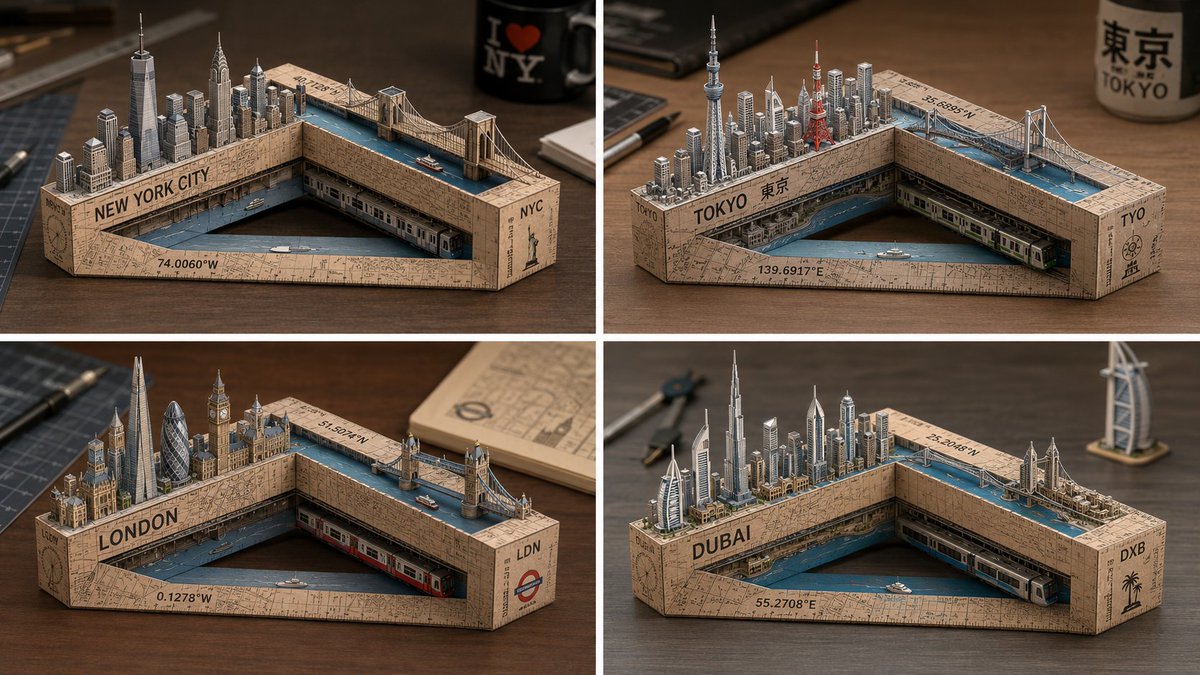
^ / \ <-- [ AI_INFER: The tallest skyscrapers of [CITY_NAME] folded from paper ] / \ / \ /_______\ \ / <-- [ Paper track with AI_INFER: local transit driving upside down ] \ / \ / <-- [ AI_INFER: Bridges and rivers of [CITY_NAME] cut from the paper ] \ / v INSTRUCTION: 1. Render as a physical, laser-cut cardboard and paper desktop sculpture. 2. The city grid of [CITY_NAME] forms a perfect, impossible Penrose Triangle. 3. The optical illusion must work perfectly from the camera's perspective. Text and gridlines are printed on the edges of the cardboard.
```
### Générer ce prompt
| Modèle | GPT Image 2 2 |
|---|---|
| Coût estimé | $0.03 / appel |
| Endpoint | `/api/v1/gpt_image_2/text_to_image` |
[Connectez-vous pour générer](https://runapi.ai/fr/login)
Votre image générée apparaîtra ici
## Décomposition du prompt
### Sujet
Laser-Cut Paper City Sculpture
### Atmosphère
architecture / Image
### Technique
gpt-image-2 / Gpt Image 2 / Text To Image / /api/v1/gpt_image_2/text_to_image
### Style
cardboard, city-grid, desktop, laser-cut, optical-illusion, papercraft, sculpture, skyscrapers
## Modèles compatibles avec ce prompt
| Modalité | Modèle | Prix | Essayer |
|---|---|---|---|
| Image | Qwen 2/qwen-2-text-to-image | $0.04 / image | [Essayer](https://runapi.ai/fr/models/qwen-2/text-to-image.md) |
| Image | Qwen 3/qwen-3-pro-text-to-image | $0.04-$0.08 / image | [Essayer](https://runapi.ai/fr/models/qwen-3/pro-text-to-image.md) |
| Image | Qwen 3/qwen-3-text-to-image | $0.03 / image | [Essayer](https://runapi.ai/fr/models/qwen-3/text-to-image.md) |
| Image | Qwen Image/qwen-image-text-to-image | $0.03 / image | [Essayer](https://runapi.ai/fr/models/qwen-image/text-to-image.md) |
| Image | Wan/wan-2.7-image | $0.03 / image | [Essayer](https://runapi.ai/fr/models/wan/2.7-image.md) |
## DETAILS
| Field | Value |
|---|---|
| Modèle | `gpt-image-2` |
| Modality | Image |
| Category | architecture |
| Tags | cardboard, city-grid, desktop, laser-cut, optical-illusion, papercraft, sculpture, skyscrapers |
## Use with an agent
### Claude
1. claude mcp add runapi -s user -- npx -y @runapi.ai/mcp
2. Restart Claude Code
3. Paste this prompt: Génère une image : " ^ / \ <-- [ AI_INFER: The tallest skyscrapers of [CITY_NAME] folded from paper ] / \ / \ /_______\ \ / <-- [ Paper track with AI_INFER: local transit driving upside down ] \ / \ / <-- [ AI_INFER: Bridges and rivers of [CITY_NAME] cut from the paper ] \ / v INSTRUCTION: 1. Render as a physical, laser-cut cardboard and paper desktop sculpture. 2. The city grid of [CITY_NAME] forms a perfect, impossible Penrose Triangle. 3. The optical illusion must work perfectly from the camera's perspective. Text and gridlines are printed on the edges of the cardboard."
### Codex
1. codex plugin install runapi-mcp@agents
2. Restart Codex
3. Paste this prompt: Génère une image : " ^ / \ <-- [ AI_INFER: The tallest skyscrapers of [CITY_NAME] folded from paper ] / \ / \ /_______\ \ / <-- [ Paper track with AI_INFER: local transit driving upside down ] \ / \ / <-- [ AI_INFER: Bridges and rivers of [CITY_NAME] cut from the paper ] \ / v INSTRUCTION: 1. Render as a physical, laser-cut cardboard and paper desktop sculpture. 2. The city grid of [CITY_NAME] forms a perfect, impossible Penrose Triangle. 3. The optical illusion must work perfectly from the camera's perspective. Text and gridlines are printed on the edges of the cardboard."
### Cursor
1. npx @runapi.ai/mcp init cursor
2. Restart Cursor
3. Paste this prompt: Génère une image : " ^ / \ <-- [ AI_INFER: The tallest skyscrapers of [CITY_NAME] folded from paper ] / \ / \ /_______\ \ / <-- [ Paper track with AI_INFER: local transit driving upside down ] \ / \ / <-- [ AI_INFER: Bridges and rivers of [CITY_NAME] cut from the paper ] \ / v INSTRUCTION: 1. Render as a physical, laser-cut cardboard and paper desktop sculpture. 2. The city grid of [CITY_NAME] forms a perfect, impossible Penrose Triangle. 3. The optical illusion must work perfectly from the camera's perspective. Text and gridlines are printed on the edges of the cardboard."
### Windsurf
1. npx @runapi.ai/mcp init windsurf
2. Restart Windsurf
3. Paste this prompt: Génère une image : " ^ / \ <-- [ AI_INFER: The tallest skyscrapers of [CITY_NAME] folded from paper ] / \ / \ /_______\ \ / <-- [ Paper track with AI_INFER: local transit driving upside down ] \ / \ / <-- [ AI_INFER: Bridges and rivers of [CITY_NAME] cut from the paper ] \ / v INSTRUCTION: 1. Render as a physical, laser-cut cardboard and paper desktop sculpture. 2. The city grid of [CITY_NAME] forms a perfect, impossible Penrose Triangle. 3. The optical illusion must work perfectly from the camera's perspective. Text and gridlines are printed on the edges of the cardboard."
## Generate via API
### curl
```curl
curl -X POST https://runapi.ai/api/v1/gpt_image_2/text_to_image \
-H "Authorization: Bearer $RUNAPI_API_KEY" \
-H "Content-Type: application/json" \
--data-binary @- <<'JSON'
{
"model": "gpt-image-2",
"prompt": " ^ / \\ <-- [ AI_INFER: The tallest skyscrapers of [CITY_NAME] folded from paper ] / \\ / \\ /_______\\ \\ / <-- [ Paper track with AI_INFER: local transit driving upside down ] \\ / \\ / <-- [ AI_INFER: Bridges and rivers of [CITY_NAME] cut from the paper ] \\ / v INSTRUCTION: 1. Render as a physical, laser-cut cardboard and paper desktop sculpture. 2. The city grid of [CITY_NAME] forms a perfect, impossible Penrose Triangle. 3. The optical illusion must work perfectly from the camera's perspective. Text and gridlines are printed on the edges of the cardboard."
}
JSON
```
### Node.js
```javascript
import { GptImage2Client } from "@runapi.ai/gpt-image-2";
const client = new GptImage2Client({
apiKey: process.env.RUNAPI_API_KEY,
});
const result = await client.textToImage.run({
"model": "gpt-image-2",
"prompt": " ^ / \\ <-- [ AI_INFER: The tallest skyscrapers of [CITY_NAME] folded from paper ] / \\ / \\ /_______\\ \\ / <-- [ Paper track with AI_INFER: local transit driving upside down ] \\ / \\ / <-- [ AI_INFER: Bridges and rivers of [CITY_NAME] cut from the paper ] \\ / v INSTRUCTION: 1. Render as a physical, laser-cut cardboard and paper desktop sculpture. 2. The city grid of [CITY_NAME] forms a perfect, impossible Penrose Triangle. 3. The optical illusion must work perfectly from the camera's perspective. Text and gridlines are printed on the edges of the cardboard."
});
console.log(result.id);
```
### Python
```python
import json
import os
import requests
response = requests.post(
"https://runapi.ai/api/v1/gpt_image_2/text_to_image",
headers={"Authorization": f"Bearer {os.environ['RUNAPI_API_KEY']}"},
json=json.loads("{\n \"model\": \"gpt-image-2\",\n \"prompt\": \"\u003cpapercraft_paradox\u003e ^ / \\\\ \u003c-- [ AI_INFER: The tallest skyscrapers of [CITY_NAME] folded from paper ] / \\\\ / \\\\ /_______\\\\ \\\\ / \u003c-- [ Paper track with AI_INFER: local transit driving upside down ] \\\\ / \\\\ / \u003c-- [ AI_INFER: Bridges and rivers of [CITY_NAME] cut from the paper ] \\\\ / v \u003c/papercraft_paradox\u003e INSTRUCTION: 1. Render as a physical, laser-cut cardboard and paper desktop sculpture. 2. The city grid of [CITY_NAME] forms a perfect, impossible Penrose Triangle. 3. The optical illusion must work perfectly from the camera's perspective. Text and gridlines are printed on the edges of the cardboard.\"\n}")
)
response.raise_for_status()
print(response.json()["id"])
```
### PHP
```php
true,
CURLOPT_HTTPHEADER => [
"Authorization: Bearer " . getenv("RUNAPI_API_KEY"),
"Content-Type: application/json",
],
CURLOPT_POSTFIELDS => "{\n \"model\": \"gpt-image-2\",\n \"prompt\": \"\u003cpapercraft_paradox\u003e ^ / \\\\ \u003c-- [ AI_INFER: The tallest skyscrapers of [CITY_NAME] folded from paper ] / \\\\ / \\\\ /_______\\\\ \\\\ / \u003c-- [ Paper track with AI_INFER: local transit driving upside down ] \\\\ / \\\\ / \u003c-- [ AI_INFER: Bridges and rivers of [CITY_NAME] cut from the paper ] \\\\ / v \u003c/papercraft_paradox\u003e INSTRUCTION: 1. Render as a physical, laser-cut cardboard and paper desktop sculpture. 2. The city grid of [CITY_NAME] forms a perfect, impossible Penrose Triangle. 3. The optical illusion must work perfectly from the camera's perspective. Text and gridlines are printed on the edges of the cardboard.\"\n}",
CURLOPT_RETURNTRANSFER => true,
]);
$response = json_decode(curl_exec($ch), true);
curl_close($ch);
echo $response["id"] . PHP_EOL;
```
### Java
```java
import java.net.URI;
import java.net.http.HttpClient;
import java.net.http.HttpRequest;
import java.net.http.HttpResponse;
var request = HttpRequest.newBuilder(URI.create("https://runapi.ai/api/v1/gpt_image_2/text_to_image"))
.header("Authorization", "Bearer " + System.getenv("RUNAPI_API_KEY"))
.header("Content-Type", "application/json")
.POST(HttpRequest.BodyPublishers.ofString("{\n \"model\": \"gpt-image-2\",\n \"prompt\": \"\u003cpapercraft_paradox\u003e ^ / \\\\ \u003c-- [ AI_INFER: The tallest skyscrapers of [CITY_NAME] folded from paper ] / \\\\ / \\\\ /_______\\\\ \\\\ / \u003c-- [ Paper track with AI_INFER: local transit driving upside down ] \\\\ / \\\\ / \u003c-- [ AI_INFER: Bridges and rivers of [CITY_NAME] cut from the paper ] \\\\ / v \u003c/papercraft_paradox\u003e INSTRUCTION: 1. Render as a physical, laser-cut cardboard and paper desktop sculpture. 2. The city grid of [CITY_NAME] forms a perfect, impossible Penrose Triangle. 3. The optical illusion must work perfectly from the camera's perspective. Text and gridlines are printed on the edges of the cardboard.\"\n}"))
.build();
var response = HttpClient.newHttpClient().send(request, HttpResponse.BodyHandlers.ofString());
System.out.println(response.body());
```
### Ruby
```ruby
require "json"
require "net/http"
uri = URI("https://runapi.ai/api/v1/gpt_image_2/text_to_image")
request = Net::HTTP::Post.new(uri)
request["Authorization"] = "Bearer " + ENV.fetch("RUNAPI_API_KEY")
request["Content-Type"] = "application/json"
request.body = "{\n \"model\": \"gpt-image-2\",\n \"prompt\": \"\u003cpapercraft_paradox\u003e ^ / \\\\ \u003c-- [ AI_INFER: The tallest skyscrapers of [CITY_NAME] folded from paper ] / \\\\ / \\\\ /_______\\\\ \\\\ / \u003c-- [ Paper track with AI_INFER: local transit driving upside down ] \\\\ / \\\\ / \u003c-- [ AI_INFER: Bridges and rivers of [CITY_NAME] cut from the paper ] \\\\ / v \u003c/papercraft_paradox\u003e INSTRUCTION: 1. Render as a physical, laser-cut cardboard and paper desktop sculpture. 2. The city grid of [CITY_NAME] forms a perfect, impossible Penrose Triangle. 3. The optical illusion must work perfectly from the camera's perspective. Text and gridlines are printed on the edges of the cardboard.\"\n}"
response = Net::HTTP.start(uri.hostname, uri.port, use_ssl: true) { |http| http.request(request) }
puts JSON.parse(response.body).fetch("id")
```
### Go
```go
package main
import (
"context"
"fmt"
"log"
"net/http"
"os"
"strings"
)
func main() {
body := strings.NewReader("{\"model\":\"gpt-image-2\",\"prompt\":\" ^ / \\\\ <-- [ AI_INFER: The tallest skyscrapers of [CITY_NAME] folded from paper ] / \\\\ / \\\\ /_______\\\\ \\\\ / <-- [ Paper track with AI_INFER: local transit driving upside down ] \\\\ / \\\\ / <-- [ AI_INFER: Bridges and rivers of [CITY_NAME] cut from the paper ] \\\\ / v INSTRUCTION: 1. Render as a physical, laser-cut cardboard and paper desktop sculpture. 2. The city grid of [CITY_NAME] forms a perfect, impossible Penrose Triangle. 3. The optical illusion must work perfectly from the camera's perspective. Text and gridlines are printed on the edges of the cardboard.\"}")
req, err := http.NewRequestWithContext(context.Background(), http.MethodPost, "https://runapi.ai/api/v1/gpt_image_2/text_to_image", body)
if err != nil {
log.Fatal(err)
}
req.Header.Set("Authorization", "Bearer "+os.Getenv("RUNAPI_API_KEY"))
req.Header.Set("Content-Type", "application/json")
resp, err := http.DefaultClient.Do(req)
if err != nil {
log.Fatal(err)
}
defer resp.Body.Close()
fmt.Println(resp.Status)
}
```
### CLI
```cli
$ runapi generate \
--model gpt-image-2 \
--prompt " ^ / \\ <-- [ AI_INFER: The tallest skyscrapers of [CITY_NAME] folded from paper ] / \\ / \\ /_______\\ \\ / <-- [ Paper track with AI_INFER: local transit driving upside down ] \\ / \\ / <-- [ AI_INFER: Bridges and rivers of [CITY_NAME] cut from the paper ] \\ / v INSTRUCTION: 1. Render as a physical, laser-cut cardboard and paper desktop sculpture. 2. The city grid of [CITY_NAME] forms a perfect, impossible Penrose Triangle. 3. The optical illusion must work perfectly from the camera's perspective. Text and gridlines are printed on the edges of the cardboard." \
--wait
```
## Prompts associés
- [Wireless Doorbell Camera Instructions Prompt](https://runapi.ai/fr/prompts/wireless-doorbell-camera-with-tiny-instructions-Jqr3B0.md) — `gpt-image-2`
- [Rainy French Street at Night](https://runapi.ai/fr/prompts/french-street-in-steady-rain-at-early-evening-7B59pA.md) — `gpt-image-2`
- [Camera Dome 48-Point View Setup](https://runapi.ai/fr/prompts/3d-rendered-camera-dome-with-three-rings-and-48-points-JPa6v0.md) — `gpt-image-2`
## Utiliser ce prompt gpt-image-2
### Comment copier ce prompt en toute sécurité ?
Utilisez le bouton de copie à côté du bloc de prompt complet. Il copie uniquement le texte du prompt, sans les étiquettes de page environnantes, afin que vous puissiez le coller dans une instruction d'agent, un corps de requête JSON ou votre propre bibliothèque de prompts.
### Pourquoi la page de détail affiche-t-elle des paramètres ?
Certains prompts ont été collectés avec des paramètres de génération sauvegardés tels que le ratio d'aspect, la durée ou les contrôles de voix. Lorsque des paramètres existent, la page les liste séparément afin que vous puissiez réutiliser le texte du prompt et les paramètres structurés ensemble.
### Quel endpoint dois-je appeler ?
Utilisez le chemin d'endpoint indiqué dans le bloc de code API. Le chemin est généré à partir du service RunAPI et du nom d'endpoint du prompt, puis rendu comme l'URL d'API publique utilisée par les exemples curl et SDK.
### Puis-je utiliser ce prompt dans un agent plutôt qu'en code ?
Oui. Choisissez Claude Code, Codex, Cursor ou Windsurf dans le sélecteur d'onglets, installez le serveur MCP RunAPI et collez l'instruction générée. L'instruction inclut le texte complet du prompt.
## Vous construisez avec une équipe ?
Nous vous aidons pour la mise en place entreprise, les intégrations et les questions techniques.
[Nous contacter](https://runapi.ai/fr/contact.md)
---
## More from RunAPI
- [Home](https://runapi.ai/fr/.md)
### Produit
- [Catalogue de modèles](https://runapi.ai/fr/models.md)
- [Tarifs](https://runapi.ai/fr/pricing.md)
- [Fournisseurs](https://runapi.ai/fr/models#all-models)
- [Galerie de prompts](https://runapi.ai/fr/prompts.md)
### Développeurs
- [Documentation](https://runapi.ai/fr/docs/guides)
- [SDK](https://runapi.ai/fr/sdk.md)
- [CLI](https://runapi.ai/fr/cli.md)
- [Serveur MCP](https://runapi.ai/fr/mcp.md)
- [x402](https://runapi.ai/fr/x402.md)
### Guides
- [Claude Code vs Cursor](https://runapi.ai/fr/claude-code-vs-cursor.md)
- [Configuration de l’API Cursor](https://runapi.ai/fr/cursor-api-setup.md)
- [RunAPI vs OpenRouter](https://runapi.ai/fr/openrouter-alternative.md)
### Entreprise
- [Entreprise](https://runapi.ai/fr/contact.md)
- [Contact](https://runapi.ai/fr/contact.md)
### Légal
- [Conditions](https://runapi.ai/fr/terms.md)
- [Confidentialité](https://runapi.ai/fr/privacy.md)
- [Site index for agents](https://runapi.ai/llms.txt)
Contact: contact@runapi.ai
## Structured data
```json
[
{
"@context": "https://schema.org",
"inLanguage": "fr",
"@type": "WebSite",
"name": "RunAPI",
"url": "https://runapi.ai/fr",
"potentialAction": {
"@type": "SearchAction",
"target": {
"@type": "EntryPoint",
"urlTemplate": "https://runapi.ai/fr/models?q={search_term_string}"
},
"query-input": "required name=search_term_string"
}
},
{
"@context": "https://schema.org",
"inLanguage": "fr",
"@type": "Organization",
"name": "RunAPI",
"url": "https://runapi.ai/fr",
"logo": {
"@type": "ImageObject",
"url": "https://runapi.ai/fricon.svg"
},
"sameAs": [
"https://github.com/runapi-ai"
]
},
{
"@context": "https://schema.org",
"inLanguage": "fr",
"@type": "BreadcrumbList",
"itemListElement": [
{
"@type": "ListItem",
"position": 1,
"name": "Accueil",
"item": "https://runapi.ai/fr"
},
{
"@type": "ListItem",
"position": 2,
"name": "Prompts",
"item": "https://runapi.ai/fr/prompts"
},
{
"@type": "ListItem",
"position": 3,
"name": "Image",
"item": "https://runapi.ai/fr/prompts/image"
},
{
"@type": "ListItem",
"position": 4,
"name": "Laser-Cut Paper City Sculpture",
"item": "https://runapi.ai/prompts/laser-cut-paper-city-in-an-impossible-penrose-triangle-AEN4D7"
}
]
},
{
"@context": "https://schema.org",
"inLanguage": "fr",
"@type": "FAQPage",
"mainEntity": [
{
"@type": "Question",
"name": "Comment copier ce prompt en toute sécurité ?",
"acceptedAnswer": {
"@type": "Answer",
"text": "Utilisez le bouton de copie à côté du bloc de prompt complet. Il copie uniquement le texte du prompt, sans les étiquettes de page environnantes, afin que vous puissiez le coller dans une instruction d'agent, un corps de requête JSON ou votre propre bibliothèque de prompts."
}
},
{
"@type": "Question",
"name": "Pourquoi la page de détail affiche-t-elle des paramètres ?",
"acceptedAnswer": {
"@type": "Answer",
"text": "Certains prompts ont été collectés avec des paramètres de génération sauvegardés tels que le ratio d'aspect, la durée ou les contrôles de voix. Lorsque des paramètres existent, la page les liste séparément afin que vous puissiez réutiliser le texte du prompt et les paramètres structurés ensemble."
}
},
{
"@type": "Question",
"name": "Quel endpoint dois-je appeler ?",
"acceptedAnswer": {
"@type": "Answer",
"text": "Utilisez le chemin d'endpoint indiqué dans le bloc de code API. Le chemin est généré à partir du service RunAPI et du nom d'endpoint du prompt, puis rendu comme l'URL d'API publique utilisée par les exemples curl et SDK."
}
},
{
"@type": "Question",
"name": "Puis-je utiliser ce prompt dans un agent plutôt qu'en code ?",
"acceptedAnswer": {
"@type": "Answer",
"text": "Oui. Choisissez Claude Code, Codex, Cursor ou Windsurf dans le sélecteur d'onglets, installez le serveur MCP RunAPI et collez l'instruction générée. L'instruction inclut le texte complet du prompt."
}
}
]
},
{
"@context": "https://schema.org",
"inLanguage": "en",
"@type": "CreativeWork",
"name": "Laser-Cut Paper City Sculpture",
"text": " ^ / \\ <-- [ AI_INFER: The tallest skyscrapers of [CITY_NAME] folded from paper ] / \\ / \\ /_______\\ \\ / <-- [ Paper track with AI_INFER: local transit driving upside down ] \\ / \\ / <-- [ AI_INFER: Bridges and rivers of [CITY_NAME] cut from the paper ] \\ / v INSTRUCTION: 1. Render as a physical, laser-cut cardboard and paper desktop sculpture. 2. The city grid of [CITY_NAME] forms a perfect, impossible Penrose Triangle. 3. The optical illusion must work perfectly from the camera's perspective. Text and gridlines are printed on the edges of the cardboard.",
"image": "https://cdn.runapi.ai/public/prompts/previews/64e938806bd6fbe4e4d4a229e7074165154334e117a41667a6be568bce7376a8-runapi-ai.jpg",
"about": [
"image",
"gpt-image-2",
"architecture"
]
}
]
```