---
title: Prompt Warrior Fashion Fusion Designer para gpt-image-2 | RunAPI
description: Copia este prompt de RunAPI, consulta los pasos de configuración del agente y usa el código API para gpt-image-2.
url: https://runapi.ai/es/prompts/warrior-fashion-fusion-and-wardrobe-transformation-AwkvMA.md
canonical: https://runapi.ai/prompts/warrior-fashion-fusion-and-wardrobe-transformation-AwkvMA
locale: es
site: RunAPI
image: https://runapi.ai/assets/opengraph-bfaaa0f0.png
prompt_id: 24674
model: gpt-image-2
modality: image
endpoint: "/api/v1/gpt_image_2/text_to_image"
---
> HTML version: https://runapi.ai/es/prompts/warrior-fashion-fusion-and-wardrobe-transformation-AwkvMA
> Site index for agents: https://runapi.ai/llms.txt
# Warrior Fashion Fusion Designer
Copia este prompt de RunAPI, consulta los pasos de configuración del agente y usa el código API para gpt-image-2.
**Prompts** · Imagen
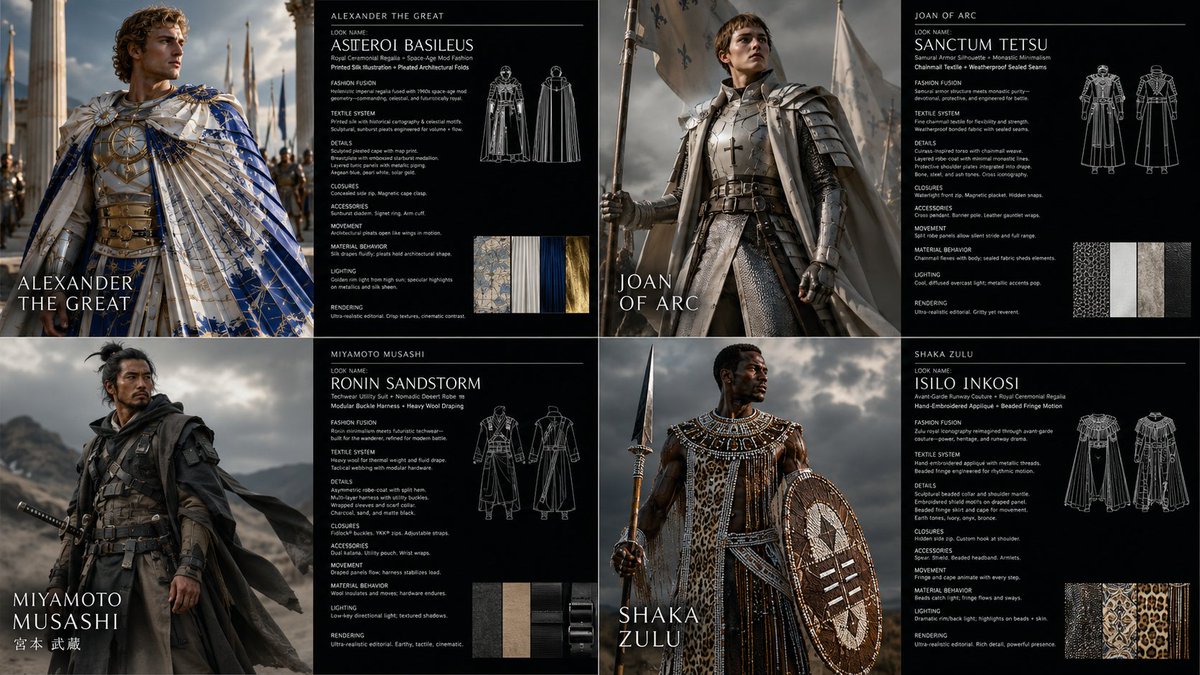
## Prompt
```text
2x2 grid, 16:9, do this for 4 famous warriors: Input A is the subject photo. You are a god-tier fashion designer, costume director, textile artist, and editorial photographer. Phase 1: Wardrobe Fusion Randomly select TWO Fashion Archetypes and TWO Textile Systems. Blend them into a coherent wearable identity. Fashion Archetypes: [Avant-Garde Runway Couture, Nomadic Desert Robe, Cybernetic Streetwear, Victorian Mourning Dress, Samurai Armor Silhouette, 1970s Disco Glamour, Arctic Expedition Gear, Renaissance Court Attire, Punk Deconstruction, Monastic Minimalism, Space-Age Mod Fashion, Baroque Opera Costume, Techwear Utility Suit, Ballet Rehearsal Layers, Royal Ceremonial Regalia] Textile Systems: [Quilted Panel Construction, Laser-Cut Mesh, Hand-Embroidered Appliqué, Reflective Foil Laminate, Heavy Wool Draping, Transparent Organza Layers, Ribbed Knit Compression, Modular Buckle Harness, Beaded Fringe Motion, Pleated Architectural Folds, Weatherproof Sealed Seams, Chainmail Textile, Printed Silk Illustration, Inflated Puffer Volumes, Raw Frayed Edges] Phase 2: Visual Rendering Generate a 2:1 horizontal asset sheet. LEFT HALF: Transform the subject’s clothing, accessories, and styling using the generated fashion identity. Preserve exact body pose, face angle, silhouette boundaries, background layout, and camera framing. RIGHT HALF: Create a dark fashion-spec panel with clean white text. Phase 3: Text Content Render this text on the right panel: "Look Name: [Generate a name from the 4 selected elements] Input A is the source photo. Goal: Restyle the subject into '[Look Name]'. Rules: Pose Fidelity: Preserve exact body pose, silhouette, camera angle, and facial direction. Fashion Fusion: Combine [Fashion Archetype 1] with [Fashion Archetype 2]. Textile System: Construct garments using [Textile System 1] and [Textile System 2]. Details: Include seams, closures, textile weight, movement, accessories, and styling logic. Lighting: Editorial fashion lighting suited to the materials. Rendering: Photorealistic high-fashion campaign image. Output: ONE image, high-fidelity wardrobe transformation. "
```
### Generar este prompt
| Modelo | GPT Image 2 2 |
|---|---|
| Coste estimado | $0.03 / llamada |
| Endpoint | `/api/v1/gpt_image_2/text_to_image` |
[Inicia sesión para generar](https://runapi.ai/es/login)
Tu imagen generada aparecerá aquí
## Desglose del prompt
### Sujeto
Warrior Fashion Fusion Designer
### Atmósfera
fashion / Imagen
### Técnico
gpt-image-2 / Gpt Image 2 / Text To Image / /api/v1/gpt_image_2/text_to_image
### Estilo
campaign, editorial, fashion, photorealistic, restyle, textile, wardrobe
## Modelos compatibles con este prompt
| Modalidad | Modelo | Precio | Probar |
|---|---|---|---|
| Imagen | Qwen 2/qwen-2-text-to-image | $0.04 / imagen | [Probar](https://runapi.ai/es/models/qwen-2/text-to-image.md) |
| Imagen | Qwen 3/qwen-3-pro-text-to-image | $0.04-$0.08 / imagen | [Probar](https://runapi.ai/es/models/qwen-3/pro-text-to-image.md) |
| Imagen | Qwen 3/qwen-3-text-to-image | $0.03 / imagen | [Probar](https://runapi.ai/es/models/qwen-3/text-to-image.md) |
| Imagen | Qwen Image/qwen-image-text-to-image | $0.03 / imagen | [Probar](https://runapi.ai/es/models/qwen-image/text-to-image.md) |
| Imagen | Wan/wan-2.7-image | $0.03 / imagen | [Probar](https://runapi.ai/es/models/wan/2.7-image.md) |
## DETALLES
| Field | Value |
|---|---|
| Modelo | `gpt-image-2` |
| Modality | Imagen |
| Category | fashion |
| Tags | campaign, editorial, fashion, photorealistic, restyle, textile, wardrobe |
## Use with an agent
### Claude
1. claude mcp add runapi -s user -- npx -y @runapi.ai/mcp
2. Reinicia Claude Code
3. Pega este prompt: Genera una imagen: "2x2 grid, 16:9, do this for 4 famous warriors: Input A is the subject photo. You are a god-tier fashion designer, costume director, textile artist, and editorial photographer. Phase 1: Wardrobe Fusion Randomly select TWO Fashion Archetypes and TWO Textile Systems. Blend them into a coherent wearable identity. Fashion Archetypes: [Avant-Garde Runway Couture, Nomadic Desert Robe, Cybernetic Streetwear, Victorian Mourning Dress, Samurai Armor Silhouette, 1970s Disco Glamour, Arctic Expedition Gear, Renaissance Court Attire, Punk Deconstruction, Monastic Minimalism, Space-Age Mod Fashion, Baroque Opera Costume, Techwear Utility Suit, Ballet Rehearsal Layers, Royal Ceremonial Regalia] Textile Systems: [Quilted Panel Construction, Laser-Cut Mesh, Hand-Embroidered Appliqué, Reflective Foil Laminate, Heavy Wool Draping, Transparent Organza Layers, Ribbed Knit Compression, Modular Buckle Harness, Beaded Fringe Motion, Pleated Architectural Folds, Weatherproof Sealed Seams, Chainmail Textile, Printed Silk Illustration, Inflated Puffer Volumes, Raw Frayed Edges] Phase 2: Visual Rendering Generate a 2:1 horizontal asset sheet. LEFT HALF: Transform the subject’s clothing, accessories, and styling using the generated fashion identity. Preserve exact body pose, face angle, silhouette boundaries, background layout, and camera framing. RIGHT HALF: Create a dark fashion-spec panel with clean white text. Phase 3: Text Content Render this text on the right panel: "Look Name: [Generate a name from the 4 selected elements] Input A is the source photo. Goal: Restyle the subject into '[Look Name]'. Rules: Pose Fidelity: Preserve exact body pose, silhouette, camera angle, and facial direction. Fashion Fusion: Combine [Fashion Archetype 1] with [Fashion Archetype 2]. Textile System: Construct garments using [Textile System 1] and [Textile System 2]. Details: Include seams, closures, textile weight, movement, accessories, and styling logic. Lighting: Editorial fashion lighting suited to the materials. Rendering: Photorealistic high-fashion campaign image. Output: ONE image, high-fidelity wardrobe transformation. " "
### Codex
1. codex plugin install runapi-mcp@agents
2. Reinicia Codex
3. Pega este prompt: Genera una imagen: "2x2 grid, 16:9, do this for 4 famous warriors: Input A is the subject photo. You are a god-tier fashion designer, costume director, textile artist, and editorial photographer. Phase 1: Wardrobe Fusion Randomly select TWO Fashion Archetypes and TWO Textile Systems. Blend them into a coherent wearable identity. Fashion Archetypes: [Avant-Garde Runway Couture, Nomadic Desert Robe, Cybernetic Streetwear, Victorian Mourning Dress, Samurai Armor Silhouette, 1970s Disco Glamour, Arctic Expedition Gear, Renaissance Court Attire, Punk Deconstruction, Monastic Minimalism, Space-Age Mod Fashion, Baroque Opera Costume, Techwear Utility Suit, Ballet Rehearsal Layers, Royal Ceremonial Regalia] Textile Systems: [Quilted Panel Construction, Laser-Cut Mesh, Hand-Embroidered Appliqué, Reflective Foil Laminate, Heavy Wool Draping, Transparent Organza Layers, Ribbed Knit Compression, Modular Buckle Harness, Beaded Fringe Motion, Pleated Architectural Folds, Weatherproof Sealed Seams, Chainmail Textile, Printed Silk Illustration, Inflated Puffer Volumes, Raw Frayed Edges] Phase 2: Visual Rendering Generate a 2:1 horizontal asset sheet. LEFT HALF: Transform the subject’s clothing, accessories, and styling using the generated fashion identity. Preserve exact body pose, face angle, silhouette boundaries, background layout, and camera framing. RIGHT HALF: Create a dark fashion-spec panel with clean white text. Phase 3: Text Content Render this text on the right panel: "Look Name: [Generate a name from the 4 selected elements] Input A is the source photo. Goal: Restyle the subject into '[Look Name]'. Rules: Pose Fidelity: Preserve exact body pose, silhouette, camera angle, and facial direction. Fashion Fusion: Combine [Fashion Archetype 1] with [Fashion Archetype 2]. Textile System: Construct garments using [Textile System 1] and [Textile System 2]. Details: Include seams, closures, textile weight, movement, accessories, and styling logic. Lighting: Editorial fashion lighting suited to the materials. Rendering: Photorealistic high-fashion campaign image. Output: ONE image, high-fidelity wardrobe transformation. " "
### Cursor
1. npx @runapi.ai/mcp init cursor
2. Reinicia Cursor
3. Pega este prompt: Genera una imagen: "2x2 grid, 16:9, do this for 4 famous warriors: Input A is the subject photo. You are a god-tier fashion designer, costume director, textile artist, and editorial photographer. Phase 1: Wardrobe Fusion Randomly select TWO Fashion Archetypes and TWO Textile Systems. Blend them into a coherent wearable identity. Fashion Archetypes: [Avant-Garde Runway Couture, Nomadic Desert Robe, Cybernetic Streetwear, Victorian Mourning Dress, Samurai Armor Silhouette, 1970s Disco Glamour, Arctic Expedition Gear, Renaissance Court Attire, Punk Deconstruction, Monastic Minimalism, Space-Age Mod Fashion, Baroque Opera Costume, Techwear Utility Suit, Ballet Rehearsal Layers, Royal Ceremonial Regalia] Textile Systems: [Quilted Panel Construction, Laser-Cut Mesh, Hand-Embroidered Appliqué, Reflective Foil Laminate, Heavy Wool Draping, Transparent Organza Layers, Ribbed Knit Compression, Modular Buckle Harness, Beaded Fringe Motion, Pleated Architectural Folds, Weatherproof Sealed Seams, Chainmail Textile, Printed Silk Illustration, Inflated Puffer Volumes, Raw Frayed Edges] Phase 2: Visual Rendering Generate a 2:1 horizontal asset sheet. LEFT HALF: Transform the subject’s clothing, accessories, and styling using the generated fashion identity. Preserve exact body pose, face angle, silhouette boundaries, background layout, and camera framing. RIGHT HALF: Create a dark fashion-spec panel with clean white text. Phase 3: Text Content Render this text on the right panel: "Look Name: [Generate a name from the 4 selected elements] Input A is the source photo. Goal: Restyle the subject into '[Look Name]'. Rules: Pose Fidelity: Preserve exact body pose, silhouette, camera angle, and facial direction. Fashion Fusion: Combine [Fashion Archetype 1] with [Fashion Archetype 2]. Textile System: Construct garments using [Textile System 1] and [Textile System 2]. Details: Include seams, closures, textile weight, movement, accessories, and styling logic. Lighting: Editorial fashion lighting suited to the materials. Rendering: Photorealistic high-fashion campaign image. Output: ONE image, high-fidelity wardrobe transformation. " "
### Windsurf
1. npx @runapi.ai/mcp init windsurf
2. Reinicia Windsurf
3. Pega este prompt: Genera una imagen: "2x2 grid, 16:9, do this for 4 famous warriors: Input A is the subject photo. You are a god-tier fashion designer, costume director, textile artist, and editorial photographer. Phase 1: Wardrobe Fusion Randomly select TWO Fashion Archetypes and TWO Textile Systems. Blend them into a coherent wearable identity. Fashion Archetypes: [Avant-Garde Runway Couture, Nomadic Desert Robe, Cybernetic Streetwear, Victorian Mourning Dress, Samurai Armor Silhouette, 1970s Disco Glamour, Arctic Expedition Gear, Renaissance Court Attire, Punk Deconstruction, Monastic Minimalism, Space-Age Mod Fashion, Baroque Opera Costume, Techwear Utility Suit, Ballet Rehearsal Layers, Royal Ceremonial Regalia] Textile Systems: [Quilted Panel Construction, Laser-Cut Mesh, Hand-Embroidered Appliqué, Reflective Foil Laminate, Heavy Wool Draping, Transparent Organza Layers, Ribbed Knit Compression, Modular Buckle Harness, Beaded Fringe Motion, Pleated Architectural Folds, Weatherproof Sealed Seams, Chainmail Textile, Printed Silk Illustration, Inflated Puffer Volumes, Raw Frayed Edges] Phase 2: Visual Rendering Generate a 2:1 horizontal asset sheet. LEFT HALF: Transform the subject’s clothing, accessories, and styling using the generated fashion identity. Preserve exact body pose, face angle, silhouette boundaries, background layout, and camera framing. RIGHT HALF: Create a dark fashion-spec panel with clean white text. Phase 3: Text Content Render this text on the right panel: "Look Name: [Generate a name from the 4 selected elements] Input A is the source photo. Goal: Restyle the subject into '[Look Name]'. Rules: Pose Fidelity: Preserve exact body pose, silhouette, camera angle, and facial direction. Fashion Fusion: Combine [Fashion Archetype 1] with [Fashion Archetype 2]. Textile System: Construct garments using [Textile System 1] and [Textile System 2]. Details: Include seams, closures, textile weight, movement, accessories, and styling logic. Lighting: Editorial fashion lighting suited to the materials. Rendering: Photorealistic high-fashion campaign image. Output: ONE image, high-fidelity wardrobe transformation. " "
## Generate via API
### curl
```curl
curl -X POST https://runapi.ai/api/v1/gpt_image_2/text_to_image \
-H "Authorization: Bearer $RUNAPI_API_KEY" \
-H "Content-Type: application/json" \
--data-binary @- <<'JSON'
{
"model": "gpt-image-2",
"prompt": "2x2 grid, 16:9, do this for 4 famous warriors: Input A is the subject photo. You are a god-tier fashion designer, costume director, textile artist, and editorial photographer. Phase 1: Wardrobe Fusion Randomly select TWO Fashion Archetypes and TWO Textile Systems. Blend them into a coherent wearable identity. Fashion Archetypes: [Avant-Garde Runway Couture, Nomadic Desert Robe, Cybernetic Streetwear, Victorian Mourning Dress, Samurai Armor Silhouette, 1970s Disco Glamour, Arctic Expedition Gear, Renaissance Court Attire, Punk Deconstruction, Monastic Minimalism, Space-Age Mod Fashion, Baroque Opera Costume, Techwear Utility Suit, Ballet Rehearsal Layers, Royal Ceremonial Regalia] Textile Systems: [Quilted Panel Construction, Laser-Cut Mesh, Hand-Embroidered Appliqué, Reflective Foil Laminate, Heavy Wool Draping, Transparent Organza Layers, Ribbed Knit Compression, Modular Buckle Harness, Beaded Fringe Motion, Pleated Architectural Folds, Weatherproof Sealed Seams, Chainmail Textile, Printed Silk Illustration, Inflated Puffer Volumes, Raw Frayed Edges] Phase 2: Visual Rendering Generate a 2:1 horizontal asset sheet. LEFT HALF: Transform the subject’s clothing, accessories, and styling using the generated fashion identity. Preserve exact body pose, face angle, silhouette boundaries, background layout, and camera framing. RIGHT HALF: Create a dark fashion-spec panel with clean white text. Phase 3: Text Content Render this text on the right panel: \"Look Name: [Generate a name from the 4 selected elements] Input A is the source photo. Goal: Restyle the subject into '[Look Name]'. Rules: Pose Fidelity: Preserve exact body pose, silhouette, camera angle, and facial direction. Fashion Fusion: Combine [Fashion Archetype 1] with [Fashion Archetype 2]. Textile System: Construct garments using [Textile System 1] and [Textile System 2]. Details: Include seams, closures, textile weight, movement, accessories, and styling logic. Lighting: Editorial fashion lighting suited to the materials. Rendering: Photorealistic high-fashion campaign image. Output: ONE image, high-fidelity wardrobe transformation. \" "
}
JSON
```
### Node.js
```javascript
import { GptImage2Client } from "@runapi.ai/gpt-image-2";
const client = new GptImage2Client({
apiKey: process.env.RUNAPI_API_KEY,
});
const result = await client.textToImage.run({
"model": "gpt-image-2",
"prompt": "2x2 grid, 16:9, do this for 4 famous warriors: Input A is the subject photo. You are a god-tier fashion designer, costume director, textile artist, and editorial photographer. Phase 1: Wardrobe Fusion Randomly select TWO Fashion Archetypes and TWO Textile Systems. Blend them into a coherent wearable identity. Fashion Archetypes: [Avant-Garde Runway Couture, Nomadic Desert Robe, Cybernetic Streetwear, Victorian Mourning Dress, Samurai Armor Silhouette, 1970s Disco Glamour, Arctic Expedition Gear, Renaissance Court Attire, Punk Deconstruction, Monastic Minimalism, Space-Age Mod Fashion, Baroque Opera Costume, Techwear Utility Suit, Ballet Rehearsal Layers, Royal Ceremonial Regalia] Textile Systems: [Quilted Panel Construction, Laser-Cut Mesh, Hand-Embroidered Appliqué, Reflective Foil Laminate, Heavy Wool Draping, Transparent Organza Layers, Ribbed Knit Compression, Modular Buckle Harness, Beaded Fringe Motion, Pleated Architectural Folds, Weatherproof Sealed Seams, Chainmail Textile, Printed Silk Illustration, Inflated Puffer Volumes, Raw Frayed Edges] Phase 2: Visual Rendering Generate a 2:1 horizontal asset sheet. LEFT HALF: Transform the subject’s clothing, accessories, and styling using the generated fashion identity. Preserve exact body pose, face angle, silhouette boundaries, background layout, and camera framing. RIGHT HALF: Create a dark fashion-spec panel with clean white text. Phase 3: Text Content Render this text on the right panel: \"Look Name: [Generate a name from the 4 selected elements] Input A is the source photo. Goal: Restyle the subject into '[Look Name]'. Rules: Pose Fidelity: Preserve exact body pose, silhouette, camera angle, and facial direction. Fashion Fusion: Combine [Fashion Archetype 1] with [Fashion Archetype 2]. Textile System: Construct garments using [Textile System 1] and [Textile System 2]. Details: Include seams, closures, textile weight, movement, accessories, and styling logic. Lighting: Editorial fashion lighting suited to the materials. Rendering: Photorealistic high-fashion campaign image. Output: ONE image, high-fidelity wardrobe transformation. \" "
});
console.log(result.id);
```
### Python
```python
import json
import os
import requests
response = requests.post(
"https://runapi.ai/api/v1/gpt_image_2/text_to_image",
headers={"Authorization": f"Bearer {os.environ['RUNAPI_API_KEY']}"},
json=json.loads("{\n \"model\": \"gpt-image-2\",\n \"prompt\": \"2x2 grid, 16:9, do this for 4 famous warriors: \u003cinstruction\u003e Input A is the subject photo. You are a god-tier fashion designer, costume director, textile artist, and editorial photographer. Phase 1: Wardrobe Fusion Randomly select TWO Fashion Archetypes and TWO Textile Systems. Blend them into a coherent wearable identity. Fashion Archetypes: [Avant-Garde Runway Couture, Nomadic Desert Robe, Cybernetic Streetwear, Victorian Mourning Dress, Samurai Armor Silhouette, 1970s Disco Glamour, Arctic Expedition Gear, Renaissance Court Attire, Punk Deconstruction, Monastic Minimalism, Space-Age Mod Fashion, Baroque Opera Costume, Techwear Utility Suit, Ballet Rehearsal Layers, Royal Ceremonial Regalia] Textile Systems: [Quilted Panel Construction, Laser-Cut Mesh, Hand-Embroidered Appliqué, Reflective Foil Laminate, Heavy Wool Draping, Transparent Organza Layers, Ribbed Knit Compression, Modular Buckle Harness, Beaded Fringe Motion, Pleated Architectural Folds, Weatherproof Sealed Seams, Chainmail Textile, Printed Silk Illustration, Inflated Puffer Volumes, Raw Frayed Edges] Phase 2: Visual Rendering Generate a 2:1 horizontal asset sheet. LEFT HALF: Transform the subject’s clothing, accessories, and styling using the generated fashion identity. Preserve exact body pose, face angle, silhouette boundaries, background layout, and camera framing. RIGHT HALF: Create a dark fashion-spec panel with clean white text. Phase 3: Text Content Render this text on the right panel: \\\"Look Name: [Generate a name from the 4 selected elements] \u003cinstruction\u003e Input A is the source photo. Goal: Restyle the subject into '[Look Name]'. Rules: Pose Fidelity: Preserve exact body pose, silhouette, camera angle, and facial direction. Fashion Fusion: Combine [Fashion Archetype 1] with [Fashion Archetype 2]. Textile System: Construct garments using [Textile System 1] and [Textile System 2]. Details: Include seams, closures, textile weight, movement, accessories, and styling logic. Lighting: Editorial fashion lighting suited to the materials. Rendering: Photorealistic high-fashion campaign image. Output: ONE image, high-fidelity wardrobe transformation. \u003c/instruction\u003e\\\" \u003c/instruction\u003e\"\n}")
)
response.raise_for_status()
print(response.json()["id"])
```
### PHP
```php
true,
CURLOPT_HTTPHEADER => [
"Authorization: Bearer " . getenv("RUNAPI_API_KEY"),
"Content-Type: application/json",
],
CURLOPT_POSTFIELDS => "{\n \"model\": \"gpt-image-2\",\n \"prompt\": \"2x2 grid, 16:9, do this for 4 famous warriors: \u003cinstruction\u003e Input A is the subject photo. You are a god-tier fashion designer, costume director, textile artist, and editorial photographer. Phase 1: Wardrobe Fusion Randomly select TWO Fashion Archetypes and TWO Textile Systems. Blend them into a coherent wearable identity. Fashion Archetypes: [Avant-Garde Runway Couture, Nomadic Desert Robe, Cybernetic Streetwear, Victorian Mourning Dress, Samurai Armor Silhouette, 1970s Disco Glamour, Arctic Expedition Gear, Renaissance Court Attire, Punk Deconstruction, Monastic Minimalism, Space-Age Mod Fashion, Baroque Opera Costume, Techwear Utility Suit, Ballet Rehearsal Layers, Royal Ceremonial Regalia] Textile Systems: [Quilted Panel Construction, Laser-Cut Mesh, Hand-Embroidered Appliqué, Reflective Foil Laminate, Heavy Wool Draping, Transparent Organza Layers, Ribbed Knit Compression, Modular Buckle Harness, Beaded Fringe Motion, Pleated Architectural Folds, Weatherproof Sealed Seams, Chainmail Textile, Printed Silk Illustration, Inflated Puffer Volumes, Raw Frayed Edges] Phase 2: Visual Rendering Generate a 2:1 horizontal asset sheet. LEFT HALF: Transform the subject’s clothing, accessories, and styling using the generated fashion identity. Preserve exact body pose, face angle, silhouette boundaries, background layout, and camera framing. RIGHT HALF: Create a dark fashion-spec panel with clean white text. Phase 3: Text Content Render this text on the right panel: \\\"Look Name: [Generate a name from the 4 selected elements] \u003cinstruction\u003e Input A is the source photo. Goal: Restyle the subject into '[Look Name]'. Rules: Pose Fidelity: Preserve exact body pose, silhouette, camera angle, and facial direction. Fashion Fusion: Combine [Fashion Archetype 1] with [Fashion Archetype 2]. Textile System: Construct garments using [Textile System 1] and [Textile System 2]. Details: Include seams, closures, textile weight, movement, accessories, and styling logic. Lighting: Editorial fashion lighting suited to the materials. Rendering: Photorealistic high-fashion campaign image. Output: ONE image, high-fidelity wardrobe transformation. \u003c/instruction\u003e\\\" \u003c/instruction\u003e\"\n}",
CURLOPT_RETURNTRANSFER => true,
]);
$response = json_decode(curl_exec($ch), true);
curl_close($ch);
echo $response["id"] . PHP_EOL;
```
### Java
```java
import java.net.URI;
import java.net.http.HttpClient;
import java.net.http.HttpRequest;
import java.net.http.HttpResponse;
var request = HttpRequest.newBuilder(URI.create("https://runapi.ai/api/v1/gpt_image_2/text_to_image"))
.header("Authorization", "Bearer " + System.getenv("RUNAPI_API_KEY"))
.header("Content-Type", "application/json")
.POST(HttpRequest.BodyPublishers.ofString("{\n \"model\": \"gpt-image-2\",\n \"prompt\": \"2x2 grid, 16:9, do this for 4 famous warriors: \u003cinstruction\u003e Input A is the subject photo. You are a god-tier fashion designer, costume director, textile artist, and editorial photographer. Phase 1: Wardrobe Fusion Randomly select TWO Fashion Archetypes and TWO Textile Systems. Blend them into a coherent wearable identity. Fashion Archetypes: [Avant-Garde Runway Couture, Nomadic Desert Robe, Cybernetic Streetwear, Victorian Mourning Dress, Samurai Armor Silhouette, 1970s Disco Glamour, Arctic Expedition Gear, Renaissance Court Attire, Punk Deconstruction, Monastic Minimalism, Space-Age Mod Fashion, Baroque Opera Costume, Techwear Utility Suit, Ballet Rehearsal Layers, Royal Ceremonial Regalia] Textile Systems: [Quilted Panel Construction, Laser-Cut Mesh, Hand-Embroidered Appliqué, Reflective Foil Laminate, Heavy Wool Draping, Transparent Organza Layers, Ribbed Knit Compression, Modular Buckle Harness, Beaded Fringe Motion, Pleated Architectural Folds, Weatherproof Sealed Seams, Chainmail Textile, Printed Silk Illustration, Inflated Puffer Volumes, Raw Frayed Edges] Phase 2: Visual Rendering Generate a 2:1 horizontal asset sheet. LEFT HALF: Transform the subject’s clothing, accessories, and styling using the generated fashion identity. Preserve exact body pose, face angle, silhouette boundaries, background layout, and camera framing. RIGHT HALF: Create a dark fashion-spec panel with clean white text. Phase 3: Text Content Render this text on the right panel: \\\"Look Name: [Generate a name from the 4 selected elements] \u003cinstruction\u003e Input A is the source photo. Goal: Restyle the subject into '[Look Name]'. Rules: Pose Fidelity: Preserve exact body pose, silhouette, camera angle, and facial direction. Fashion Fusion: Combine [Fashion Archetype 1] with [Fashion Archetype 2]. Textile System: Construct garments using [Textile System 1] and [Textile System 2]. Details: Include seams, closures, textile weight, movement, accessories, and styling logic. Lighting: Editorial fashion lighting suited to the materials. Rendering: Photorealistic high-fashion campaign image. Output: ONE image, high-fidelity wardrobe transformation. \u003c/instruction\u003e\\\" \u003c/instruction\u003e\"\n}"))
.build();
var response = HttpClient.newHttpClient().send(request, HttpResponse.BodyHandlers.ofString());
System.out.println(response.body());
```
### Ruby
```ruby
require "json"
require "net/http"
uri = URI("https://runapi.ai/api/v1/gpt_image_2/text_to_image")
request = Net::HTTP::Post.new(uri)
request["Authorization"] = "Bearer " + ENV.fetch("RUNAPI_API_KEY")
request["Content-Type"] = "application/json"
request.body = "{\n \"model\": \"gpt-image-2\",\n \"prompt\": \"2x2 grid, 16:9, do this for 4 famous warriors: \u003cinstruction\u003e Input A is the subject photo. You are a god-tier fashion designer, costume director, textile artist, and editorial photographer. Phase 1: Wardrobe Fusion Randomly select TWO Fashion Archetypes and TWO Textile Systems. Blend them into a coherent wearable identity. Fashion Archetypes: [Avant-Garde Runway Couture, Nomadic Desert Robe, Cybernetic Streetwear, Victorian Mourning Dress, Samurai Armor Silhouette, 1970s Disco Glamour, Arctic Expedition Gear, Renaissance Court Attire, Punk Deconstruction, Monastic Minimalism, Space-Age Mod Fashion, Baroque Opera Costume, Techwear Utility Suit, Ballet Rehearsal Layers, Royal Ceremonial Regalia] Textile Systems: [Quilted Panel Construction, Laser-Cut Mesh, Hand-Embroidered Appliqué, Reflective Foil Laminate, Heavy Wool Draping, Transparent Organza Layers, Ribbed Knit Compression, Modular Buckle Harness, Beaded Fringe Motion, Pleated Architectural Folds, Weatherproof Sealed Seams, Chainmail Textile, Printed Silk Illustration, Inflated Puffer Volumes, Raw Frayed Edges] Phase 2: Visual Rendering Generate a 2:1 horizontal asset sheet. LEFT HALF: Transform the subject’s clothing, accessories, and styling using the generated fashion identity. Preserve exact body pose, face angle, silhouette boundaries, background layout, and camera framing. RIGHT HALF: Create a dark fashion-spec panel with clean white text. Phase 3: Text Content Render this text on the right panel: \\\"Look Name: [Generate a name from the 4 selected elements] \u003cinstruction\u003e Input A is the source photo. Goal: Restyle the subject into '[Look Name]'. Rules: Pose Fidelity: Preserve exact body pose, silhouette, camera angle, and facial direction. Fashion Fusion: Combine [Fashion Archetype 1] with [Fashion Archetype 2]. Textile System: Construct garments using [Textile System 1] and [Textile System 2]. Details: Include seams, closures, textile weight, movement, accessories, and styling logic. Lighting: Editorial fashion lighting suited to the materials. Rendering: Photorealistic high-fashion campaign image. Output: ONE image, high-fidelity wardrobe transformation. \u003c/instruction\u003e\\\" \u003c/instruction\u003e\"\n}"
response = Net::HTTP.start(uri.hostname, uri.port, use_ssl: true) { |http| http.request(request) }
puts JSON.parse(response.body).fetch("id")
```
### Go
```go
package main
import (
"context"
"fmt"
"log"
"net/http"
"os"
"strings"
)
func main() {
body := strings.NewReader("{\"model\":\"gpt-image-2\",\"prompt\":\"2x2 grid, 16:9, do this for 4 famous warriors: Input A is the subject photo. You are a god-tier fashion designer, costume director, textile artist, and editorial photographer. Phase 1: Wardrobe Fusion Randomly select TWO Fashion Archetypes and TWO Textile Systems. Blend them into a coherent wearable identity. Fashion Archetypes: [Avant-Garde Runway Couture, Nomadic Desert Robe, Cybernetic Streetwear, Victorian Mourning Dress, Samurai Armor Silhouette, 1970s Disco Glamour, Arctic Expedition Gear, Renaissance Court Attire, Punk Deconstruction, Monastic Minimalism, Space-Age Mod Fashion, Baroque Opera Costume, Techwear Utility Suit, Ballet Rehearsal Layers, Royal Ceremonial Regalia] Textile Systems: [Quilted Panel Construction, Laser-Cut Mesh, Hand-Embroidered Appliqué, Reflective Foil Laminate, Heavy Wool Draping, Transparent Organza Layers, Ribbed Knit Compression, Modular Buckle Harness, Beaded Fringe Motion, Pleated Architectural Folds, Weatherproof Sealed Seams, Chainmail Textile, Printed Silk Illustration, Inflated Puffer Volumes, Raw Frayed Edges] Phase 2: Visual Rendering Generate a 2:1 horizontal asset sheet. LEFT HALF: Transform the subject’s clothing, accessories, and styling using the generated fashion identity. Preserve exact body pose, face angle, silhouette boundaries, background layout, and camera framing. RIGHT HALF: Create a dark fashion-spec panel with clean white text. Phase 3: Text Content Render this text on the right panel: \\\"Look Name: [Generate a name from the 4 selected elements] Input A is the source photo. Goal: Restyle the subject into '[Look Name]'. Rules: Pose Fidelity: Preserve exact body pose, silhouette, camera angle, and facial direction. Fashion Fusion: Combine [Fashion Archetype 1] with [Fashion Archetype 2]. Textile System: Construct garments using [Textile System 1] and [Textile System 2]. Details: Include seams, closures, textile weight, movement, accessories, and styling logic. Lighting: Editorial fashion lighting suited to the materials. Rendering: Photorealistic high-fashion campaign image. Output: ONE image, high-fidelity wardrobe transformation. \\\" \"}")
req, err := http.NewRequestWithContext(context.Background(), http.MethodPost, "https://runapi.ai/api/v1/gpt_image_2/text_to_image", body)
if err != nil {
log.Fatal(err)
}
req.Header.Set("Authorization", "Bearer "+os.Getenv("RUNAPI_API_KEY"))
req.Header.Set("Content-Type", "application/json")
resp, err := http.DefaultClient.Do(req)
if err != nil {
log.Fatal(err)
}
defer resp.Body.Close()
fmt.Println(resp.Status)
}
```
### CLI
```cli
$ runapi generate \
--model gpt-image-2 \
--prompt "2x2 grid, 16:9, do this for 4 famous warriors: Input A is the subject photo. You are a god-tier fashion designer, costume director, textile artist, and editorial photographer. Phase 1: Wardrobe Fusion Randomly select TWO Fashion Archetypes and TWO Textile Systems. Blend them into a coherent wearable identity. Fashion Archetypes: [Avant-Garde Runway Couture, Nomadic Desert Robe, Cybernetic Streetwear, Victorian Mourning Dress, Samurai Armor Silhouette, 1970s Disco Glamour, Arctic Expedition Gear, Renaissance Court Attire, Punk Deconstruction, Monastic Minimalism, Space-Age Mod Fashion, Baroque Opera Costume, Techwear Utility Suit, Ballet Rehearsal Layers, Royal Ceremonial Regalia] Textile Systems: [Quilted Panel Construction, Laser-Cut Mesh, Hand-Embroidered Appliqué, Reflective Foil Laminate, Heavy Wool Draping, Transparent Organza Layers, Ribbed Knit Compression, Modular Buckle Harness, Beaded Fringe Motion, Pleated Architectural Folds, Weatherproof Sealed Seams, Chainmail Textile, Printed Silk Illustration, Inflated Puffer Volumes, Raw Frayed Edges] Phase 2: Visual Rendering Generate a 2:1 horizontal asset sheet. LEFT HALF: Transform the subject’s clothing, accessories, and styling using the generated fashion identity. Preserve exact body pose, face angle, silhouette boundaries, background layout, and camera framing. RIGHT HALF: Create a dark fashion-spec panel with clean white text. Phase 3: Text Content Render this text on the right panel: \"Look Name: [Generate a name from the 4 selected elements] Input A is the source photo. Goal: Restyle the subject into '[Look Name]'. Rules: Pose Fidelity: Preserve exact body pose, silhouette, camera angle, and facial direction. Fashion Fusion: Combine [Fashion Archetype 1] with [Fashion Archetype 2]. Textile System: Construct garments using [Textile System 1] and [Textile System 2]. Details: Include seams, closures, textile weight, movement, accessories, and styling logic. Lighting: Editorial fashion lighting suited to the materials. Rendering: Photorealistic high-fashion campaign image. Output: ONE image, high-fidelity wardrobe transformation. \" " \
--wait
```
## Prompts relacionados
- [Wireless Doorbell Camera Instructions Prompt](https://runapi.ai/es/prompts/wireless-doorbell-camera-with-tiny-instructions-Jqr3B0.md) — `gpt-image-2`
- [Rainy French Street at Night](https://runapi.ai/es/prompts/french-street-in-steady-rain-at-early-evening-7B59pA.md) — `gpt-image-2`
- [Camera Dome 48-Point View Setup](https://runapi.ai/es/prompts/3d-rendered-camera-dome-with-three-rings-and-48-points-JPa6v0.md) — `gpt-image-2`
## Cómo usar este prompt de gpt-image-2
### ¿Cómo copio este prompt de forma segura?
Usa el botón de copiar junto al bloque completo del prompt. Solo copia el texto del prompt, no las etiquetas de la página que lo rodean, para que puedas pegarlo en una instrucción de agente, un cuerpo de solicitud JSON o tu propia biblioteca de prompts.
### ¿Por qué la página de detalles muestra parámetros?
Algunos prompts se recopilaron con configuraciones de generación guardadas como la relación de aspecto, la duración o los controles de voz. Cuando existen parámetros, la página los lista por separado para que puedas reutilizar el texto del prompt y la configuración estructurada juntos.
### ¿Qué endpoint debería llamar?
Usa la ruta del endpoint que aparece en el bloque de código API. La ruta se genera a partir del servicio de RunAPI del prompt y el nombre del endpoint, luego se renderiza como la URL pública de la API usada por los ejemplos de curl y SDK.
### ¿Puedo usar este prompt en un agente en lugar de código?
Sí. Elige Claude Code, Codex, Cursor o Windsurf en el selector de pestañas, instala el servidor MCP de RunAPI y pega la instrucción generada. La instrucción incluye el texto completo del prompt.
## ¿Construyes con un equipo?
Te ayudamos con la configuración empresarial, las integraciones y las preguntas técnicas.
[Contacta con nosotros](https://runapi.ai/es/contact.md)
---
## More from RunAPI
- [Home](https://runapi.ai/es/.md)
### Producto
- [Catálogo de modelos](https://runapi.ai/es/models.md)
- [Precios](https://runapi.ai/es/pricing.md)
- [Proveedores](https://runapi.ai/es/models#all-models)
- [Galería de prompts](https://runapi.ai/es/prompts.md)
### Desarrolladores
- [Documentación](https://runapi.ai/es/docs/guides)
- [SDKs](https://runapi.ai/es/sdk.md)
- [CLI](https://runapi.ai/es/cli.md)
- [Servidor MCP](https://runapi.ai/es/mcp.md)
- [x402](https://runapi.ai/es/x402.md)
### Guías
- [Claude Code vs Cursor](https://runapi.ai/es/claude-code-vs-cursor.md)
- [Configuración de Cursor API](https://runapi.ai/es/cursor-api-setup.md)
- [RunAPI vs OpenRouter](https://runapi.ai/es/openrouter-alternative.md)
### Empresa
- [Enterprise](https://runapi.ai/es/contact.md)
- [Contacto](https://runapi.ai/es/contact.md)
### Legal
- [Términos](https://runapi.ai/es/terms.md)
- [Privacidad](https://runapi.ai/es/privacy.md)
- [Site index for agents](https://runapi.ai/llms.txt)
Contact: contact@runapi.ai
## Structured data
```json
[
{
"@context": "https://schema.org",
"inLanguage": "es",
"@type": "WebSite",
"name": "RunAPI",
"url": "https://runapi.ai/es",
"potentialAction": {
"@type": "SearchAction",
"target": {
"@type": "EntryPoint",
"urlTemplate": "https://runapi.ai/es/models?q={search_term_string}"
},
"query-input": "required name=search_term_string"
}
},
{
"@context": "https://schema.org",
"inLanguage": "es",
"@type": "Organization",
"name": "RunAPI",
"url": "https://runapi.ai/es",
"logo": {
"@type": "ImageObject",
"url": "https://runapi.ai/esicon.svg"
},
"sameAs": [
"https://github.com/runapi-ai"
]
},
{
"@context": "https://schema.org",
"inLanguage": "es",
"@type": "BreadcrumbList",
"itemListElement": [
{
"@type": "ListItem",
"position": 1,
"name": "Inicio",
"item": "https://runapi.ai/es"
},
{
"@type": "ListItem",
"position": 2,
"name": "Prompts",
"item": "https://runapi.ai/es/prompts"
},
{
"@type": "ListItem",
"position": 3,
"name": "Imagen",
"item": "https://runapi.ai/es/prompts/image"
},
{
"@type": "ListItem",
"position": 4,
"name": "Warrior Fashion Fusion Designer",
"item": "https://runapi.ai/prompts/warrior-fashion-fusion-and-wardrobe-transformation-AwkvMA"
}
]
},
{
"@context": "https://schema.org",
"inLanguage": "es",
"@type": "FAQPage",
"mainEntity": [
{
"@type": "Question",
"name": "¿Cómo copio este prompt de forma segura?",
"acceptedAnswer": {
"@type": "Answer",
"text": "Usa el botón de copiar junto al bloque completo del prompt. Solo copia el texto del prompt, no las etiquetas de la página que lo rodean, para que puedas pegarlo en una instrucción de agente, un cuerpo de solicitud JSON o tu propia biblioteca de prompts."
}
},
{
"@type": "Question",
"name": "¿Por qué la página de detalles muestra parámetros?",
"acceptedAnswer": {
"@type": "Answer",
"text": "Algunos prompts se recopilaron con configuraciones de generación guardadas como la relación de aspecto, la duración o los controles de voz. Cuando existen parámetros, la página los lista por separado para que puedas reutilizar el texto del prompt y la configuración estructurada juntos."
}
},
{
"@type": "Question",
"name": "¿Qué endpoint debería llamar?",
"acceptedAnswer": {
"@type": "Answer",
"text": "Usa la ruta del endpoint que aparece en el bloque de código API. La ruta se genera a partir del servicio de RunAPI del prompt y el nombre del endpoint, luego se renderiza como la URL pública de la API usada por los ejemplos de curl y SDK."
}
},
{
"@type": "Question",
"name": "¿Puedo usar este prompt en un agente en lugar de código?",
"acceptedAnswer": {
"@type": "Answer",
"text": "Sí. Elige Claude Code, Codex, Cursor o Windsurf en el selector de pestañas, instala el servidor MCP de RunAPI y pega la instrucción generada. La instrucción incluye el texto completo del prompt."
}
}
]
},
{
"@context": "https://schema.org",
"inLanguage": "en",
"@type": "CreativeWork",
"name": "Warrior Fashion Fusion Designer",
"text": "2x2 grid, 16:9, do this for 4 famous warriors: Input A is the subject photo. You are a god-tier fashion designer, costume director, textile artist, and editorial photographer. Phase 1: Wardrobe Fusion Randomly select TWO Fashion Archetypes and TWO Textile Systems. Blend them into a coherent wearable identity. Fashion Archetypes: [Avant-Garde Runway Couture, Nomadic Desert Robe, Cybernetic Streetwear, Victorian Mourning Dress, Samurai Armor Silhouette, 1970s Disco Glamour, Arctic Expedition Gear, Renaissance Court Attire, Punk Deconstruction, Monastic Minimalism, Space-Age Mod Fashion, Baroque Opera Costume, Techwear Utility Suit, Ballet Rehearsal Layers, Royal Ceremonial Regalia] Textile Systems: [Quilted Panel Construction, Laser-Cut Mesh, Hand-Embroidered Appliqué, Reflective Foil Laminate, Heavy Wool Draping, Transparent Organza Layers, Ribbed Knit Compression, Modular Buckle Harness, Beaded Fringe Motion, Pleated Architectural Folds, Weatherproof Sealed Seams, Chainmail Textile, Printed Silk Illustration, Inflated Puffer Volumes, Raw Frayed Edges] Phase 2: Visual Rendering Generate a 2:1 horizontal asset sheet. LEFT HALF: Transform the subject’s clothing, accessories, and styling using the generated fashion identity. Preserve exact body pose, face angle, silhouette boundaries, background layout, and camera framing. RIGHT HALF: Create a dark fashion-spec panel with clean white text. Phase 3: Text Content Render this text on the right panel: \"Look Name: [Generate a name from the 4 selected elements] Input A is the source photo. Goal: Restyle the subject into '[Look Name]'. Rules: Pose Fidelity: Preserve exact body pose, silhouette, camera angle, and facial direction. Fashion Fusion: Combine [Fashion Archetype 1] with [Fashion Archetype 2]. Textile System: Construct garments using [Textile System 1] and [Textile System 2]. Details: Include seams, closures, textile weight, movement, accessories, and styling logic. Lighting: Editorial fashion lighting suited to the materials. Rendering: Photorealistic high-fashion campaign image. Output: ONE image, high-fidelity wardrobe transformation. \" ",
"image": "https://cdn.runapi.ai/public/prompts/previews/d93a93e8daa37b847eb66796824b12b0d2704f0114a180bc0a74af118075e76e-runapi-ai.jpg",
"about": [
"image",
"gpt-image-2",
"fashion"
]
}
]
```