---
title: Warrior Fashion Fusion Designer Prompt für gpt-image-2 | RunAPI
description: Diesen RunAPI-Prompt kopieren, Agent-Einrichtungsschritte anzeigen und API-Code für gpt-image-2 verwenden.
url: https://runapi.ai/de/prompts/warrior-fashion-fusion-and-wardrobe-transformation-AwkvMA.md
canonical: https://runapi.ai/prompts/warrior-fashion-fusion-and-wardrobe-transformation-AwkvMA
locale: de
site: RunAPI
image: https://runapi.ai/assets/opengraph-bfaaa0f0.png
prompt_id: 24674
model: gpt-image-2
modality: image
endpoint: "/api/v1/gpt_image_2/text_to_image"
---
> HTML version: https://runapi.ai/de/prompts/warrior-fashion-fusion-and-wardrobe-transformation-AwkvMA
> Site index for agents: https://runapi.ai/llms.txt
# Warrior Fashion Fusion Designer
Diesen RunAPI-Prompt kopieren, Agent-Einrichtungsschritte anzeigen und API-Code für gpt-image-2 verwenden.
**Prompts** · Bild
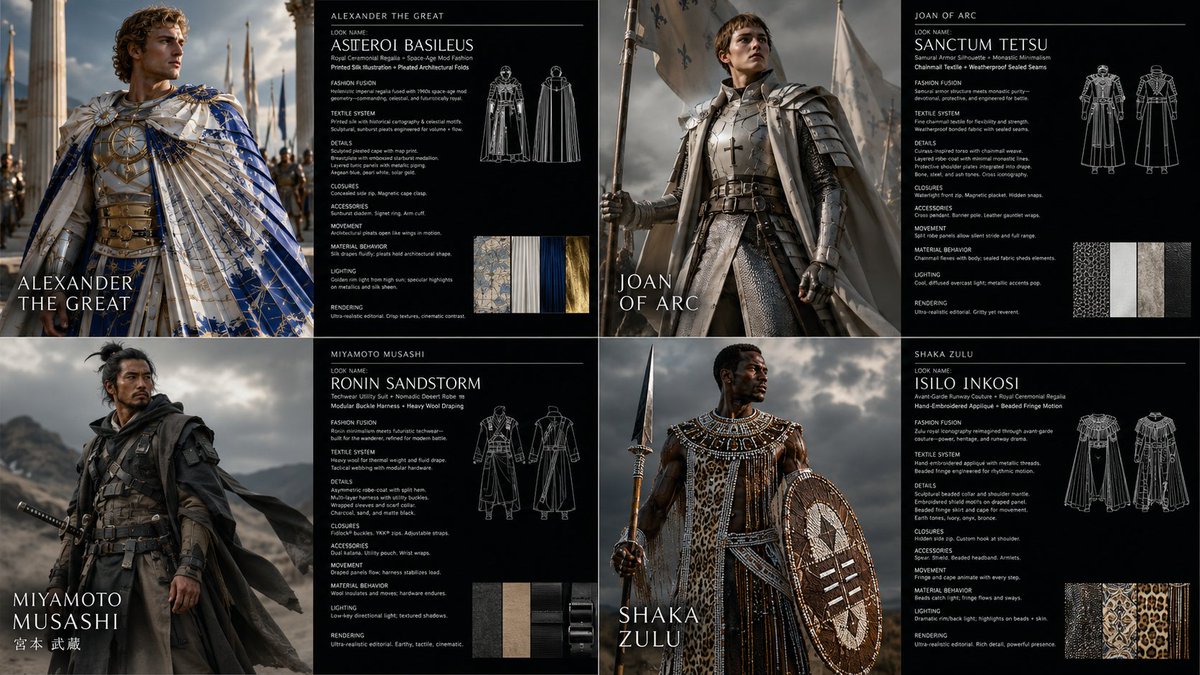
## Prompt
```text
2x2 grid, 16:9, do this for 4 famous warriors: Input A is the subject photo. You are a god-tier fashion designer, costume director, textile artist, and editorial photographer. Phase 1: Wardrobe Fusion Randomly select TWO Fashion Archetypes and TWO Textile Systems. Blend them into a coherent wearable identity. Fashion Archetypes: [Avant-Garde Runway Couture, Nomadic Desert Robe, Cybernetic Streetwear, Victorian Mourning Dress, Samurai Armor Silhouette, 1970s Disco Glamour, Arctic Expedition Gear, Renaissance Court Attire, Punk Deconstruction, Monastic Minimalism, Space-Age Mod Fashion, Baroque Opera Costume, Techwear Utility Suit, Ballet Rehearsal Layers, Royal Ceremonial Regalia] Textile Systems: [Quilted Panel Construction, Laser-Cut Mesh, Hand-Embroidered Appliqué, Reflective Foil Laminate, Heavy Wool Draping, Transparent Organza Layers, Ribbed Knit Compression, Modular Buckle Harness, Beaded Fringe Motion, Pleated Architectural Folds, Weatherproof Sealed Seams, Chainmail Textile, Printed Silk Illustration, Inflated Puffer Volumes, Raw Frayed Edges] Phase 2: Visual Rendering Generate a 2:1 horizontal asset sheet. LEFT HALF: Transform the subject’s clothing, accessories, and styling using the generated fashion identity. Preserve exact body pose, face angle, silhouette boundaries, background layout, and camera framing. RIGHT HALF: Create a dark fashion-spec panel with clean white text. Phase 3: Text Content Render this text on the right panel: "Look Name: [Generate a name from the 4 selected elements] Input A is the source photo. Goal: Restyle the subject into '[Look Name]'. Rules: Pose Fidelity: Preserve exact body pose, silhouette, camera angle, and facial direction. Fashion Fusion: Combine [Fashion Archetype 1] with [Fashion Archetype 2]. Textile System: Construct garments using [Textile System 1] and [Textile System 2]. Details: Include seams, closures, textile weight, movement, accessories, and styling logic. Lighting: Editorial fashion lighting suited to the materials. Rendering: Photorealistic high-fashion campaign image. Output: ONE image, high-fidelity wardrobe transformation. "
```
### Diesen Prompt generieren
| Modell | GPT Image 2 2 |
|---|---|
| Geschätzte Kosten | $0.03 / Aufruf |
| Endpunkt | `/api/v1/gpt_image_2/text_to_image` |
[Zum Generieren anmelden](https://runapi.ai/de/login)
Dein generiertes Bild wird hier angezeigt
## Prompt-Analyse
### Motiv
Warrior Fashion Fusion Designer
### Atmosphäre
fashion / Bild
### Technisch
gpt-image-2 / Gpt Image 2 / Text To Image / /api/v1/gpt_image_2/text_to_image
### Stil
campaign, editorial, fashion, photorealistic, restyle, textile, wardrobe
## Modelle, die diesen Prompt unterstützen
| Modalität | Modell | Preis | Ausprobieren |
|---|---|---|---|
| Bild | Qwen 2/qwen-2-text-to-image | $0.04 / Bild | [Ausprobieren](https://runapi.ai/de/models/qwen-2/text-to-image.md) |
| Bild | Qwen 3/qwen-3-pro-text-to-image | $0.04-$0.08 / Bild | [Ausprobieren](https://runapi.ai/de/models/qwen-3/pro-text-to-image.md) |
| Bild | Qwen 3/qwen-3-text-to-image | $0.03 / Bild | [Ausprobieren](https://runapi.ai/de/models/qwen-3/text-to-image.md) |
| Bild | Qwen Image/qwen-image-text-to-image | $0.03 / Bild | [Ausprobieren](https://runapi.ai/de/models/qwen-image/text-to-image.md) |
| Bild | Wan/wan-2.7-image | $0.03 / Bild | [Ausprobieren](https://runapi.ai/de/models/wan/2.7-image.md) |
## DETAILS
| Field | Value |
|---|---|
| Modell | `gpt-image-2` |
| Modality | Bild |
| Category | fashion |
| Tags | campaign, editorial, fashion, photorealistic, restyle, textile, wardrobe |
## Use with an agent
### Claude
1. claude mcp add runapi -s user -- npx -y @runapi.ai/mcp
2. Restart Claude Code
3. Paste this prompt: Ein Bild generieren: "2x2 grid, 16:9, do this for 4 famous warriors: Input A is the subject photo. You are a god-tier fashion designer, costume director, textile artist, and editorial photographer. Phase 1: Wardrobe Fusion Randomly select TWO Fashion Archetypes and TWO Textile Systems. Blend them into a coherent wearable identity. Fashion Archetypes: [Avant-Garde Runway Couture, Nomadic Desert Robe, Cybernetic Streetwear, Victorian Mourning Dress, Samurai Armor Silhouette, 1970s Disco Glamour, Arctic Expedition Gear, Renaissance Court Attire, Punk Deconstruction, Monastic Minimalism, Space-Age Mod Fashion, Baroque Opera Costume, Techwear Utility Suit, Ballet Rehearsal Layers, Royal Ceremonial Regalia] Textile Systems: [Quilted Panel Construction, Laser-Cut Mesh, Hand-Embroidered Appliqué, Reflective Foil Laminate, Heavy Wool Draping, Transparent Organza Layers, Ribbed Knit Compression, Modular Buckle Harness, Beaded Fringe Motion, Pleated Architectural Folds, Weatherproof Sealed Seams, Chainmail Textile, Printed Silk Illustration, Inflated Puffer Volumes, Raw Frayed Edges] Phase 2: Visual Rendering Generate a 2:1 horizontal asset sheet. LEFT HALF: Transform the subject’s clothing, accessories, and styling using the generated fashion identity. Preserve exact body pose, face angle, silhouette boundaries, background layout, and camera framing. RIGHT HALF: Create a dark fashion-spec panel with clean white text. Phase 3: Text Content Render this text on the right panel: "Look Name: [Generate a name from the 4 selected elements] Input A is the source photo. Goal: Restyle the subject into '[Look Name]'. Rules: Pose Fidelity: Preserve exact body pose, silhouette, camera angle, and facial direction. Fashion Fusion: Combine [Fashion Archetype 1] with [Fashion Archetype 2]. Textile System: Construct garments using [Textile System 1] and [Textile System 2]. Details: Include seams, closures, textile weight, movement, accessories, and styling logic. Lighting: Editorial fashion lighting suited to the materials. Rendering: Photorealistic high-fashion campaign image. Output: ONE image, high-fidelity wardrobe transformation. " "
### Codex
1. codex plugin install runapi-mcp@agents
2. Restart Codex
3. Paste this prompt: Ein Bild generieren: "2x2 grid, 16:9, do this for 4 famous warriors: Input A is the subject photo. You are a god-tier fashion designer, costume director, textile artist, and editorial photographer. Phase 1: Wardrobe Fusion Randomly select TWO Fashion Archetypes and TWO Textile Systems. Blend them into a coherent wearable identity. Fashion Archetypes: [Avant-Garde Runway Couture, Nomadic Desert Robe, Cybernetic Streetwear, Victorian Mourning Dress, Samurai Armor Silhouette, 1970s Disco Glamour, Arctic Expedition Gear, Renaissance Court Attire, Punk Deconstruction, Monastic Minimalism, Space-Age Mod Fashion, Baroque Opera Costume, Techwear Utility Suit, Ballet Rehearsal Layers, Royal Ceremonial Regalia] Textile Systems: [Quilted Panel Construction, Laser-Cut Mesh, Hand-Embroidered Appliqué, Reflective Foil Laminate, Heavy Wool Draping, Transparent Organza Layers, Ribbed Knit Compression, Modular Buckle Harness, Beaded Fringe Motion, Pleated Architectural Folds, Weatherproof Sealed Seams, Chainmail Textile, Printed Silk Illustration, Inflated Puffer Volumes, Raw Frayed Edges] Phase 2: Visual Rendering Generate a 2:1 horizontal asset sheet. LEFT HALF: Transform the subject’s clothing, accessories, and styling using the generated fashion identity. Preserve exact body pose, face angle, silhouette boundaries, background layout, and camera framing. RIGHT HALF: Create a dark fashion-spec panel with clean white text. Phase 3: Text Content Render this text on the right panel: "Look Name: [Generate a name from the 4 selected elements] Input A is the source photo. Goal: Restyle the subject into '[Look Name]'. Rules: Pose Fidelity: Preserve exact body pose, silhouette, camera angle, and facial direction. Fashion Fusion: Combine [Fashion Archetype 1] with [Fashion Archetype 2]. Textile System: Construct garments using [Textile System 1] and [Textile System 2]. Details: Include seams, closures, textile weight, movement, accessories, and styling logic. Lighting: Editorial fashion lighting suited to the materials. Rendering: Photorealistic high-fashion campaign image. Output: ONE image, high-fidelity wardrobe transformation. " "
### Cursor
1. npx @runapi.ai/mcp init cursor
2. Restart Cursor
3. Paste this prompt: Ein Bild generieren: "2x2 grid, 16:9, do this for 4 famous warriors: Input A is the subject photo. You are a god-tier fashion designer, costume director, textile artist, and editorial photographer. Phase 1: Wardrobe Fusion Randomly select TWO Fashion Archetypes and TWO Textile Systems. Blend them into a coherent wearable identity. Fashion Archetypes: [Avant-Garde Runway Couture, Nomadic Desert Robe, Cybernetic Streetwear, Victorian Mourning Dress, Samurai Armor Silhouette, 1970s Disco Glamour, Arctic Expedition Gear, Renaissance Court Attire, Punk Deconstruction, Monastic Minimalism, Space-Age Mod Fashion, Baroque Opera Costume, Techwear Utility Suit, Ballet Rehearsal Layers, Royal Ceremonial Regalia] Textile Systems: [Quilted Panel Construction, Laser-Cut Mesh, Hand-Embroidered Appliqué, Reflective Foil Laminate, Heavy Wool Draping, Transparent Organza Layers, Ribbed Knit Compression, Modular Buckle Harness, Beaded Fringe Motion, Pleated Architectural Folds, Weatherproof Sealed Seams, Chainmail Textile, Printed Silk Illustration, Inflated Puffer Volumes, Raw Frayed Edges] Phase 2: Visual Rendering Generate a 2:1 horizontal asset sheet. LEFT HALF: Transform the subject’s clothing, accessories, and styling using the generated fashion identity. Preserve exact body pose, face angle, silhouette boundaries, background layout, and camera framing. RIGHT HALF: Create a dark fashion-spec panel with clean white text. Phase 3: Text Content Render this text on the right panel: "Look Name: [Generate a name from the 4 selected elements] Input A is the source photo. Goal: Restyle the subject into '[Look Name]'. Rules: Pose Fidelity: Preserve exact body pose, silhouette, camera angle, and facial direction. Fashion Fusion: Combine [Fashion Archetype 1] with [Fashion Archetype 2]. Textile System: Construct garments using [Textile System 1] and [Textile System 2]. Details: Include seams, closures, textile weight, movement, accessories, and styling logic. Lighting: Editorial fashion lighting suited to the materials. Rendering: Photorealistic high-fashion campaign image. Output: ONE image, high-fidelity wardrobe transformation. " "
### Windsurf
1. npx @runapi.ai/mcp init windsurf
2. Restart Windsurf
3. Paste this prompt: Ein Bild generieren: "2x2 grid, 16:9, do this for 4 famous warriors: Input A is the subject photo. You are a god-tier fashion designer, costume director, textile artist, and editorial photographer. Phase 1: Wardrobe Fusion Randomly select TWO Fashion Archetypes and TWO Textile Systems. Blend them into a coherent wearable identity. Fashion Archetypes: [Avant-Garde Runway Couture, Nomadic Desert Robe, Cybernetic Streetwear, Victorian Mourning Dress, Samurai Armor Silhouette, 1970s Disco Glamour, Arctic Expedition Gear, Renaissance Court Attire, Punk Deconstruction, Monastic Minimalism, Space-Age Mod Fashion, Baroque Opera Costume, Techwear Utility Suit, Ballet Rehearsal Layers, Royal Ceremonial Regalia] Textile Systems: [Quilted Panel Construction, Laser-Cut Mesh, Hand-Embroidered Appliqué, Reflective Foil Laminate, Heavy Wool Draping, Transparent Organza Layers, Ribbed Knit Compression, Modular Buckle Harness, Beaded Fringe Motion, Pleated Architectural Folds, Weatherproof Sealed Seams, Chainmail Textile, Printed Silk Illustration, Inflated Puffer Volumes, Raw Frayed Edges] Phase 2: Visual Rendering Generate a 2:1 horizontal asset sheet. LEFT HALF: Transform the subject’s clothing, accessories, and styling using the generated fashion identity. Preserve exact body pose, face angle, silhouette boundaries, background layout, and camera framing. RIGHT HALF: Create a dark fashion-spec panel with clean white text. Phase 3: Text Content Render this text on the right panel: "Look Name: [Generate a name from the 4 selected elements] Input A is the source photo. Goal: Restyle the subject into '[Look Name]'. Rules: Pose Fidelity: Preserve exact body pose, silhouette, camera angle, and facial direction. Fashion Fusion: Combine [Fashion Archetype 1] with [Fashion Archetype 2]. Textile System: Construct garments using [Textile System 1] and [Textile System 2]. Details: Include seams, closures, textile weight, movement, accessories, and styling logic. Lighting: Editorial fashion lighting suited to the materials. Rendering: Photorealistic high-fashion campaign image. Output: ONE image, high-fidelity wardrobe transformation. " "
## Generate via API
### curl
```curl
curl -X POST https://runapi.ai/api/v1/gpt_image_2/text_to_image \
-H "Authorization: Bearer $RUNAPI_API_KEY" \
-H "Content-Type: application/json" \
--data-binary @- <<'JSON'
{
"model": "gpt-image-2",
"prompt": "2x2 grid, 16:9, do this for 4 famous warriors: Input A is the subject photo. You are a god-tier fashion designer, costume director, textile artist, and editorial photographer. Phase 1: Wardrobe Fusion Randomly select TWO Fashion Archetypes and TWO Textile Systems. Blend them into a coherent wearable identity. Fashion Archetypes: [Avant-Garde Runway Couture, Nomadic Desert Robe, Cybernetic Streetwear, Victorian Mourning Dress, Samurai Armor Silhouette, 1970s Disco Glamour, Arctic Expedition Gear, Renaissance Court Attire, Punk Deconstruction, Monastic Minimalism, Space-Age Mod Fashion, Baroque Opera Costume, Techwear Utility Suit, Ballet Rehearsal Layers, Royal Ceremonial Regalia] Textile Systems: [Quilted Panel Construction, Laser-Cut Mesh, Hand-Embroidered Appliqué, Reflective Foil Laminate, Heavy Wool Draping, Transparent Organza Layers, Ribbed Knit Compression, Modular Buckle Harness, Beaded Fringe Motion, Pleated Architectural Folds, Weatherproof Sealed Seams, Chainmail Textile, Printed Silk Illustration, Inflated Puffer Volumes, Raw Frayed Edges] Phase 2: Visual Rendering Generate a 2:1 horizontal asset sheet. LEFT HALF: Transform the subject’s clothing, accessories, and styling using the generated fashion identity. Preserve exact body pose, face angle, silhouette boundaries, background layout, and camera framing. RIGHT HALF: Create a dark fashion-spec panel with clean white text. Phase 3: Text Content Render this text on the right panel: \"Look Name: [Generate a name from the 4 selected elements] Input A is the source photo. Goal: Restyle the subject into '[Look Name]'. Rules: Pose Fidelity: Preserve exact body pose, silhouette, camera angle, and facial direction. Fashion Fusion: Combine [Fashion Archetype 1] with [Fashion Archetype 2]. Textile System: Construct garments using [Textile System 1] and [Textile System 2]. Details: Include seams, closures, textile weight, movement, accessories, and styling logic. Lighting: Editorial fashion lighting suited to the materials. Rendering: Photorealistic high-fashion campaign image. Output: ONE image, high-fidelity wardrobe transformation. \" "
}
JSON
```
### Node.js
```javascript
import { GptImage2Client } from "@runapi.ai/gpt-image-2";
const client = new GptImage2Client({
apiKey: process.env.RUNAPI_API_KEY,
});
const result = await client.textToImage.run({
"model": "gpt-image-2",
"prompt": "2x2 grid, 16:9, do this for 4 famous warriors: Input A is the subject photo. You are a god-tier fashion designer, costume director, textile artist, and editorial photographer. Phase 1: Wardrobe Fusion Randomly select TWO Fashion Archetypes and TWO Textile Systems. Blend them into a coherent wearable identity. Fashion Archetypes: [Avant-Garde Runway Couture, Nomadic Desert Robe, Cybernetic Streetwear, Victorian Mourning Dress, Samurai Armor Silhouette, 1970s Disco Glamour, Arctic Expedition Gear, Renaissance Court Attire, Punk Deconstruction, Monastic Minimalism, Space-Age Mod Fashion, Baroque Opera Costume, Techwear Utility Suit, Ballet Rehearsal Layers, Royal Ceremonial Regalia] Textile Systems: [Quilted Panel Construction, Laser-Cut Mesh, Hand-Embroidered Appliqué, Reflective Foil Laminate, Heavy Wool Draping, Transparent Organza Layers, Ribbed Knit Compression, Modular Buckle Harness, Beaded Fringe Motion, Pleated Architectural Folds, Weatherproof Sealed Seams, Chainmail Textile, Printed Silk Illustration, Inflated Puffer Volumes, Raw Frayed Edges] Phase 2: Visual Rendering Generate a 2:1 horizontal asset sheet. LEFT HALF: Transform the subject’s clothing, accessories, and styling using the generated fashion identity. Preserve exact body pose, face angle, silhouette boundaries, background layout, and camera framing. RIGHT HALF: Create a dark fashion-spec panel with clean white text. Phase 3: Text Content Render this text on the right panel: \"Look Name: [Generate a name from the 4 selected elements] Input A is the source photo. Goal: Restyle the subject into '[Look Name]'. Rules: Pose Fidelity: Preserve exact body pose, silhouette, camera angle, and facial direction. Fashion Fusion: Combine [Fashion Archetype 1] with [Fashion Archetype 2]. Textile System: Construct garments using [Textile System 1] and [Textile System 2]. Details: Include seams, closures, textile weight, movement, accessories, and styling logic. Lighting: Editorial fashion lighting suited to the materials. Rendering: Photorealistic high-fashion campaign image. Output: ONE image, high-fidelity wardrobe transformation. \" "
});
console.log(result.id);
```
### Python
```python
import json
import os
import requests
response = requests.post(
"https://runapi.ai/api/v1/gpt_image_2/text_to_image",
headers={"Authorization": f"Bearer {os.environ['RUNAPI_API_KEY']}"},
json=json.loads("{\n \"model\": \"gpt-image-2\",\n \"prompt\": \"2x2 grid, 16:9, do this for 4 famous warriors: \u003cinstruction\u003e Input A is the subject photo. You are a god-tier fashion designer, costume director, textile artist, and editorial photographer. Phase 1: Wardrobe Fusion Randomly select TWO Fashion Archetypes and TWO Textile Systems. Blend them into a coherent wearable identity. Fashion Archetypes: [Avant-Garde Runway Couture, Nomadic Desert Robe, Cybernetic Streetwear, Victorian Mourning Dress, Samurai Armor Silhouette, 1970s Disco Glamour, Arctic Expedition Gear, Renaissance Court Attire, Punk Deconstruction, Monastic Minimalism, Space-Age Mod Fashion, Baroque Opera Costume, Techwear Utility Suit, Ballet Rehearsal Layers, Royal Ceremonial Regalia] Textile Systems: [Quilted Panel Construction, Laser-Cut Mesh, Hand-Embroidered Appliqué, Reflective Foil Laminate, Heavy Wool Draping, Transparent Organza Layers, Ribbed Knit Compression, Modular Buckle Harness, Beaded Fringe Motion, Pleated Architectural Folds, Weatherproof Sealed Seams, Chainmail Textile, Printed Silk Illustration, Inflated Puffer Volumes, Raw Frayed Edges] Phase 2: Visual Rendering Generate a 2:1 horizontal asset sheet. LEFT HALF: Transform the subject’s clothing, accessories, and styling using the generated fashion identity. Preserve exact body pose, face angle, silhouette boundaries, background layout, and camera framing. RIGHT HALF: Create a dark fashion-spec panel with clean white text. Phase 3: Text Content Render this text on the right panel: \\\"Look Name: [Generate a name from the 4 selected elements] \u003cinstruction\u003e Input A is the source photo. Goal: Restyle the subject into '[Look Name]'. Rules: Pose Fidelity: Preserve exact body pose, silhouette, camera angle, and facial direction. Fashion Fusion: Combine [Fashion Archetype 1] with [Fashion Archetype 2]. Textile System: Construct garments using [Textile System 1] and [Textile System 2]. Details: Include seams, closures, textile weight, movement, accessories, and styling logic. Lighting: Editorial fashion lighting suited to the materials. Rendering: Photorealistic high-fashion campaign image. Output: ONE image, high-fidelity wardrobe transformation. \u003c/instruction\u003e\\\" \u003c/instruction\u003e\"\n}")
)
response.raise_for_status()
print(response.json()["id"])
```
### PHP
```php
true,
CURLOPT_HTTPHEADER => [
"Authorization: Bearer " . getenv("RUNAPI_API_KEY"),
"Content-Type: application/json",
],
CURLOPT_POSTFIELDS => "{\n \"model\": \"gpt-image-2\",\n \"prompt\": \"2x2 grid, 16:9, do this for 4 famous warriors: \u003cinstruction\u003e Input A is the subject photo. You are a god-tier fashion designer, costume director, textile artist, and editorial photographer. Phase 1: Wardrobe Fusion Randomly select TWO Fashion Archetypes and TWO Textile Systems. Blend them into a coherent wearable identity. Fashion Archetypes: [Avant-Garde Runway Couture, Nomadic Desert Robe, Cybernetic Streetwear, Victorian Mourning Dress, Samurai Armor Silhouette, 1970s Disco Glamour, Arctic Expedition Gear, Renaissance Court Attire, Punk Deconstruction, Monastic Minimalism, Space-Age Mod Fashion, Baroque Opera Costume, Techwear Utility Suit, Ballet Rehearsal Layers, Royal Ceremonial Regalia] Textile Systems: [Quilted Panel Construction, Laser-Cut Mesh, Hand-Embroidered Appliqué, Reflective Foil Laminate, Heavy Wool Draping, Transparent Organza Layers, Ribbed Knit Compression, Modular Buckle Harness, Beaded Fringe Motion, Pleated Architectural Folds, Weatherproof Sealed Seams, Chainmail Textile, Printed Silk Illustration, Inflated Puffer Volumes, Raw Frayed Edges] Phase 2: Visual Rendering Generate a 2:1 horizontal asset sheet. LEFT HALF: Transform the subject’s clothing, accessories, and styling using the generated fashion identity. Preserve exact body pose, face angle, silhouette boundaries, background layout, and camera framing. RIGHT HALF: Create a dark fashion-spec panel with clean white text. Phase 3: Text Content Render this text on the right panel: \\\"Look Name: [Generate a name from the 4 selected elements] \u003cinstruction\u003e Input A is the source photo. Goal: Restyle the subject into '[Look Name]'. Rules: Pose Fidelity: Preserve exact body pose, silhouette, camera angle, and facial direction. Fashion Fusion: Combine [Fashion Archetype 1] with [Fashion Archetype 2]. Textile System: Construct garments using [Textile System 1] and [Textile System 2]. Details: Include seams, closures, textile weight, movement, accessories, and styling logic. Lighting: Editorial fashion lighting suited to the materials. Rendering: Photorealistic high-fashion campaign image. Output: ONE image, high-fidelity wardrobe transformation. \u003c/instruction\u003e\\\" \u003c/instruction\u003e\"\n}",
CURLOPT_RETURNTRANSFER => true,
]);
$response = json_decode(curl_exec($ch), true);
curl_close($ch);
echo $response["id"] . PHP_EOL;
```
### Java
```java
import java.net.URI;
import java.net.http.HttpClient;
import java.net.http.HttpRequest;
import java.net.http.HttpResponse;
var request = HttpRequest.newBuilder(URI.create("https://runapi.ai/api/v1/gpt_image_2/text_to_image"))
.header("Authorization", "Bearer " + System.getenv("RUNAPI_API_KEY"))
.header("Content-Type", "application/json")
.POST(HttpRequest.BodyPublishers.ofString("{\n \"model\": \"gpt-image-2\",\n \"prompt\": \"2x2 grid, 16:9, do this for 4 famous warriors: \u003cinstruction\u003e Input A is the subject photo. You are a god-tier fashion designer, costume director, textile artist, and editorial photographer. Phase 1: Wardrobe Fusion Randomly select TWO Fashion Archetypes and TWO Textile Systems. Blend them into a coherent wearable identity. Fashion Archetypes: [Avant-Garde Runway Couture, Nomadic Desert Robe, Cybernetic Streetwear, Victorian Mourning Dress, Samurai Armor Silhouette, 1970s Disco Glamour, Arctic Expedition Gear, Renaissance Court Attire, Punk Deconstruction, Monastic Minimalism, Space-Age Mod Fashion, Baroque Opera Costume, Techwear Utility Suit, Ballet Rehearsal Layers, Royal Ceremonial Regalia] Textile Systems: [Quilted Panel Construction, Laser-Cut Mesh, Hand-Embroidered Appliqué, Reflective Foil Laminate, Heavy Wool Draping, Transparent Organza Layers, Ribbed Knit Compression, Modular Buckle Harness, Beaded Fringe Motion, Pleated Architectural Folds, Weatherproof Sealed Seams, Chainmail Textile, Printed Silk Illustration, Inflated Puffer Volumes, Raw Frayed Edges] Phase 2: Visual Rendering Generate a 2:1 horizontal asset sheet. LEFT HALF: Transform the subject’s clothing, accessories, and styling using the generated fashion identity. Preserve exact body pose, face angle, silhouette boundaries, background layout, and camera framing. RIGHT HALF: Create a dark fashion-spec panel with clean white text. Phase 3: Text Content Render this text on the right panel: \\\"Look Name: [Generate a name from the 4 selected elements] \u003cinstruction\u003e Input A is the source photo. Goal: Restyle the subject into '[Look Name]'. Rules: Pose Fidelity: Preserve exact body pose, silhouette, camera angle, and facial direction. Fashion Fusion: Combine [Fashion Archetype 1] with [Fashion Archetype 2]. Textile System: Construct garments using [Textile System 1] and [Textile System 2]. Details: Include seams, closures, textile weight, movement, accessories, and styling logic. Lighting: Editorial fashion lighting suited to the materials. Rendering: Photorealistic high-fashion campaign image. Output: ONE image, high-fidelity wardrobe transformation. \u003c/instruction\u003e\\\" \u003c/instruction\u003e\"\n}"))
.build();
var response = HttpClient.newHttpClient().send(request, HttpResponse.BodyHandlers.ofString());
System.out.println(response.body());
```
### Ruby
```ruby
require "json"
require "net/http"
uri = URI("https://runapi.ai/api/v1/gpt_image_2/text_to_image")
request = Net::HTTP::Post.new(uri)
request["Authorization"] = "Bearer " + ENV.fetch("RUNAPI_API_KEY")
request["Content-Type"] = "application/json"
request.body = "{\n \"model\": \"gpt-image-2\",\n \"prompt\": \"2x2 grid, 16:9, do this for 4 famous warriors: \u003cinstruction\u003e Input A is the subject photo. You are a god-tier fashion designer, costume director, textile artist, and editorial photographer. Phase 1: Wardrobe Fusion Randomly select TWO Fashion Archetypes and TWO Textile Systems. Blend them into a coherent wearable identity. Fashion Archetypes: [Avant-Garde Runway Couture, Nomadic Desert Robe, Cybernetic Streetwear, Victorian Mourning Dress, Samurai Armor Silhouette, 1970s Disco Glamour, Arctic Expedition Gear, Renaissance Court Attire, Punk Deconstruction, Monastic Minimalism, Space-Age Mod Fashion, Baroque Opera Costume, Techwear Utility Suit, Ballet Rehearsal Layers, Royal Ceremonial Regalia] Textile Systems: [Quilted Panel Construction, Laser-Cut Mesh, Hand-Embroidered Appliqué, Reflective Foil Laminate, Heavy Wool Draping, Transparent Organza Layers, Ribbed Knit Compression, Modular Buckle Harness, Beaded Fringe Motion, Pleated Architectural Folds, Weatherproof Sealed Seams, Chainmail Textile, Printed Silk Illustration, Inflated Puffer Volumes, Raw Frayed Edges] Phase 2: Visual Rendering Generate a 2:1 horizontal asset sheet. LEFT HALF: Transform the subject’s clothing, accessories, and styling using the generated fashion identity. Preserve exact body pose, face angle, silhouette boundaries, background layout, and camera framing. RIGHT HALF: Create a dark fashion-spec panel with clean white text. Phase 3: Text Content Render this text on the right panel: \\\"Look Name: [Generate a name from the 4 selected elements] \u003cinstruction\u003e Input A is the source photo. Goal: Restyle the subject into '[Look Name]'. Rules: Pose Fidelity: Preserve exact body pose, silhouette, camera angle, and facial direction. Fashion Fusion: Combine [Fashion Archetype 1] with [Fashion Archetype 2]. Textile System: Construct garments using [Textile System 1] and [Textile System 2]. Details: Include seams, closures, textile weight, movement, accessories, and styling logic. Lighting: Editorial fashion lighting suited to the materials. Rendering: Photorealistic high-fashion campaign image. Output: ONE image, high-fidelity wardrobe transformation. \u003c/instruction\u003e\\\" \u003c/instruction\u003e\"\n}"
response = Net::HTTP.start(uri.hostname, uri.port, use_ssl: true) { |http| http.request(request) }
puts JSON.parse(response.body).fetch("id")
```
### Go
```go
package main
import (
"context"
"fmt"
"log"
"net/http"
"os"
"strings"
)
func main() {
body := strings.NewReader("{\"model\":\"gpt-image-2\",\"prompt\":\"2x2 grid, 16:9, do this for 4 famous warriors: Input A is the subject photo. You are a god-tier fashion designer, costume director, textile artist, and editorial photographer. Phase 1: Wardrobe Fusion Randomly select TWO Fashion Archetypes and TWO Textile Systems. Blend them into a coherent wearable identity. Fashion Archetypes: [Avant-Garde Runway Couture, Nomadic Desert Robe, Cybernetic Streetwear, Victorian Mourning Dress, Samurai Armor Silhouette, 1970s Disco Glamour, Arctic Expedition Gear, Renaissance Court Attire, Punk Deconstruction, Monastic Minimalism, Space-Age Mod Fashion, Baroque Opera Costume, Techwear Utility Suit, Ballet Rehearsal Layers, Royal Ceremonial Regalia] Textile Systems: [Quilted Panel Construction, Laser-Cut Mesh, Hand-Embroidered Appliqué, Reflective Foil Laminate, Heavy Wool Draping, Transparent Organza Layers, Ribbed Knit Compression, Modular Buckle Harness, Beaded Fringe Motion, Pleated Architectural Folds, Weatherproof Sealed Seams, Chainmail Textile, Printed Silk Illustration, Inflated Puffer Volumes, Raw Frayed Edges] Phase 2: Visual Rendering Generate a 2:1 horizontal asset sheet. LEFT HALF: Transform the subject’s clothing, accessories, and styling using the generated fashion identity. Preserve exact body pose, face angle, silhouette boundaries, background layout, and camera framing. RIGHT HALF: Create a dark fashion-spec panel with clean white text. Phase 3: Text Content Render this text on the right panel: \\\"Look Name: [Generate a name from the 4 selected elements] Input A is the source photo. Goal: Restyle the subject into '[Look Name]'. Rules: Pose Fidelity: Preserve exact body pose, silhouette, camera angle, and facial direction. Fashion Fusion: Combine [Fashion Archetype 1] with [Fashion Archetype 2]. Textile System: Construct garments using [Textile System 1] and [Textile System 2]. Details: Include seams, closures, textile weight, movement, accessories, and styling logic. Lighting: Editorial fashion lighting suited to the materials. Rendering: Photorealistic high-fashion campaign image. Output: ONE image, high-fidelity wardrobe transformation. \\\" \"}")
req, err := http.NewRequestWithContext(context.Background(), http.MethodPost, "https://runapi.ai/api/v1/gpt_image_2/text_to_image", body)
if err != nil {
log.Fatal(err)
}
req.Header.Set("Authorization", "Bearer "+os.Getenv("RUNAPI_API_KEY"))
req.Header.Set("Content-Type", "application/json")
resp, err := http.DefaultClient.Do(req)
if err != nil {
log.Fatal(err)
}
defer resp.Body.Close()
fmt.Println(resp.Status)
}
```
### CLI
```cli
$ runapi generate \
--model gpt-image-2 \
--prompt "2x2 grid, 16:9, do this for 4 famous warriors: Input A is the subject photo. You are a god-tier fashion designer, costume director, textile artist, and editorial photographer. Phase 1: Wardrobe Fusion Randomly select TWO Fashion Archetypes and TWO Textile Systems. Blend them into a coherent wearable identity. Fashion Archetypes: [Avant-Garde Runway Couture, Nomadic Desert Robe, Cybernetic Streetwear, Victorian Mourning Dress, Samurai Armor Silhouette, 1970s Disco Glamour, Arctic Expedition Gear, Renaissance Court Attire, Punk Deconstruction, Monastic Minimalism, Space-Age Mod Fashion, Baroque Opera Costume, Techwear Utility Suit, Ballet Rehearsal Layers, Royal Ceremonial Regalia] Textile Systems: [Quilted Panel Construction, Laser-Cut Mesh, Hand-Embroidered Appliqué, Reflective Foil Laminate, Heavy Wool Draping, Transparent Organza Layers, Ribbed Knit Compression, Modular Buckle Harness, Beaded Fringe Motion, Pleated Architectural Folds, Weatherproof Sealed Seams, Chainmail Textile, Printed Silk Illustration, Inflated Puffer Volumes, Raw Frayed Edges] Phase 2: Visual Rendering Generate a 2:1 horizontal asset sheet. LEFT HALF: Transform the subject’s clothing, accessories, and styling using the generated fashion identity. Preserve exact body pose, face angle, silhouette boundaries, background layout, and camera framing. RIGHT HALF: Create a dark fashion-spec panel with clean white text. Phase 3: Text Content Render this text on the right panel: \"Look Name: [Generate a name from the 4 selected elements] Input A is the source photo. Goal: Restyle the subject into '[Look Name]'. Rules: Pose Fidelity: Preserve exact body pose, silhouette, camera angle, and facial direction. Fashion Fusion: Combine [Fashion Archetype 1] with [Fashion Archetype 2]. Textile System: Construct garments using [Textile System 1] and [Textile System 2]. Details: Include seams, closures, textile weight, movement, accessories, and styling logic. Lighting: Editorial fashion lighting suited to the materials. Rendering: Photorealistic high-fashion campaign image. Output: ONE image, high-fidelity wardrobe transformation. \" " \
--wait
```
## Ähnliche Prompts
- [Rainy French Street at Night](https://runapi.ai/de/prompts/french-street-in-steady-rain-at-early-evening-7B59pA.md) — `gpt-image-2`
- [Camera Dome 48-Point View Setup](https://runapi.ai/de/prompts/3d-rendered-camera-dome-with-three-rings-and-48-points-JPa6v0.md) — `gpt-image-2`
- [Cozy Vintage Hallway Dance Scene](https://runapi.ai/de/prompts/elderly-couple-s-playful-hallway-dance-AkyGwJ.md) — `gpt-image-2`
## Diesen gpt-image-2-Prompt verwenden
### Wie kopiere ich diesen Prompt sicher?
Verwende den Kopieren-Button neben dem vollständigen Prompt-Block. Er kopiert nur den Prompt-Text, nicht die umliegenden Seitenbeschriftungen, sodass du ihn in eine Agent-Anweisung, einen JSON-Anfragekörper oder deine eigene Prompt-Bibliothek einfügen kannst.
### Warum zeigt die Detailseite Parameter?
Einige Prompts wurden mit gespeicherten Generierungseinstellungen wie Seitenverhältnis, Dauer oder Sprachsteuerung gesammelt. Wenn Parameter vorhanden sind, listet die Seite sie separat auf, sodass du Prompt-Text und strukturierte Einstellungen gemeinsam wiederverwenden kannst.
### Welchen Endpunkt soll ich aufrufen?
Verwende den im API-Code-Block angezeigten Endpunkt-Pfad. Der Pfad wird aus dem RunAPI-Service und Endpunktnamen des Prompts generiert und als öffentliche API-URL für curl- und SDK-Beispiele dargestellt.
### Kann ich diesen Prompt in einem Agent statt im Code verwenden?
Ja. Wähle Claude Code, Codex, Cursor oder Windsurf im Tab-Wechsler, installiere den RunAPI MCP-Server und füge die generierte Anweisung ein. Die Anweisung enthält den vollständigen Prompt-Text.
## Bauen Sie mit einem Team?
Wir helfen bei Enterprise-Setup, Integrationen und technischen Fragen.
[Kontakt aufnehmen](https://runapi.ai/de/contact.md)
---
## More from RunAPI
- [Home](https://runapi.ai/de/.md)
### Produkt
- [Modellkatalog](https://runapi.ai/de/models.md)
- [Preise](https://runapi.ai/de/pricing.md)
- [Anbieter](https://runapi.ai/de/models#all-models)
- [Prompt-Galerie](https://runapi.ai/de/prompts.md)
### Entwickler
- [Dokumentation](https://runapi.ai/de/docs/guides)
- [SDKs](https://runapi.ai/de/sdk.md)
- [CLI](https://runapi.ai/de/cli.md)
- [MCP Server](https://runapi.ai/de/mcp.md)
- [x402](https://runapi.ai/de/x402.md)
### Anleitungen
- [Claude Code vs Cursor](https://runapi.ai/de/claude-code-vs-cursor.md)
- [Cursor API-Einrichtung](https://runapi.ai/de/cursor-api-setup.md)
- [RunAPI vs OpenRouter](https://runapi.ai/de/openrouter-alternative.md)
### Unternehmen
- [Enterprise](https://runapi.ai/de/contact.md)
- [Kontakt](https://runapi.ai/de/contact.md)
### Rechtliches
- [Bedingungen](https://runapi.ai/de/terms.md)
- [Datenschutz](https://runapi.ai/de/privacy.md)
- [Site index for agents](https://runapi.ai/llms.txt)
Contact: contact@runapi.ai
## Structured data
```json
[
{
"@context": "https://schema.org",
"inLanguage": "de",
"@type": "WebSite",
"name": "RunAPI",
"url": "https://runapi.ai/de",
"potentialAction": {
"@type": "SearchAction",
"target": {
"@type": "EntryPoint",
"urlTemplate": "https://runapi.ai/de/models?q={search_term_string}"
},
"query-input": "required name=search_term_string"
}
},
{
"@context": "https://schema.org",
"inLanguage": "de",
"@type": "Organization",
"name": "RunAPI",
"url": "https://runapi.ai/de",
"logo": {
"@type": "ImageObject",
"url": "https://runapi.ai/deicon.svg"
},
"sameAs": [
"https://github.com/runapi-ai"
]
},
{
"@context": "https://schema.org",
"inLanguage": "de",
"@type": "BreadcrumbList",
"itemListElement": [
{
"@type": "ListItem",
"position": 1,
"name": "Start",
"item": "https://runapi.ai/de"
},
{
"@type": "ListItem",
"position": 2,
"name": "Prompts",
"item": "https://runapi.ai/de/prompts"
},
{
"@type": "ListItem",
"position": 3,
"name": "Bild",
"item": "https://runapi.ai/de/prompts/image"
},
{
"@type": "ListItem",
"position": 4,
"name": "Warrior Fashion Fusion Designer",
"item": "https://runapi.ai/prompts/warrior-fashion-fusion-and-wardrobe-transformation-AwkvMA"
}
]
},
{
"@context": "https://schema.org",
"inLanguage": "de",
"@type": "FAQPage",
"mainEntity": [
{
"@type": "Question",
"name": "Wie kopiere ich diesen Prompt sicher?",
"acceptedAnswer": {
"@type": "Answer",
"text": "Verwende den Kopieren-Button neben dem vollständigen Prompt-Block. Er kopiert nur den Prompt-Text, nicht die umliegenden Seitenbeschriftungen, sodass du ihn in eine Agent-Anweisung, einen JSON-Anfragekörper oder deine eigene Prompt-Bibliothek einfügen kannst."
}
},
{
"@type": "Question",
"name": "Warum zeigt die Detailseite Parameter?",
"acceptedAnswer": {
"@type": "Answer",
"text": "Einige Prompts wurden mit gespeicherten Generierungseinstellungen wie Seitenverhältnis, Dauer oder Sprachsteuerung gesammelt. Wenn Parameter vorhanden sind, listet die Seite sie separat auf, sodass du Prompt-Text und strukturierte Einstellungen gemeinsam wiederverwenden kannst."
}
},
{
"@type": "Question",
"name": "Welchen Endpunkt soll ich aufrufen?",
"acceptedAnswer": {
"@type": "Answer",
"text": "Verwende den im API-Code-Block angezeigten Endpunkt-Pfad. Der Pfad wird aus dem RunAPI-Service und Endpunktnamen des Prompts generiert und als öffentliche API-URL für curl- und SDK-Beispiele dargestellt."
}
},
{
"@type": "Question",
"name": "Kann ich diesen Prompt in einem Agent statt im Code verwenden?",
"acceptedAnswer": {
"@type": "Answer",
"text": "Ja. Wähle Claude Code, Codex, Cursor oder Windsurf im Tab-Wechsler, installiere den RunAPI MCP-Server und füge die generierte Anweisung ein. Die Anweisung enthält den vollständigen Prompt-Text."
}
}
]
},
{
"@context": "https://schema.org",
"inLanguage": "en",
"@type": "CreativeWork",
"name": "Warrior Fashion Fusion Designer",
"text": "2x2 grid, 16:9, do this for 4 famous warriors: Input A is the subject photo. You are a god-tier fashion designer, costume director, textile artist, and editorial photographer. Phase 1: Wardrobe Fusion Randomly select TWO Fashion Archetypes and TWO Textile Systems. Blend them into a coherent wearable identity. Fashion Archetypes: [Avant-Garde Runway Couture, Nomadic Desert Robe, Cybernetic Streetwear, Victorian Mourning Dress, Samurai Armor Silhouette, 1970s Disco Glamour, Arctic Expedition Gear, Renaissance Court Attire, Punk Deconstruction, Monastic Minimalism, Space-Age Mod Fashion, Baroque Opera Costume, Techwear Utility Suit, Ballet Rehearsal Layers, Royal Ceremonial Regalia] Textile Systems: [Quilted Panel Construction, Laser-Cut Mesh, Hand-Embroidered Appliqué, Reflective Foil Laminate, Heavy Wool Draping, Transparent Organza Layers, Ribbed Knit Compression, Modular Buckle Harness, Beaded Fringe Motion, Pleated Architectural Folds, Weatherproof Sealed Seams, Chainmail Textile, Printed Silk Illustration, Inflated Puffer Volumes, Raw Frayed Edges] Phase 2: Visual Rendering Generate a 2:1 horizontal asset sheet. LEFT HALF: Transform the subject’s clothing, accessories, and styling using the generated fashion identity. Preserve exact body pose, face angle, silhouette boundaries, background layout, and camera framing. RIGHT HALF: Create a dark fashion-spec panel with clean white text. Phase 3: Text Content Render this text on the right panel: \"Look Name: [Generate a name from the 4 selected elements] Input A is the source photo. Goal: Restyle the subject into '[Look Name]'. Rules: Pose Fidelity: Preserve exact body pose, silhouette, camera angle, and facial direction. Fashion Fusion: Combine [Fashion Archetype 1] with [Fashion Archetype 2]. Textile System: Construct garments using [Textile System 1] and [Textile System 2]. Details: Include seams, closures, textile weight, movement, accessories, and styling logic. Lighting: Editorial fashion lighting suited to the materials. Rendering: Photorealistic high-fashion campaign image. Output: ONE image, high-fidelity wardrobe transformation. \" ",
"image": "https://cdn.runapi.ai/public/prompts/previews/d93a93e8daa37b847eb66796824b12b0d2704f0114a180bc0a74af118075e76e-runapi-ai.jpg",
"about": [
"image",
"gpt-image-2",
"fashion"
]
}
]
```